GA4 can answer a lot of analytics questions, but it is not always the easiest way to explain what happened between a campaign click and a paying customer. The right alternative depends on whether the problem is confusing reports, privacy requirements, product behavior, or revenue measurement.
A lightweight dashboard may be enough to understand traffic. When the decision is where to invest marketing budget, marketing attribution software becomes more relevant. This guide compares 10 GA4 alternatives by their real strengths, pricing approach, and the measurement questions each can answer.

Key takeaways
- GA4 has real-time reporting, consent-aware modeling, and attribution. The tradeoff is often reporting complexity or the particular data model, not the total absence of these features.
- Usermaven is best considered when the same analysis must connect traffic, campaign touchpoints, product usage, CRM outcomes, and revenue.
- Heap and Mixpanel emphasize product behavior; Matomo and Piwik PRO emphasize analytics governance; Plausible, Fathom, Simple Analytics, Clicky, and Pirsch address simpler web measurement in different ways.
- Compare traffic volume, event definitions, attribution rules, consent handling, and historical data before treating two platforms’ dashboards as equivalent.
Why modern marketers look for GA4 alternatives
GA4 is a capable analytics platform, especially when Google Ads, Search Console, and BigQuery are central to reporting. An alternative becomes worthwhile when the implementation effort, report definitions, governance needs, or connection to downstream revenue no longer matches the business.
The practical GA4 limitations to test are event and identity setup, interpretation of modeled results, standard-report freshness, retention limits, and the analytics outcomes missing from existing reports. A wider review of website analytics tools helps distinguish a specialist replacement from a direct substitute.
GA4 is difficult to set up and use
GA4 automatically collects some events and supports enhanced measurement, but business-specific events, cross-domain journeys, ecommerce schemas, and CRM conversions still require a tracking plan. Common challenges include:
- A steep learning curve
- Developer support for more complex conversions and ecommerce events
- Confusing reports that are hard to interpret
As a result, many teams struggle to access clear insights without spending significant time learning the tool.
Data accuracy is affected by cookies and ad blockers
Browser restrictions, consent choices, and ad blockers can reduce directly observed events. GA4 also supports Consent Mode and modeled key events where eligible, so a report is not necessarily a one-to-one count of observed browser events. Possible measurement gaps include:
- Differences between observed events and modeled reporting totals
- Incomplete user journeys
- Channel credit that changes with attribution settings, consent, and processing
For teams that rely on accurate attribution and reporting, these gaps can create serious blind spots.
Privacy and compliance limitations
Data privacy regulations like GDPR and CCPA have changed how analytics tools are evaluated. While GA4 offers privacy controls, some businesses need:
- Cookieless tracking options
- Greater control over data retention
- Clearer data ownership and storage policies
These requirements often push privacy-focused teams to consider alternative analytics platforms.
Limited flexibility for marketers and growth teams
GA4 offers custom reports, Explorations, audiences, and BigQuery export, but practical marketing questions can still require configuration. Challenges may include:
- More configuration than a purpose-built channel or revenue dashboard
- Extra steps to track meaningful conversions
- Difficulty answering practical marketing questions quickly
This makes GA4 harder to adapt to fast-moving growth and experimentation workflows.
Realtime vs. finalized reports
GA4 has a Realtime report showing activity over the previous 30 minutes. That does not mean all standard acquisition, attribution, and revenue reports are instantly finalized. Some processing can take 24 to 48 hours, and modeled or attributed conversions may be revised later. This distinction matters when analysts need to:
- Monitor campaigns in real time
- React quickly to traffic spikes or drops
- Track live user behavior
For live traffic validation, GA4 Realtime is useful. For final campaign or revenue comparisons, define a reporting cutoff and allow processing to settle.
When GA4 still makes sense
GA4 isn’t the wrong choice for everyone. It can work well if:
- You’re already deeply integrated into Google’s ecosystem
- You have technical resources to manage setup and configuration
- GA4’s available data-driven and last-click attribution models fit your reporting needs, even if you also review data-driven attribution alongside CRM outcomes
Replacing GA4 is not always necessary. Some organizations keep GA4 for Google integrations and add a second platform for product retention, governance, or CRM-linked revenue attribution.
Top 10 GA4 alternatives in 2026
There is no single winner across these categories. A product analytics suite, a consent-focused platform, and a revenue attribution solution serve different buying decisions. Prices are entry points at the stated usage level or sales-led where indicated; confirm a quote before purchase.
| Tool | Best fit | Pricing approach |
|---|---|---|
| Usermaven | Marketing and revenue attribution, with web and product behavior | Business / Enterprise: custom quote for new customers |
| Heap | Autocapture, product behavior, and retroactive analysis | Free up to 10K sessions/month; paid plans vary |
| Matomo | Data ownership and self-hosted analytics | Free on-premise software; paid cloud by hits |
| Clicky | Live website visitor monitoring | Free tier; paid plans from $9.99/month |
| Piwik PRO | Governance, consent tools, and regulated industries | Business from €36/month; enterprise from €366/month billed yearly |
| Fathom Analytics | Simple website and revenue-event reporting | From $15/month by pageviews |
| Mixpanel | Event-based product funnels, retention, and experiments | Free up to 1M events/month; paid usage-based |
| Plausible | Lightweight web analytics with funnels/journeys on Business | Starter from $9/month; higher tiers by volume |
| Simple Analytics | Minimal cookie-free traffic reporting | Free hobby tier; self-serve from £20/month |
| Pirsch | Developer-friendly cookieless analytics and funnels | Standard from $6/month; Plus from $12/month (10K views) |
GA4 alternatives vary widely in what they’re built for. Let’s take a closer look at these top Google Analytics alternatives one by one.
1. Usermaven (The best GA4 alternative)
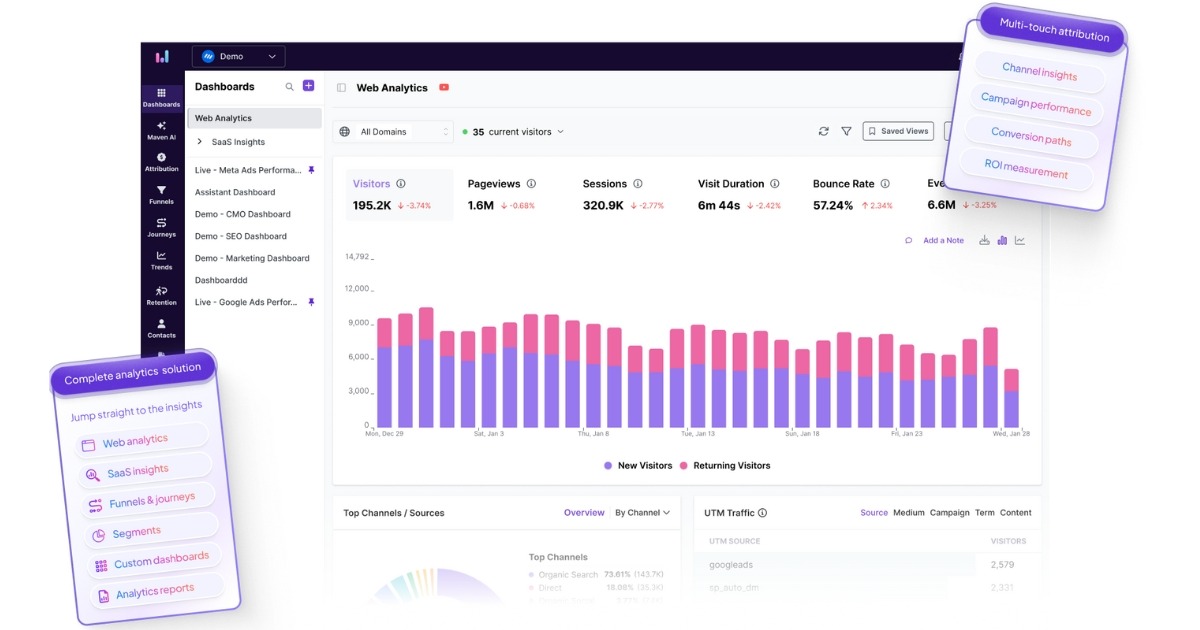
Usermaven takes a different route from GA4: it connects website and product analytics with campaign touchpoints, conversion paths, CRM opportunities, and revenue. It is a practical Google Analytics alternative when reporting must explain customer acquisition quality rather than pageviews alone; this is the core question behind measuring marketing attribution.
Best for:
Marketers, SaaS teams, agencies, and businesses looking for a usable GA4 alternative with real-time insights, privacy-friendly tracking, and built-in attribution.
Key features
Usermaven focuses on removing analytics friction. Instead of overwhelming users with raw data and complex configurations, it provides clear, actionable analytics insights that teams can use immediately.
Auto event tracking (no-code)
Usermaven auto-captures supported interactions, including page views and interaction events. Revenue events, CRM stages, and high-value conversion goals still need correct implementation and validation; autocapture does not guarantee a complete attribution model by itself.
Simple setup and modern UI
Getting started with Usermaven is straightforward. The platform offers:
- Fast installation
- Intuitive navigation
- Clean dashboards built for non-technical users
Compared to many Google Analytics competitors, Usermaven is easier to adopt and use day-to-day.
Multi-touch marketing attribution
Usermaven offers seven standard attribution models, including first-touch, last-touch, linear, U-shaped, time-decay, and first/last non-direct. Enterprise workspaces can also create versioned custom models with stage weights and channel multipliers.
Lookback attribution windows and channel rules determine which marketing touchpoints can receive credit. GA4 also offers data-driven and last-click attribution, but Usermaven provides additional standard model comparisons and CRM-linked revenue context. Alternative model totals are different views of the same conversion value, not additional revenue to add together.
Funnel analysis
Built-in funnel tracking allows teams to analyze every step of the conversion process. With Usermaven Funnels, you can quickly see where users drop off and optimize key flows without building complex custom reports.
Visual customer journeys
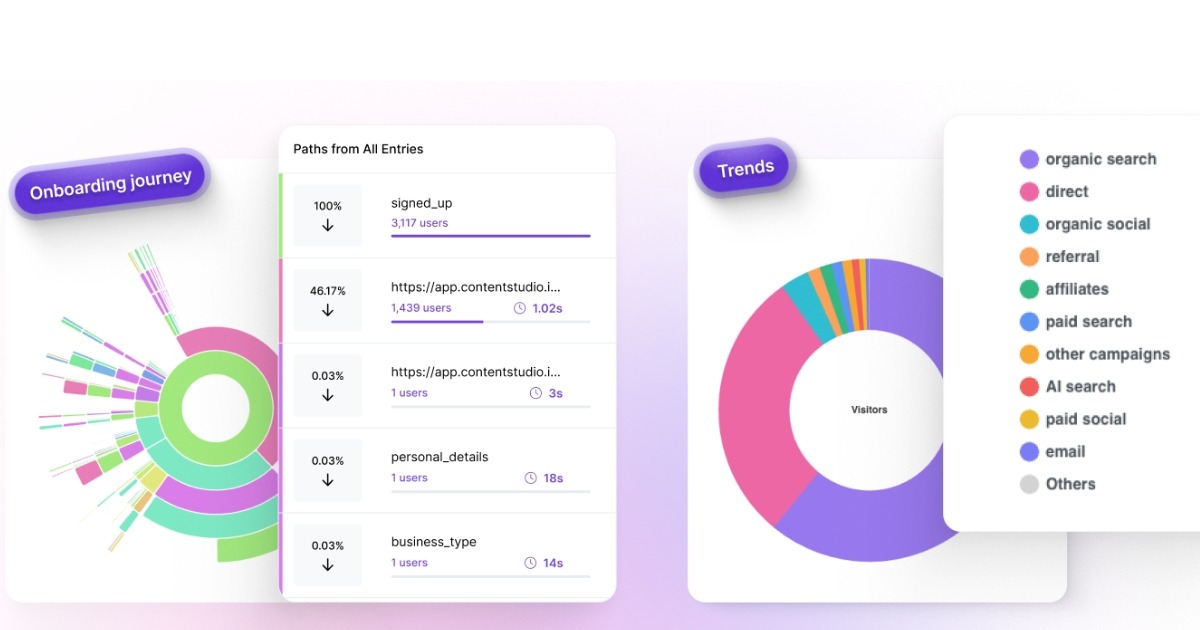
Usermaven provides visual customer journeys across captured website and product events, with identity resolution where configured. These views help identify drop-off points and distinguish a repeat customer from disconnected anonymous sessions.
Advanced segmentation
Usermaven supports powerful user segmentation based on:
- User behavior and events
- Acquisition channels
- Custom properties
This makes it easier to analyze specific audiences and understand what drives meaningful actions.
Real-time and accurate analytics
Usermaven provides current activity and behavioral reporting. Compare freshness by report type, because live activity, reconciled revenue, and attribution credits can settle at different times in any analytics platform.
To improve data accuracy, Usermaven also supports ad blocker resistant tracking using pixel white labeling and custom domains.
Cookieless tracking options
Usermaven offers cookieless tracking and custom tracking domains. Privacy obligations still depend on the data collected, configuration, jurisdiction, and applicable consent requirements; no analytics tool guarantees compliance by default.
Product analytics for SaaS teams
In addition to website analytics, Usermaven tracks in-app behavior such as feature adoption, engagement, retention, and onboarding performance without requiring complex developer involvement.
AI-powered insights
Maven AI supports questions across attribution, product behavior, and revenue, including AI funnel insights and AI-assisted attribution analysis. Its newer Agents can run scheduled checks on adoption, journeys, and retention, while authorized MCP clients can access supported analytics workflows. These tools assist interpretation but do not replace event-quality checks.
Pricing
Usermaven currently documents customized Business and Enterprise pricing for new customers. Older Growth and Scale prices remain visible in some public materials, but they should not be treated as a guaranteed new-customer quote. Ask what attribution, AI, event volume, workspaces, and implementation support are included in the proposed plan.
Guided setup and white-label reporting may be included as quoted add-ons. The pricing overview explains plan scope, while the buying decision should be based on the actual requirements and agreed proposal.
Why it stands out
Usermaven is a strong option when website activity must connect to acquisition touchpoints, CRM pipeline, revenue, and post-signup behavior. GA4 may remain useful in parallel for Google ecosystem reporting.
The easiest GA4 alternative for marketers and product teams
2. Heap
Heap is a product analytics platform known for automatically capturing user interactions. It is often considered by teams looking for GA4 alternatives that focus on understanding how users behave inside digital products.
Best for
Product and growth teams that want automatic event capture and detailed behavioral insights, especially for web and app products.
Key features
- Automatic event capture: Heap records user interactions by default, reducing the need for manual event setup.
- Funnels and user paths: Analyze how users move through key flows and identify drop-off points.
- Behavior-based segmentation: Segment users based on actions, properties, and engagement patterns.
- Retroactive analysis: Define events after data has already been collected.
Pricing
Heap’s Free plan includes up to 10,000 monthly sessions and six months of history. Growth, Pro, and Premier expand features and are priced by usage or custom quote; Sense AI appears in eligible paid plans.
Limitations to consider
While Heap is a strong product analytics tool, it may not be the best Google Analytics alternative for every use case:
- Multi-touch attribution exists on eligible plans, but it is not centered on CRM opportunity and closed-won revenue
- Not designed as a privacy-first analytics platform
- Session-based pricing needs evaluation against traffic growth and replay requirements
- Better suited for product teams than marketing-led workflows
Bottom line
Heap is a solid option if your primary goal is product behavior analysis. Teams looking for a simpler GA4 replacement with built-in attribution, privacy controls, and real-time insights may find it limiting.
If Heap doesn’t fit your requirements, consider exploring the best Heap alternative here.
3. Matomo

Matomo is a well-known Google Analytics alternative focused on privacy, data ownership, and compliance. It is often chosen by organizations that want full control over where their analytics data is stored and how it is handled.
Best for
Privacy-focused businesses, enterprises, and organizations that require data ownership, EU hosting, or on-premise analytics setups.
Key features
- Privacy-first analytics: Full data ownership with GDPR-compliant tracking.
- Flexible hosting options: Cloud-hosted in Europe or fully self-hosted on your own infrastructure.
- Core web analytics: Track visits, page views, referrers, devices, and campaigns.
- Visitor behavior options: Goals, ecommerce, and optional heatmaps/session recordings depending on hosting and feature package.
- Segmentation and reporting: Create custom segments and reports for deeper analysis.
Pricing
Matomo’s cloud pricing is based on monthly traffic volume.
- Business plan:
Starts at €22 per month for up to 50,000 hits per month (excluding tax).
Additional traffic is billed incrementally, for example, 5,000 extra hits for €2.20. - Enterprise plan:
Custom pricing based on traffic volume, hosting needs, and compliance requirements.
Includes advanced allowances and tailored setups.
Matomo also offers an on-premise option, where the software itself is free, but hosting, maintenance, and infrastructure costs are handled by your team.
Limitations to consider
While Matomo is a strong privacy-focused GA4 alternative, it may not be ideal for every team:
- Interface can feel dated compared to modern analytics tools
- Self-hosting requires technical expertise and ongoing maintenance
- Limited built-in attribution and product analytics features
- Live reporting is available, but it is not primarily a CRM-to-revenue attribution tool
Bottom line
Matomo is a solid choice if privacy, compliance, and data ownership are your top priorities. Teams looking for a more intuitive GA4 replacement with real-time insights, attribution, and minimal setup may find it less practical.
If Matomo doesn’t fully meet your needs, it may be worth looking at the best Matomo alternative.
4. Clicky

Clicky is a lightweight Google Analytics alternative known for its real-time reporting and simple interface. It is often used by small websites that want immediate visibility into visitor activity without a complex setup.
Best for
Small websites, blogs, and teams that want basic, real-time analytics with minimal configuration.
Key features
- Real-time analytics: View visitors, page views, and actions as they happen.
- Individual visitor tracking: See how individual users navigate your site.
- Heatmaps and session views: Visualize clicks and engagement on supported plans.
- Simple setup: Easy to install and quick to get started.
- Uptime monitoring: Included in higher-tier plans.
Pricing
Clicky offers a free plan and several paid tiers based on the number of websites and daily page views.
- Free: 1 website with up to 3,000 daily page views
- Pro: $9.99/month, up to 10 websites and 30,000 daily page views
- Pro Plus: $14.99/month, includes heatmaps and uptime monitoring
- Pro Platinum: $19.99/month, up to 30 websites and 100,000 daily page views
- Custom: Pricing varies for large setups, supporting up to 1,000 websites and 20M daily page views
Discounted annual plans are also available.
Limitations to consider
Clicky works well for basic analytics, but it has notable limitations as a GA4 alternative:
- Less emphasis on advanced product funnels and lifecycle journey analysis
- Not a specialist multi-touch, CRM-to-revenue attribution platform
- Limited segmentation and reporting depth
- Not designed for SaaS or product analytics
Bottom line
Clicky is a good fit if you want a simple, real-time analytics tool for a small website. Teams looking for a full Google Analytics alternative with attribution, funnels, and deeper insights will likely need a more advanced solution.
5. Piwik Pro
Piwik PRO is an enterprise-focused Google Analytics alternative built for organizations that need strong privacy controls, data ownership, and compliance-ready analytics. It is commonly used by regulated industries and large teams with strict governance requirements.
Best for
Enterprises, public-sector organizations, and data-sensitive businesses that require advanced security, compliance, and flexible hosting options.
Key features
- Privacy-first analytics: Designed for GDPR, HIPAA, and other regulatory requirements.
- Modular platform: Includes Analytics, Tag Manager, Data Activation, and a Consent Management Platform.
- Flexible hosting: EU-based cloud, private cloud, or on-premise deployments.
- Advanced data control: Custom data retention, access management, and audit-ready reporting.
- Dedicated support: Enterprise-grade onboarding and implementation assistance.
Pricing
Piwik PRO prices Business by actions and domains; Enterprise adds deeper governance, deployment options, and support.
- Business: From €36/month, with EU-hosted cloud analytics and tiered monthly action limits.
- Enterprise: From €366/month billed annually, with cost depending on actions, hosting, governance, and support requirements.
Custom pricing is available for organizations with advanced security, private cloud, or on-premise needs.
Limitations to consider
Piwik PRO is powerful, but it may not be the best GA4 alternative for every team:
- Higher cost compared to lightweight analytics tools
- More complex setup than marketer-focused platforms
- Limited built-in marketing attribution compared to growth-oriented tools
Bottom line
Piwik PRO is a strong choice for enterprises that prioritize privacy, compliance, and data control. Teams looking for a simpler GA4 replacement with built-in attribution and faster insights may find it heavier than necessary.
If Piwik PRO isn’t the right fit for your needs, consider exploring the Piwik PRO alternative.
6. Fathom Analytics

Fathom Analytics is a privacy-focused Google Analytics alternative designed for teams that want simple, compliant website analytics without cookies or complex setup. It is often chosen by businesses that value clarity and data ownership over advanced analysis.
Best for
Privacy-first teams, content websites, and businesses that want a lightweight GA4 alternative with minimal configuration.
Key features
- Cookieless tracking: No cookies or consent banners required.
- Privacy compliance: Built for GDPR and global privacy regulations.
- Simple setup: Easy integration with most CMS platforms.
- Core web analytics: Track page views, referrers, devices, and events.
- API and exports: Reporting access and exports subject to the platform’s feature and fair-use policies.
Pricing
Fathom pricing starts at $15 per month for up to 100,000 pageviews.
Plans scale based on usage, with pricing reaching up to $470 per month for high-traffic websites. Custom pricing is available for very large sites.
Limitations to consider
As a GA4 alternative, Fathom keeps things intentionally simple:
- Does not target full in-product behavioral journeys or product retention cohorts
- Source and conversion reporting is available, but not full multi-touch CRM revenue attribution
- Limited product and SaaS analytics capabilities
Bottom line
Fathom Analytics is a strong choice if privacy and simplicity are your top priorities. Teams that need deeper insights, attribution, or product analytics may require a more advanced Google Analytics alternative.
If you’re looking beyond Fathom Analytics, try the Fathom Analytics alternative here.
7. Mixpanel

Mixpanel is a well-known product analytics platform focused on tracking user behavior inside web and mobile applications. It is often evaluated as a GA4 alternative by product teams that want deeper insights into user engagement and retention.
Best for
Product and growth teams that need detailed behavioral analysis, cohorts, and retention metrics for apps and SaaS products.
Key features
- Event-based product analytics: Track user actions, flows, and feature usage.
- Funnels and retention analysis: Understand how users convert and where they drop off.
- Cohort analysis: Group users based on behavior and engagement patterns.
- Session replay and reports: Analyze user behavior over time with saved reports.
Pricing
Mixpanel offers a free plan with limited usage. Paid pricing is event-based and scales with the number of events tracked.
- Free: Up to 1 million events/month with core funnels, retention and limited replay allowance
- Growth: Free monthly event allowance with usage-based charges above included limits; advanced features vary by plan
- Enterprise: Custom pricing with advanced security, governance, and support
At higher event volumes, pricing can increase significantly and is calculated through an interactive pricing slider, which makes exact costs difficult to estimate upfront.
Limitations to consider
As a Google Analytics alternative, Mixpanel has some trade-offs:
- Event growth, replays, experiments, and optional modules should be modeled before choosing a plan
- Not designed for privacy-first or cookieless tracking
- Limited marketing attribution capabilities
- Better suited for product analytics than website analytics
Bottom line
Mixpanel is a strong product analytics tool for teams focused on user engagement and retention. However, businesses looking for a simpler GA4 replacement with predictable pricing, attribution, and privacy-friendly tracking may find it less practical.
Looking for something simpler than Mixpanel? Choose a Mixpanel alternative that fits your workflow.
8. Plausible

Plausible is a lightweight, privacy-focused Google Analytics alternative built for teams that want simple website analytics without cookies, trackers, or complex configuration. It is often chosen by businesses that value transparency, speed, and ease of use.
Best for
Content websites, startups, and privacy-conscious teams looking for a simple GA4 alternative with clear reporting.
Key features
- Privacy-first analytics: No cookies, no personal data, and GDPR compliant by default.
- Simple dashboard: Clean, easy-to-understand metrics without clutter.
- Goals and custom events: Track conversions, including custom events, through defined goals.
- Team access and shared dashboards: Built for collaboration.
- Funnels and journeys: Business tier includes conversion funnels and exploratory visitor paths; historical Google Analytics import is also supported.
Pricing
Plausible pricing is based on monthly pageviews and includes a 30-day free trial.
- Starter: $9 per month for up to 10k monthly pageviews
- Growth: From $14/month at an entry traffic allowance; higher pageview volumes cost more
- Business: From $19/month at an entry allowance; includes advanced funnels and user journeys
- Enterprise: Custom pricing for large websites and teams
Annual plans are available with discounted pricing.
Limitations to consider
As a GA4 alternative, Plausible keeps things intentionally minimal:
- Funnels and user journeys require the appropriate Business plan
- Source and revenue-by-referrer reporting is available, but not full multi-touch CRM revenue attribution
- Limited product and SaaS analytics capabilities
Bottom line
Plausible is a strong choice if you want a privacy-friendly and easy-to-use alternative to Google Analytics. Teams that need deeper insights, attribution, or product analytics will likely need a more advanced solution.
If Plausible doesn’t quite fit your needs, it may be time to explore a Plausible alternative.
9. Simple Analytics

Simple Analytics is a privacy-focused Google Analytics alternative designed for teams that want straightforward website analytics without cookies, tracking complexity, or intrusive data collection. It emphasizes simplicity and transparency over advanced analysis.
Best for
Privacy-conscious businesses, small teams, and website owners who want clean, easy-to-read analytics with minimal setup.
Key features
- Privacy-first tracking: No cookies, no personal data, and GDPR compliant by default.
- Simple dashboards: Clear metrics focused on pageviews, referrers, and events.
- Event tracking: Track key actions without complex configuration.
- Ad blocker bypass: Improved data accuracy compared to traditional cookie-based tools.
- API and exports: Access and export your analytics data when needed.
Pricing
Simple Analytics pricing is based on expected monthly pageviews.
- Free: Hobby sites, one-month history, and other feature restrictions
- Self-serve paid: From £20/month at the displayed 100,000-pageview setting
- Extra users: Additional users are billed separately at the provider’s published per-user rate
- Enterprise: Custom pricing for large organizations and higher data limits
Annual billing options are available with discounted pricing.
Limitations to consider
As a GA4 alternative, Simple Analytics is intentionally minimal:
- Less suited to rich product funnels and identified customer-journey analytics
- No marketing attribution features
- Limited product and SaaS analytics capabilities
Bottom line
Simple Analytics is a good fit if privacy and simplicity are your top priorities. Teams that need deeper behavioral insights, attribution, or conversion analysis will likely require a more feature-rich Google Analytics alternative.
10. Pirsch

Pirsch is a cookieless Google Analytics alternative with event tracking, an API, unlimited retention, and advanced options such as funnels, segmentation, and white labeling in Plus. It is a strong fit when privacy-sensitive web measurement and flexible integrations matter.
Best for
Developers, technical teams, and privacy-conscious websites that need basic analytics with flexible deployment options.
Key features
- Privacy-first analytics: GDPR compliant with full data ownership.
- Cookieless tracking: No cookies or personal data required.
- Lightweight script: Minimal impact on website performance.
- Event and conversion tracking: Track key actions and goals.
- Flexible deployment: Cloud-hosted, managed cloud, or on-premise options.
Pricing
Pirsch pricing is based on monthly pageviews.
- Standard: From $6/month at 10,000 pageviews
- Plus: From $12/month at 10,000 pageviews, with funnels, segmentation, and white labeling
- Enterprise: Custom pricing for managed cloud, on-premise installations, and advanced security needs
Unlimited data retention is included across plans.
Limitations to consider
As a GA4 alternative, Pirsch has some trade-offs:
- Limited marketing attribution features
- No advanced product analytics
- Developer-oriented APIs and integration options may be unnecessary for simple content sites
Bottom line
Pirsch is a solid choice for teams that prioritize privacy, performance, and data ownership. Businesses looking for a more marketer-friendly GA4 replacement with attribution and funnels may need a different Google Analytics alternative.
Validate the numbers before switching
A GA4 migration can change definitions even when tracking is technically correct. Run both tools in parallel on the same dates and decide what the comparison is intended to prove before interpreting gaps.
| Audit phase | What to check | Failure to avoid |
|---|---|---|
| 1. Source definitions | UTMs, referrers, direct and paid channels | Different channels grouped under the same name |
| 2. Events and goals | Signup, lead, purchase, and duplicate-event rules | Counting button clicks as completed purchases |
| 3. Identity and consent | Cross-domain sessions, logged-in identity, consent mode | Comparing observed visitors with modeled users |
| 4. Revenue and attribution | CRM/order values, lookback, model and reporting date | Adding first-click and last-click credit as if revenue occurred twice |
| 5. Reconciliation | Same timezone, date range, filters and conversion cohort | Comparing live traffic to finalized revenue totals |
Worked example: A $1,000 closed-won deal has a paid social first touch, organic search visit, and branded search last touch. A first-touch report may credit $1,000 to social, while a last-touch report may credit $1,000 to branded search. These are alternative allocations of the same $1,000 deal, not $2,000 of revenue. Compare the models side by side and reconcile the credited total to the CRM before acting on it.
The same principle applies to GA4 and any new platform: attribution explains credit assignment, while incremental lift requires an experiment or other causal method. The result of a migration should be a more reliable decision, not a larger-looking number.
How to choose the right Google Analytics alternative
Not all Google Analytics alternatives are built for the same use cases. Some focus on privacy, others on product analytics, and some on marketing attribution. Choosing the right GA4 alternative depends on what you actually need from your analytics day-to-day.
Use the framework below to narrow your options quickly.
If you’re a marketer or growth team
Marketing teams typically need analytics that answer practical questions fast:
- Where are sign-ups and conversions really coming from?
- Which channels influence conversions across the funnel?
- What content or campaigns drive meaningful actions?
Look for GA4 alternatives that offer:
- Built-in attribution models
- Funnel and conversion tracking
- Clear, customizable dashboards
- Real-time or near real-time data
Acquisition reporting becomes useful when the conversion definition is trustworthy and the reporting model aligns with the revenue record. Connect campaign outcomes with the CRM or order source of truth before using attributed value to reallocate spend.
If you’re a SaaS or product-led team
Product teams need to understand how users interact with features over time, not just page views.
A strong GA4 alternative for SaaS should support:
- User journeys across sessions
- Feature adoption and engagement tracking
- Retention and cohort analysis
- Onboarding and activation insights
This helps teams improve product experience, reduce churn, and optimize onboarding without stitching together multiple tools.
If privacy and compliance are a priority
For privacy-first businesses, GA4 may not offer enough flexibility. If compliance is a top concern, prioritize tools that provide:
- Cookieless or consent-free tracking options
- Clear data ownership and retention controls
- EU data hosting or self-hosting options
- Minimal or no personal data collection
Many GA4 alternatives are built specifically to meet modern privacy standards without sacrificing essential insights.
To explore this topic further, learn how privacy friendly analytics tools handle data collection without relying on invasive tracking methods.
If you’re an agency or consultant
Agencies need analytics that scale across clients without increasing complexity.
Key features to look for include:
- Multiple workspaces or properties
- Client-friendly reporting and dashboards
- Easy setup without developer dependency
- Reliable data accuracy across accounts
An agency-friendly reporting tool saves time, reduces onboarding friction, and improves reporting consistency.
If you’re an enterprise or large organization
Enterprises often have analytics requirements that go beyond basic reporting. While GA4 can work at scale, many large organizations look for GA4 alternatives that offer greater control, flexibility, and support.
Enterprise teams should prioritize:
- Advanced data governance and access controls
- Flexible data retention policies
- On-premise or private cloud hosting options
- Dedicated support and SLAs
- The ability to scale without sampling or hidden limitations
For regulated industries or global teams, these capabilities are often essential, not optional.
If you want something like GA4 but actually usable
Many teams don’t need more data; they need clearer data. If GA4 feels overwhelming, focus on tools that emphasize:
- Simple setup with automatic event tracking
- Intuitive navigation and reporting
- Actionable insights instead of raw metrics
Usability often makes a bigger difference than feature count when it comes to long-term adoption.
For many teams, this becomes less about features and more about a build vs. buy analytics decision: whether to keep investing time in a complex setup or choose a tool that delivers usable insights faster.
Related read: Fathom vs. GA4 vs. Usermaven
Time to move beyond GA4!
Choose an alternative for the specific job GA4 is not doing well enough: simpler web reporting, governed data collection, deeper product analysis, or connecting acquisition to revenue. GA4 may still play a role where its Google integrations are valuable.
Usermaven makes the most sense when campaign attribution, product engagement, and downstream revenue belong in the same analysis. A lighter website analytics tool may be enough when the goal is simply to monitor traffic or conversions.
If attribution gaps, CRM revenue visibility, or product behavior are what GA4 is not answering, book a demo to see how Usermaven can connect those reports.
Website analytics tool for modern marketers & agencies
FAQs
1. What does GA4 cost?
Google Analytics 4 has a free standard property. Google Analytics 360 uses enterprise agreements with pricing based on the organization and contracted requirements; there is no universal publicly guaranteed entry price.
2. What is the best alternative to Google Analytics?
It depends on the measurement job. Usermaven fits attribution and product-to-revenue analysis; Heap or Mixpanel fit deeper product behavior; Matomo and Piwik PRO fit data governance; Plausible and Fathom fit simpler website analytics.
3. Which GA4 alternative is easiest for a basic website?
Plausible, Fathom Analytics, Clicky, Simple Analytics, and Pirsch are worth comparing for streamlined website traffic reporting. Choose based on event tracking, data retention, site volume, and export needs.
4. Does GA4 have real-time reports and attribution?
Yes. GA4 Realtime shows recent activity, and its Advertising reports support data-driven and last-click attribution. Standard reports and attributed conversions can change after processing; real-time activity is not the same as finalized channel revenue.
5. Why do businesses replace or supplement GA4?
Common reasons include difficult report interpretation, custom event implementation, governance requirements, or the need to connect campaign touchpoints with CRM revenue and product retention. Some organizations keep GA4 alongside a specialist tool.
6. Does Plausible support funnels and user journeys?
Yes. Plausible offers funnels and user journeys on its Business plan. Its emphasis remains lightweight web measurement rather than user-identified product lifecycle and CRM opportunity attribution.
Updated

Written by
Imrana Essa
SaaS Marketing Lead
Imrana Essa is a marketing lead and content strategist with 8+ years of experience creating and leading content for B2B and SaaS brands. She specializes in marketing analytics, attribution, content strategy, and organic growth, translating complex marketing concepts into clear, actionable insights. Her work focuses on helping marketers understand performance, make data-informed decisions, and build strategies that contribute to sustainable growth.
All articles by Imrana →