Getting more traffic is good. But what happens after people arrive?
You might have thousands of visitors landing on your website, yet only a small percentage explore your content, interact with your product, or take the next step.

That’s where engagement rate becomes useful.
It helps you understand whether people are interacting with your website, content, or product rather than simply showing up. But engagement rate isn’t calculated the same way everywhere, and a higher number doesn’t always mean better business results.
Drive business growth
with AI-powered analytics
Key takeaways
- Engagement rate measures audience interaction. It helps you understand whether visitors or users are interacting with your content, website, or product.
- Different platforms calculate engagement differently. Website engagement typically uses sessions, while social media engagement often uses reach, impressions, or followers.
- A higher engagement rate isn’t always better. Engagement needs to be evaluated alongside conversions, customer behavior, and business outcomes.
- Engagement metrics provide useful context. Pageviews, session duration, events, active users, and feature adoption help explain how people interact.
- Improving engagement starts with understanding user intent. Relevant content, better experiences, and fewer conversion barriers can make interactions more meaningful.
What is engagement rate?
Engagement rate is a metric that measures how actively people interact with your website, content, or product relative to a defined audience or activity total.
It helps you understand whether people are doing something meaningful after encountering your brand.
For example, engagement might mean:
- On a website: Visitors spend time reading, explore multiple pages, or complete important actions.
- On social media: People like, comment on, save, or share your posts.
- In a product: Users return regularly, interact with features, or complete important tasks.
The exact definition depends on what you’re measuring.
A visitor spending 30 seconds reading a blog post might count as an engaged website session in GA4. But someone viewing an Instagram post without interacting with it might not count as an engagement in a social media report.
That’s why it’s important to understand the calculation before comparing engagement rates.
How to calculate engagement rate
The engagement rate formula depends on the platform and the type of interaction you’re measuring.
For websites, you typically calculate the percentage of sessions that meet specific engagement criteria. For social media, you measure interactions relative to an audience denominator such as reach or impressions.
Here’s how the calculations differ.
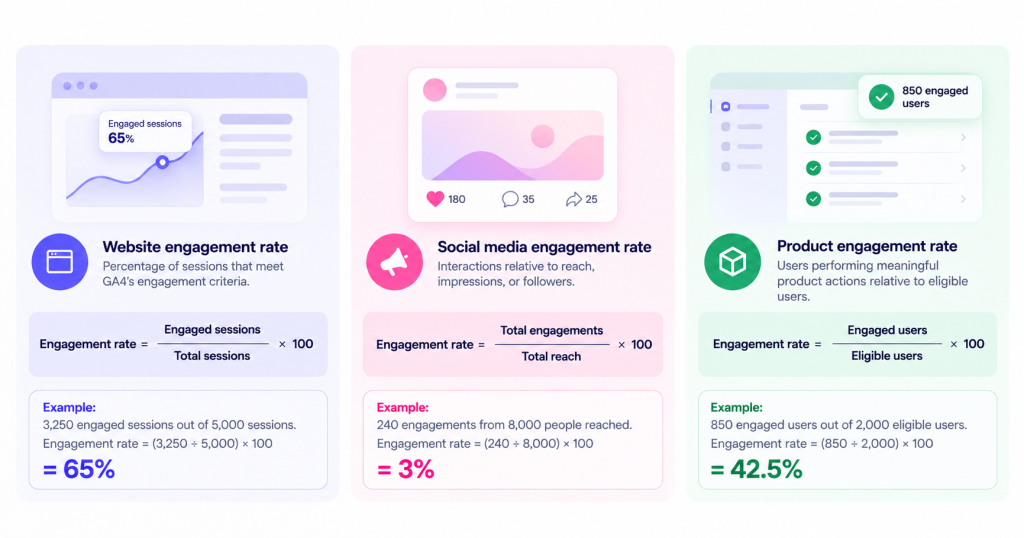
1. Website engagement rate formula
Google Analytics 4 (GA4) calculates engagement rate using engaged sessions.
Engagement rate = (Engaged sessions ÷ Total sessions) × 100
According to Google’s official documentation, a session is considered engaged when it meets at least one of these conditions:
- Lasts longer than 10 seconds.
- Includes a key event.
- Includes at least two pageviews or screenviews.
Example:
Suppose your website received 5,000 sessions last month, and 3,250 qualified as engaged sessions.
Engagement rate = (3,250 ÷ 5,000) × 100
Your website engagement rate is 65%.
This means 65% of sessions met at least one of GA4’s engagement criteria.
However, it doesn’t necessarily mean 65% of visitors were satisfied or interested in buying. Engagement rate measures specific behaviors, not customer intent directly.
FIG 1: Insert engagement rate formula infographic here.
2. Social media engagement rate formula
Social media platforms measure engagement through actions such as likes, comments, shares, saves, and other supported interactions.
One common calculation is engagement rate by reach:
Engagement rate = (Total engagements ÷ Total reach) × 100
For example, imagine a LinkedIn post reached 8,000 people and received:
- 180 likes
- 35 comments
- 25 shares
That’s 240 engagements.
Engagement rate = (240 ÷ 8,000) × 100
Your engagement rate by reach is 3%.
You can also calculate engagement using impressions or followers. Just remember that each method answers a different question.
3. Product engagement rate formula
Product engagement is slightly different because businesses define meaningful activity based on how their products work.
For a SaaS product, engagement might involve creating reports, using features, inviting teammates, or completing important workflows.
A common approach is:
Product engagement rate = (Users completing a defined engagement action ÷ Eligible users) × 100
Suppose your SaaS platform has 2,000 eligible users, and 850 complete an important product action during the month.
Product engagement rate = (850 ÷ 2,000) × 100
Your product engagement rate is 42.5%.
This is an example of a custom product engagement metric, not a universal industry formula. Different products define engagement differently.
Website analytics tool for modern marketers & agencies
Website vs. social media vs. product engagement rate
Although these metrics share the same name, they measure different behaviors.
| Type | What it measures | Common calculation |
|---|---|---|
| Website engagement | Sessions meeting engagement criteria | Engaged sessions ÷ total sessions |
| Social media engagement | Interactions with published content | Engagements ÷ reach, impressions, or followers |
| Product engagement | Users performing meaningful product actions | Engaged users ÷ eligible users |
The important distinction: These rates aren’t directly comparable.
A 65% website engagement rate and a 3% social media engagement rate don’t mean your website is performing better than your social media content.
They use different definitions and denominators.
Why is engagement rate important?
Engagement rate helps you look beyond how many people you reach and understand what happens after they interact with your brand.
But its real value comes from using engagement data to make better marketing and product decisions.
1. Understand content performance
Traffic alone doesn’t tell you whether your content is useful.
Imagine two blog posts receive the same number of visitors. One attracts people who leave almost immediately, while the other encourages readers to explore related topics and visit product pages.
Both generate traffic, but their engagement patterns are different.
Combining engagement metrics with website analytics can help you identify which pages attract relevant visitors and which need improvement.
2. Identify friction in the customer journey
Low engagement can sometimes point to problems with navigation, messaging, or page experience.
For example, visitors might click an ad expecting to see a product comparison but land on a generic homepage.
They may leave because the page doesn’t answer their question.
Analyzing users journeys alongside engagement data helps you understand how visitors move between pages and where their behavior changes.
3. Improve conversion opportunities
Engagement and conversions are connected, but they aren’t the same thing.
Someone can spend several minutes browsing your website without signing up. Another visitor might land on a pricing page and convert almost immediately.
That’s why you should compare engagement with conversion rate rather than treating engagement as the final measure of success.
The goal isn’t simply to keep people on your website longer. It’s to help them complete the actions that matter.
4. Understand product adoption and retention
For SaaS businesses, engagement can reveal whether customers are using the features they signed up for.
If users regularly log in but rarely complete important workflows, they might not be experiencing the product’s full value.
Tracking feature adoption alongside retention analysis helps teams investigate whether users continue finding value over time.
What is a good engagement rate?
There is no universal good engagement rate.
The answer depends on whether you’re measuring website sessions, social media interactions, or product activity.
It also depends on your industry, audience, content type, and the way engagement is defined.
Website engagement rate
In GA4, a good engagement rate is one that reflects meaningful activity for your website’s goals.
For example, an educational blog might have visitors who spend time reading a single article. A SaaS pricing page might have shorter visits but generate more demo requests.
Rather than relying on a universal benchmark, compare engagement across:
- Similar landing pages
- Traffic acquisition channels
- New and returning visitors
- Comparable reporting periods
- Pages with similar conversion goals
A useful benchmark is your own historical performance, provided your tracking configuration remains consistent.
Social media engagement rate
Social media engagement varies significantly by platform.
A rate that performs well on LinkedIn might not be equally strong on Instagram or TikTok.
It also matters whether you’re calculating engagement by reach, impressions, or followers.
Compare posts using the same calculation and look for patterns across content formats, topics, and audience segments.
Product engagement rate
For products, the definition of an engaged user matters more than any generic benchmark.
A project management platform might define engagement as creating or completing tasks. An analytics platform might focus on users who build reports, investigate data, or return to dashboards.
Start by identifying the actions that represent actual product value, then measure how consistently users perform them.
Engagement rate vs. bounce rate: What’s the difference?
Engagement rate and bounce rate are related, but they aren’t interchangeable in every analytics platform.
In GA4, bounce rate is the percentage of sessions that were not engaged.
That means:
Bounce rate = 100% − Engagement rate
For example, if your website has an engagement rate of 68%, its GA4 bounce rate is 32%.
| Engagement rate | Bounce rate |
|---|---|
| Measures engaged sessions | Measures non-engaged sessions |
| Higher often indicates more qualifying activity | Higher indicates fewer sessions meeting engagement criteria |
| Based on session engagement rules | Based on the inverse of those rules in GA4 |
| Useful for analyzing visitor interaction | Useful for investigating potential engagement issues |
Important: This relationship applies to GA4’s definitions. Other analytics platforms may calculate bounce rate differently.
Also, a bounce doesn’t automatically mean a visitor had a bad experience. Someone might find an answer quickly and leave without meeting the platform’s engagement criteria.
7 key metrics to measure website and product engagement
Engagement rate provides a useful overview, but it doesn’t explain every aspect of user behavior.
These seven metrics can help you understand what’s happening behind the percentage.
1. Pageviews
Pageviews measure how many times pages on your website are viewed.
They help you identify popular content and understand which pages receive attention.
However, high pageviews don’t necessarily mean strong engagement. A visitor repeatedly refreshing the same page can increase pageviews without gaining additional value.
2. Sessions
Sessions represent visits to your website or app within a defined period.
They help you understand how frequently people visit and provide the denominator for GA4’s website engagement rate.
Comparing sessions with engagement and conversions helps distinguish traffic growth from improvements in visitor behavior.
3. Average engagement time
Average engagement time measures how long your website or app is actively in use, according to the analytics platform’s tracking rules.
For content-heavy websites, it can help identify pages where visitors spend time reading or interacting.
However, longer isn’t always better. A visitor struggling to complete a simple task might spend more time on a page than someone who completes it easily.
4. Bounce rate
Bounce rate helps identify sessions that don’t meet the platform’s engagement criteria.
If a landing page consistently has high bounce rates and low conversions, investigate whether its content matches visitor expectations.
You should also review traffic sources, device types, and tracking configuration before assuming the page itself is the problem.
5. Event interactions
Events capture actions such as button clicks, form submissions, downloads, and feature interactions.
Unlike pageviews, they help show what people actually do.
With event tracking, teams can analyze interactions that matter to their business rather than relying only on general traffic metrics.
6. Active users and stickiness
Daily active users (DAU) and monthly active users (MAU) help measure how frequently people use a product.
One common stickiness measure is:
DAU/MAU ratio = (DAU ÷ MAU) × 100
For example, if your product has 600 daily active users and 3,000 monthly active users, its DAU/MAU ratio is 20%.
This ratio gives you a useful view of usage frequency, although it doesn’t explain whether those interactions are valuable.
7. Feature adoption
Feature adoption measures how many eligible users start using a particular product feature.
For example, if 400 out of 1,000 eligible users adopt a reporting feature, the adoption rate is 40%.
Using product analytics, teams can examine feature usage patterns and investigate which features contribute to activation and continued product use.
How to improve engagement rate
Improving engagement isn’t about making visitors click more buttons or spend unnecessary time on your website.
It’s about helping people find what they need and making useful interactions easier.
Here are six practical ways to approach it.
1. Match your content to search intent
People arrive with different expectations.
Someone searching for “what is marketing attribution” probably wants a clear explanation. Someone searching for “marketing attribution software” may be comparing tools.
If both visitors land on a generic sales page, their engagement patterns may suffer.
Review your important landing pages and make sure they answer the questions that brought visitors there.
2. Improve the first-screen experience
Visitors should quickly understand what a page offers.
Clear headings, relevant messaging, readable layouts, and visible next steps can reduce confusion.
For blog posts, answer the main question early. For product pages, explain the problem and value before introducing unnecessary detail.
3. Make navigation easier
Complicated navigation makes it harder for visitors to explore relevant content.
Use clear menus, descriptive links, and logical page structures.
For longer articles, contextual links can help readers explore related concepts without interrupting the explanation.
4. Track meaningful interactions
Not every click deserves equal attention.
A visitor opening a navigation menu and a visitor submitting a demo request represent very different levels of intent.
Define important actions for each stage of the customer journey and track them consistently.
5. Analyze engagement by audience segment
An overall engagement rate can hide important differences.
For example, organic search visitors might engage with educational content, while paid search visitors might focus on pricing and product features.
Using customer segmentation, you can compare behavior across acquisition channels, visitor groups, and other relevant characteristics.
This helps you identify where improvements are actually needed.
6. Connect engagement with conversions
Engagement improvements matter most when they help visitors complete valuable actions.
Suppose a landing page’s engagement rate increases from 55% to 70%, but its demo conversion rate stays unchanged.
That’s worth investigating. The page may be attracting more interaction without improving purchase intent.
A funnel analysis can help identify where visitors stop progressing toward conversion.
FIG 2: Insert engagement improvement process infographic here.
How Usermaven helps you understand engagement and conversions
A visitor might read several blog posts, explore your product, and return through a paid campaign before requesting a demo.
Looking only at engagement rate tells you part of that story.
You still need to understand which interactions mattered, where visitors dropped off, and which marketing channels contributed to the eventual conversion.
Usermaven connects website and product behavior with marketing attribution, helping teams investigate how engagement relates to conversions, pipeline, and revenue.
Understand what visitors do after landing
Usermaven’s website analytics and event tracking help you examine traffic sources, page activity, and important visitor interactions.
You can investigate which pages attract visitors and what actions they take afterward.
This gives you more context than a single engagement percentage.
Find where engaged visitors stop converting
Someone might explore multiple pages without completing a signup or demo request.
Usermaven’s funnels help you analyze the steps visitors take before converting and identify where they drop off.
You can then investigate whether the problem is related to messaging, navigation, or another part of the experience.
Connect marketing activity with business outcomes
Engagement doesn’t tell you which channels generate valuable customers.
Usermaven’s multi-touch marketing attribution connects marketing interactions with conversions and downstream outcomes, helping you evaluate channel contributions beyond traffic and engagement.
You can also use Maven AI to investigate behavioral patterns, compare performance, and generate reports from connected analytics data.
These insights still depend on accurate tracking and well-defined conversion goals.
See Usermaven in action
Book a free demo and discover how powerful analytics can grow your business.
Final thoughts
Engagement rate is useful for understanding how people interact with your website, content, or product. But the percentage alone won’t tell you whether those interactions are helping your business grow.
Start by choosing the right engagement definition, comparing similar audiences, and tracking meaningful actions.
Then connect those interactions with conversions and customer outcomes.
Usermaven helps you bring marketing attribution, website behavior, product analytics, and conversion data together so you can see what drives meaningful results.
Book a demo to see how Usermaven can help you understand your customer journeys and marketing performance.
FAQs
What is a good engagement rate for a website?
A good website engagement rate depends on your traffic sources, page types, audience, and analytics platform. In GA4, engagement rate measures the percentage of sessions that meet its engagement criteria. Compare similar pages and historical periods rather than relying on one universal benchmark.
How do you calculate engagement rate?
For websites using GA4, divide engaged sessions by total sessions and multiply by 100. For social media, divide total engagements by reach, impressions, or followers, depending on your reporting method. Always specify which formula you’re using.
Is a 5% engagement rate good?
A 5% engagement rate might be reasonable for certain social media contexts, but it shouldn’t be treated as a universal benchmark. On a website using GA4’s engagement definition, 5% would generally indicate that very few sessions meet its engagement criteria. The denominator and platform matter.
Can engagement rate be higher than 100%?
Website engagement rate in GA4 cannot exceed 100% because engaged sessions are a subset of total sessions. However, some social media engagement calculations can exceed 100% when total interactions are divided by unique reach, because one person can interact multiple times.
Does a high engagement rate mean more conversions?
Not necessarily. High engagement can indicate that people are interacting with your content or product, but it doesn’t guarantee they will convert. Compare engagement with conversion rates, qualified leads, revenue, or other meaningful outcomes.
How often should you measure engagement rate?
Weekly or monthly reviews are useful for identifying trends, depending on your traffic volume. For campaigns or product launches, more frequent monitoring may help. Use consistent definitions and comparable periods so changes are meaningful.

Written by
Imrana Essa
SaaS Marketing Lead
Imrana Essa is a marketing lead and content strategist with 8+ years of experience creating and leading content for B2B and SaaS brands. She specializes in marketing analytics, attribution, content strategy, and organic growth, translating complex marketing concepts into clear, actionable insights. Her work focuses on helping marketers understand performance, make data-informed decisions, and build strategies that contribute to sustainable growth.
All articles by Imrana →