Your free trial is getting signups, but sales can’t tell which accounts are ready to buy and which signed up out of curiosity. Calling every new user wastes time. Waiting for people to upgrade on their own leaves revenue on the table.
A product qualified lead (PQL) solves that problem. Instead of guessing intent from ebook downloads or email clicks, you qualify leads by what they actually do inside your product. For teams running product-led growth, PQLs are often the clearest signal that a free user is ready for a sales conversation or an upgrade.
Here’s how to define, score, and convert them.
Key takeaways
- A product qualified lead is a user or account that has experienced real value in your product and matches your ideal customer profile.
- PQLs are based on product behavior, while MQLs are based on marketing engagement and SQLs on sales validation.
- A strong PQL definition combines three things: customer fit, product usage, and buying intent.
- Your PQL criteria should come from the behavior of customers who already converted, not from guesses.
- PQL models need clean event tracking and regular review against closed-won data to stay accurate.
What is a product qualified lead (PQL)?
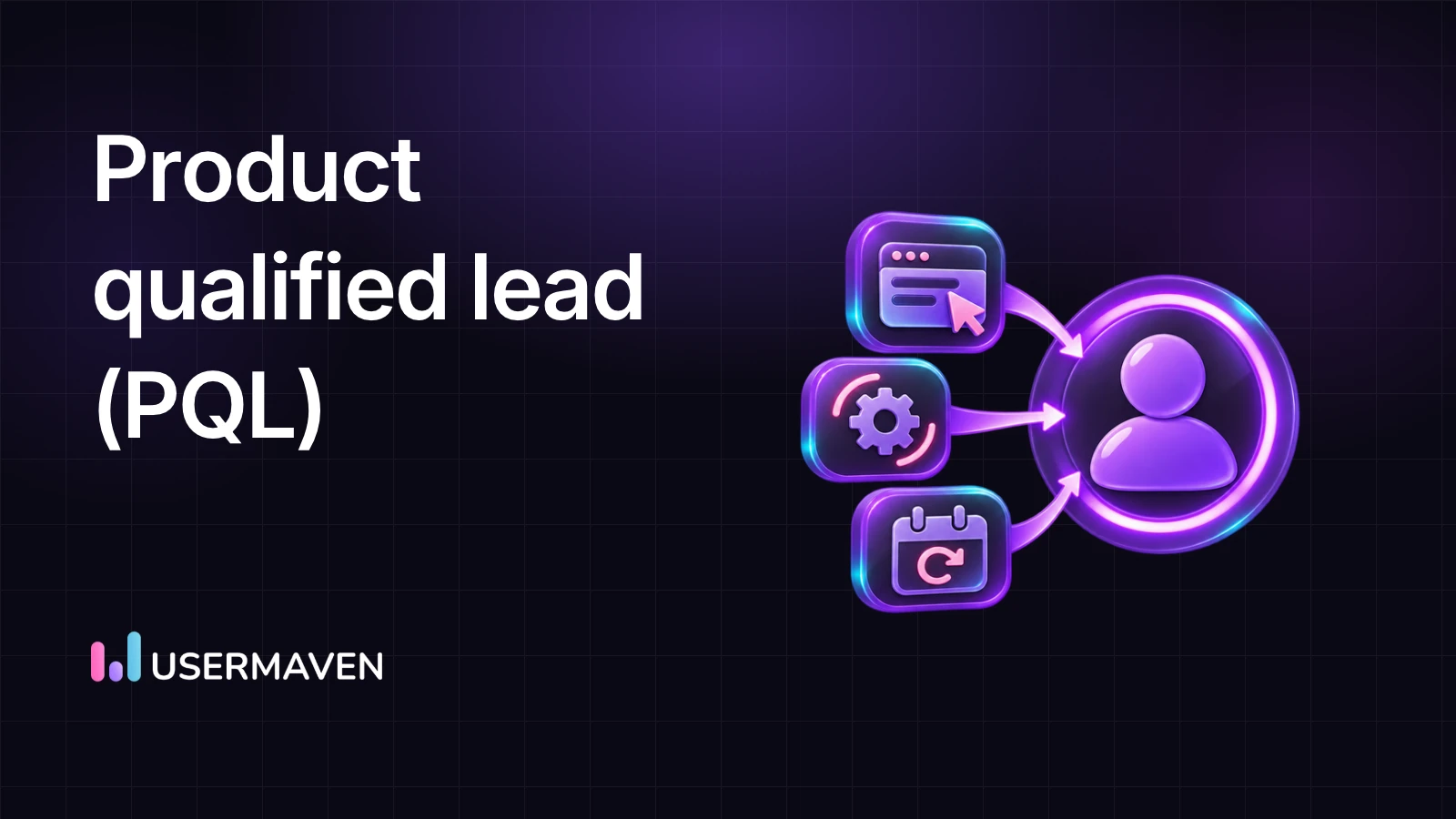
A product qualified lead (PQL) is a prospect who has used your product through a free trial, freemium plan, or other hands-on access, reached meaningful value, and shown signs that they’re likely to become a paying customer.
The key difference from other lead types is the evidence. A PQL isn’t qualified because they read a blog post or attended a webinar. They’re qualified because they completed actions in your product that paying customers also complete. TechTarget’s definition of a PQL frames it the same way, as a lead who has experienced value through first-hand product use.
In practice, a PQL usually meets three conditions:
- They fit your ideal customer profile. Company size, industry, role, or use case matches the customers you serve best.
- They reached value. They hit your product’s aha moment, such as creating a first project, connecting a data source, or inviting teammates.
- They show buying intent. They hit a plan limit, viewed pricing, tried a paid feature, or expanded usage across their team.
A user who meets only one of these conditions isn’t a PQL yet. A student who loves your product but works at no company is engaged but not a good fit. A VP at a target account who signed up and never logged in again is a good fit with no product evidence.
How PQLs fit into product-led growth
In a sales-led model, marketing generates leads, sales qualifies them, and the prospect sees the product during a demo. In a product-led model, the product is the first sales conversation. People sign up, try it, and decide for themselves whether it’s worth paying for.
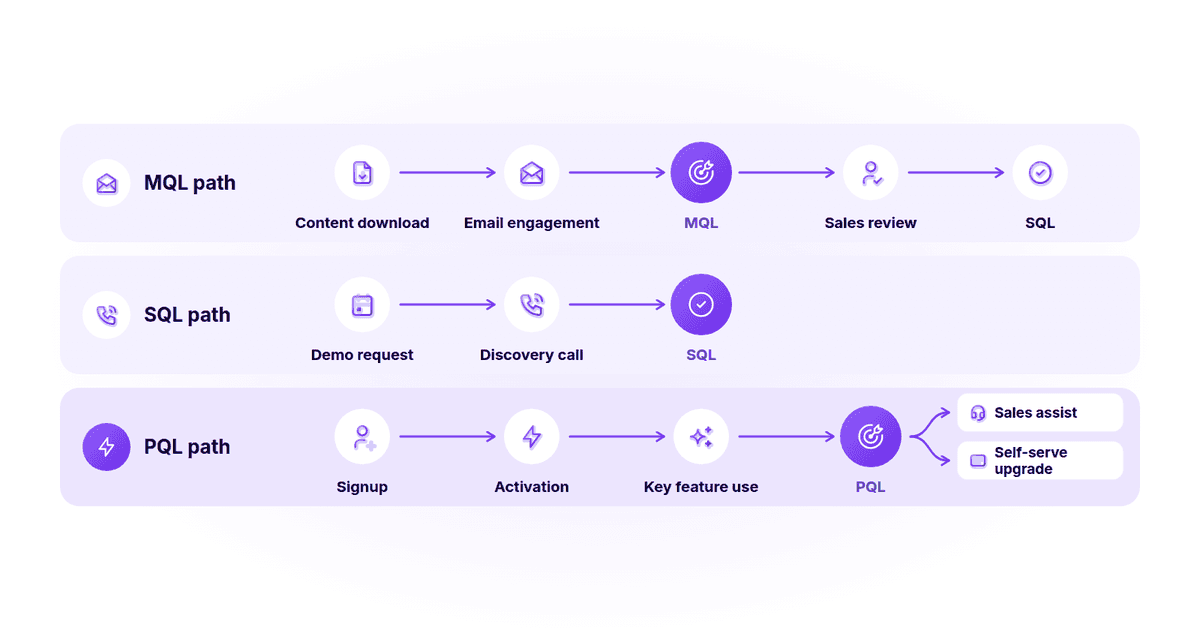
That shift changes where qualification happens. Instead of scoring someone based on how many emails they opened, you score them on user activation, feature use, and team growth inside the product. If you’re still deciding which motion fits your company, our comparison of product-led growth vs sales-led growth covers the trade-offs.
Most B2B SaaS companies end up running a hybrid. Smaller accounts self-serve and upgrade on their own. Larger accounts, or accounts showing signs of a bigger deal, get routed to sales. PQLs are what connect the two motions. They tell sales which self-serve users deserve a human touch.
PQL vs MQL vs SQL
All three are ways to decide which leads deserve attention. They differ in the evidence they rely on and who owns them.
| Marketing qualified lead (MQL) | Sales qualified lead (SQL) | Product qualified lead (PQL) | |
|---|---|---|---|
| Main signal | Engagement with marketing content | Confirmed need, budget, and timing | Meaningful use of the product |
| Typical triggers | Ebook download, webinar signup, repeated site visits | Discovery call, demo request, sales assessment | Activation, core feature use, team invites, usage limits |
| Who usually owns it | Marketing | Sales | Product, growth, and sales together |
| Evidence of value | Indirect. They’re interested in the topic | Verbal. They told sales they have a need | Direct. They’ve used the product successfully |
| Best fit for | Sales-led and content-heavy funnels | Deals that need sales validation | Free trials, freemium, and product-led motions |
A marketing qualified lead shows interest in the problem you solve. A sales qualified lead has been vetted by a salesperson. A PQL has already proven to themselves that your product works.
These categories aren’t mutually exclusive. A PQL can become an SQL after a sales conversation confirms budget and timing. An MQL can sign up for a trial and later qualify as a PQL. The goal isn’t to pick one, but to use the right signal for each stage of your B2B SaaS marketing funnel.
Is a PQL better than an MQL?
For products people can try before buying, PQLs are usually a stronger signal because they’re based on actual behavior rather than content interest. ProductLed’s comparison of PQLs and MQLs makes this case in detail. That said, MQLs still matter for buyers who aren’t ready to sign up yet, especially in longer B2B buying cycles.
PQL qualification criteria
Good PQL criteria are specific, measurable, and tied to outcomes you can verify. Most teams group them into three categories.
Fit criteria
Fit tells you whether the account is worth a sales conversation if they convert. Common fit signals include:
- Company size or employee count
- Industry or vertical
- Job title or department of the user
- Business email domain rather than a personal address
- Geography or region you can sell to
Usage criteria
Usage tells you whether the account has experienced value. These are the heart of any PQL definition:
- Completed onboarding or setup steps
- Reached the activation event, such as a first report, project, or integration
- Used one or more core features repeatedly
- Returned on several separate days within a set window
- Number of active users in the same account
Feature adoption metrics help you separate features that predict conversion from those that are simply popular.
Intent criteria
Intent tells you whether the account is close to a buying decision:
- Hit a usage limit on the free plan
- Visited the pricing or billing page
- Tried a feature gated to a paid plan
- Requested help, a quote, or a security review
- Invited people from other teams or departments
Negative signals
Most PQL guides skip this, but signals that lower a score are just as useful:
- Personal email domains or competitors signing up
- No activity for a set period after an initial burst
- A single user with no teammates in a product built for teams
- Usage limited to low-value features
- Repeated failed setup attempts, which may point to a support issue rather than buying intent
How to identify product qualified leads
Identifying PQLs is less about tools and more about knowing which behaviors actually predict a purchase. Here’s a practical process.
1. Start with customers who already converted
Pull a list of accounts that moved from free to paid in the last few months. Then look at what they did before upgrading. Which features did they use? How many teammates did they invite? How long did it take them to reach first value?
Compare that with accounts that signed up but never paid. The differences between the two groups are your candidate PQL signals. Paid vs free user behavior is often more revealing than any best-practice list.
2. Define your activation event
Your activation event is the moment a user first gets real value. For a project management tool, it might be creating a project and assigning a task to a teammate. For an analytics tool, it might be installing the tracking script and viewing a first report.
If you haven’t defined it yet, start there. Shorter time to value usually means more users reach activation, which means more potential PQLs.
3. Track the right events
You can’t qualify leads on behavior you don’t measure. Make sure your event tracking covers signup, onboarding steps, activation, core features, team invites, pricing page views, and upgrade attempts.
Identify users by email or user ID at signup so their activity, including the anonymous visits before signup, ties back to one profile. For B2B products, group users into companies too. A PQL is often an account, not an individual.
4. Look at accounts, not just users
In B2B SaaS, one enthusiastic user rarely signs a contract alone. Five people from the same company using the product across two departments is a much stronger signal than one power user.
Roll up usage by account. Track how many active users each account has, how many teams are involved, and whether usage is growing week over week.
5. Set a time window
Behavior goes stale. A user who was very active three months ago and hasn’t logged in since isn’t a PQL today. Define windows such as “within the first 14 days of signup” or “in the last 30 days” so your list reflects current intent.
Power up your SaaS
with perfect product analytics
How to build a PQL scoring model
A scoring model turns your criteria into a number, so sales and growth teams can prioritize consistently. If you already use lead scoring for MQLs, the mechanics will feel familiar. The difference is that most of the points come from product behavior.
Step 1. Choose a simple structure
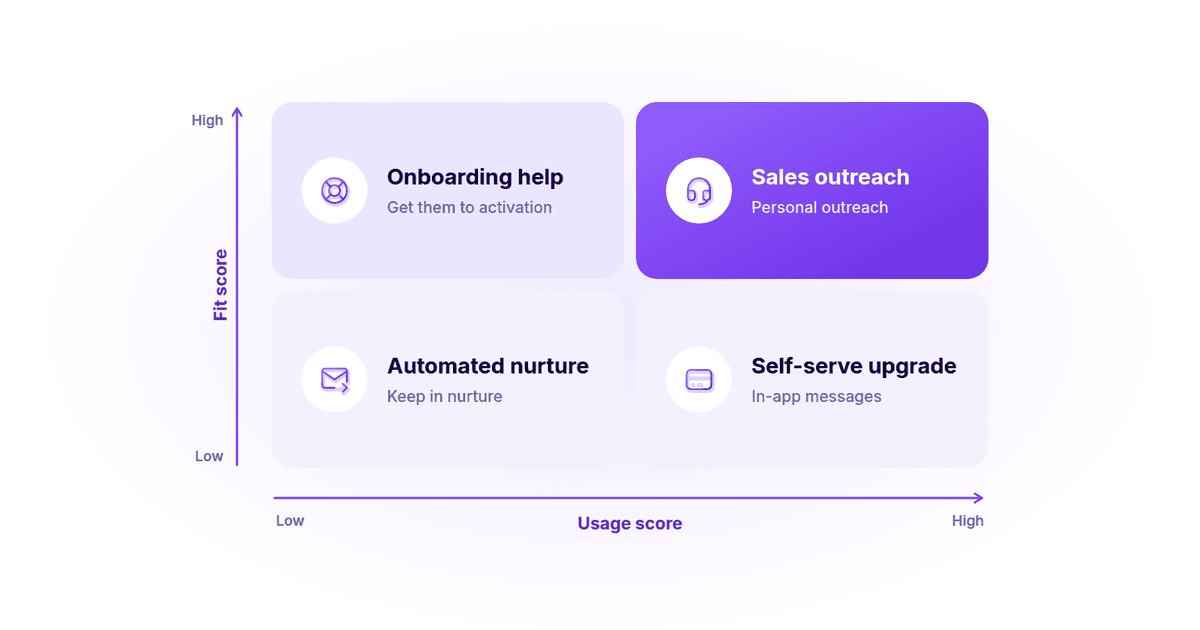
Many teams use two separate scores rather than one combined number:
- A fit score based on firmographic and role data
- A usage score based on product behavior and intent
Keeping them separate makes it easier to see why an account qualified and what sales should do next.
Step 2. Assign points to behaviors
Weight actions by how strongly they correlated with conversion in your own data. Here’s an illustrative example for a B2B collaboration tool. These point values are a starting template, not a benchmark.
| Signal | Category | Example points |
|---|---|---|
| Completed onboarding checklist | Usage | +10 |
| Reached activation event (first project shared) | Usage | +25 |
| Used a core feature on 3+ separate days in 14 days | Usage | +20 |
| Invited 3 or more teammates | Usage | +20 |
| Connected an integration | Usage | +15 |
| Viewed pricing page twice or more | Intent | +10 |
| Hit free plan limit | Intent | +20 |
| Business email at a company with 50+ employees | Fit | +15 |
| Personal email domain | Fit | -15 |
| No product activity for 14 days | Usage | -20 |
Step 3. Set thresholds and actions
Decide what happens at each score level. For example:
- High fit and high usage: Route to sales for a personal outreach.
- Low fit and high usage: Nudge toward a self-serve upgrade with in-app messages.
- High fit and low usage: Send onboarding help to get them to activation.
- Low fit and low usage: Keep in automated nurture.
Step 4. Add decay
Reduce scores when activity stops. Without decay, your PQL list fills up with accounts that were interested last quarter and have since moved on.
Step 5. Validate and recalibrate
After a month or two, check how your PQLs actually performed. What share became paying customers? How did that compare with non-PQL users? Did any high-scoring accounts churn quickly after upgrading?
Adjust weights based on what you learn. Review the model at least once a quarter, and again after major product or pricing changes.
Examples of product qualified leads
PQL definitions vary by product. Here are some realistic examples for different types of B2B SaaS tools.
| Product type | Example PQL definition |
|---|---|
| Project management tool | Created 2+ projects, invited 3+ teammates, and used task assignments on 5+ days in the first 14 days |
| Analytics platform | Installed tracking, created a custom report, and returned 3+ times in a week, at a company with 20+ employees |
| Design or collaboration tool | 5+ editors from the same company domain active in the last 30 days |
| Developer tool or API | Moved from test keys to production usage and is approaching the free usage limit |
| Email or marketing software | Imported a contact list, sent a first campaign, and viewed the pricing page |
| CRM or sales tool | Connected a mailbox, logged 50+ activities, and added users from a second team |
Notice the pattern. Each example combines value (a meaningful action), depth (repeated use or multiple users), and a reason to pay (limits, team growth, or company fit).
How to convert PQLs into paying customers
Finding PQLs is only half the job. How you follow up decides whether they convert.
Reach out with context
Sales shouldn’t open with a generic demo pitch. The product data tells you what the account is already doing. Reference it. “I noticed your team connected Salesforce and has five people building reports. Want help setting up permissions before you roll it out further?” lands better than “Do you have 15 minutes for a call?”
Agree on a handoff process
Decide in advance which PQLs go to sales, how quickly reps follow up, and what happens if they don’t. Without a shared definition, product teams flag leads that sales ignores, and trust in the model drops.
Use in-app prompts for self-serve users
Not every PQL needs a call. For smaller accounts, well-timed in-app messages about a usage limit, a paid feature, or a team plan can do the job.
Remove friction from upgrading
If a ready-to-buy user hits a confusing checkout or can’t find pricing, you lose them. Map the upgrade path as its own funnel and watch for drop-off.
Keep helping after the upgrade
The behaviors that made someone a PQL often predict retention too. Accounts that keep adding users and adopting features tend to stay. Use cohort analysis to see whether PQL-sourced customers retain better than others.
Common PQL mistakes and best practices
| Common mistake | Better approach |
|---|---|
| Treating every trial signup as a PQL | Require evidence of value, such as activation or repeated use |
| Scoring on logins or page views | Score on actions that correlate with paying, not vanity metrics |
| Ignoring company fit | Combine usage with fit, so sales focuses on accounts worth the effort |
| Scoring only individual users | Roll usage up to the account level for B2B products |
| Setting criteria once and never revisiting them | Recalibrate against closed-won data every quarter |
| Building the model without sales input | Define PQL criteria and follow-up rules with sales together |
| Tracking too few events | Instrument signup, activation, core features, invites, and upgrade steps |
One more best practice: keep your first model simple. Three to five well-chosen signals that you trust are more useful than twenty you can’t explain to a sales rep.
How analytics helps you identify PQLs
Every step above depends on reliable product data. You need to know who signed up, where they came from, what they did, and whether they eventually paid. That usually means connecting several kinds of analysis:
- Product usage analytics to see which features accounts use and how often.
- Behavioral segmentation to group users who completed key actions and compare them with those who didn’t.
- Funnel analysis to measure how many users move from signup to activation to upgrade, and where they drop off. The onboarding funnel is often where PQLs are won or lost.
- Stickiness and retention metrics to tell lasting engagement apart from a single busy week. DAU/MAU stickiness is a useful lens here.
- Attribution to understand which channels bring in users who become PQLs, not just users who sign up. Lead attribution shows how to connect those dots.
That last point is easy to miss. If your paid campaigns drive plenty of signups but few PQLs, your cost per signup looks fine while your cost per qualified account is high. Knowing which sources produce product qualified leads changes where you spend.
How Usermaven helps B2B SaaS teams find product qualified leads
Usermaven is an AI-powered marketing attribution platform that also includes website and product analytics. It gives you the behavioral and acquisition data you need to define PQL criteria, find accounts that match them, and see which channels bring those accounts in.
Here’s how teams use it for lead qualification:
- See product engagement at the user and company level. Usermaven’s product analytics tracks active users, stickiness, and retention, and lets you switch between user and company views. That matters when your PQLs are accounts, not individuals.
- Measure feature adoption. You can group events into modules and see who used, adopted, and retained each feature. The feature adoption setup guide explains how adoption thresholds work.
- Build behavioral segments. Segments let you define groups of visitors, users, leads, or companies based on events, attributes, and traffic source, so you can save a segment that matches your PQL criteria and watch it update as new events come in.
- Review individual accounts in context. Contact Profiles bring visitor, user, and company activity together with first-touch source and UTM data. That gives sales the context they need before reaching out.
- Find where trial users drop off. Funnel analysis shows conversion from signup to activation to upgrade, with company-level views for B2B, and user journeys show the paths people take before converting.
- Connect acquisition to activation and revenue. Usermaven for product teams ties acquisition sources to activation, retention, and lifetime value, while pipeline attribution uses connected HubSpot or Salesforce data to see which channels contribute to opportunities and closed deals. Together, they show which campaigns produce accounts that actually activate, not just sign up.
- Ask questions in plain English. Maven AI lets you ask questions like “Which channels brought users who adopted our reporting feature last month?” and can run scheduled analyses that land in email or Slack.
For an example of how a B2B SaaS company used journey analysis and attribution to understand its pipeline, read the Hyperengage case study. You can also see how Usermaven supports B2B SaaS teams across product-led and sales-led journeys.
Target the right audience
with Usermaven Segments
Conclusion
A product qualified lead is the clearest buying signal a product-led company has. It combines who the account is, what they’ve done in your product, and whether they’re showing signs of being ready to pay.
Start small. Look at the accounts that already converted, find the two or three behaviors they had in common, and build your first definition around those. Track it, share it with sales, and review it every quarter.
If you want to see which channels bring in users who activate and convert, book a demo of Usermaven and explore your product and attribution data in one place.
FAQs
What does PQL stand for?
PQL stands for product qualified lead. It’s a prospect who has used your product, reached meaningful value, and shows signs of being ready to buy.
What is the difference between a PQL and an SQL?
A PQL is qualified by product behavior, such as activation and feature use. An SQL is qualified by a salesperson who has confirmed need, budget, and timing. A PQL often becomes an SQL after a sales conversation.
Can a company use PQLs without a free trial or freemium plan?
It’s harder, but possible. Interactive demos, sandbox environments, and paid pilots can all generate product usage data. Without some form of hands-on access, though, you don’t have the behavioral evidence that defines a PQL.
How do you calculate the PQL conversion rate?
Divide the number of PQLs that became paying customers by the total number of PQLs in the same period, then multiply by 100. Compare it with the conversion rate of non-PQL users to check whether your criteria are actually predictive.
Who owns PQLs, marketing, product, or sales?
Usually all three. Product or growth teams define the usage signals, marketing tracks which channels bring in PQLs, and sales handles follow-up for high-value accounts. Shared ownership works best when the definition is written down and agreed on.
How often should you update your PQL criteria?
Review them at least once a quarter and after major product, pricing, or packaging changes. Compare PQLs against closed-won and churned accounts to see which signals still predict conversion.
Is a PQL an individual or an account?
It can be either. Self-serve products for individuals often qualify single users. In B2B SaaS, it usually makes more sense to qualify the account, since buying decisions involve several people.

Written by
Imrana Essa
SaaS Marketing Lead
Imrana Essa is a marketing lead and content strategist with 8+ years of experience creating and leading content for B2B and SaaS brands. She specializes in marketing analytics, attribution, content strategy, and organic growth, translating complex marketing concepts into clear, actionable insights. Her work focuses on helping marketers understand performance, make data-informed decisions, and build strategies that contribute to sustainable growth.
All articles by Imrana →