Two users can share a job title, company size and pricing plan, then behave in completely opposite ways inside your product.
One invites the team on day one and builds a workflow by Friday. The other logs in twice and disappears. Demographics can’t tell them apart, but their behavior can, and that’s the whole idea behind behavioral segmentation.
This guide covers the types of behavioral segmentation, SaaS examples you can copy, a step-by-step setup and what to look for in software, including how Usermaven handles it.
Key takeaways
- Behavioral segmentation groups users by what they do, such as how often they log in, which features they use and where they drop off, rather than by who they are.
- In SaaS, the most useful segments are built around activation, feature adoption, engagement frequency, journey stage and buying signals.
- A good segment has a clear rule (event, frequency and time window) and a clear action attached to it.
- Combine behavioral data with firmographics or plan data to prioritize, for example high-value accounts with falling usage.
- Segments should update automatically as users act, so they stay accurate without manual exports.
What is behavioral segmentation?
Behavioral segmentation is a way of dividing customers into groups based on their actions and interactions with your business, instead of their age, location or company size. It can include:
- Purchasing habits: how often they buy, which plan they choose, how much they spend and whether they upgrade.
- Brand interactions: how they engage with your website, emails, webinars or social media.
- Product usage: which features they use, how often and how deeply.
Because behavior reflects real intent, these segments help you send more relevant messages, build better onboarding and spot churn risk earlier. Here’s how behavioral segmentation compares with other common approaches:
| Approach | Groups people by | SaaS example | Best for |
|---|---|---|---|
| Behavioral | Actions and usage | Users who created 3+ projects in their first week | Onboarding, adoption, retention, upsell timing |
| Demographic | Personal attributes | Users by role or seniority | Messaging and persona fit |
| Firmographic | Company attributes | Accounts with 50–200 employees in fintech | ICP targeting and sales prioritization |
| Psychographic | Attitudes and values | Teams that prioritize privacy over convenience | Positioning and brand messaging |
If you want to go deeper on the last one, this comparison of psychographic vs. behavioral segmentation explains when to use each.
Why is behavioral segmentation key for SaaS?
Behavioral segmentation matters in SaaS because revenue depends on what users do after signup, not just who signs up. Knowing someone’s age or device type gives you a rough idea, but it won’t tell you whether they reached value or quietly gave up.
1. It reveals the “why” behind user behavior
Say you run a project management tool. Behavioral segments might show that some teams live in task assignments while others mostly use comments and chat.
This actionable insight tells you why different users choose your product and which parts they value most.
2. It helps you speak the right language to each user
Nobody wants advanced tutorials on day one, and highly engaged customers don’t need discount offers. Behavioral segments help you avoid those misfires.
New users can get onboarding messages that cover the basics, while disengaged users get win-back campaigns that highlight features they haven’t tried yet.
3. It makes your product feel like a custom fit
Behavioral segmentation lets you personalize the user experience. A design tool, for example, could recommend templates and tutorials based on the features a user relies on most.
4. It shows you what to build next
When you can see which features resonate with which segments, you can prioritize development and keep your product roadmap aligned with what users value.
AI makes this faster. With Maven AI, Usermaven’s AI analytics assistant, you can ask plain-English questions about the analytics of your website and product instead of building every report by hand.
5. It helps you save customers before they say goodbye
Behavioral data is an early-warning system for customer churn. Users who log in less often or show a drop in feature usage are telling you something weeks before they cancel.
Targeted support, a re-onboarding session or a well-timed check-in can help them rediscover the value of your product.
Types of behavioral segmentation, with SaaS examples
There’s no one-size-fits-all approach, but most SaaS teams build segments from the types below. Start with one or two that match your biggest goal.
| Type | Group users by | SaaS example | What to do with it |
|---|---|---|---|
| Engagement frequency | How often they log in or act | Weekly active vs. monthly active users | Reward the first group, re-engage the second |
| Feature adoption | Which features they use | Users who have never opened reports | In-app tips and short tutorials |
| Journey stage | Where they are in the lifecycle | Trial, activated, paying, at risk | Stage-specific messaging |
| Goal completion | Whether they reached key outcomes | Finished setup vs. stalled at step 2 | Remove friction from the stalled step |
| Buying signals | Actions that hint at purchase intent | Visited pricing twice this week | Sales follow-up or upgrade prompt |
| Benefits sought | The job they use you for | Reporting users vs. collaboration users | Tailored onboarding paths |
| Loyalty | Tenure, renewals and advocacy | Customers on their third renewal | Referral and case study asks |
Here’s a closer look at the four that drive most SaaS decisions.
1. User engagement
Group users by login frequency, feature usage (for example, active users of a specific tool) or completion of key tasks, such as finishing a project.
Identify your “power users” and reward them with early access or loyalty perks. Re-engage less active users with outreach that addresses how they actually use the product.
2. User journey
Divide users by how far they’ve progressed through your product, then look for the steps where they drop off.
Analyze user journeys to pinpoint drop-off points. For example, you might segment users who haven’t completed a crucial onboarding step, such as connecting a data source, and give them targeted in-app guidance.
3. Goal completion
Group users by whether they reach specific outcomes in your product, such as publishing a report, completing a project or collaborating with teammates.
Users who struggle to reach their goals are your best candidates for help, like a targeted tutorial or a call with support. In Usermaven, those outcomes can be tracked as conversion goals in Usermaven, which makes the segment easy to build.
4. Feature adoption
Group users by their adoption of specific features. This shows which features resonate with which groups and which ones are underused.
Then target users who haven’t adopted a valuable feature with in-app tutorials or a short success story that matches how they already use the product.
How to prioritize behavioral segments
Behavior alone tells you what users do. Pair it with account value and you know where to spend your team’s time first.
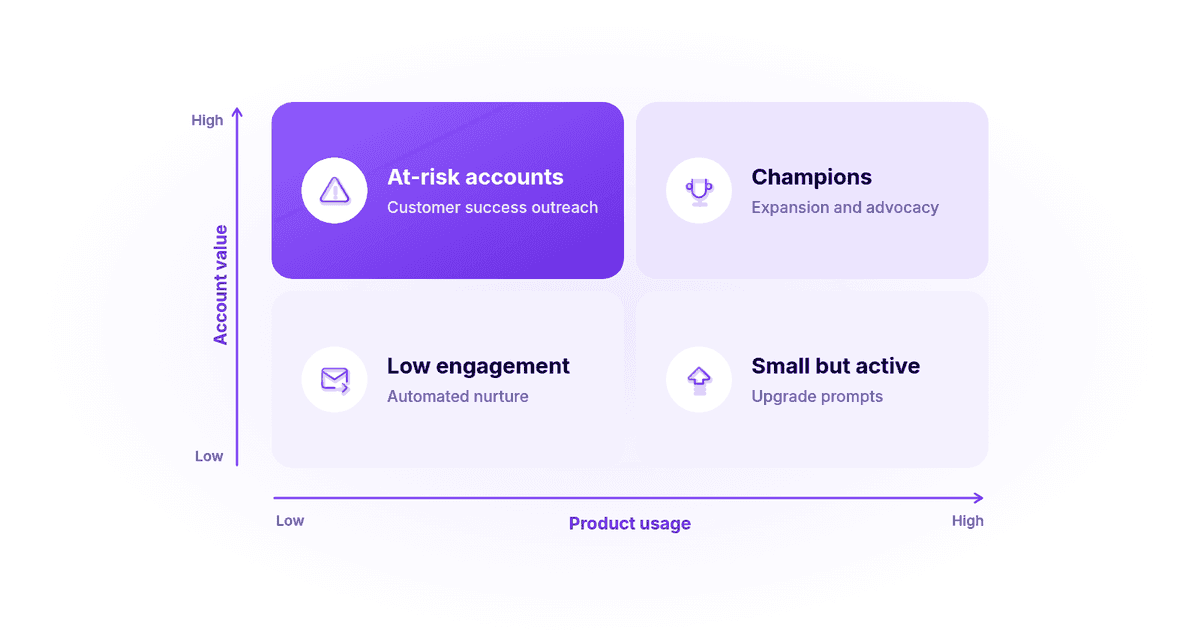
The top-left box deserves the most attention. High-value accounts with low usage are often your biggest churn risk, and they rarely complain before they leave.
How to build behavioral segments step by step
Start with a goal, not a data dump. Here’s a simple process that works for most SaaS teams:
- Identify your goal. Decide what you want to improve: onboarding, feature adoption, upgrades or to reduce churn.
- Collect behavioral data. Use product analytics tools to capture user actions, feature usage and engagement, ideally with identified users and companies.
- Write the segment rule. Define an event, a frequency and a time window, for example “created a report 3+ times in the last 14 days.”
- Compare outcomes. Check how each segment converts, retains or expands compared with everyone else.
- Act on it. Attach a message, an in-app prompt, a sales task or a product change to each segment.
- Review and refine. Revisit segments monthly and retire the ones nobody acts on.
A worked example shows why step 4 matters. Say 1,000 users start a trial. The 400 who complete setup within three days convert to paid at 22%, which is 88 customers. The other 600 convert at 5%, which is 30 customers. Overall conversion is 118 out of 1,000, or 11.8%.
The average hides the story. Getting just 100 more users through setup in three days could add about 17 customers for every 1,000 trials, so that’s where onboarding work should go.
Behavioral segmentation examples you can copy
Each example below pairs a precise rule with a next step. Swap in your own events and time windows.
| Segment | Rule | Action |
|---|---|---|
| Fast activators | Completed setup and invited a teammate within 7 days of signup | Introduce advanced features and team plans |
| Stalled trials | Signed up 5+ days ago and never completed setup | Send a setup guide or offer a quick onboarding call |
| Pricing page hesitators | Visited the pricing page 2+ times in 14 days, still on a trial or free plan | Answer pricing objections in-app or by email |
| Power users | Used the core feature 10+ times in the last 30 days | Ask for reviews, referrals or beta feedback |
| Slipping away | Weekly active last month, no login in the past 14 days | Personal check-in from customer success |
| Unadopted feature | Active for 30+ days, never used a key feature | Short in-app tour of that feature |
Target the right audience
with Usermaven Segments
Advanced techniques of behavioral segmentation
Once basic segments are working, these techniques add more depth.
1. Cohort analysis
Cohort analysis groups users by a shared starting point, such as signup week or acquisition channel, and tracks their behavior over time. It shows whether product changes and campaigns actually improve retention.
In Usermaven, cohort retention reports show what share of each signup cohort comes back in the following weeks, so you can compare segments side by side.
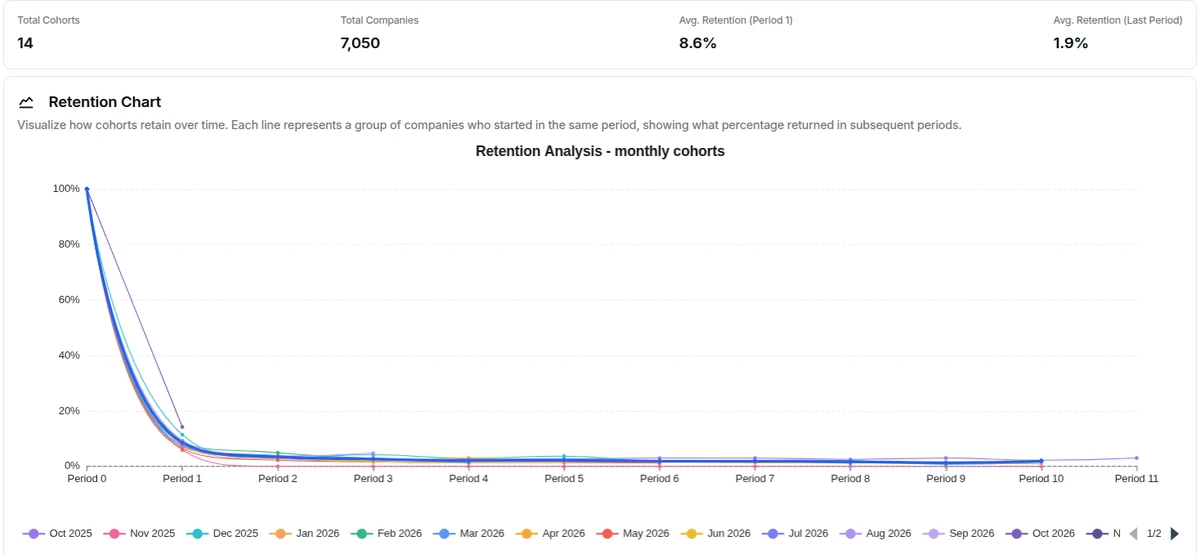
For a full walkthrough, see this guide to cohort analysis and measuring user retention.
2. Predictive analytics
Predictive models use past behavior to estimate which users are likely to convert, expand or churn. Even a simple rule-based score, such as falling logins plus an unresolved ticket, helps teams act earlier.
3. Real-time segments
Static lists go stale the day you export them. Dynamic segments update automatically as users act, so a user who stops logging in moves into your at-risk segment without anyone rebuilding a report.
What to look for in behavioral segmentation software
The right behavioral segmentation software makes it easy to turn a question into a segment and a segment into an action. Use these criteria to compare tools:
| Capability | Why it matters | Question to ask |
|---|---|---|
| Event tracking | Segments are only as good as the events behind them | Can it capture clicks and forms automatically as well as custom events? |
| Frequency and time filters | Most useful rules depend on how often and how recently | Can I filter by “did X at least N times in the last N days”? |
| AND/OR logic | Real segments combine several conditions | Can I mix behavior with plan, role and page visits? |
| User and company level | B2B decisions happen at the account level | Can I segment both people and accounts? |
| Dynamic updates | Segments must stay current without exports | Do segments update automatically as new data arrives? |
| Use across reports | A segment should power funnels, retention and dashboards | Can I apply the same segment everywhere? |
| Privacy and data ownership | Behavioral data is sensitive | Does it use first-party tracking and support consent requirements? |
For a broader view beyond behavior, this guide to SaaS customer segmentation covers firmographic and value-based models too.
Understanding user behavior with Usermaven for SaaS
Usermaven combines product analytics with marketing attribution software, so the same segments show how users behave and which channels brought them in. Here’s how segmentation works in practice.
1. Easy access to user segments
Open Contacts Hub from the left-hand navigation and select Segments. Every segment you create lives there, and segments update automatically as new data comes in.
2. Flexible segment creation
You can build a segment in two ways. Filter All visitors, All users or All companies in Contacts Hub and click Save as a Segment, or click the + button in the Segments section.
Combine conditions with AND and OR filters to target specific groups, such as admins on a particular plan who haven’t completed a key action.
3. Event frequency with Refine
The Refine option for event filters lets you target users by how often they performed an event within a set period. For example, find users who completed a key action at least three times in the last week.
4. URL filtering
URL filters target contacts based on the pages they visited. For example, you can find users who visited your pricing or plans page but didn’t upgrade, then follow up with a message that addresses their likely questions.
5. Use segments across your analytics
Saved segments can be applied in Product Insights and other reports, so a segment like “completed onboarding tutorial” can be compared with users who skipped it across funnels and retention.
This walkthrough of Contacts Hub shows where segments live and how to explore individual users and companies:
Power up your SaaS
with perfect product analytics
The bottom line
Behavioral segmentation shows you what users actually do, which makes it the most practical way to improve onboarding, adoption and retention in a SaaS product.
Start with one goal, write precise segment rules, attach an action to each segment and review them regularly. Usermaven’s segmentation keeps those groups current, so your team can act on them while they still matter.
FAQs
1. How often should I update my behavioral segments?
Segments built on live data update automatically, but review your segment definitions at least monthly. Retire segments nobody acts on and adjust rules when your product, pricing or onboarding changes.
2. Can behavioral segmentation be used for marketing outside the SaaS platform?
Absolutely! Insights from behavioral segmentation can inform your broader marketing strategy. For example, you can tailor email campaigns or social media content based on user segments.
3. What other segmentation methods can be used alongside behavioral segmentation?
Behavioral Segmentation is powerful, but it can be even more effective when combined with other methods. Consider incorporating demographics, firmographics (company-based data), or psychographics (user attitudes and values) for a more well-rounded understanding of your customer base.
What is an example of behavioral segmentation?
A common SaaS example is grouping trial users who visited the pricing page two or more times in 14 days but haven’t upgraded. That behavior signals buying intent, so the team can follow up with pricing answers or a sales conversation.
What is the difference between behavioral and psychographic segmentation?
Behavioral segmentation groups people by what they do, such as feature usage or purchase frequency. Psychographic segmentation groups them by attitudes, values and interests. Behavior is easier to measure and act on, while psychographics help with positioning and messaging.
Can behavioral segments update in real time?
Yes, if your tool uses dynamic segments. Users move in and out automatically as they act, so a user who stops logging in joins your at-risk segment without a manual export or rebuild.
Updated

Written by
Adeel Khan
Growth Marketing Expert
Adeel Khan is a full-stack SaaS marketer with 10+ years of experience in content marketing, paid advertising, analytics, and conversion rate optimization. He shares practical insights and strategies drawn from hands-on experience, helping B2B SaaS marketers improve performance and make better marketing decisions.
All articles by Adeel →