A LinkedIn post can get 100,000 impressions and still have little business impact. Another can reach 10,000 people, attract the right job titles, trigger profile visits, send qualified traffic, and contribute to the pipeline.
That difference is why LinkedIn influence cannot be reduced to followers or engagement rate. Native LinkedIn analytics shows how far content travels, who sees it, how people respond, and whether the content creates deeper interest in a person or Company Page.
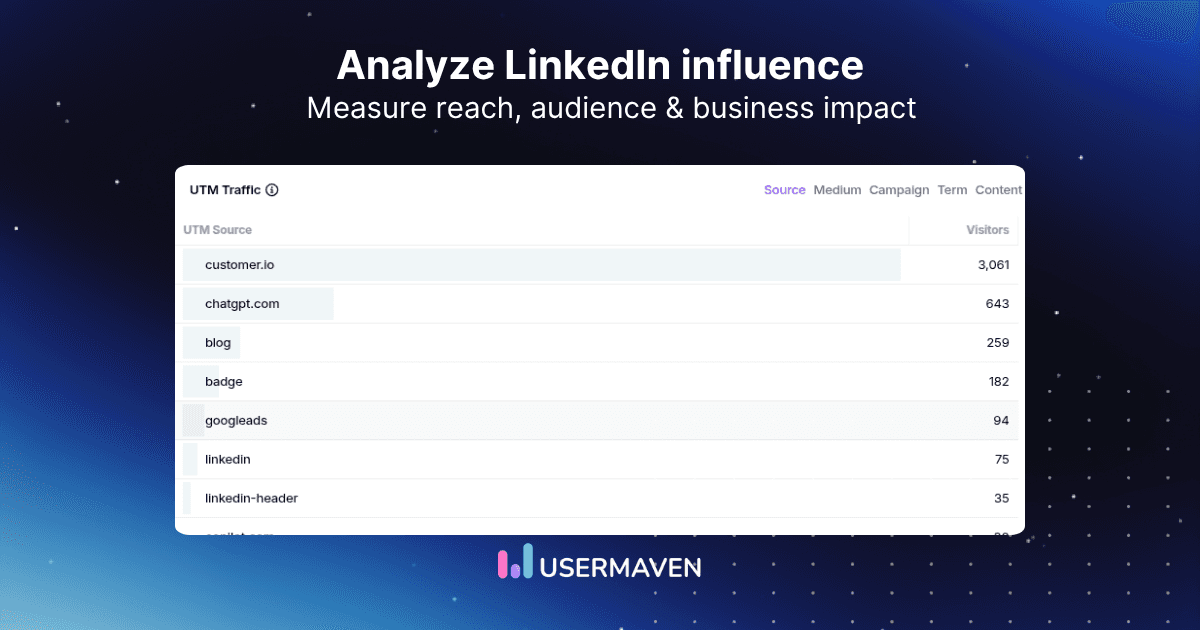
Website analytics and marketing attribution software add the next layer by showing what happens after a LinkedIn interaction becomes a website visit. The strongest analysis uses both views instead of forcing either one to explain the entire customer journey.
LinkedIn influence at a glance
LinkedIn influence is the measurable ability of a person or Page to reach a relevant professional audience, generate meaningful engagement and profile interest, and contribute to downstream actions such as website visits, leads, pipeline, or revenue.
LinkedIn does not provide one universal influence score. Influence has to be evaluated across several layers.
| Question | Short answer |
| Is follower count enough? | No |
| Is engagement rate enough? | No |
| Best reach metrics | Members reached + impressions |
| Best expansion signal | Out-of-network impressions |
| Best profile-interest signals | Profile viewers from post + followers gained |
| Best audience-quality signals | Job title, seniority, industry, company |
| Best business-impact signals | Website conversions, pipeline, revenue |
| Can LinkedIn show link visits? | Yes, for eligible external links |
| Can LinkedIn show full website journeys? | No |
| Best measurement approach | Native LinkedIn analytics + website and attribution analytics |
| LinkedIn analytics measures influence on LinkedIn. Website and attribution analytics measure observable business impact after LinkedIn. |
Key takeaways
- LinkedIn influence is multi-layered: reach, distribution, audience fit, profile activity, traffic, and business outcomes all matter.
- Impressions are context, not proof of impact: a post can be widely displayed without attracting the right audience or creating meaningful action.
- Out-of-network reach measures expansion: it shows whether content is moving beyond existing followers and connections.
- Profile views and followers gained are deeper signals: they show that content made people investigate or follow the creator.
- Audience fit matters more than raw follower count: the right job titles, seniority levels, companies, and industries matter more than scale alone.
- Personal profiles and Company Pages need different analysis: LinkedIn exposes different analytics for each.
- Native and website analytics answer different questions: LinkedIn shows platform response, while website analytics shows post-click behavior.
- No-click influence remains partly unobservable: an organic impression cannot always be deterministically tied to a later direct or search conversion.
A framework for measuring LinkedIn influence
A useful influence model moves from visibility to commercial impact. Each layer answers a different question, so collapsing them into one engagement score hides more than it explains.

| Layer | Main question | Useful metrics |
| Visibility | Are people seeing the content? | Impressions, members reached, search appearances |
| Distribution | Is content escaping the existing network? | In-network vs out-of-network impressions |
| Resonance | Is the audience responding? | Comments, reactions, reposts, saves, sends |
| Audience fit | Are the right people seeing it? | Job title, seniority, industry, company |
| Profile interest | Does content create curiosity? | Profile viewers from post, followers gained |
| Traffic | Does LinkedIn create site visits? | Link visits, website sessions |
| Conversion | Does traffic take valuable action? | Signup, demo, purchase, goal completion |
| Commercial impact | Does LinkedIn contribute to business results? | Pipeline, attributed revenue, ROAS |
This ladder is also useful for diagnosing weak performance. If reach is low, the problem is distribution. If reach is strong but profile interest is weak, the content may be visible without creating authority. If profile interest is strong but website conversions are weak, the issue may sit after LinkedIn.
Website analytics tool for modern marketers & agencies
Where AI helps LinkedIn influence analysis
AI is useful for comparing patterns across a large body of LinkedIn and website data. It can summarize which posts generate the strongest out-of-network reach, identify content that creates profile interest, compare traffic quality by campaign, and surface gaps between engagement and downstream conversion.
But AI does not turn platform exposure into proven business influence. If there is no observable link between an impression and a later customer outcome, the system can analyze surrounding evidence but cannot manufacture a deterministic connection.
| AI can interpret LinkedIn analytics. It cannot turn unobserved influence into proven attribution. |
Analyze LinkedIn post performance
LinkedIn’s current post analytics includes discovery, profile activity, social engagement, link engagement, viewer demographics, and additional metrics for formats such as video or articles.
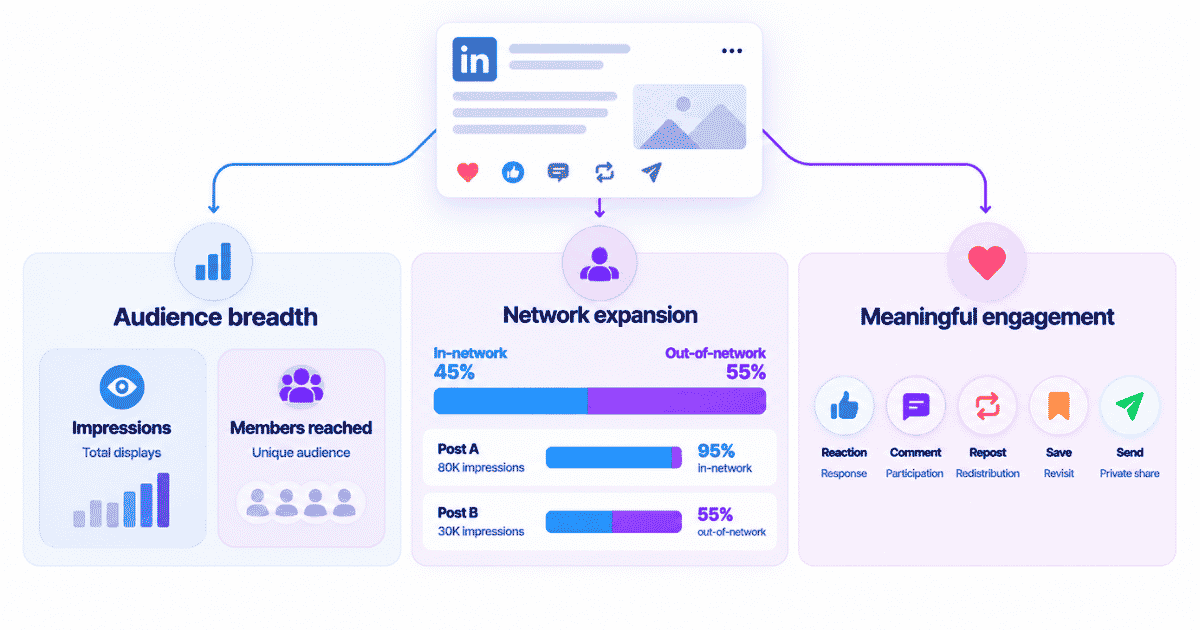
Start with members reached
Impressions count how many times a post was shown. Members reached estimates how many distinct LinkedIn members and Pages saw it.
That distinction matters because one person can create several impressions. Use members reached to understand audience breadth and impressions to understand total distribution.
Check out-of-network reach
LinkedIn separates impressions from people inside the existing network and those outside it. That makes distribution quality more informative than total impressions alone.
| Post | Impressions | Out-of-network share | Interpretation |
| Post A | 80,000 | 5% | Large reach, mostly existing network |
| Post B | 30,000 | 55% | Smaller reach, stronger audience expansion |
Post A has more distribution. Post B may be better at expanding influence because a much larger share of its impressions came from people who were not already connected to or following the creator.
Measure meaningful engagement
Current LinkedIn post analytics can include reactions, comments, reposts, saves, and sends on LinkedIn. These actions should not be treated as equally valuable.
| Signal | What it can suggest |
| Reaction | Low-friction positive response |
| Comment | Active participation or discussion |
| Repost | Public redistribution to another audience |
| Save | Content useful enough to revisit |
| Send | Content useful enough to share privately |
A save or private send can indicate deeper utility than a reaction, especially for professional content, but none of these actions should automatically be labeled buying intent.
Measure profile interest from content
A strong post can create a second action before it ever sends someone to a website. LinkedIn can report profile viewers from a post and followers gained from that post.
That creates a useful progression: post viewed, profile investigated, creator followed.
Profile interest rate
For internal comparison, marketers can derive a profile interest rate:
| Profile interest rate = Profile viewers from post / Members reached x 100 |
Example: a post reaches 2,000 members and generates 60 profile viewers. The profile interest rate is 3%.
Follower conversion rate
A similar derived metric can compare how effectively posts convert reach into new followers:
| Follower conversion rate = Followers gained from post / Members reached x 100 |
These are derived analytical metrics, not native LinkedIn benchmarks. Use them to compare your own posts over time rather than inventing a universal good or bad threshold.
Analyze audience quality
Influence is only valuable when the audience is relevant to the goal. LinkedIn audience analytics can show follower growth and demographics such as job title, location, industry, seniority, company size, and company.
Audience fit over audience size
A creator with 50,000 followers can be less commercially relevant than one with 8,000 followers if the smaller audience contains a much higher share of the buyers, operators, or executives the business actually needs to reach.
| Influence is not only about how many people follow. It is about whether the right people do. |
Track audience change over time
Look beyond follower growth and watch whether the audience composition moves toward the target market. Useful shifts include more target job titles, more relevant seniority levels, a better company-size mix, and greater representation from priority industries.
Drive business growth
with AI-powered analytics
Analyze LinkedIn profile influence
Content analytics and profile analytics measure different parts of influence. A post can perform well while the profile remains hard to discover, or a profile can attract search visibility even when individual posts are modest.
Search visibility
LinkedIn Search Appearances can show how often a profile appears in search and provide context about the people and companies finding it. Use this to evaluate discoverability and whether the profile is positioned around the right expertise.
Profile views
A profile view is a stronger interest signal than simply appearing in a feed or search result because someone chose to investigate the person further. It is still not a business conversion and should not be treated as one.
Personal profile vs Company Page analytics
Personal profiles and Company Pages should not be evaluated with one identical scorecard.
| Measurement area | Personal profile | Company Page |
| Post analytics | Yes | Yes |
| Audience/follower demographics | Yes | Yes |
| Profile/Page views | Yes | Yes |
| Search appearances | Yes | Yes |
| Competitor analytics | No | Yes |
| Newsletter analytics | When applicable | When applicable |
| Employer brand analytics | No | Yes |
| Paid campaign reporting | Campaign Manager layer | Campaign Manager layer |
LinkedIn’s Page analytics includes separate views for content, followers, visitors, search appearances, competitors, employer brand, and newsletters. The Page layer should therefore be measured separately from an individual creator’s influence.
Analyze Company Page influence

Content performance
Evaluate Page content using impressions, members reached, clicks, reactions, comments, reposts, and engagement rate. The purpose is to learn which content attracts professional attention and which messages create action.
Follower quality
Track follower demographics by seniority, job function, industry, company size, and location. A growing Page can still be strategically weak if it attracts the wrong audience.
Search visibility
Page Search Appearances adds another layer by showing whether the company is discoverable for relevant topics and by relevant professionals.
Competitor context
Competitor analytics can provide directional context on follower growth and organic content performance. Use it to spot patterns, not to create a simplistic league table of influence.
Track LinkedIn website influence
Native LinkedIn metrics stop at the platform boundary. External-link visits can show that someone clicked, but they do not explain what happened after the landing page loaded.
That next layer belongs in Website Analytics, where LinkedIn traffic can be evaluated by sessions, pages viewed, engagement, conversion goals, and downstream behavior.
| LinkedIn post -> external link click -> website session -> behavior -> conversion -> customer -> revenue |
This is where influence analysis moves from content performance to observable business impact. Before comparing posts or sources, define the action that counts as success. Usermaven conversion goals can turn a signup, demo, purchase, page visit, or custom event into a consistent outcome for source and attribution analysis.
Use UTMs for organic LinkedIn posts
Filtering traffic only by source=LinkedIn tells you that LinkedIn produced the visit. It does not identify which organic post produced it. Consistent UTM parameters preserve that post-level campaign context.
| utm_source=linkedin utm_medium=social utm_campaign=founder_content utm_content=post_topic_a |
Use utm_campaign to group related content and utm_content to identify the specific post, angle, CTA, or variant.
| Post | Visits | Conversions | Conversion rate |
| Post A | 600 | 6 | 1.0% |
| Post B | 180 | 14 | 7.8% |
Post A creates more traffic. Post B generates more conversions from far fewer visits and a much stronger conversion rate. That distinction is why influence should not be judged only by impressions or clicks. At a larger scale, campaign analytics can compare tagged LinkedIn content by traffic quality, conversions, and downstream performance instead of ranking posts by reach alone.
Understand the no-click attribution gap
Not every LinkedIn influence path contains a measurable click.
A prospect can read a LinkedIn post, remember the company, search for the brand three days later, visit the site through Organic Search, and request a demo. The content may have influenced discovery even though the analytics system has no deterministic post-to-session link.
| No analytics platform can deterministically connect an anonymous organic LinkedIn impression to a later direct or search conversion when no observable connecting signal exists. |
Complementary evidence can include native LinkedIn reach and profile metrics, CRM context, branded-search movement, experiments, and self-reported attribution that asks buyers how they first heard about the company.
Organic, boosted, and paid LinkedIn influence
The old organic-versus-paid split is now too simple. LinkedIn influence can be distributed through several mechanisms.
| Distribution type | Main role |
| Organic member post | Earned creator reach |
| Member boost | Increase distribution of personal content |
| Page boost | Amplify Page content |
| Thought Leader Ad | Sponsor an individual member’s content |
| Standard LinkedIn Ad | Run advertiser-created campaign creative |
The distribution type should always be part of the analysis because a sponsored post has a different opportunity to reach new audiences than an organic post.
Thought Leader Ads and influence
Thought Leader Ads let brands sponsor eligible public posts from individual LinkedIn members with permission. That makes creator influence and paid distribution overlap.
When comparing performance, separate the organic strength of the original post from the additional reach purchased through the campaign. A sponsored post should not be compared directly with an organic post as though both received the same distribution opportunity.
The useful question is whether paid amplification extends a message that already resonates and whether the additional reach produces profile interest, website activity, or qualified downstream outcomes.
Track paid LinkedIn influence correctly
Paid LinkedIn influence belongs partly in LinkedIn attribution because the campaign has spend, ad identifiers, conversions, and a multi-touch role beyond native engagement.
Before interpreting the numbers, the LinkedIn Ads mistakes workflow is useful for catching tracking, targeting, and conversion problems that can make a campaign appear weaker or stronger than it really is.
For Usermaven, the current LinkedIn Ads tracking template is:
| utm_source=linkedin&utm_medium=paid&utm_campaign={{CAMPAIGN_NAME}} &utm_content={{CREATIVE_ID}}&ad_id={{CREATIVE_ID}} |
The Creative ID passed into ad_id is the critical ad-level identifier. Without it, Usermaven cannot reliably tie downstream conversions to the correct LinkedIn creative.
What LinkedIn reports
- Impressions and reach.
- Clicks and engagement.
- Campaign conversions and audience performance.
- Paid delivery and campaign-level metrics.
What independent attribution adds
- Website behavior after the click.
- User journeys across later sessions and channels.
- Conversion value and revenue.
- LinkedIn’s role when another channel closes the conversion.
| Campaign Manager tells you how LinkedIn reports the campaign. Independent attribution tells you how LinkedIn fits into the broader customer journey. |
Measure influence across long B2B journeys
LinkedIn often contributes early in a long B2B path rather than closing the conversion in the same session.
| LinkedIn -> article -> Organic Search -> case study -> demo -> opportunity -> Closed Won |
A short attribution window can erase the early LinkedIn interaction before the deal closes. Usermaven supports lookback windows up to 365 days, which is useful for longer journeys where buyers research, return through several channels, and interact with multiple campaigns before converting.
A multi-touch attribution view can show LinkedIn as an introducing or assisting touchpoint without pretending that every recorded touch had equal causal impact.
This is especially relevant for B2B SaaS teams where a social interaction can happen weeks before an opportunity or revenue event.
When the analysis needs to continue from acquisition through opportunities, customers, and Closed Won revenue, full-funnel revenue attribution keeps LinkedIn’s observed role connected to the downstream stages that follow.
How Usermaven extends LinkedIn analytics
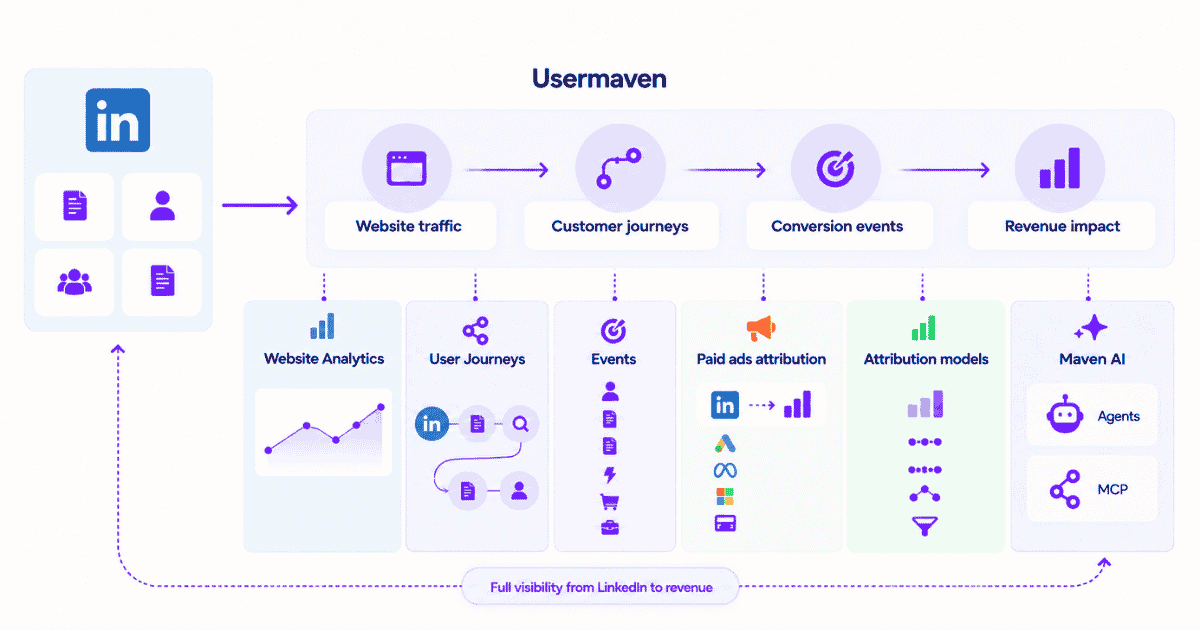
Usermaven does not replace LinkedIn’s post, profile, audience, or Page analytics. It measures what happens when LinkedIn becomes part of the website and customer journey.
Measure LinkedIn website traffic

Use Website Analytics to compare LinkedIn traffic by campaign, landing page, conversion behavior, and downstream outcome instead of treating every LinkedIn session as equally valuable.
Follow customer journeys
With User Journeys, teams can inspect paths such as LinkedIn -> article -> Organic Search -> pricing -> demo and understand how the observed journey developed over time.
Track conversion events
Usermaven Events can represent signups, form submissions, demos, purchases, activation events, subscriptions, revenue events, and off-site outcomes that matter after a LinkedIn visit.
Measure paid LinkedIn revenue
The paid ads attribution workflow connects LinkedIn ad spend, impressions, clicks, conversions, conversion value, and revenue so paid campaigns can be judged beyond platform-reported clicks and conversions.
Compare attribution assumptions
Built-in models such as first touch, last touch, linear, U-shaped, and time decay can show how LinkedIn’s apparent contribution changes when the credit rule changes. Enterprise custom attribution models can also apply business-specific weighting logic and channel adjustments.
The model should be used as a measurement lens, not as a way to manufacture a preferred answer.
Check data quality first
The Measurement Trust Center checks campaign tracking, customer matching, connected platforms, conversion feedback, and data confidence before teams act on reports.
| Do not diagnose weak LinkedIn influence from broken measurement. |
Analyze LinkedIn with Maven AI
Maven AI can investigate captured analytics with questions such as which LinkedIn campaigns generated the strongest qualified conversion rate, which LinkedIn journeys appeared before Closed Won deals, or how LinkedIn compares with Organic Search and email.
AI can accelerate investigation, but it remains limited by the quality and completeness of the underlying tracking.
Evidence: Hyperengage revealed hidden influence
Hyperengage is not a controlled experiment proving LinkedIn alone caused pipeline. It is useful because its buying journeys included LinkedIn alongside content, organic search, podcasts, email, and partnerships, which exposed how single-touch reporting can hide earlier influence.
The Hyperengage case study describes a B2B SaaS team that moved from fragmented platform dashboards and last-click thinking toward full-journey attribution.
| Metric | Reported result |
| Channels attributed | 4 -> 6 |
| Visitor-to-goal conversion rate | 22.19% |
| Visitors | +68% |
| Sessions | +49.7% |
| Pageviews | +25% |
| Organic-search first-touch conversions | 0 -> 8 |
The useful lesson for LinkedIn analysis is not that every LinkedIn interaction should receive credit. It is that a channel can look unimportant under last-click reporting even when it appears earlier in journeys that later convert.
Influence analysis therefore needs two layers: native evidence that the content reaches and engages relevant people, and journey evidence that shows what happens when those people become observable visitors and customers.
LinkedIn influence analysis checklist
| Check | Question |
| Visibility | How many people saw the content? |
| Reach | How many distinct members were reached? |
| Distribution | How much reach came from outside the network? |
| Engagement | Which posts created comments, saves, sends, or reposts? |
| Profile interest | Which posts created profile views and followers? |
| Audience fit | Are the right job titles, seniority levels, and companies engaging? |
| Search visibility | Is the profile or Page appearing for relevant searches? |
| Website traffic | Which LinkedIn posts generated site visits? |
| Conversion | Which visits produced meaningful actions? |
| No-click influence | What influence cannot be deterministically attributed? |
| Paid amplification | Was the content organic, boosted, or sponsored? |
| Attribution | Where does LinkedIn appear across the journey? |
| Revenue | Is LinkedIn associated with pipeline or revenue? |
| Data quality | Is the measurement setup reliable enough to act on? |
Final verdict
LinkedIn influence is not one score. Native analytics reveals visibility, audience expansion, engagement, profile interest, audience quality, and discoverability.
Website and attribution data answer the next question: whether observable LinkedIn traffic contributes to conversions, customer journeys, pipeline, or revenue.
The strongest measurement approach uses both layers rather than asking LinkedIn engagement metrics or attribution data to answer questions they were not designed to answer.
Book a demo to measure LinkedIn beyond impressions and connect campaigns with journeys, pipeline, and revenue.
FAQs about analyzing LinkedIn influence
1. How do you analyze LinkedIn influence?
Analyze LinkedIn influence across several layers: visibility, out-of-network distribution, engagement, audience quality, profile interest, website traffic, conversion, and commercial impact. No single metric captures the full picture.
2. What metrics measure LinkedIn influence?
Useful metrics include impressions, members reached, out-of-network impressions, comments, saves, sends, profile viewers from a post, followers gained, audience demographics, external-link visits, website conversions, pipeline, and revenue.
3. Is LinkedIn engagement rate a good influence metric?
Engagement rate is useful for understanding response relative to distribution, but it is incomplete. A high engagement rate can still come from the wrong audience, and it does not show whether the content creates profile interest, qualified traffic, or business outcomes.
4. What is the difference between impressions and members reached?
Impressions count total displays of the content, including repeat displays. Members reached estimates the number of distinct members and Pages that saw the post at least once.
5. Why does out-of-network reach matter?
Out-of-network reach shows whether a post is expanding beyond the creator’s existing followers and connections. It is useful for evaluating audience growth and discovery, but it should still be checked against audience quality.
6. How can I measure LinkedIn profile influence?
Use post-driven profile views, followers gained, profile views, search appearances, and the relevance of the people and companies finding the profile. These metrics show discoverability and interest, not final business conversion.

Written by
Ryan Mitchell
Marketing Analytics Strategist
Ryan Mitchell is a marketing analytics strategist specializing in campaign measurement, customer journeys, and marketing performance. He writes about analytics, reporting, and data-driven marketing strategies, helping SaaS and B2B teams measure what matters across every stage of the customer journey.
All articles by Ryan →