Every visit to your website has a first page and a last page, and both tell you something.
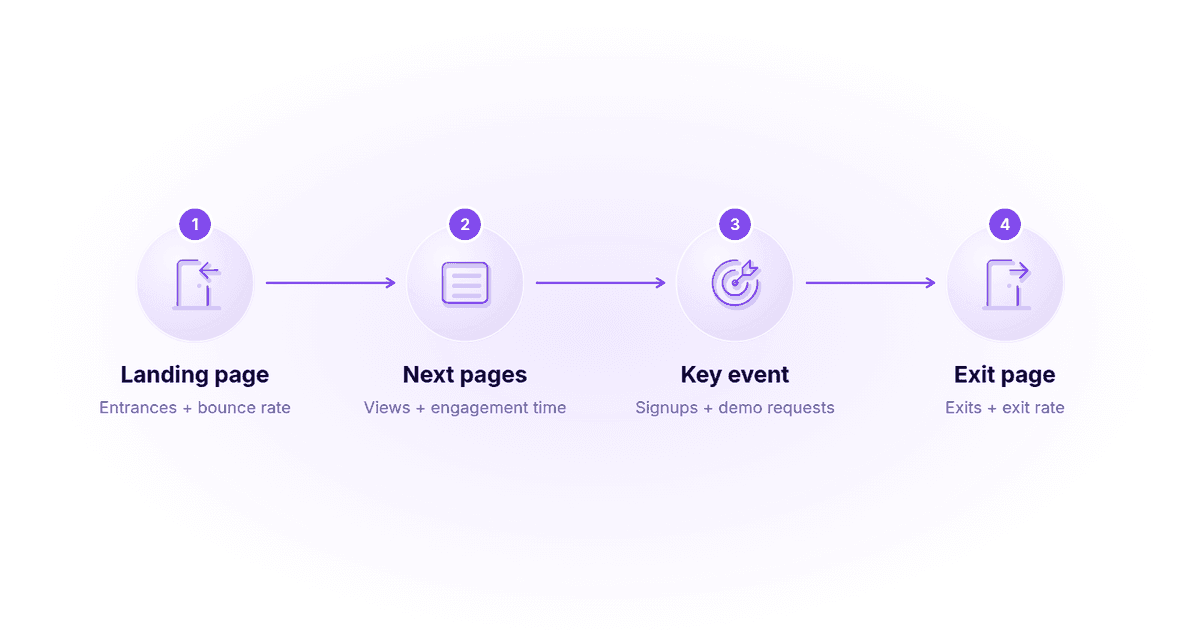
The landing page is where a session starts. The exit page is where it ends. Put the two side by side and you can see which pages pull people in, which ones keep them moving, and where they give up.
This guide explains what landing and exit pages are, how they differ from entrances, how to calculate exit rate, where to find both reports in GA4, and how to improve the pages that matter for SEO and conversions.
Key takeaways
- A landing page (or entry page) is the first page a visitor sees in a session. An exit page is the last page they view before leaving.
- Exit rate shows the share of a page’s views that were the last in a session. Bounce rate only counts sessions that started on that page and weren’t engaged.
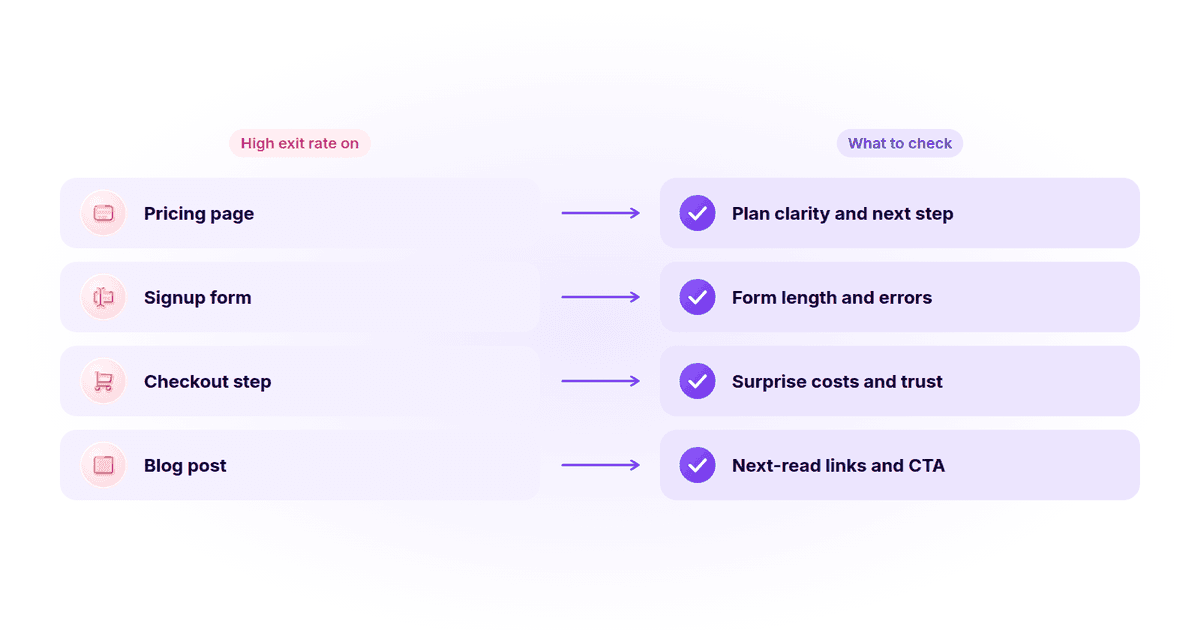
- High exits are normal on thank-you, contact and confirmation pages. They’re a warning sign on pricing, signup and checkout pages.
- GA4 has a built-in landing page report, but exits live in Explore, and exit rate isn’t shown by default.
- Exit rate isn’t a direct Google ranking factor, but pages that leave visitors unsatisfied usually underperform in search and conversions.
What is a landing page?
A landing page is the first page someone views when they arrive on your website. In analytics tools it’s also called the entry page, because it’s where the session begins. It could be your homepage, a blog post, a pricing page or an ad campaign page.
In marketing, the term has a second, narrower meaning: a page built for one goal, such as a demo request, a signup or a download. These campaign pages usually have one clear call to action (CTA) and few distractions.
Both meanings overlap. Every campaign landing page is an entry page for the visitors who click your ad or email, but not every entry page is a campaign landing page. In this guide, “landing page” covers both, and we’ll say which one we mean where it matters.
What is an exit page?
An exit page is the last page a visitor views before they leave your website, whether they close the tab, go back to search results or click through to another site. Every session has exactly one exit page.
Exit pages show you where journeys end. When a page that should lead somewhere (like pricing or a signup step) is a common exit page, it usually points to something worth fixing.
Landing page vs. exit page vs. entrance
These three terms get mixed up a lot, especially in Google Analytics. Here’s how they compare:
| Term | What it means | Type in GA4 | Question it answers |
|---|---|---|---|
| Landing page | The first page of a session | Dimension | Where do visitors start? |
| Entrances | How many times a page was the first page of a session | Metric | How often does this page start a visit? |
| Exits | How many times a page was the last page of a session | Metric | How often does a visit end here? |
| Exit page | The last page of a session | Page with exits | Where do visitors leave? |
So when you compare “page” vs. “landing page” in Google Analytics, the page report counts every view of a page, while the landing page report only counts sessions that started on it.
Exit rate vs. bounce rate: how to calculate them
Exit rate and bounce rate both measure people leaving, but they look at different sessions.
Exit rate = (exits from a page ÷ views of that page) × 100
Bounce rate (GA4) = (sessions that weren’t engaged ÷ total sessions) × 100
In GA4, a session counts as engaged if it lasts longer than 10 seconds, includes a key event or includes at least 2 page or screen views. Bounce rate is the opposite of engagement rate.
A quick example: your pricing page gets 2,000 views in a month, and 600 of those views were the last in a session. Its exit rate is 600 ÷ 2,000 = 30%. If 800 sessions started on the pricing page and 360 of them weren’t engaged, its bounce rate is 360 ÷ 800 = 45%.
The key difference: exit rate includes people who browsed several pages before leaving, while bounce rate only looks at sessions that started on the page. For a deeper look at the second metric, see what counts as a good bounce rate.
How to find landing and exit pages in GA4
GA4 handles these two reports differently, which is why so many people search for them.
Landing pages in GA4
Go to Reports → Engagement → Landing page. The report lists each landing page with its sessions, users, average engagement time per session and revenue. Add a comparison or filter to see how a single campaign’s landing pages perform.
Exit pages in GA4
There is no standard exit pages report in GA4. To see exits, open Explore, start a Free form exploration, add Page path and screen class as the dimension, and add Exits and Views as metrics. GA4 doesn’t show exit rate by default, so divide exits by views yourself to get it.
Entrances and exits can also land on different days, so the totals may not line up with sessions for a given date range. Google’s guide to entrances and exits explains how both metrics are counted.
How to read your exit page report
A high exit rate isn’t automatically bad. What matters is whether the page is meant to be the end of the journey.
| Page type | High exit rate is… | Why |
|---|---|---|
| Thank-you or confirmation page | Expected | The visitor finished the task |
| Contact or support page | Usually fine | They found the details they needed |
| Blog post that answers a question | Often fine | They got the answer, but you can still offer a next read |
| Pricing page | A warning sign | They were close to deciding and walked away |
| Signup or checkout step | A warning sign | Something in the flow is stopping them |
Start with the warning-sign pages that get the most views. A small exit rate drop on a high-traffic pricing page is worth more than a big drop on a page few people see. It also helps to track the drop-off rate between each step, so you know exactly where people leave a flow.
Website analytics tool for modern marketers & agencies
Why are landing pages important for SEO?
Landing pages are often the pages that rank, so they shape your search visibility. Here’s how they help:
- They match search intent. A page built around one topic or query gives search engines a clear signal about what it’s for, which helps it rank for those terms.
- They keep visitors engaged. When people find what they need quickly, they’re more likely to stay, explore further and convert.
- They support a good page experience. Fast loading, clear navigation and mobile-friendly layouts help both users and rankings.
- They attract links. Useful landing page content can earn mentions and support link building. Some teams also use an outreach link building service or a trusted link-building service to promote these pages through outreach. Well-optimized pages can naturally support link building because others reference them.
- They build topical authority. Well-researched landing page content helps you become a trusted source in your niche and attract more organic traffic.
- They turn clicks into results. High-performing landing pages have one clear goal, such as a form or a purchase, so the traffic you earn from search actually turns into leads.
If you want outside help making your landing pages effective, working with an experienced agency, such as the best SEO agency in Sherbrooke or a partner in your own city, can speed things up.
What are the elements of high-performing landing pages?
How well do landing pages convert? In Unbounce’s 2024 Conversion Benchmark Report, which analyzed 41,000 landing pages and 464 million visitors, the median conversion rate across industries was 6.6%. For SaaS landing pages, it was 3.8%. Use those numbers as a rough reference point, not a target, since your offer and traffic mix matter more.
These are the elements that most often separate the pages that convert from the ones that don’t.
1. Compelling headlines
Your headline is the first thing visitors read. It should say what you offer and why it matters to them in one clear line.
2. Strong call to action (CTA)
The CTA is the heart of the page. Make it stand out, keep the wording specific (“Book a demo,” not “Submit”) and leave no doubt about the next step.
3. User-friendly design and layout
A clean layout leads visitors from the headline to the CTA. Remove menus and links that pull people away from the page’s one goal.
4. Mobile responsiveness and speed optimization
Mobile optimization matters because a large share of visitors arrive on phones. Make sure the page adapts to every screen size and loads quickly, or many visitors will leave before it finishes.
5. Conversion tracking and analytics
Track conversions, bounce rate and click-through rate for each landing page, so you know which ones are doing their job. Watch the digital marketing metrics and KPIs that connect each page to leads and revenue.
This also helps you analyze content performance on the page itself, so you can see whether your copy, visuals and CTA are actually moving visitors toward action.
How to increase conversions on your landing pages
1. Craft a clear value proposition
Say what makes your product different and which problem it solves. Lead with the pain point your audience already feels.
2. Personalize pages for different audiences
Segment visitors by location, behavior, source or interests, and build pages that speak to each group. Our guide to data segmentation for SaaS businesses shows how to group users in a way you can act on.
3. Match your ads to your landing pages
Keep the message, offer and visuals consistent from the ad click to the landing page. A mismatch makes visitors feel they landed in the wrong place, and they leave.
4. Track and measure landing page performance
Use performance attribution software to monitor conversion, bounce and click-through rates while connecting leads or sales to specific campaigns. With Usermaven, teams can keep analyzing user behavior and feedback to make data-driven improvements. You can even use predictive customer analytics to spot which landing page visitors are most likely to convert.
Why exit pages matter for SEO
Exit rate isn’t a direct Google ranking factor. Exit pages are an analytics signal, but they point to problems that do affect search performance:
- User experience: a high exit rate on a page that should lead somewhere often means the page doesn’t meet visitors’ needs. Search engines reward pages that satisfy the people who click them.
- Bounce rate: pages that lose visitors right away usually have weak engagement too. Improving the content and layout on these pages tends to help both metrics.
- Content quality: exit pages show which content fails to hold attention. Better, more relevant content keeps people reading, and strengthening its authority through backlinks from a white label link building agency can add credibility.
- Conversion rate optimization (CRO): exits inside conversion funnels show where people drop out. Fixing those steps helps you improve user engagement and keeps more visitors satisfied.
By fixing the pages where visitors leave too early, you improve usability and user experience across the site, which supports both rankings and conversions.
What are the elements of high-performing exit pages?
You can’t stop every exit, and you shouldn’t try. The goal is to make sure the pages that end journeys too early give people a reason to stay.
1. Relevant content and internal linking
Make sure the page answers the question the visitor came with. Then use internal links to point them to the next most useful page.
2. Encourage continued exploration
Suggest related articles, products or resources at the natural end of the page. A short “read next” section or a relevant product recommendation keeps curious visitors moving.
3. Reduce distractions and friction
Cut excessive ads, pop-ups or outbound links that pull attention away from the page’s goal. Speed up load times, check mobile layouts and keep forms and checkout steps short and simple.
4. Ask why people leave
On pages with unexpected exits, a short exit survey or feedback widget can tell you what’s missing. One honest answer often explains what a chart can’t.
What are the benefits of optimizing landing and exit pages?
- Lower bounce rates and longer visits: relevant content and clear next steps keep visitors on your site longer.
- Better engagement signals: pages that satisfy visitors tend to earn more clicks, links and return visits, which supports search visibility.
- More conversions from the same traffic: fixing the steps where people exit turns more of your existing visitors into leads and customers.
- Clearer priorities: landing and exit data shows which pages deserve your time first, so you stop guessing.
How to track landing and exit pages with Usermaven
In Usermaven’s website analytics, the Top pages section of the dashboard has “Entry pages” and “Exit pages” views. Entry pages show the visit duration for sessions that started on each page. Exit pages show the exit rate for each page, so you can spot where visitors leave.
You can filter the whole dashboard by source, campaign, country or device. For example, you can check traffic from one marketing campaign to one landing page over a specific date range. The docs explain how the Top pages, entry pages and exit pages views work.
Because Usermaven also connects visits to conversions and customer journey analytics, you can see not just where people enter and leave, but which journeys end in a signup or a sale.
See Usermaven in action
Book a free demo and discover how powerful analytics can grow your business.
Conclusion
Landing pages show you where visitors start, and exit pages show you where they stop. Read them together and you’ll know which pages earn attention, which ones keep it, and which ones lose people at the worst moment.
To make this easier, Usermaven brings visitor activity, landing page performance, exit behavior and conversion paths into one place, while respecting user privacy with GDPR and CCPA compliance. Its pixel white-labeling also helps you collect accurate data even when ad blockers are in use, so you can start fixing the pages that matter most.
FAQs
How do you calculate exit rate?
Divide the number of exits from a page by the number of views of that page, then multiply by 100. For example, 600 exits from 2,000 views gives an exit rate of 30%. In GA4, add Exits and Views to a free-form exploration and divide the two.
What is the difference between exit rate and bounce rate?
Exit rate looks at every view of a page and shows how often it was the last page in a session. Bounce rate only looks at sessions that started on that page and shows how many weren’t engaged. A visitor can exit a page after browsing five others, but that’s not a bounce.
What is a good exit rate?
It depends on the page. High exit rates are normal on thank-you, contact and confirmation pages because the visitor is done. On pricing, signup and checkout pages, a high exit rate usually means something is getting in the way, so compare each page with similar pages on your own site.
Is entrance the other name for the landing page of a website?
Not quite. In GA4, the landing page is a dimension: the first page of a session. Entrances is a metric: the number of times a page was that first page. They describe the same moment from two angles, so you’ll often see them used together.
Where are exit pages in GA4?
GA4 has no standard exit pages report. Open Explore, create a free-form exploration, add Page path and screen class as the dimension, and add Exits and Views as metrics. Landing pages, on the other hand, have their own report under Reports, then Engagement.
Do exit pages affect SEO?
Not directly, because exit rate isn’t a Google ranking factor. But pages that leave visitors unsatisfied often have weak engagement and conversions, and fixing them usually improves the content quality and user experience that search engines reward.
What is the difference between a landing page and a one-pager?
A landing page is a focused web page designed for a specific marketing or promotional purpose, typically featuring a single call to action (CTA). In contrast, a one-pager is a comprehensive single-page website with a scrollable design, diverse content types, and navigation options to provide a more holistic view of a subject, business, or portfolio.

Written by
Adeel Khan
Growth Marketing Expert
Adeel Khan is a full-stack SaaS marketer with 10+ years of experience in content marketing, paid advertising, analytics, and conversion rate optimization. He shares practical insights and strategies drawn from hands-on experience, helping B2B SaaS marketers improve performance and make better marketing decisions.
All articles by Adeel →