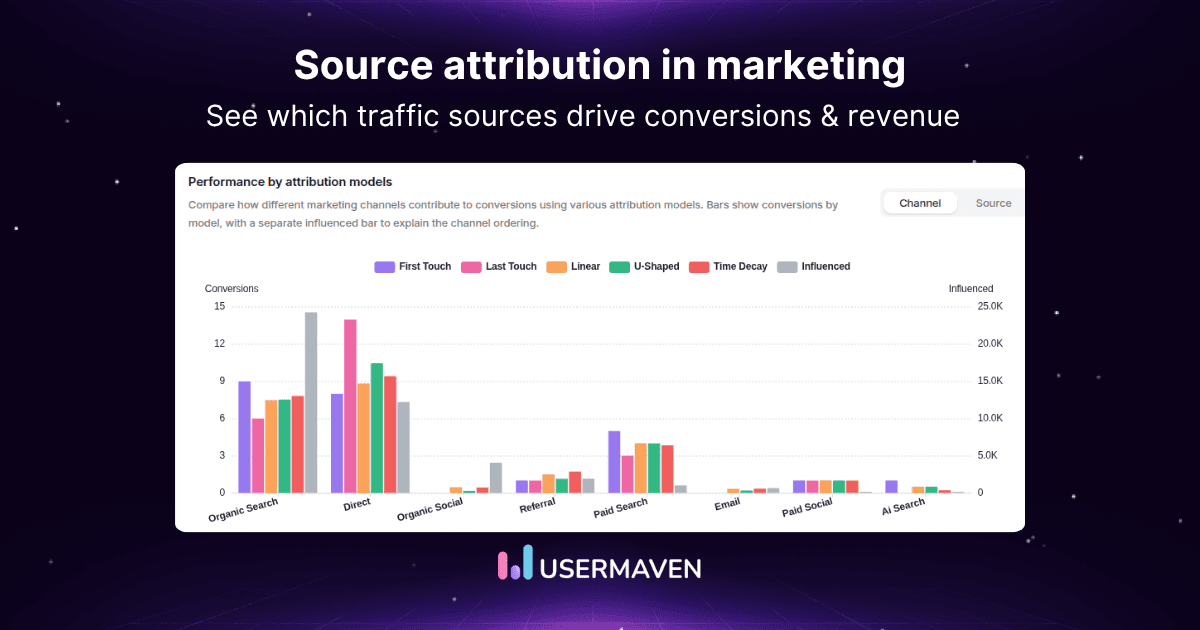
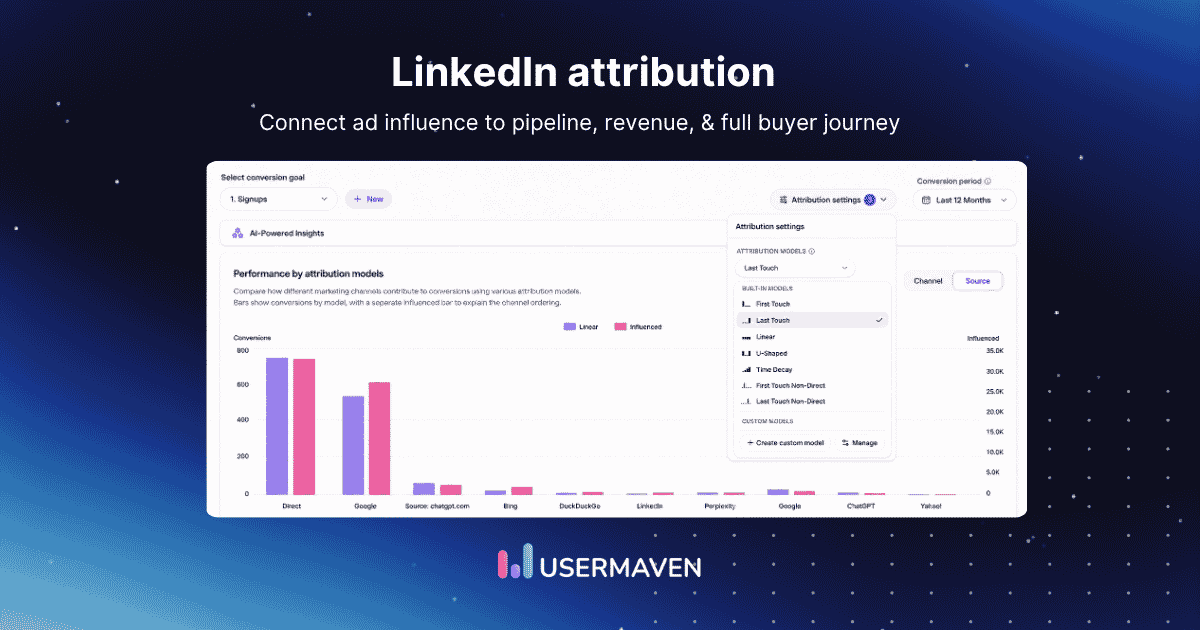
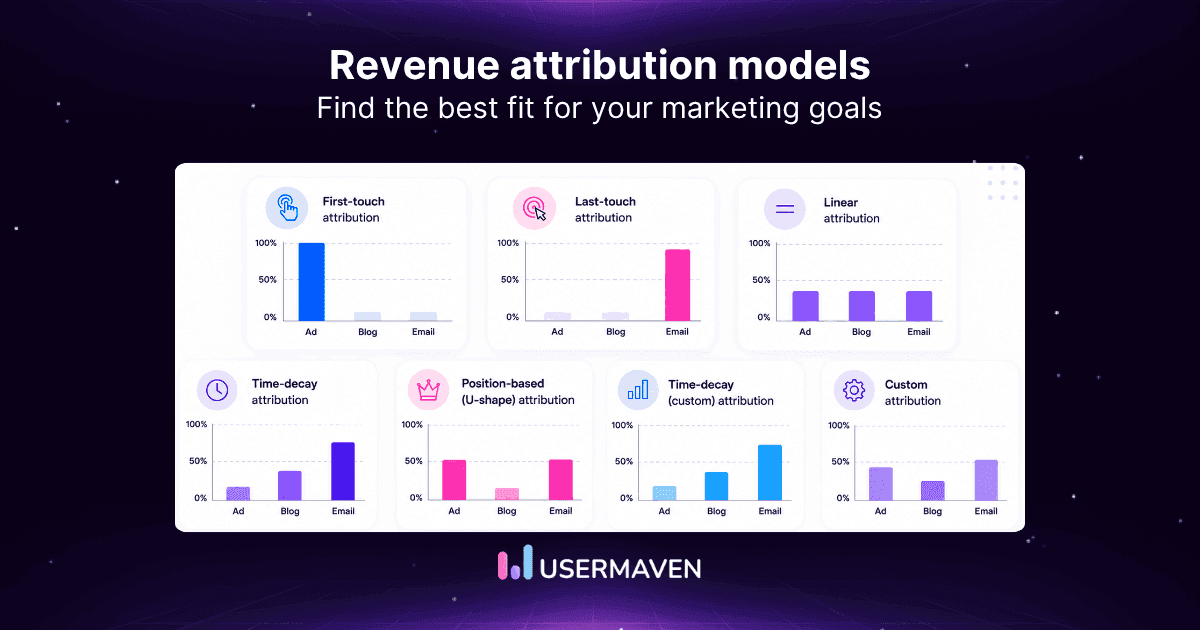
A revenue attribution tool is only useful if it can connect marketing activity to the revenue record your business actually trusts.
A B2B company may care about Salesforce opportunities and Closed Won revenue, a PLG company about subscriptions and expansion, and an ecommerce brand about order revenue and repeat purchases.
The right marketing attribution software should fit that commercial reality.
This guide compares 10 revenue attribution tools by revenue source, attribution depth, behavioral context, CRM or commerce fit, pricing access, and ideal use case. So, the buying decision starts with the revenue job rather than the longest feature list.
Revenue attribution tools at a glance
Use the revenue model first, then compare platform depth. A tool can be excellent at ecommerce orders and still be the wrong choice for a six-month B2B opportunity cycle.
| Revenue model / use case | Best fit | Why |
|---|---|---|
| SaaS / B2B | Usermaven | Attribution + behavior + CRM revenue |
| Account-level B2B | Dreamdata | Account journeys + pipeline attribution |
| Enterprise GTM | HockeyStack | Revenue intelligence + GTM context |
| HubSpot-native | HubSpot Marketing Hub | CRM-native revenue attribution |
| ABM / account journeys | Factors.ai | Account attribution + intent |
| Paid media | Cometly | Ads → pipeline → revenue |
| Calls / offline | Ruler Analytics | Online-to-offline revenue |
| Enterprise attribution | Adobe Marketo Measure | CRM-centric B2B attribution |
| Ecommerce | Triple Whale | Commerce-native revenue attribution |
| Scaling DTC | Northbeam | Attribution + incrementality |
Key takeaways
- Define revenue first: Pipeline, Closed Won, ARR, order revenue, and collected revenue are different outcomes. Decide which record the tool must attribute before comparing vendors.
- Best overall for SaaS and B2B: Usermaven is strongest when revenue attribution also needs website behavior, product usage, journeys, CRM pipeline, and AI-assisted investigation.
- Best for account-level B2B: Dreamdata is purpose-built around B2B accounts, buying journeys, pipeline, and revenue attribution.
- CRM fit matters: HubSpot-native and Salesforce-heavy teams can need different architectures even when both want the same revenue answer.
- Data quality beats model count: Broken campaign data, identity, CRM relationships, or revenue values can make sophisticated attribution look precise while remaining unreliable.
- Different businesses need different tools: Ecommerce orders, B2B opportunities, subscriptions, and offline sales should not be evaluated with one universal software checklist.
What are revenue attribution tools?
Revenue attribution tools connect marketing and customer touchpoints with a commercial outcome such as pipeline, Closed Won revenue, subscription value, ecommerce orders, or offline sales. Revenue attribution provides the measurement framework that determines how those outcomes receive credit.
In practice, these platforms combine acquisition data, identity, customer behavior, CRM or payment records, attribution rules, and revenue reporting.
The strongest tool is the one that connects the journey to the correct revenue record with enough context to support a decision.
When the buying question extends beyond revenue-specific measurement, marketing attribution tools cover the broader market for campaign, channel, journey, and conversion-credit analysis.
Best revenue attribution tools
The platforms below solve different revenue problems. Some are built around B2B opportunities, others around paid-media signals, ecommerce orders, or enterprise CRM workflows.
Each profile therefore starts with the commercial job it is best suited to perform.
1. Usermaven: Best overall for SaaS and B2B

Overview
Usermaven connects paid and organic acquisition with website behavior, product usage, known users and companies, CRM pipeline, and revenue.
It is designed for teams that want to move from campaign reporting into a measurable path from first touch to customer and commercial outcome.
Best for
B2B SaaS, PLG and hybrid SaaS, lean growth or RevOps teams, agencies, and companies that need revenue attribution without separating marketing analytics, product behavior, journeys, and CRM reporting into several tools.
Pricing
Growth starts at $84 per month for 250,000 events and covers web, product, and ecommerce analytics. Scale starts at $199 per month and is the relevant revenue-attribution tier.
Scale adds paid ads attribution, channel and content attribution, CRM pipeline and revenue attribution, conversion paths, ad integrations, Conversion Syncs, Maven AI, and MCP. Current Usermaven pricing shows live plan limits and event tiers.
Key revenue capabilities
- Paid ads, channel, content, landing-page, CRM pipeline, and revenue attribution
- Google, Meta, and LinkedIn Ads tracking with downstream conversion feedback
- Website and product analytics on the same event dataset
- Anonymous-to-known person and company context
- Funnels and customer journeys across acquisition, product, and CRM stages
- HubSpot and Salesforce context for opportunity and revenue analysis
- Maven AI and MCP for revenue investigation
- Measurement Trust Center for collection, identity, integrations, delivery, and reliability
Why it stands out
Usermaven can show more than which channel received revenue credit. Product analytics helps explain whether acquired users activate and adopt the product, while customer journeys trace the sequence that preceded a high-value customer.
Funnels add progression context, helping a team separate a weak acquisition source from an onboarding, product, or sales-process problem.
That makes the attribution output more useful when the goal is to explain why revenue quality differs, not only report who received credit.
Verdict
Best overall when the buyer wants revenue attribution plus behavioral and product context in a self-serve platform, rather than a dedicated enterprise ABM, ecommerce-only, or paid-media-only measurement stack.
2. Dreamdata: Best for account-level B2B revenue attribution

Overview
Dreamdata is a B2B activation and attribution platform built around company identification, account journeys, CRM and GTM data, pipeline, revenue, audience building, and attribution across longer buying cycles.
Best for
Mid-market and enterprise B2B companies with long sales cycles, several stakeholders per opportunity, and teams that want to evaluate marketing at the account rather than individual-lead level.
Pricing
Dreamdata offers a $0 free plan with foundational B2B web analytics, company identification, engagement scoring, audience building, and ad-spend reporting. Advanced Activation & Attribution uses custom pricing and adds broader attribution, AI, activation, reporting, and data controls.
Key revenue capabilities
- Account-level buyer journeys and company identification
- B2B pipeline and revenue attribution
- Custom and AI-based attribution
- CRM and GTM data unification
- Ad-spend reporting and audience activation
- Account-level revenue analytics on the free foundation
Why it stands out
Dreamdata is particularly strong when the commercial unit is the account. It is built for situations where several contacts and channels influence the same opportunity before revenue is created.
Verdict
A strong specialist when account-level B2B attribution is the main job. Teams deciding between that specialization and a broader website/product analytics layer can compare the approaches in the Dreamdata alternative comparison.
3. HockeyStack: Best for enterprise GTM revenue intelligence

Overview
HockeyStack combines attribution, buyer journeys, account intelligence, GTM data, revenue reporting, AI analysis, lift and incrementality, and workflow-oriented revenue intelligence for complex B2B organizations.
Best for
Enterprise B2B, ABM programs, long buying cycles, complex buying committees, and teams that want attribution embedded in a broader GTM intelligence operating layer.
Pricing
HockeyStack’s main pricing page is sales-led and does not publish a simple self-serve package price. That makes HockeyStack pricing a demo-led buying decision rather than a straightforward self-serve comparison.
Key revenue capabilities
- Account-level buyer journeys
- Flexible attribution modeling across campaigns and assets
- Pipeline, revenue, ROI, and Closed Won analysis
- Account intelligence and scoring
- Lift and incrementality views
- Odin-assisted GTM analysis and recommendations
Why it stands out
HockeyStack is strongest when revenue attribution is one part of a larger enterprise GTM system. Its buyer journeys and account context are designed around complex B2B deals rather than isolated conversions.
Verdict
Best for enterprise GTM teams that want revenue attribution plus account intelligence and AI. The HockeyStack alternative comparison is relevant when the tradeoff is enterprise GTM depth versus a more self-serve attribution and behavioral analytics workflow.
4. HubSpot Marketing Hub: Best for HubSpot-native revenue attribution

Overview
HubSpot Marketing Hub keeps contacts, lifecycle stages, campaigns, deals, customer interactions, and attribution reporting inside the HubSpot ecosystem. For teams already standardized on HubSpot, the advantage is operational continuity rather than adding another measurement vendor.
Best for
Sales-led teams that already use HubSpot as the CRM and marketing operating system, especially when most important revenue records and lifecycle stages are maintained inside the same platform.
Pricing
Marketing Hub Professional is currently listed around $890 per month and Enterprise around $3,600 per month. Required onboarding and marketing-contact limits can raise the total cost.
HubSpot’s revenue attribution reporting is an Enterprise capability, while other attribution reporting begins on eligible Professional plans.
Key revenue capabilities
- Contact-create attribution
- Deal-create attribution on eligible Enterprise setups
- Revenue attribution on Marketing Hub Enterprise
- CRM-native lifecycle and deal data
- Campaign and customer-journey reporting
- Multiple attribution models inside the reporting workflow
Why it stands out
HubSpot can be sufficient when the customer journey and the commercial truth already live mainly in one CRM. That reduces integration overhead and keeps marketing and sales working from a familiar record system.
HubSpot’s attribution reporting documentation distinguishes contact-create, deal-create, and revenue attribution, with revenue reports tied to Closed Won deal revenue.
Verdict
Best for HubSpot-native teams that want CRM-centered attribution. When richer pre-lead website or product behavior is required around those records, the HubSpot and Usermaven integration explains how those layers can work together.
5. Factors.ai: Best for ABM and account journeys

Overview
Factors.ai combines company identification, account journeys, LinkedIn and intent signals, account scoring, ABM analytics, attribution, CRM workflows, and activation for B2B revenue teams.
Best for
Mid-market B2B companies that rely heavily on LinkedIn and account-based marketing, and want attribution to sit beside intent, company identification, scoring, and sales activation.
Pricing
Lite is $199 per month after trial. Basic is $6,000 per year, Growth $20,000 per year, and Enterprise starts at $30,000 per year. Higher tiers add deeper buyer journeys, custom or predictive scoring, ABM analytics, and broader activation workflows.
Key revenue capabilities
- Company identification and account timelines
- LinkedIn impression and influence analysis
- Buyer-stage and account-journey analytics
- CRM sync with account and opportunity data
- Custom and predictive account scoring
- Advanced ABM reporting and conversion feedback
Verdict
Best when the revenue question is inseparable from ABM: which accounts are engaging, how paid and organic touches influence them, and which signals are associated with pipeline progression.
6. Cometly: Best for paid-media revenue attribution

Overview
Cometly is a B2B SaaS attribution platform built around server-side tracking, multi-touch attribution, account journeys, events, CRM-connected pipeline, revenue reporting, and conversion feedback to paid platforms.
Best for
Demand-generation and performance teams where the main revenue path begins with paid media and ends in qualified pipeline, Closed Won deals, or another CRM outcome.
Pricing
Cometly uses usage-based pricing sized around website traffic, seats, and stack requirements rather than a simple fixed startup plan. Cometly pricing therefore depends on both usage and the implementation requirements of the stack.
Key revenue capabilities
- Pixel and server-side tracking
- Multi-touch attribution and account journeys
- CRM-connected pipeline and revenue visibility
- Conversion API feedback to ad platforms
- Events, dashboards, audiences, and AI analysis
- Paid-platform and data-stack integrations
Verdict
Best when the central revenue question is which ads generate pipeline and revenue. The Cometly alternative comparison is useful when the decision also includes website, product, journey, and broader behavioral analytics.
7. Ruler Analytics: Best for calls and offline revenue

Overview
Ruler Analytics connects first-party website activity with forms, phone calls, live chat, CRM opportunities, offline conversions, and revenue. It is designed to close the measurement gap after a prospect leaves the website and enters a sales process.
Best for
Lead-generation companies, professional services, appointment-led businesses, agencies, and teams where phone calls or offline sales outcomes are central to conversion.
Pricing
Ruler’s Small plan starts at $400 per month for up to 10,000 monthly visits on monthly billing. Ruler Analytics pricing then scales with traffic volume and measurement scope on higher tiers.
Key revenue capabilities
- First-party tracking and conversion tags
- Form, call, chat, and offsite conversion capture
- CRM opportunity and revenue stages
- Multi-touch, data-driven, and impression attribution
- Cross-domain and multi-device reporting
- Marketing mix modeling on advanced plans
Verdict
Best when the path is website → call or form → salesperson → CRM → revenue. The Ruler Analytics alternative comparison helps teams weigh that offline specialization against a broader SaaS attribution and analytics workflow.
8. Adobe Marketo Measure: Best for enterprise B2B attribution

Overview
Adobe Marketo Measure is an enterprise B2B attribution product designed to connect online and offline buyer touchpoints with progression, pipeline, revenue, and ROI. It includes pre-built and custom models, CRM integrations, and AI-assisted attribution.
Best for
Large organizations already invested in Adobe Marketo, Salesforce, Microsoft Dynamics, or mature marketing operations that need formal enterprise attribution across long B2B buying cycles.
Pricing
Adobe does not publish a simple standalone Marketo Measure price. Marketo Engage uses sales-led packages, with premium attribution associated with higher-end packaging and customized pricing.
Key revenue capabilities
- Every-touch online and offline B2B attribution
- Campaign, channel, content, pipeline, revenue, and ROI reporting
- First-touch, lead-creation, U-shaped, W-shaped, and full-path models
- Custom stage weighting and AI recommendations
- Native enterprise CRM integrations
- Data warehouse, BI, and CRM reporting options
Adobe’s Marketo Measure attribution-model documentation currently describes First Touch, Lead Creation, U-Shaped, W-Shaped, Full Path, and Custom models tied to key B2B milestones.
Verdict
Best for enterprises that need rigorous B2B revenue attribution inside an Adobe and CRM environment and have the operations resources to support a larger implementation.
9. Triple Whale: Best for ecommerce revenue attribution

Overview
Triple Whale is an ecommerce data and measurement platform centered on store revenue, ad spend, customer economics, first-party tracking, multi-touch attribution, creative performance, and AI for DTC brands.
Best for
Shopify and ecommerce businesses where the trusted revenue record is the order, and the core questions involve ROAS, new-customer revenue, products, creative performance, and lifetime value.
Pricing
Triple Whale offers a free plan and paid packages that scale with annual GMV or revenue. Triple Whale pricing changes with both business size and the measurement package selected.
Key revenue capabilities
- First-party ecommerce tracking through Triple Pixel
- Multi-touch ecommerce attribution
- Order revenue and channel performance
- Post-purchase survey inputs
- Creative, product, cohort, and profitability analytics
- MMM and incrementality capabilities in advanced packages
Verdict
Best when the revenue record is commerce-native rather than CRM-native. The Triple Whale alternative comparison is relevant for teams that need broader SaaS, CRM, website, or product analytics beyond the ecommerce stack.
10. Northbeam: Best for scaling DTC attribution

Overview
Northbeam is an ecommerce measurement platform built for brands with meaningful paid-media spend. It combines first-party multi-touch attribution, omnichannel reporting, view-through revenue measurement, advanced media analysis, and optional incrementality.
Best for
Scaling DTC and ecommerce teams that have moved beyond basic pixel reporting and need a more independent measurement layer for higher media spend and more complex channel decisions.
Pricing
Northbeam currently lists Starter at about $1,500 per month for brands spending under roughly $1.5M per year on ads. Professional is about $3,500 per month, while Enterprise uses custom pricing.
Key revenue capabilities
- First-party multi-touch attribution across ad channels
- Custom omnichannel dashboards
- View-through revenue attribution
- Advanced media and creative analysis
- Custom attribution optimization
- Optional incrementality measurement
Verdict
Best for DTC brands whose revenue attribution has matured into a broader media-measurement problem. The Northbeam alternative comparison helps teams assess whether they need that ecommerce depth or a broader cross-business attribution stack.
Compare revenue attribution tools
This table focuses on the commercial outcome each platform can connect to marketing. “Pricing access” describes whether a buyer can understand the entry model without a full sales process, not the total cost at scale.
| Tool | Best for | Revenue source | Attribution depth | Behavioral context | Pricing access |
|---|---|---|---|---|---|
| Usermaven | SaaS / B2B | CRM pipeline, Closed Won, subscriptions/revenue events | Strong multi-touch | Strong web + product | Public |
| Dreamdata | Account-level B2B | CRM opportunities + revenue | Strong B2B | Strong account journeys | Free + custom |
| HockeyStack | Enterprise GTM | Pipeline + revenue | Strong + lift | Strong account / GTM | Sales-led |
| HubSpot | HubSpot-native | Deals + revenue | CRM-native | Lifecycle + CRM | Public tiers |
| Factors.ai | ABM | Accounts + opportunities | ABM-focused | Strong account journeys | Public annual tiers |
| Cometly | Paid media B2B | CRM pipeline + revenue | Strong paid media | Acquisition journeys | Usage-based |
| Ruler Analytics | Calls / offline | CRM + offline revenue | Strong | Lead/customer journey | Public tiers |
| Marketo Measure | Enterprise B2B | Pipeline + Closed Won | Very strong | Touchpoint-centric | Custom |
| Triple Whale | Ecommerce | Order + customer revenue | Strong ecommerce | Commerce-focused | Free + GMV-based |
| Northbeam | Scaling DTC | Ecommerce revenue | Advanced | Commerce/media-focused | Sales-led |
What should your tool actually attribute?
Before comparing attribution models, define the revenue record the platform must connect to. A tool that handles ecommerce orders beautifully can still be the wrong choice for a six-month Salesforce opportunity cycle.
| Business model | Revenue record |
|---|---|
| B2B SaaS | Opportunity / Closed Won / ARR |
| PLG SaaS | Paid subscription / MRR / upgrade |
| Ecommerce | Order / net revenue |
| High-ticket services | CRM deal / paid invoice |
| Subscription business | Initial + renewal / expansion revenue |
Pipeline and revenue should stay separate. A $100,000 opportunity can create $100,000 of influenced pipeline while producing $0 Closed Won revenue if the deal is lost.
Revenue analytics answers the broader question of how revenue is growing through metrics such as MRR, ARR, retention, churn, expansion, and customer value. Revenue attribution asks which observed interactions should receive credit for the agreed commercial outcome.
How to choose a revenue attribution tool
Feature count is a poor selection method. Start with the revenue system, customer journey, and decisions the attribution data must support, then evaluate how much implementation and operating complexity the team can realistically maintain.

Revenue source
Identify the system that owns the monetary truth: CRM, billing, ecommerce, payment processor, or finance system. The attribution layer should reconcile to that source rather than create a competing revenue total.
Sales cycle
A three-day ecommerce journey and a six-month enterprise deal need different lookback rules. The attribution window should match how long customers normally take to convert, otherwise early touchpoints may disappear before revenue is recorded.
Identity
Understand how anonymous activity becomes a known person or account. Contacts Hub is one example of joining pre-identification behavior with known customer and company profiles before revenue is analyzed.
CRM fit
Salesforce-first teams need reliable opportunity, stage, contact-role, and Closed Won context. The Salesforce marketing attribution workflow illustrates why CRM architecture changes which attribution tool is practical.
Attribution models
First-touch, last-touch, linear, time-decay, U-shaped, custom, and data-driven approaches answer different questions. Multi-touch attribution becomes especially useful when several interactions contribute before revenue.
The broader marketing attribution models framework helps buyers compare the assumptions behind each crediting method.
Behavioral context
A revenue total can tell you which source received credit without explaining why its customers are better.
Behavioral analytics adds the actions between acquisition and revenue, including pricing views, product adoption, demos, return visits, and other signals of intent or value.
Offline outcomes
If sales conversations, calls, trade shows, invoices, or other offline outcomes are important, confirm that those touchpoints can enter the measurement chain without being reduced to a generic CRM source field.
Total cost
Subscription price is only one part of ownership. Implementation, analyst or RevOps time, seats, data volume, integrations, and the tools a platform does not replace should also be included.
Marketing attribution software cost is more useful when evaluated as total operating cost rather than advertised entry price.
Measurement trust
A dashboard should not become the source of budget truth before collection, identity, CRM sync, revenue mapping, and delivery are validated. Usermaven’s Measurement Trust Center treats those checks as part of the measurement workflow.
When CRM-native attribution is enough
A dedicated attribution platform is not automatically necessary. CRM-native reporting can be enough when the important journey, conversion logic, and revenue record already live in the same system and pre-lead behavior is not a major decision input.
HubSpot-first teams
HubSpot can cover a meaningful portion of the funnel when contacts, marketing activity, lifecycle stages, deals, and revenue are maintained consistently. Revenue attribution itself is an Enterprise capability, so plan requirements should be part of the buying decision.
Salesforce-first teams
Salesforce can represent Lead Source, Campaigns, Campaign Members, opportunities, pipeline, and Closed Won outcomes. Its Customizable Campaign Influence can assign campaign influence around opportunity revenue using standard or custom models.
CRM-native attribution becomes less complete when important acquisition, anonymous website behavior, or product activity lives outside Salesforce.
A dedicated attribution platform becomes more valuable when the journey starts before the CRM record exists, spans several systems, or requires behavior and identity context that the CRM was not designed to capture.
How to validate revenue attribution accuracy
Revenue attribution can look precise while being built on unreliable inputs. Validate the measurement chain before arguing over small model differences or moving budget based on credited revenue.

Check campaigns
Standardize UTMs, click IDs, channel rules, and campaign naming so one source does not fragment across several labels.
Validate identity
Trace anonymous-to-known matching, customer IDs, and account relationships. Duplicate or broken identity can split one journey into several people or merge unrelated activity.
Verify CRM relationships
Check contacts, accounts, opportunities, deal stages, and Closed Won states. In B2B, missing contact roles can erase the very people whose earlier marketing interactions should influence the opportunity.
Confirm revenue values
Verify that the report uses the intended revenue basis: opportunity amount, Closed Won ACV, ARR, order revenue, paid invoice, or another agreed value.
Align definitions
Marketing, sales, finance, and RevOps should use the same words for pipeline, bookings, Closed Won, recognized revenue, and collected revenue. Otherwise two accurate reports can still appear to disagree.
Test windows
Run known customer journeys through the chosen lookback period. Long sales cycles often require wider windows than ecommerce, and short windows can systematically erase demand-creation touches.
Audit regularly
Site releases, CRM remapping, new ad platforms, and changed conversion rules can quietly break attribution. A structured attribution checklist helps teams test the full chain before the dashboard becomes a source of executive truth.
What real revenue attribution looks like
The value of revenue attribution is not producing more reports. It is exposing which channels and journeys are actually connected with qualified outcomes, so budget can move with more confidence.
Hyperengage: from fragmented reporting to pipeline decisions
Hyperengage previously combined Google Analytics, CRM data, platform dashboards, and manual tracking. The Hyperengage case study describes a fragmented picture where last-click reporting undercredited early-funnel channels such as content, podcasts, and organic search.
After implementing Usermaven, Hyperengage expanded attribution coverage and could trace full journeys before conversion.
The case study reports 975 visitors completing the primary conversion goal and a 22.19% visitor-to-goal conversion rate. Previously hidden sources such as email and AI Search also became visible in the attribution mix.
The practical outcome was a different budget standard. The team put more focus into channels that showed a stronger connection to qualified pipeline and pulled back from sources that produced traffic without enough meaningful conversions.
| Why this evidence matters Revenue attribution changed the question from “Which channel got the last click?” to “Which channels consistently contribute to qualified pipeline?” That is the standard a revenue attribution tool should help a B2B team apply. |
How Usermaven connects journeys to revenue
The useful workflow is not a standalone attribution chart. It is a connected measurement chain that preserves what happened before the CRM record and what happened after the initial marketing conversion.

Capture acquisition
Paid, organic, referral, landing-page, and campaign context can be compared beside downstream outcomes. Content attribution adds a way to evaluate which articles and content assets participate before pipeline and revenue.
Track behavior
Event tracking captures the actions that show progression: demos, signups, activation, purchases, upgrades, and custom revenue events. This helps keep the revenue outcome connected to the behavior that preceded it.
Connect CRM revenue
HubSpot and Salesforce can remain the systems of record for deals and opportunities while Usermaven adds earlier acquisition, identity, website, and product context around those records.
A marketing attribution dashboard can then place campaign, journey, pipeline, and revenue performance in one decision view instead of forcing teams to reconcile separate platform reports.
Feed better outcomes back
Conversion Syncs can send selected downstream outcomes back to supported ad platforms, so bidding can learn from qualified leads, customers, or revenue instead of optimizing only for the easiest conversion to collect.
See what's working. Fix what's not. Grow faster.
Where AI helps revenue teams
The value of AI is not generating another attribution chart. It is reducing the time between “revenue changed” and “which journeys, sources, accounts, or customer segments explain the change?”
Investigate revenue quality
Maven AI can help revenue teams investigate questions such as:
- Which campaigns generate the most Closed Won revenue?
- Which channels create pipeline but weak win rates?
- Which sources generate the highest revenue per lead?
- Which journeys appear before deals over $50K?
- Which campaigns create customers with stronger retention or LTV?
- Which source loses the most credit when the attribution model changes?
Explore through MCP
Usermaven MCP lets authorized analytics be explored from compatible AI clients. A revenue team can compare Closed Won by source, find journeys before enterprise deals, or contrast pipeline and realized revenue without rebuilding each report manually.
Keep human judgment
AI can surface patterns and anomalies, but people still need to define what counts as revenue, choose an attribution window, validate CRM relationships, interpret causality, and decide whether a budget shift makes strategic sense.
Which revenue attribution tool fits?
Choose by the revenue job and data architecture, not by the longest feature list.
For SaaS and B2B: Choose Usermaven when revenue attribution also needs website behavior, product usage, CRM pipeline, and customer journeys.
For account-level B2B: Choose Dreamdata when account journeys and specialized pipeline attribution are the primary job.
For enterprise GTM: Choose HockeyStack when attribution belongs inside a larger GTM-intelligence and account-insight system.
For HubSpot teams: Choose HubSpot when CRM-native attribution is sufficient and the important journey already lives inside HubSpot.
For ABM: Choose Factors.ai when account identification, intent, LinkedIn influence, and buying-stage analysis matter.
For paid media: Choose Cometly when server-side ads-to-pipeline attribution and conversion feedback dominate the workflow.
For calls and offline: Choose Ruler Analytics when phone, form, CRM, and offline revenue are central to the customer journey.
For enterprise Adobe stacks: Choose Adobe Marketo Measure when formal B2B revenue attribution must live inside a mature Adobe/CRM environment.
For ecommerce: Choose Triple Whale when order revenue, store economics, and ecommerce performance are the measurement center.
For scaling DTC: Choose Northbeam when media spend is large enough to justify advanced attribution and incrementality.
Final verdict
The best revenue attribution tool depends on the commercial outcome being measured, not on who offers the longest feature list. Revenue architecture should come before software architecture.
B2B teams may care about pipeline and Closed Won, SaaS teams about subscriptions and expansion, and ecommerce teams about order and repeat revenue. Data quality, identity, and CRM or commerce integration matter before model sophistication.
For growing SaaS and B2B teams, Usermaven offers a strong overall balance of attribution, website and product behavior, customer journeys, CRM pipeline, revenue, and AI without requiring an enterprise GTM measurement stack.
Ready to see Usermaven in action? Explore the platform or book a demo for a closer look.
Unlock insights that drive growth
FAQs
1. What is a revenue attribution tool?
A revenue attribution tool connects marketing and customer interactions with a commercial outcome such as pipeline, Closed Won revenue, subscriptions, ecommerce orders, or offline sales, then assigns credit according to an attribution model.
2. What are the best revenue attribution tools?
Strong options include Usermaven for SaaS and B2B, Dreamdata for account-level B2B, HockeyStack for enterprise GTM, HubSpot for CRM-native teams, Factors.ai for ABM, Cometly for paid media, Ruler Analytics for offline revenue, Adobe Marketo Measure for enterprise B2B, Triple Whale for ecommerce, and Northbeam for scaling DTC.
3. What is the most accurate revenue attribution tool?
Accuracy depends more on data quality and business fit than on one vendor name. The strongest tool reliably connects campaign data, identity, the correct revenue record, an appropriate attribution window, and the revenue definition your business actually uses.
4. How do revenue attribution tools work?
They collect or ingest touchpoint data, connect those interactions with known people or accounts, join the journey to a CRM, commerce, subscription, or payment outcome, and distribute revenue credit using one or more attribution models.
5. What should a revenue attribution tool connect to?
It should connect the marketing journey with the system that records the business outcome. For B2B this is often a CRM opportunity and Closed Won value; for ecommerce it is order revenue; for SaaS it may be subscription, ARR, upgrade, or expansion value.
6. What is the best revenue attribution tool for B2B SaaS?
Updated

Written by
Adeel Khan
Growth Marketing Expert
Adeel Khan is a full-stack SaaS marketer with 10+ years of experience in content marketing, paid advertising, analytics, and conversion rate optimization. He shares practical insights and strategies drawn from hands-on experience, helping B2B SaaS marketers improve performance and make better marketing decisions.
All articles by Adeel →