You refresh your ad dashboard for the third time today. The clicks look great, but conversions? Almost flat.
You’ve tweaked headlines, adjusted budgets, even changed creatives, yet nothing seems to move the needle.
The problem isn’t your ads. It’s your data.
Ad platforms like Google and Meta can’t see what’s really happening after the click. Cookie restrictions, ad blockers, and privacy updates are cutting off the information they need to optimize.
Conversion syncs solve this problem. They use first-party data to give your ad platforms the insights they’re missing so your campaigns can finally perform at their best.
What are conversion syncs (and how they work)
Conversion syncs are a way to send conversion events from your website, app, or CRM back to advertising platforms such as Google Ads and Meta Ads.
Instead of relying entirely on browser-based tracking, conversion syncing can use server-to-server connections and APIs to share actions such as purchases, sign-ups, qualified leads, and subscription upgrades.
This helps overcome certain ad platform limitations, particularly gaps in browser-based tracking, by providing additional conversion signals that advertising platforms might otherwise miss.
How do conversion syncs work?
The process typically involves four steps:
- Someone clicks your ad. The advertising platform may attach a click identifier to the destination URL.
- Their activity is recorded. Your analytics or CRM system records relevant events and associates them with available identifiers.
- A conversion happens. The visitor makes a purchase, signs up, becomes a qualified lead, or completes another valuable action.
- The conversion is synced. Your system sends the event details to the advertising platform, which attempts to match the conversion to an eligible ad interaction.
Depending on the platform and integration, synced data may include the event name, conversion time, value, currency, and supported identifiers.
How do click identifiers help with conversion matching?
Click identifiers help advertising platforms connect conversion events with earlier ad interactions.
Common examples include:
- GCLID (Google Click Identifier): Used to identify eligible Google Ads clicks.
- GBRAID and WBRAID: Google identifiers used in certain privacy-sensitive advertising measurement scenarios.
- FBCLID (Facebook Click Identifier): A URL parameter associated with clicks from Meta advertising.
For example, someone might click a Google Ad, sign up for a free trial, and upgrade to a paid subscription two weeks later.
If the relevant identifiers are captured and retained, the subscription upgrade can be sent back to Google Ads as a conversion event. Google can then attempt to match that event to the original advertising interaction.
Some integrations also support matching through appropriately processed first-party customer information, such as hashed email addresses.
An important distinction: Conversion syncing doesn’t guarantee that every event will be matched or attributed. Results depend on the available identifiers, platform requirements, consent, and tracking configuration.
The main benefit is that advertising platforms can receive more meaningful conversion signals, including valuable actions that happen after the initial website visit.
Why reliable conversion data matters for ad performance
Advertising platforms use conversion data to understand which clicks, audiences, and campaigns lead to valuable results.
When that data is incomplete or inaccurate, it’s harder to measure what’s working. Automated bidding systems may also have fewer useful signals to guide their decisions.
Here’s how conversion data quality can affect your advertising performance.
1. Better signals for automated bidding
Google Ads Smart Bidding and Meta’s automated delivery systems use conversion signals to optimize campaigns.
If your tracking captures every form submission but misses which leads become paying customers, your campaigns may be optimized toward lead volume rather than revenue.
Sending qualified lead, purchase, or other meaningful conversion events can help these systems optimize toward outcomes that better reflect your business goals.
2. More accurate campaign measurement
Missing conversions can make a successful campaign appear less effective than it actually is.
For example, a B2B SaaS campaign might generate 100 demo requests, but only 15 eventually become customers.
Tracking those 15 sales gives you a more useful picture of campaign performance than counting demo requests alone.
It also helps you evaluate metrics such as cost per acquisition (CPA), conversion value, and return on ad spend (ROAS).
3. Better budget allocation
When you understand which campaigns generate valuable conversions, you can make more informed spending decisions.
You might discover that a campaign with a higher cost per lead produces more paying customers than one generating cheaper leads.
That insight can help you prioritize customer acquisition quality instead of simply chasing lower acquisition costs.
4. More reliable optimization over time
Conversion data becomes especially useful when you can compare results consistently across campaigns and reporting periods.
However, more conversion events don’t automatically mean better performance. Duplicate events, incorrect conversion values, and poorly configured conversion actions can also mislead advertising algorithms.
That’s why conversion data quality matters as much as conversion volume.
Reliable tracking, accurate event values, and appropriate conversion goals give you a stronger foundation for measuring performance and improving your paid advertising strategy.
Setting up conversion syncs in Usermaven
Setting up conversion syncs in Usermaven takes just a few minutes. Here’s how it works:
Step 1 — Navigate to conversion syncs
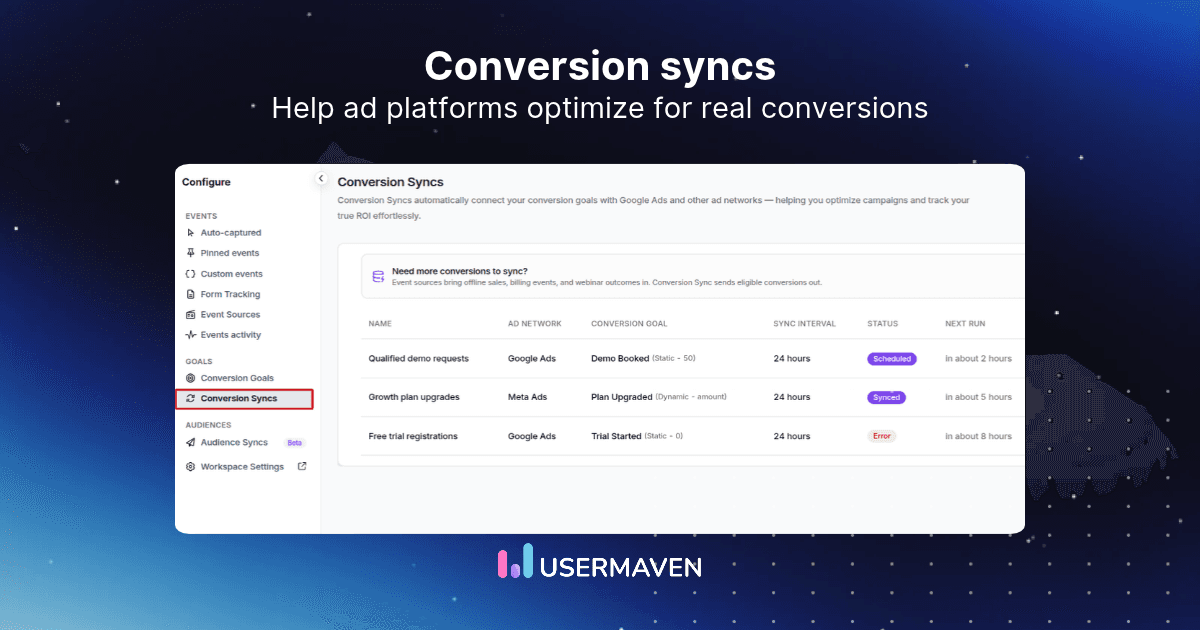
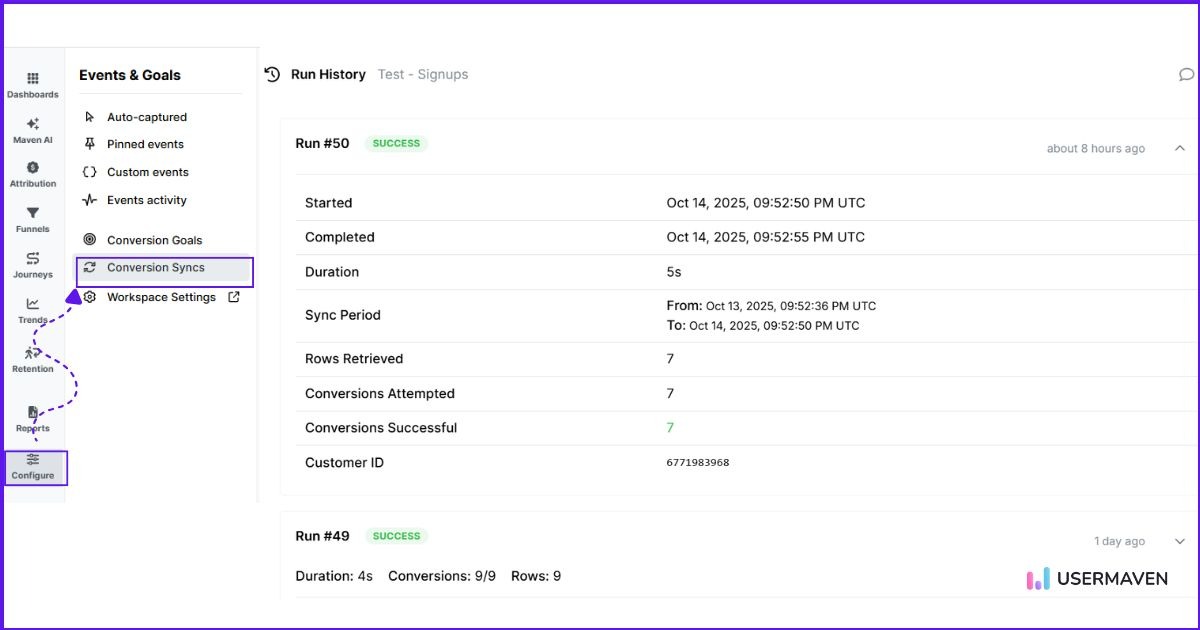
From your Usermaven dashboard, go to Configure → Conversion Syncs. This is where you can manage all your existing syncs or create a new one.
Step 2 — Create and configure a new sync
Click Create New Conversion Sync, and fill in a few simple details:
- Sync name: A clear label like “Google – Sign-ups” or “Meta – Purchases.”
- Ad account: Choose the connected Google Ads or Meta Ads account.
- Conversion goal: Pick the goal you want to sync (like demo requested or purchase made).
- Conversion category: Map your goal to a standard event type recognized by the platform, such as “Sign-up,” “Purchase,” or “Lead.”
Step 3 — Save and activate
Once you save, Usermaven automatically creates the corresponding conversion action in your ad account. From there, it starts sending conversion data to the selected platform.
Step 4 — Verify and monitor
You can check if your sync is working by:
- In Google Ads, going to Tools & Settings → Conversions and confirming the status shows “Recording conversions.”
- In Meta Ads, visiting the Events Manager and reviewing the Test Events tab.
If you see conversions flowing in, your sync is live and ready to optimize your ads.
💡 Tip:
If you’d like a detailed walkthrough or troubleshooting guidance, check out our help docs for step-by-step instructions.
How to use synced conversions to boost ad performance
Once your conversions are syncing in Usermaven, you can use that data to make more informed campaign decisions. Here’s how to get the most out of it.
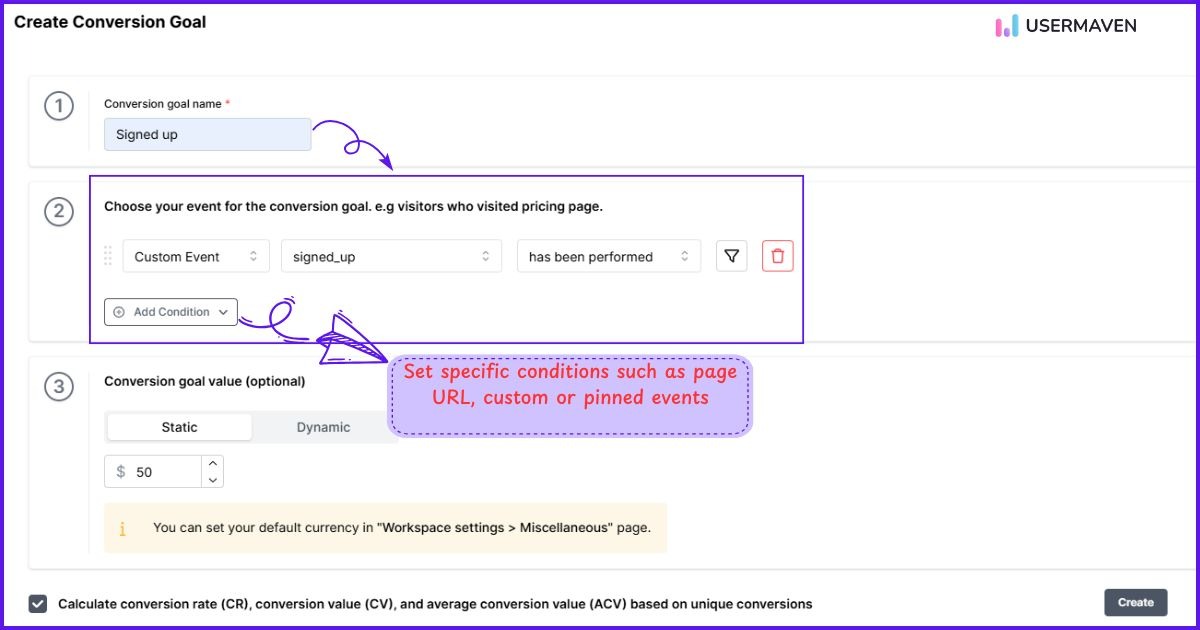
1. Focus on goals that drive real value
Inside Usermaven, identify the conversion goals that reflect true business outcomes, like sign-ups, purchases, or upgrades. These are the actions that matter most to your ad platforms.
Use dynamic values for revenue-based goals, when the conversion amount varies. This helps supported ad platforms distinguish higher-value conversions from lower-value ones.
Make sure the goals and values you’re syncing reflect what you actually want your campaigns to achieve.
2. Use your conversion data to power smarter bidding
Once your high-value conversions are syncing correctly, consider using a value-based bidding strategy if your campaigns have sufficient conversion data and meet the platform’s requirements.
- Google Ads: Use Maximize Conversion Value to optimize for total conversion value, or Target ROAS when you have a specific return on ad spend goal.
- Meta Ads: Consider value-based optimization for eligible campaigns when you’re sending supported purchase values.
With meaningful conversion values, bidding systems can optimize toward outcomes that matter to your business, rather than treating every conversion as equally valuable.
3. Optimize campaigns with attribution insights
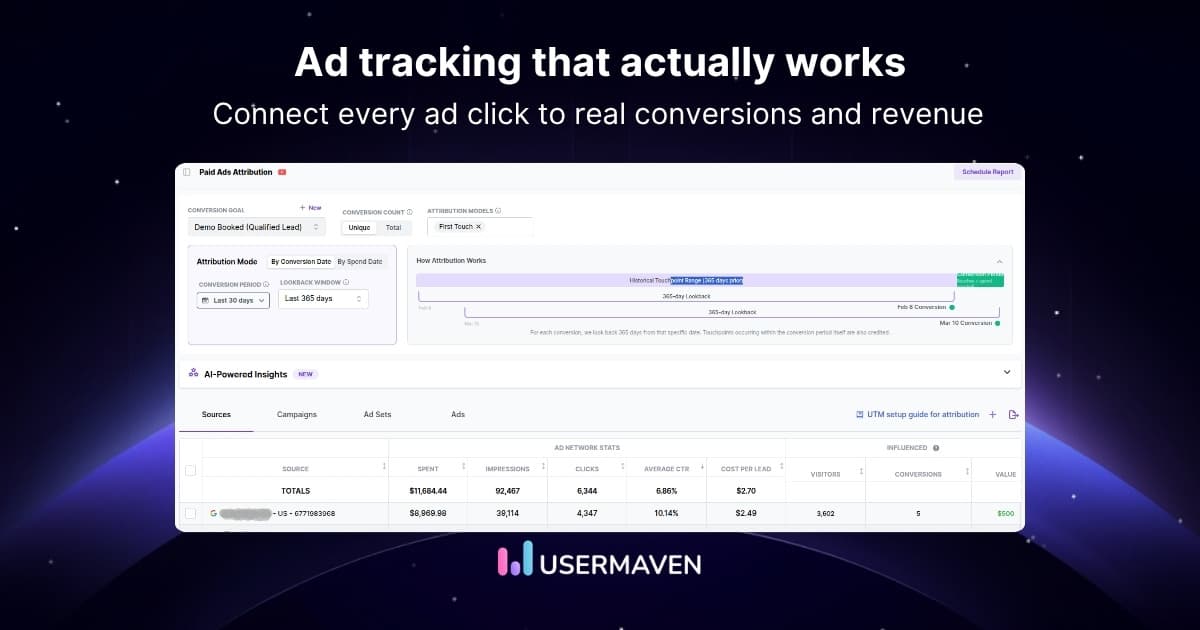
Go beyond surface-level metrics and understand exactly which campaigns, ads, and channels actually drive conversions. In Usermaven, the attribution feature gives you a clear, connected view of the entire customer journey from the first click to the last click or final purchase.
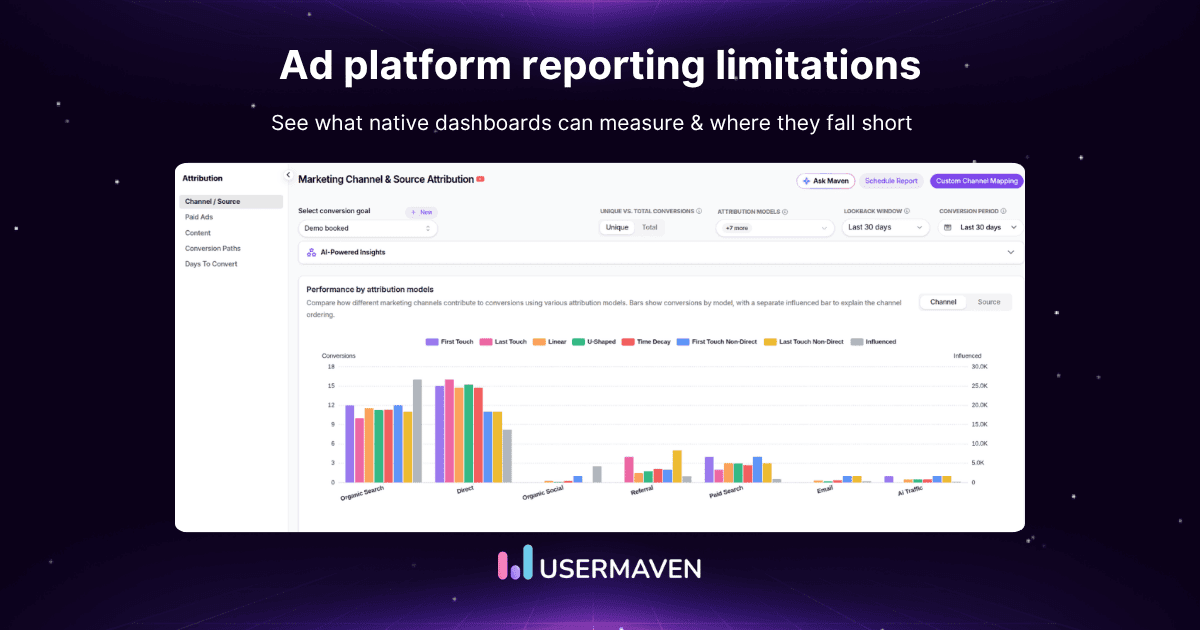
You can choose from different attribution models based on how you want to evaluate performance:
- First Touch: Gives full credit to the first interaction that brought a user to your website. Great for measuring awareness campaigns.
- Last Touch: Credits the final touchpoint before conversion, ideal for identifying what drives users to act.
- Linear: Distributes credit evenly across all customer journey touchpoints, offering a balanced view of your entire marketing journey.
- U-Shaped: Gives more weight to the first and last interactions, highlighting the channels that introduce and close deals.
- Time Decay: Prioritizes recent touchpoints closer to the conversion, useful for understanding which efforts influenced the final decision.
- First Touch Non-Direct / Last Touch Non-Direct: Exclude direct traffic to focus on marketing-driven interactions, giving you a clearer picture of campaign performance.
Usermaven also supports custom attribution models for businesses that need more control over how conversion credit is distributed.
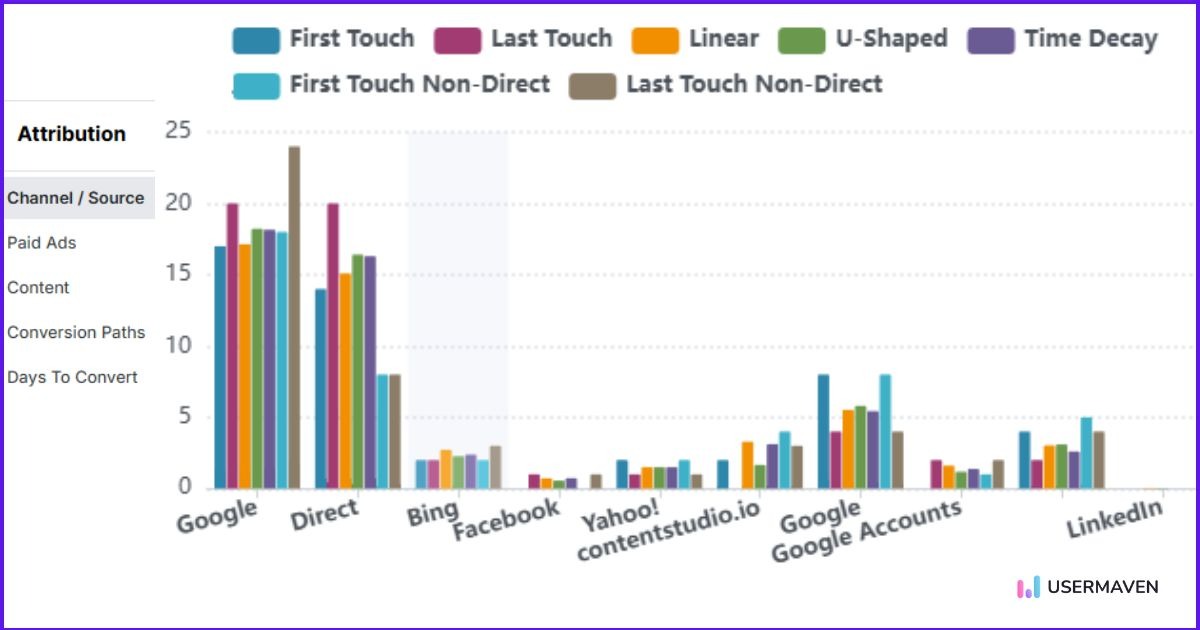
By comparing models through multi-touch attribution, you can:
- Identify campaigns that introduce valuable customers but receive little last-touch credit.
- Understand which channels contribute to conversions, pipeline, and revenue.
- Make more informed budget decisions using attributed performance rather than clicks alone.
This is particularly useful for B2B SaaS companies where customers interact with several campaigns before making a purchase.
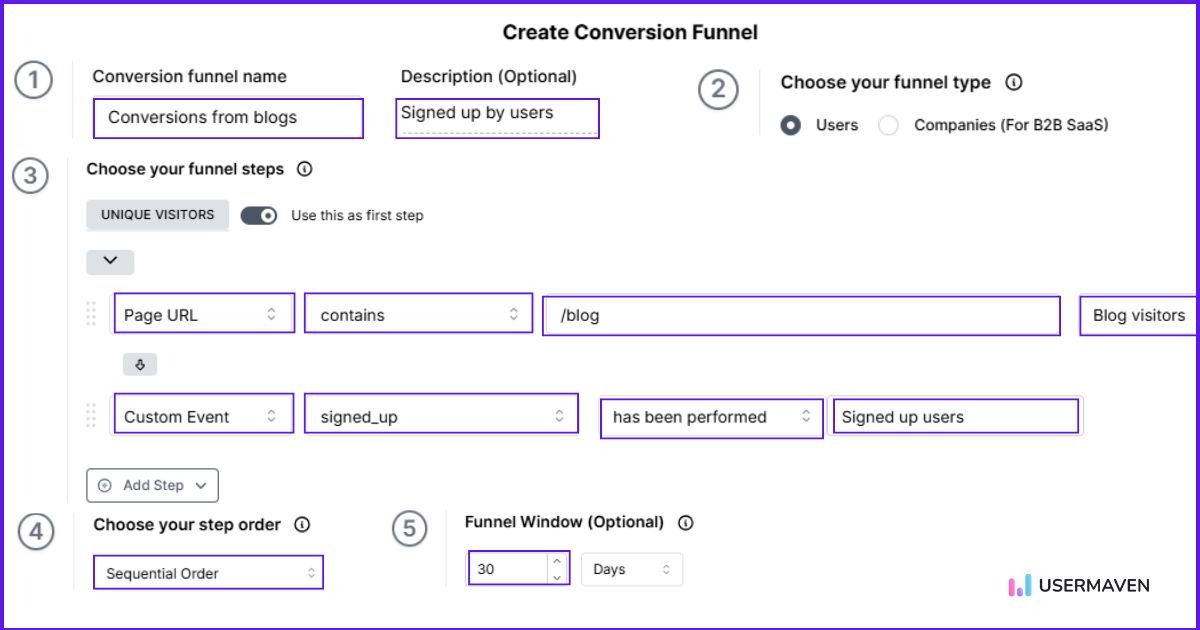
4. Uncover bottlenecks with funnel tracking
Usermaven’s funnels help you identify where visitors drop off before completing important conversion goals.
For example, you might discover that paid visitors frequently reach your pricing page but rarely complete a demo booking.
That gives you a specific problem to investigate, whether it’s unclear messaging, unnecessary form fields, or friction in the conversion process.
Improving these steps can increase the number of valuable conversions your campaigns generate without necessarily increasing ad spend.
5. Build sharper audiences with verified data
Usermaven’s event tracking helps you understand how visitors interact with your website and product, from viewing pricing pages to signing up or completing purchases.
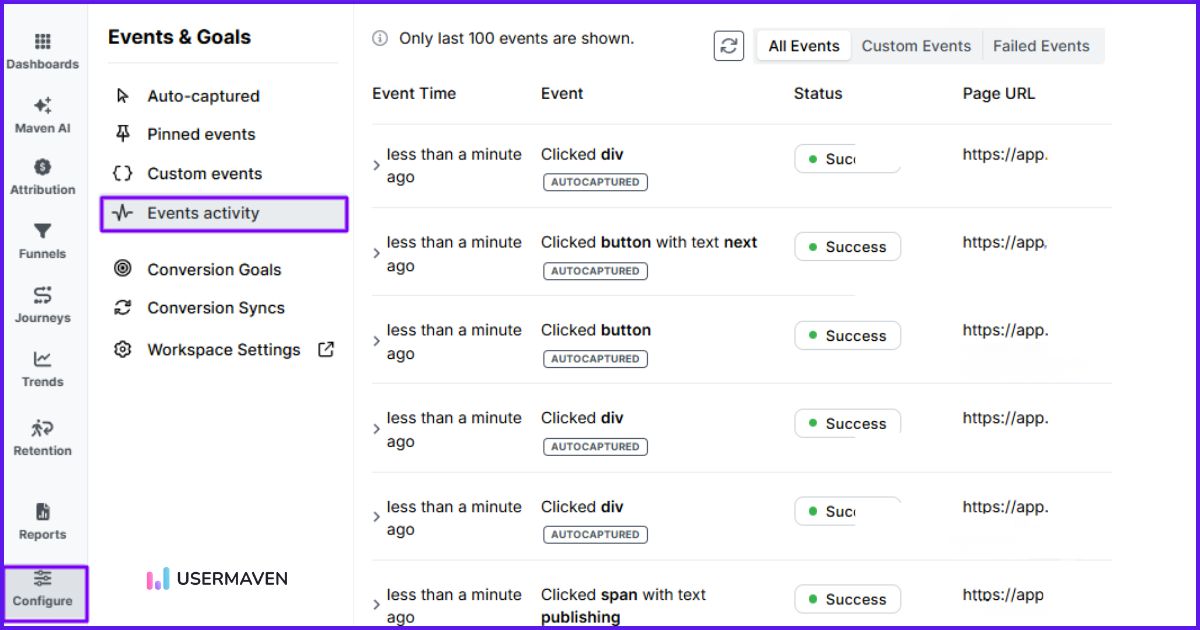
Use segments and contacts to group users by behavior or traffic source, and journeys to see which paths lead to the highest conversions. These insights reveal your most valuable audiences and the actions that define them.
With this event-driven data, you can personalize campaigns and guide your ad platforms toward audiences proven to deliver better performance and ROAS.
6. Iterate with weekly reviews
Each week, review Usermaven’s attribution and web analytics reports:
- Scale campaigns that deliver the most conversion value.
- Test new audiences seeded from top converters.
- Refine landing pages where drop-offs persist.
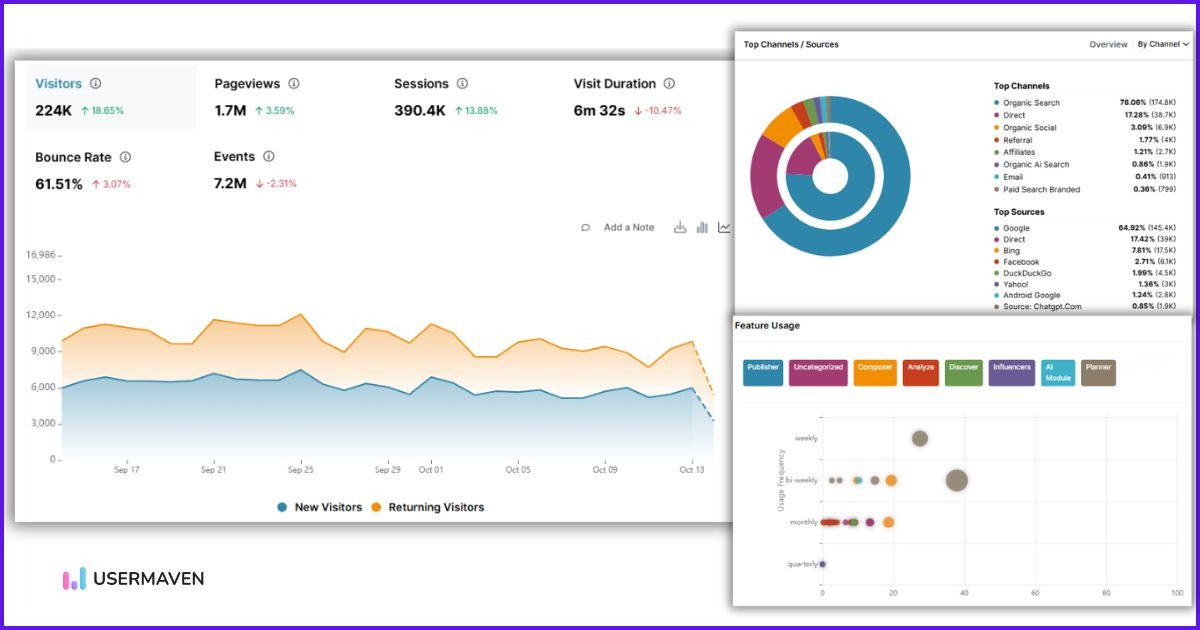
You can also use Maven AI to explore campaign performance through natural-language questions or schedule recurring analyses with AI Agents.
Avoid making several major changes at once. Give campaigns enough time to collect meaningful data, especially when conversions happen after a longer sales cycle.
7. Keep your signals clean
Regularly check your conversion goals, event mappings, and values to make sure you’re sending the right information to each advertising platform.
Pay particular attention to:
- Duplicate conversions: Avoid counting the same event twice when using browser-based and server-side tracking together.
- Conversion values: Confirm that revenue amounts and currencies are correct.
- Event matching: Check whether supported identifiers are being captured and passed correctly.
- Conversion status: Review rejected, unmatched, or delayed events where the platform provides diagnostics.
If conversions stop appearing, use Meta’s Test Events and the relevant conversion diagnostics in Google Ads to investigate the issue. Then review the corresponding goal and sync configuration in Usermaven.
Clean, consistent conversion data helps you measure campaign performance more reliably and gives advertising platforms a better foundation for optimization.
Why choose Usermaven for conversion syncs
Here’s what makes Usermaven the go-to platform for conversion syncing and ad optimization.
- No-code setup and automation
Setting up server-side tracking used to require developers and complex API work. With Usermaven, everything is automated. You can configure conversion syncs in minutes without touching a single line of code.
It’s true marketing automation built for modern advertisers who want to move fast without the technical overhead.
- Reliable, privacy-compliant first-party tracking
Usermaven’s conversion syncs are designed with privacy and compliance in mind. All data is first-party, consent-based, and aligned with global privacy standards like GDPR and CCPA.
Even as browsers and operating systems continue to restrict third-party tracking, Usermaven ensures you maintain reliable conversion tracking and ad attribution accuracy.
- All-in-one analytics for growing businesses
Conversion syncs are just one part of what makes Usermaven a powerful analytics platform for modern businesses. It works for ecommerce brands, SaaS products, and agencies alike.
You can track funnels, measure attribution, and follow the complete customer journey all in one place. This gives you a clear view of how users engage and convert.
With accurate, first-party insights, you can connect marketing performance to real outcomes and make confident, data-driven decisions.
Take control of your ad performance with Usermaven!
Digital advertising is harder than ever. Between privacy updates, cookie restrictions, and limited tracking, it’s tough for brands to truly understand what’s working.
We’ve covered how conversion syncs help you send accurate, first-party data to your ad platforms and use it to boost ad performance, ROAS, and targeting.
Now it’s your turn to put it into action.
With Usermaven as your ad attribution software, you can set up conversion syncs in minutes and start sending accurate conversion data back to your ad platforms automatically. No coding. No manual uploads. Just better ad performance powered by trustworthy data.
Ready to see how it works?
Book a demo now and discover how Usermaven can help you turn accurate data into higher ROAS and smarter ad decisions.
FAQs
1. What’s the difference between conversion tracking and conversion syncs?
Conversion tracking records user actions (like purchases or sign-ups) on your website. Conversion syncs take it a step further by sending that data directly to ad platforms through a server-to-server connection. This helps ad algorithms optimize more accurately and maintain performance even with privacy restrictions.
2. Do conversion syncs replace ad pixels or tracking tags?
No. Conversion syncs don’t replace ad pixels but work alongside them. They act as a more reliable backup that ensures data accuracy when browser-based tracking is blocked by ad blockers or cookie restrictions.
3. How do conversion syncs help in a cookieless environment?
As browsers limit third-party cookies, conversion syncs allow you to send verified first-party conversion data directly from your server to ad networks. This keeps your conversion tracking accurate and your ad performance steady, even without cookies.
4. Can I use conversion syncs if I run ads on multiple platforms?
Yes. Conversion syncs support multi-platform advertising by sending conversions to several ad accounts simultaneously, such as Google Ads and Meta Ads. This ensures consistency across all your campaigns and improves cross-platform attribution.
5. Can I customize which events are sent as conversions in Usermaven?
Absolutely. In Usermaven, you decide which tracked events, such as purchases, upgrades, or demo requests, are marked as conversion goals. You have full control over what data is synced to your ad platforms

Written by
Imrana Essa
SaaS Marketing Lead
Imrana Essa is a marketing lead and content strategist with 8+ years of experience creating and leading content for B2B and SaaS brands. She specializes in marketing analytics, attribution, content strategy, and organic growth, translating complex marketing concepts into clear, actionable insights. Her work focuses on helping marketers understand performance, make data-informed decisions, and build strategies that contribute to sustainable growth.
All articles by Imrana →