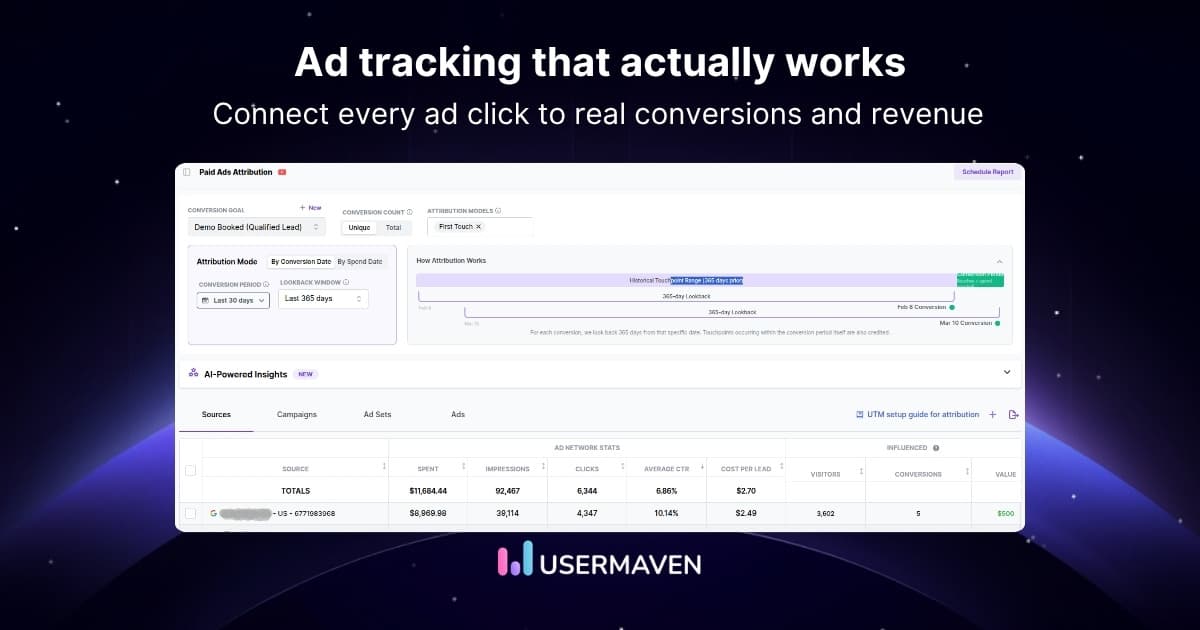
Meta can tell you which ad got the click. The harder question is whether that click became a qualified lead, customer, or revenue.
Facebook ad tracking connects that paid interaction with what happens next, from landing-page behavior and signups to purchases and upgrades. This guide focuses on measuring your own Facebook and Instagram campaigns as part of broader ad tracking.
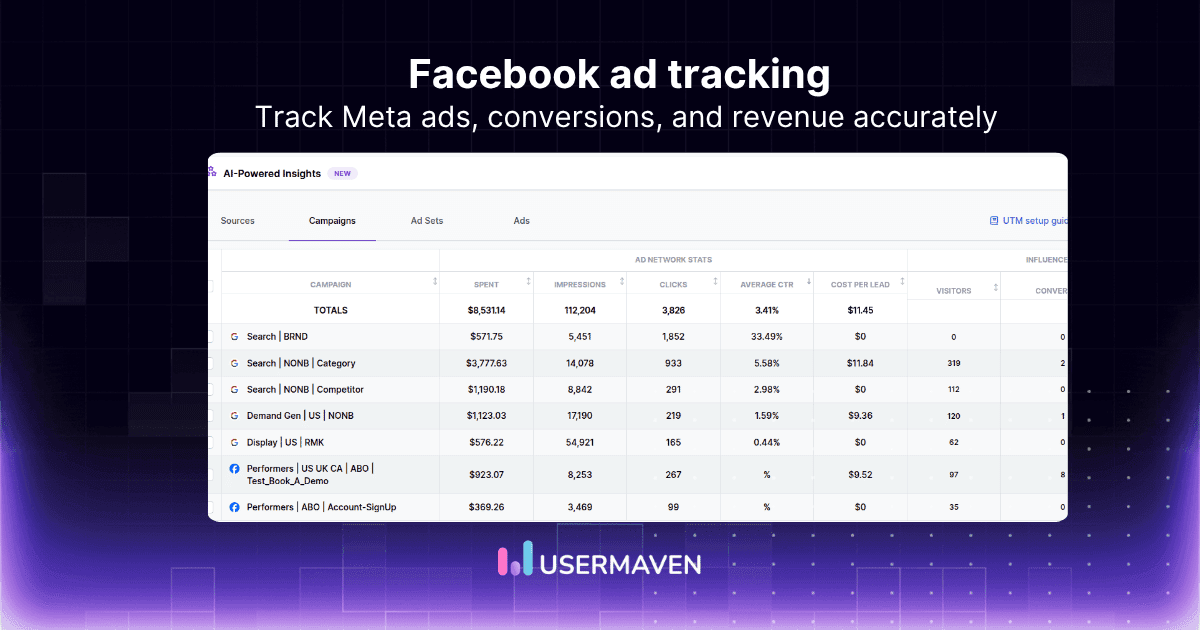
You will see how Meta Pixel, Conversions API, URL parameters, conversion events, funnels, independent attribution, and Facebook ads tracking software fit together so campaign decisions rely on meaningful outcomes rather than clicks alone.
Key takeaways
Meta Ads Manager covers delivery: Use it for spend, impressions, clicks, CTR, and campaign, ad set, or ad-level performance.
Meta Pixel captures browser behavior: It records website actions that happen after someone arrives from an ad.
Conversions API adds server-side signals: It can send website, app, offline, messaging, CRM, or backend events directly to Meta.
URL parameters preserve acquisition context: UTMs, ad IDs, and click identifiers make downstream analysis more precise.
Tracking and attribution are different: Tracking records the action; attribution decides whether Meta receives credit for it.
Independent analytics closes the loop: The strongest setup connects Meta traffic with product behavior, pipeline, revenue, and other channels.
What is Facebook ad tracking?
Facebook ad tracking is the process of measuring how users interact with Facebook and Instagram ads and connecting those interactions with downstream actions such as website visits, leads, purchases, product usage, or revenue.
At the platform level, Meta can report impressions, clicks, spend, click-through rate, and delivery across campaigns, ad sets, and ads.
Those metrics explain what happened inside the advertising platform, but they do not always show the full customer journey after the click.
That is why modern Facebook conversion tracking usually combines platform data with website events, server-side outcomes, campaign identifiers, and an independent analytics layer.
Facebook vs Meta terminology
Facebook advertising now sits within Meta’s broader advertising ecosystem, so this article uses Facebook ad tracking and Meta ad tracking interchangeably where the search intent is the same.
What this guide does not cover
It does not provide a competitor-spying tutorial for Meta Ad Library or instructions for disabling personalized-ad tracking. Those are different search intents from measuring your own paid campaigns.
How does Facebook ad tracking work?
A complete setup has several layers. Each captures a different part of the journey, and relying on only one layer can leave blind spots.

1. Ad-platform tracking
Meta Ads Manager provides campaign delivery and performance data such as spend, impressions, clicks, CTR, and results at campaign, ad set, and ad level.
2. Website and event tracking
After the click, analytics can record actions such as landing-page visits, form submissions, signups, purchases, and product interactions. For a deeper look at how those actions are defined and collected, see our event tracking guide.
3. Server-side conversion tracking
Important outcomes can also come from a backend, payment system, CRM, or other source. Server side tracking helps capture these actions even when they do not occur directly in the browser.
4. Independent analytics and attribution
An independent layer can combine Meta with Google, email, organic traffic, CRM stages, website behavior, and revenue. This creates a single source of truth for comparing channel performance under one measurement framework.
| Tracking layer | What it measures | Example |
| Meta Ads Manager | Ad delivery and platform performance | Spend, clicks, CTR |
| Meta Pixel | Browser-side website behavior | Lead submitted |
| Conversions API | Server-side and connected events | Purchase or qualified lead |
| URL parameters | Acquisition context | Campaign, ad set, ad ID |
| Independent analytics | Cross-channel outcomes | Pipeline or revenue |
Meta Pixel vs Conversions API
Meta Pixel and Conversions API solve related parts of Facebook ad conversion tracking, but they collect data from different places.

Meta Pixel
The Meta Pixel is browser-side JavaScript that records website activity such as page views and conversion events. It is useful for understanding behavior that happens in the browser and for giving Meta signals it can use for measurement and campaign optimization.
Conversions API
Conversions API creates a direct connection between marketing data and Meta. It can support website, app, offline, messaging, and other event sources.
Meta recommends considering it alongside the Pixel for website events rather than treating it as an automatic replacement. See Meta’s Conversions API documentation for current platform guidance.
Should you use Pixel and CAPI together?
Often, yes. Pixel can capture browser interactions while CAPI adds server or backend signals. The important requirement is to ensure that the same conversion is not counted twice.
Event deduplication
When the same event is sent from browser and server, Meta uses matching event names and event IDs as part of deduplication. If the identifiers are missing or inconsistent, purchase or lead counts can be inflated.
| Meta Pixel | Conversions API | |
| Collection | Browser | Server or connected source |
| Best for | Website interactions | Backend and connected outcomes |
| Affected by browser restrictions | More | Less |
| Can send conversion events | Yes | Yes |
| Can include event parameters | Yes | Yes |
| Can work together | Yes | Yes |
How to set up Facebook ad conversion tracking
Start with the outcome you need to measure and build the tracking stack around it. Installing a pixel before defining your conversion model usually creates more events, not better decisions.
1. Define the conversions that matter
Choose a small set of outcomes that represent real progress: signup, qualified lead, demo booked, purchase, subscription, upgrade, or closed revenue.
2. Set up the Meta Pixel
Install and validate browser-side tracking so important website actions are recorded consistently.
3. Configure conversion events
Map meaningful actions to standard or custom events and include useful parameters such as value, currency, product, plan, or lead type where appropriate.

4. Add URL and campaign parameters
Preserve source, campaign, ad set, ad, and click context so downstream analytics can connect the conversion with the correct paid interaction.
5. Add Conversions API where appropriate
Use server-side or connected event delivery for important outcomes that happen in checkout, billing, CRM, backend, or offline workflows.
6. Deduplicate browser and server events
When the same conversion is sent through Pixel and CAPI, make sure the event identifiers are aligned so Meta can recognize duplicates.
7. Validate the implementation
Trigger real flows and inspect whether events fire once, contain the expected parameters, and arrive in the correct destination.
8. Connect independent analytics
Bring Meta campaign data and conversion behavior into a neutral analytics layer so you are not limited to a single platform’s reporting logic.
9. Connect revenue or CRM outcomes
For SaaS and B2B, the most useful conversion may happen days or weeks after the original click. Preserve the acquisition context until the real commercial result occurs.
Facebook ad tracking without click redirects
Direct landing URLs
Yes. Facebook ad tracking without click redirect means you send visitors directly to the intended landing page instead of routing the click through a separate tracking domain first.
URL parameters
The tracking context can travel in the destination URL itself. Marketers can use UTM parameters with campaign, ad set, ad, and click identifiers to preserve where the visit came from.
First-party tracking
A direct URL does not mean no tracking. The landing page can capture first-party campaign parameters, website events, and the Facebook click identifier.
Server-side events can then connect purchases, qualified leads, or upgrades with the original visit.
Usermaven setup
Usermaven’s Meta tracking template uses source, medium, campaign, ad set, ad ID, and the Facebook click ID.
The Meta UTM tracking template emphasizes the ad ID because it is needed to associate conversions with the specific ad.
What Facebook conversion events should you track?
The right event set depends on the funnel. Track actions that indicate meaningful progression rather than every available interaction.
Lead-generation campaigns
Useful events include form_submitted, demo_booked, qualified_lead, opportunity_created, and closed_won.
Ecommerce campaigns
Typical events include product_viewed, add_to_cart, checkout_started, purchase_completed, refund_issued, and repeat_purchase.
SaaS campaigns
Useful events include signed_up, onboarding_completed, key_feature_used, subscription_started, plan_upgraded, and subscription_cancelled.
B2B campaigns
Track demo requests, lead qualification, opportunities, sales stages, and closed revenue. This makes conversion tracking more useful than optimizing only around the initial form submission.
How to track Facebook ads in Google Analytics
Google Analytics can provide an independent view of sessions, campaign traffic, events, and key outcomes from Facebook ads, provided your destination URLs and event setup are consistent.
Use consistent UTMs
Tag Facebook and Instagram destination URLs with a consistent source, medium, campaign, and content structure. HubSpot’s UTM tracking guide explains how UTM codes identify campaign traffic and support campaign measurement.
Track meaningful events
Make sure the events used for campaign evaluation represent useful outcomes such as signup, purchase, qualified lead, or upgrade rather than only page views.
Compare acquisition with downstream outcomes
Use source and campaign dimensions alongside conversion or revenue data to see whether Facebook traffic produces the behavior you actually value.
Expect Meta and GA4 to disagree
The two systems use different identities, event visibility, attribution rules, and reporting logic. Use the comparison to investigate measurement rather than assuming one dashboard must always match the other.
For a broader comparison, see Usermaven vs Google Analytics.
Facebook ad tracking vs attribution
Tracking and attribution are connected but different. Tracking asks whether the impression, click, visit, event, or conversion was recorded. Attribution asks whether Facebook should receive credit for the outcome and how much.
For example, a user might click a Meta ad, return through organic search, open an email, and then upgrade. The tracking system records those touchpoints and events; the attribution model decides which interactions receive credit.
The deeper discussion belongs in the dedicated guide to Facebook ads attribution, including attribution windows, models, and why platform-reported credit can differ from independent analysis.
Why Meta and analytics tools disagree
Discrepancies are not automatically proof that one platform is broken. Several structural differences can cause Meta, GA4, CRM reports, and independent analytics tools to show different conversion totals.
Attribution windows
Different systems may consider different time periods after a click or view eligible for credit.
View-through conversions
Meta may credit conversions influenced by ad views even when the user did not click the ad.
Identity differences
Each platform has different ways of connecting browsers, devices, users, and accounts.
Browser and consent limitations
Some browser-side events may be blocked, restricted, or unavailable depending on the environment and consent state.
Timezone differences
The same conversion can fall into different reporting dates when systems use different account timezones.
Duplicate or missing events
Implementation mistakes can inflate or suppress counts before attribution logic is even applied.
Different attribution logic
Meta, GA4, and independent tools can legitimately assign different credit to the same customer journey.
When numbers diverge, use a structured ad platform discrepancies workflow to determine whether the difference comes from collection, identity, attribution, or reporting.
How to track a Facebook ad funnel
Facebook ad funnel tracking connects the initial paid interaction with the steps that happen before the final business outcome.
A SaaS journey might look like: Meta ad → landing page → signup → activated user → demo → paid customer. An ecommerce journey might be: Meta ad → product page → cart → checkout → purchase.
Using funnel analytics software helps quantify where users progress or drop, while customer journey analytics software shows the broader sequence across sessions and channels.
The key is to preserve campaign context beyond the first session. If the source disappears once the user creates an account or enters the CRM, the team can measure the click but not the commercial result.
How to improve Facebook ad tracking accuracy
To improve Facebook ad tracking accuracy, focus on identifiers, event definitions, server-side coverage, and validation before adding more analytics dashboards.
Standardize URL parameters: Use one naming convention and preserve campaign, ad set, and ad identifiers consistently across campaigns.
Keep ad IDs available downstream: The ad ID is especially useful when you need to associate a conversion with a specific creative.
Use Pixel and server signals intentionally: Decide which events should be browser-side, server-side, or both, then deduplicate overlapping events.
Track later-funnel outcomes: Send purchases, qualified leads, upgrades, or closed revenue instead of optimizing only around the earliest lead event.
Validate after website changes: New forms, checkout changes, redirects, or tag-manager updates can silently break tracking.
Compare platform and independent data: Large gaps can reveal missing campaign parameters, identity problems, duplicate events, or attribution differences.
Audit measurement health: Treat tracking quality as an ongoing operational process rather than a one-time setup task.
Common Facebook ad tracking problems
Most Facebook tracking failures can be traced to collection, parameter, identity, or conversion-definition problems.
1. Meta Pixel is not firing
Check whether the base script loads on the intended pages and whether the event trigger matches the real user action.
2. The conversion event fires on the wrong action
Avoid triggering a lead or purchase event on page load when the user has not actually completed the outcome.

3. UTMs are missing or inconsistent
Standardize naming and make sure campaign parameters survive the complete landing-page path.
4. Redirects strip campaign parameters
Test the final destination URL after redirects, shorteners, locale changes, and cross-domain transitions.
5. Pixel and CAPI double-count conversions
Use consistent event names and IDs so browser and server versions of the same event can be deduplicated.
6. Ad IDs are not preserved
Without granular identifiers, later conversions may only be tied to a broad campaign or source.
7. Cross-domain tracking breaks
Confirm that checkout, app, subdomain, or payment flows keep the identity and acquisition context needed downstream.
8. CRM outcomes never return to analytics
For long sales cycles, connect lead and opportunity stages so the ad is judged by qualified pipeline and revenue.
9. Meta reports more conversions than analytics
Investigate view-through credit, attribution windows, identity, consent, missing events, and timezone differences.
What to look for in Facebook ad tracking software
Facebook ad tracking software should help you connect campaign delivery with behavior and business outcomes, not simply reproduce Ads Manager in another dashboard.
Meta Ads integration: Import campaign, ad set, ad, spend, click, and performance context.
Campaign and ad-level tracking: Preserve enough granularity to understand which creative and audience actually drove the outcome.
Event tracking: Connect the click with website, product, ecommerce, or lead events.
Server-side support: Capture important backend conversions and reduce dependence on browser-only signals.
UTM and click-ID support: Keep acquisition context intact through the journey.
Identity resolution: Connect anonymous visits with known users, leads, or customer accounts where appropriate.
Funnels and journeys: Analyze what happens between the ad click and the final conversion.
CRM and revenue context: Evaluate pipeline and revenue rather than only front-end leads.
Cross-channel reporting: Use cross-platform ad tracking to compare Meta with Google, email, organic, direct, and other channels under one framework.
Conversion feedback: Return verified outcomes to Meta so campaign optimization can learn from the conversions that matter.
Data-quality controls: Surface missing campaign data, matching problems, stale integrations, or conversion-feedback issues.
See Usermaven in action
Book a free demo and discover how powerful analytics can grow your business.
Best Facebook ad tracking tools
The strongest tool depends on whether your priority is cross-channel attribution, paid-media optimization, ecommerce reporting, conversion feedback, or server-side infrastructure.
1. Usermaven
Usermaven is best suited to SaaS, B2B, lead-generation, and marketing teams that want Facebook campaign data connected with behavior, journeys, conversion goals, CRM context, and revenue.
Its Meta tracking workflow preserves campaign and ad identifiers, supports cross-channel attribution, and can send selected first-party conversion goals back to Meta through conversion syncs.
2. RedTrack
RedTrack is oriented toward performance marketers, media buyers, agencies, and ecommerce teams that need paid-media tracking, server-side conversion collection, CAPI integrations, and campaign optimization.
Its product positioning emphasizes conversion and revenue tracking across multiple traffic sources rather than Meta in isolation.
3. Cometly
Cometly focuses on marketing attribution for paid acquisition teams. Its Facebook integration combines ad-level performance with leads and conversions.
It also supports Meta Instant Forms and qualified conversion feedback through the Conversions API, fitting teams that want to connect ad interactions with pipeline and revenue.
4. Triple Whale
Triple Whale is particularly strong for ecommerce brands. Its Meta Ads integration combines campaign data with ecommerce measurement and UTM tracking.
That makes it useful for teams that want Facebook performance analyzed alongside store revenue and other paid channels.
5. AnyTrack
AnyTrack focuses on conversion tracking and ad-platform feedback. Its Facebook Ads workflow supports website, store, funnel, and CRM conversions, event mapping, and Meta Conversions API delivery.
It is a practical fit for performance teams that prioritize campaign reporting, cross-platform attribution, and server-side conversion signals.
6. Stape
Stape differs from the attribution platforms above because it specializes in server-side tracking infrastructure.
Its Meta products focus on Conversions API Gateway and server-side Google Tag Manager workflows for teams that need stronger server-side collection and event delivery.
| Tool | Best for | Facebook tracking focus | Main strength |
| Usermaven | SaaS, B2B, marketing teams | Ads → behavior → conversions → revenue | Journeys + attribution |
| RedTrack | Performance marketers | Paid campaign and conversion tracking | Multi-channel ad tracking |
| Cometly | Lead-gen marketers | Ad-to-lead and revenue attribution | Paid acquisition attribution |
| Triple Whale | Ecommerce brands | Meta + store performance | Ecommerce revenue analytics |
| AnyTrack | Performance teams | Conversion tracking + CAPI | Cross-platform conversion signals |
| Stape | Technical teams | CAPI and server-side setup | Tracking infrastructure |
How Usermaven tracks Facebook ads
Usermaven connects Meta campaign data with the actions and commercial outcomes that happen after the click, so marketers can analyze more than the conversion count reported by one ad platform.

Connect Meta advertising data
Bring campaign performance into the same measurement environment as website, product, and customer data so Meta can be compared with other channels.
Preserve campaign and ad identifiers
Usermaven’s current Meta tracking template uses source, medium, campaign name, ad set name, ad ID, and the Facebook click ID. The ad ID is especially important for tying downstream conversions to the correct Meta creative.
Connect ad traffic with event data
Once the visitor reaches the site, event tracking can capture forms, signups, purchases, product usage, upgrades, and other behaviors that explain what happened after the paid click.
Follow the customer beyond the first session
Customer journeys can show how Meta interacts with organic, email, direct, and other channels before the final outcome, which is particularly valuable for longer SaaS and B2B buying cycles.
Measure funnels and conversion paths
Funnels can compare stages such as ad visit → signup → activation → purchase, while journey analysis preserves the wider sequence of touchpoints.
Compare Meta with other channels
A neutral marketing attribution software layer applies the same reporting framework across Meta, Google, LinkedIn, organic, email, and direct traffic instead of evaluating each channel only through its own dashboard.
Send verified conversions back to Meta
With conversion syncs, teams can select meaningful goals such as signups, purchases, or upgrades and send verified first-party conversion data back to Meta for campaign optimization.
Where AI helps with Facebook ad tracking
AI can shorten the time from tracking data to investigation, but only when campaign tagging, event collection, identity, and conversion feedback are trustworthy.
Ask campaign questions in natural language
Maven AI can answer questions about campaign performance, attribution, conversions, traffic changes, and customer behavior without requiring teams to manually rebuild every report.
Use MCP for deeper analysis
The Usermaven MCP server can connect authorized Usermaven data with MCP-compatible tools such as ChatGPT, Claude, Codex, and Cursor. Teams can investigate attribution, funnels, journeys, conversion goals, and campaign metrics from approved AI workflows.
Check measurement quality before trusting AI
The Measurement Trust Center checks campaign tracking, customer matching, connected platforms, conversion feedback, and data confidence. This is particularly relevant for Facebook ad tracking because a missing campaign parameter or broken conversion sync can make an AI explanation confidently wrong.
Detect anomalies and performance changes
AI can surface unusual conversion drops, sudden campaign changes, or differences between traffic and downstream outcomes, giving teams a faster starting point for diagnosis.
Keep human judgment in the loop
AI can identify patterns, but marketers still need to decide whether a change is caused by creative performance, audience quality, tracking implementation, attribution rules, seasonality, or a real shift in customer behavior.
Facebook ad tracking best practices
The goal is not perfect agreement between every dashboard. It is a consistent measurement system that makes budget decisions more reliable.
Use consistent UTMs: Standardize source, medium, campaign, ad set, and creative naming.
Preserve ad IDs: Keep enough granularity to tie downstream outcomes to the correct ad.
Track real business outcomes: Prioritize qualified leads, purchases, upgrades, pipeline, and revenue.
Use browser and server signals intentionally: Choose the appropriate collection method and deduplicate overlaps.
Validate major conversions: Test events after site, form, checkout, CRM, or tag changes.
Connect CRM and revenue data: Do not stop measurement at the first lead when the real value appears later.
Compare Meta with an independent layer: Use consistent attribution logic across channels.
Send verified outcomes back to Meta: Feed campaign optimization with the conversions that actually represent value.
Audit tracking regularly: Measurement quality changes as campaigns, websites, and integrations evolve.
Final verdict
Facebook ad tracking should measure more than clicks and the conversions Meta reports inside Ads Manager.
A stronger setup combines campaign identifiers, Meta Pixel, server-side signals, website and product events, CRM or revenue outcomes, and independent attribution so marketers can see what happens after the ad interaction.
The objective is simple: understand which Facebook and Instagram campaigns create valuable customers and revenue, then give both your team and Meta’s optimization system better signals to act on.
Ready to see Usermaven in action? Explore the platform or book a demo for a closer look.
Drive business growth
with AI-powered analytics
FAQs
1. What is Facebook ad tracking?
Facebook ad tracking measures ad delivery and connects Facebook or Instagram ad interactions with downstream outcomes such as visits, leads, purchases, product usage, and revenue.
2. How do I track Facebook ad conversions?
Set up Meta Pixel for browser-side events, configure the conversion actions that matter, preserve campaign and ad parameters, add Conversions API where appropriate, validate deduplication, and connect the resulting data with independent analytics or CRM outcomes.
3. What is the difference between Meta Pixel and Conversions API?
Meta Pixel collects website events in the browser. Conversions API sends events from a server or connected data source directly to Meta. They can work together when overlapping events are properly deduplicated.
4. Can you track Facebook ads without a click redirect?
Yes. You can send users directly to the landing page and preserve campaign context with UTMs, Meta dynamic URL parameters, ad IDs, and click identifiers. A redirect is not required for first-party event and conversion tracking.
5. How do I track Facebook ads in Google Analytics?
Add consistent UTM parameters to the destination URL, verify Facebook traffic appears under the intended source and medium, and connect that traffic with meaningful GA4 events or conversions.
6. Why do Facebook and Google Analytics show different conversions?
They can differ because of attribution windows, view-through credit, identity methods, browser and consent limitations, missing events, timezone settings, and different attribution rules.
Updated

Written by
Junaid Ahmed
Content Writer & Digital Marketer
Junaid Ahmed is a content and copywriter with 3+ years of experience creating research-driven content across SaaS, B2B, ecommerce, and digital marketing. He specializes in turning complex topics into clear, practical content that helps marketers better understand their challenges, evaluate solutions, and make informed decisions. His work spans educational content, industry insights, and actionable marketing guides.
All articles by Junaid →