You can drive plenty of traffic and still have no clear view of what actually worked. That is usually where campaign reporting starts to fall apart.
UTM parameters give marketers a simple way to organize traffic across channels. Adding clear labels to your links helps you see where visits are coming from and which campaigns are driving results.
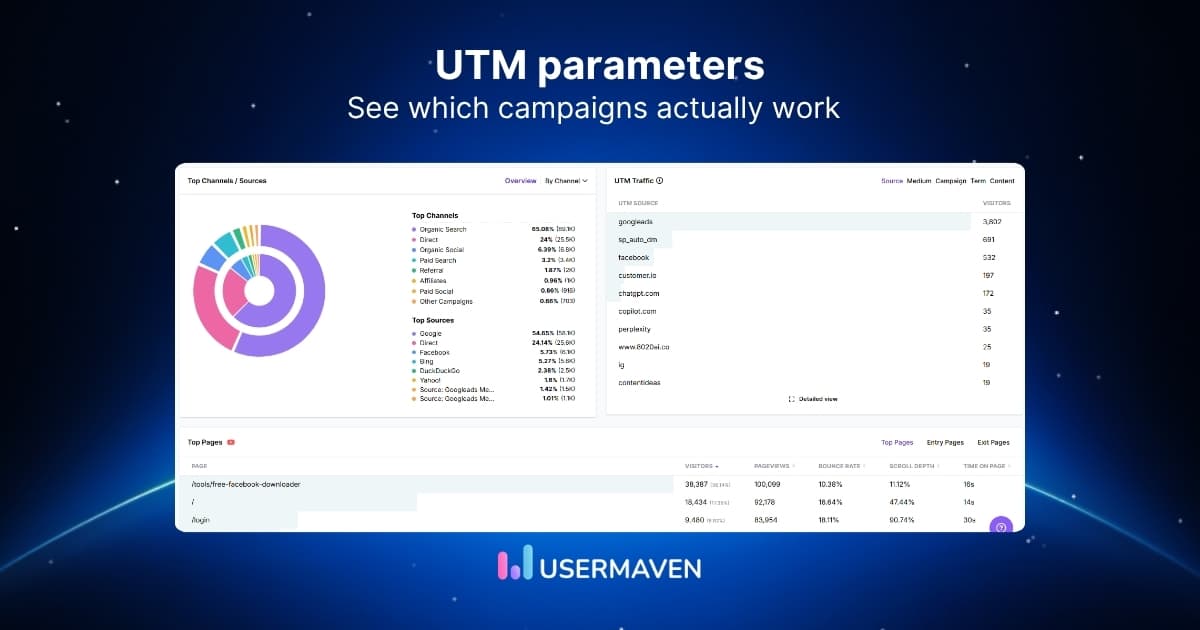
When used consistently, they make performance easier to compare and marketing attribution easier to trust. That is useful whether you are tracking email, social, paid ads, or partner campaigns.
In this guide, we will cover what UTM parameters are, where to use them, and the best practices for keeping your tracking clean and reliable.
What are UTM parameters?
UTM parameters are short tags added to the end of a URL to tell your analytics tools where a click came from. They give your links a bit of extra context, so your traffic reports are not just numbers without a source.
UTM stands for Urchin Tracking Module. While the name sounds technical, the idea is simple: these tags make tracking easier by showing how people found your content in the first place.
A simple UTM parameters example looks like this:
yourwebsite.com/demo?utm_source=linkedin&utm_medium=social&utm_campaign=q2_promo
With tags like these in place, tracking website visitors becomes much more straightforward. Instead of seeing traffic with limited context, you can tie visits back to specific emails, ads, posts, or partnerships and build a stronger website analytics strategy around what is actually driving results.
In practical terms, UTM parameters help answer questions like:
- Which channel brought this visitor in?
- Which campaign led to the click?
- Which links are actually driving valuable traffic?
Without UTMs, a lot of campaign traffic can end up looking unclear or lumped together in analytics. With them, your data becomes much easier to read, compare, and act on.
Why are UTM parameters important?
When campaign links are tagged properly, the payoff shows up quickly. Reporting gets cleaner, comparisons get easier, and performance becomes much easier to act on.

Some of the biggest benefits of using UTM parameters include:
- Clearer marketing campaign attribution: You can tell which channels, posts, emails, or ads are bringing in traffic, instead of lumping everything into broad source categories.
- More accurate lead source tracking: UTMs help you connect conversions back to the campaign touchpoint that started the journey, which makes reporting much more useful.
- Better comparison across channels: When links are tagged consistently, it becomes much easier to compare performance across social, email, paid ads, and partnerships.
- Stronger reporting for teams and stakeholders: UTMs give you cleaner campaign data to work with, which means less guessing and more confidence when sharing results.
- A clearer view of what deserves more budget: You can spot which campaigns are creating real traction and which ones are underperforming, making data-driven marketing decisions around optimization far easier to act on.
- More consistency in your tracking setup: A structured approach to UTMs reduces messy naming, missing data, and reporting gaps that make campaign analysis harder than it needs to be.
- Useful insight beyond the click: UTMs do not just show that someone arrived. They help you understand which marketing effort influenced that action in the first place.
The 5 UTM parameters explained
Once the basics are clear, the next step is knowing what each UTM parameter actually does. Each one adds a different layer of context, and together they make campaign tracking much easier to read.
1. utm_source
This tells you where the traffic came from. It identifies the platform, website, or publisher that sent the click.
For example, if someone clicks a link from LinkedIn, your source might be linkedin. If it came from Instagram, it could be instagram. This is especially useful when comparing platforms side by side or reviewing channel-level performance in your reports.
Example:utm_source=facebook
2. utm_medium
This shows how the link was shared. In other words, it describes the marketing channel or traffic type.
Common media include social, email, cpc, and affiliate. So if you are tracking paid search, the medium might be cpc. If you are reviewing social performance, using a consistent medium makes your reports much easier to group and compare.
Example:utm_medium=cpc
3. utm_campaign
This tells you which specific campaign the link belongs to. It is one of the most useful parameters because it helps you separate one promotion, launch, or seasonal push from another.
Say you are running a summer sale, a product launch, and a webinar campaign at the same time. Campaign tagging helps you keep those efforts distinct instead of blending everything together in the same reporting view.
Example:utm_campaign=summer_sale
This is also where naming discipline matters. A clear campaign name helps you connect traffic back to goals, performance, and broader website metrics without second-guessing what the tag was supposed to mean.
4. utm_term
This parameter is most commonly used in search campaigns to capture the keyword associated with the ad. It adds another layer of detail when you want to understand performance beyond the campaign level.
For teams running UTM parameters in Google Ads setups, this can be a helpful way to keep keyword-level reporting organized, especially when you want more visibility into which search terms are tied to clicks and conversions.
Example:utm_term=team_collaboration_software
5. utm_content
Sometimes the traffic source, medium, and campaign are all the same, but the creative is different. That is where utm_content comes in. It helps you tell one version of a link apart from another.
This is useful for comparing CTA buttons, ad creatives, banner placements, or even two versions of the same post. It can be especially helpful when setting up UTM parameters for Facebook ads or reviewing performance alongside Meta thread analytics, where multiple creatives may point to the same page.
Example:utm_content=video_ad_a
💡 Pro tip: If you want a faster way to keep your UTM setup clean across platforms, use our UTM tracking templates for ready-to-use templates across different ad platforms.
Where to use UTM parameters
Once you know what each tag does, the next step is knowing where to put them. Let’s look at the channels and campaign touchpoints where UTM parameters are most useful.
Social media
Social posts often drive traffic from more than one place at once. You might be publishing across LinkedIn, Instagram, X, Facebook, Threads, and more, all pointing to the same landing page.
UTM parameters help you separate those clicks by platform, post, or campaign, so social reporting is not reduced to one broad traffic bucket.
A LinkedIn webinar promotion, for instance, might use:
- URL:
yourwebsite.com/webinar - UTM source:
linkedin - UTM medium:
social - UTM campaign:
webinar_promo
Email marketing
Email is one of the easiest places for UTMs to add value. Newsletters, nurture emails, product announcements, and promotional sends can all drive traffic to the same pages, but not for the same reason.
Adding UTM parameters helps you keep those sends distinct, so you can see which email actually led to the click and which campaign it supported.
That level of separation is useful because a report found that the total click rate rose to 2.15% year over year, which makes it even more important to know which specific send, offer, or campaign actually earned the click.
A product launch email sending traffic to your demo page could be tagged like this:
- URL:
yourwebsite.com/demo - UTM source:
product_email - UTM medium:
email - UTM campaign:
new_feature_launch
PPC
Paid campaigns generate traffic from multiple ads, platforms, and keywords at once, so clean tagging matters even more here. UTMs make it easier to keep those clicks organized once they land on your site.
For example, if you are running a Google Ads campaign:
- URL:
yourwebsite.com/crm-software - UTM source:
google - UTM medium:
cpc - UTM campaign:
crm_search_campaign
If you are setting up UTM parameters for Meta ads, the same logic applies. The goal is to keep campaign, ad set, or creative-level traffic easier to separate once the clicks start coming in.
Affiliate or influencer marketing
Affiliate and influencer campaigns often send traffic from multiple partners to the same landing page, which makes performance harder to untangle without proper tagging.
UTM parameters help keep that traffic separate, so you can see which creator, affiliate, or partnership is driving clicks, engagement, and conversions. That visibility becomes even more important when partner activity is spread across many sources. Squaredance found affiliate reporting covered 32 click-driving channels and 23 sales-driving channels in Q1 2024.
An affiliate link to your pricing page, for example, might use:
- URL:
yourwebsite.com/pricing - UTM source:
affiliate_janedoe - UTM medium:
affiliate - UTM campaign:
partner_promo
Local SEO
Local SEO is not always the first place marketers think of for UTM tagging, but it can still be useful in the right places. If you are linking from business listings, local directories, or location-based campaign pages, UTMs can help you keep that traffic easier to identify.
That can give you better visibility into which local placements are actually sending qualified traffic, especially when multiple listings point to the same page.
A Google Business Profile link, for example, could be tagged like this:
- URL:
yourwebsite.com/location/chicago - UTM source:
google_business_profile - UTM medium:
local - UTM campaign:
chicago_listing
A simple rule works well here: if a link is part of a marketing effort, it is usually worth tagging. The cleaner the setup, the easier it is to read the results later.
Unlock insights that drive growth
UTM parameter best practices to keep tracking clean
A good UTM setup is not just about adding tags to links. It is about using them in a way that keeps your campaign data clear, usable, and easy to trust over time.
1. Use a consistent naming convention
UTMs work best when everyone on your team uses the same naming rules. If one campaign uses facebook and another uses Facebook, your reporting can quickly get messy.
A simple naming convention helps avoid common UTM mistakes and keeps campaign performance easier to compare.
A few good rules to follow:
- Use lowercase across all tags
- Avoid spaces
- Choose one separator style, such as hyphens or underscores
- Keep campaign names clear and easy to recognize
2. Keep your tags simple and readable
UTM names should be specific enough to be useful, but not so long that they become hard to manage. A tag like spring_sale_2026 is much easier to work with than something overly detailed or inconsistent.
If the name is hard to read, it will probably be harder to report on later too.
3. Tag links with a clear purpose
UTMs work best when they are tied to a reporting need. That could be comparing channels, measuring a campaign, tracking a partner, or separating paid and organic efforts.
When tags are added without a clear reason, the data becomes cluttered and less useful.
4. Never use UTMs on internal links
UTM parameters are meant for incoming campaign traffic, not links between pages on your own site. If you add them to internal links, they can overwrite the original source data.
That makes attribution less accurate and creates confusion in your reporting. UTMs should stay on links used in ads, emails, social posts, listings, and other external placements.
5. Keep campaign names aligned with how you report
Your UTM setup should reflect how you actually review performance. If your team reports by product launch, region, or channel, your campaign naming should support that from the start.
This makes it much easier to filter reports, compare results, and understand what each campaign name is supposed to represent.
6. Document your UTM conventions
Even a simple UTM structure can break down if everyone uses their own version. A shared reference doc or template helps teams stay aligned, especially when more people start creating campaign links.
This can be as simple as documenting:
- Approved source names
- Approved medium names
- Campaign naming format
- When to use each type of tag
A shared naming system matters because stronger documentation makes it easier to support marketing measurement for better ROI when teams are dealing with fragmented data and siloed reporting.
7. Check links before campaigns go live
Small errors in UTMs can lead to fragmented reports later. A typo, missing value, or inconsistent tag may not look like much at first, but it can create avoidable reporting gaps.
Before publishing, check:
- The destination URL works
- Each UTM tag is spelled correctly
- Naming matches your agreed format
- The campaign label is the right one for reporting
Done well, these practices keep UTM tracking from turning into cleanup work later. The more disciplined the setup, the more useful your campaign data becomes.
Make your UTM tracking easier with Usermaven
If you are creating tagged links manually, Usermaven’s free UTM builder makes the process a lot easier. It helps you generate campaign-ready URLs with the fields marketers actually need, including source, medium, campaign, term, content, and campaign ID.

The setup is simple. Paste in your destination URL, fill in your campaign details, and the builder generates the full tracking link for you. That means less friction during setup and fewer tagging mistakes once campaigns go live.
Here is the basic flow:
- Add your website URL
- Fill in your UTM fields
- Generate the tagged link
- Use it across email, paid ads, social, or partner campaigns
What makes Usermaven more useful is that it does not stop at link creation. Once your UTMs are in place, the platform helps you turn that tagged traffic into something much easier to analyze and act on.
A few features that make it especially relevant for UTM tracking:
- UTM traffic reporting so you can view tagged campaign traffic inside the web analytics dashboard
- Automatic event tracking to capture actions after the click without manual setup for every interaction
- User journey analysis to see how campaign traffic moves through the path to conversion
- Real-time dashboards to monitor campaign performance as data starts coming in
- Multi-touch attribution software to understand how tagged traffic contributes beyond a single click
- Ad network UTM templates for platforms like Google Ads, Meta Ads, Microsoft Ads, and LinkedIn Ads
That way, your UTM links do more than label traffic. They become part of a clearer view of how campaigns influence conversions, pipeline, and revenue.
To sum it up,
UTM parameters bring discipline to campaign tracking. They help you move past surface-level traffic numbers and get closer to the real story behind performance.
When every link is tagged with intention, it becomes easier to see what is creating momentum, what is driving conversions, and where your marketing is earning its return. That kind of visibility makes every campaign decision sharper.
Usermaven is a powerful marketing attribution tool built to take that clarity further. It takes your UTM data and connects it to the broader customer journey, so you are not just tracking where clicks came from, but understanding how campaigns influence pipeline, conversions, and revenue.
Ready to see Usermaven in action? Explore the platform or book a demo for a closer look.
FAQs about UTM parameters
1. What does UTM stand for?
UTM stands for Urchin Tracking Module. The name comes from Urchin, the analytics platform that later became part of Google Analytics.
2. What are the easiest tools for generating UTM parameters?
Online UTM builders make the process much faster and cleaner. Tools like Usermaven’s free UTM builder help you create tagged links quickly and avoid common formatting mistakes.
3. What are UTM parameters in social media marketing?
In social media, UTM parameters help you tell which platform, post, or ad drove the click. That means you can separate traffic from a LinkedIn post, an Instagram Story, and a paid Facebook campaign instead of grouping them together.
4. What are UTM parameters in digital marketing?
UTM parameters are tags added to URLs to show where traffic came from. In digital marketing, they help teams track campaigns more accurately across channels.
5. What are UTM parameters used for?
UTM parameters are used to track campaign traffic with more precision. Instead of just seeing visits, you can see which source, channel, or campaign brought someone in and which efforts are contributing to conversions.
6. Are UTM parameters case-sensitive?
Yes, and that matters more than it seems. If you use Facebook in one link and facebook in another, many analytics tools will treat them as separate sources and split your reporting.
7. How do I add UTM parameters to a URL?
Updated

Written by
Ryan Mitchell
Marketing Analytics Strategist
Ryan Mitchell is a marketing analytics strategist specializing in campaign measurement, customer journeys, and marketing performance. He writes about analytics, reporting, and data-driven marketing strategies, helping SaaS and B2B teams measure what matters across every stage of the customer journey.
All articles by Ryan →