Attribution tracking is the process of recording the marketing touchpoints a customer interacts with, such as ad clicks, emails and website visits, and connecting them to sign-ups, deals and revenue. It shows which channels and campaigns actually lead to customers.
It works by capturing source data on every visit, collecting events, linking visits to known users and companies, and syncing outcomes from your CRM. This guide covers each step, the methods involved, a practical setup and fixes for the most common tracking gaps.

Key takeaways
- Definition: Attribution tracking records the touchpoints that lead to a conversion and connects them to sign-ups, deals and revenue.
- Five stages: It captures source data, collects events, stitches identity, syncs outcomes and assigns credit.
- Source data: UTM parameters and click IDs show where a visit came from, while first-party and server-side tracking keep that data reliable.
- Clean conversions: Deduplicating browser and server events and sending conversions back to ad platforms improves reporting and ad targeting.
- Data quality first: Accurate tracking matters more than the model, so audit UTMs, identity and CRM sync before trusting any report.
What is attribution tracking?
Attribution tracking is the process of capturing every marketing touchpoint a person interacts with and linking those touchpoints to the conversions and revenue that follow. It is the data layer behind marketing attribution.
Tracking answers what happened, such as a LinkedIn ad click, two blog visits and a demo request. Marketing attribution models then decide how much credit each touchpoint deserves. If tracking is incomplete, even the best model produces the wrong answer.
Attribution tracking vs. conversion tracking
Conversion tracking records that a goal happened, such as a purchase or form submission. Attribution tracking goes further by recording the full path before that conversion and tying it to the people, accounts and revenue involved.
Why attribution tracking matters
Reliable tracking turns scattered channel reports into one view of what drives growth. It matters for every team that spends or reports on marketing budget.
- Smarter budget allocation. You can move spend toward channels that bring customers, not just clicks.
- One source of truth. It reduces the gap between what each ad platform claims and what actually happened.
- Better ad optimization. Accurate conversions sent back to ad platforms improve their targeting and bidding.
- Clear reporting. Leadership sees pipeline and revenue by channel instead of vanity metrics.
How attribution tracking works
Most attribution tracking setups follow the same five stages, whether you use a dedicated platform or build the pieces yourself.
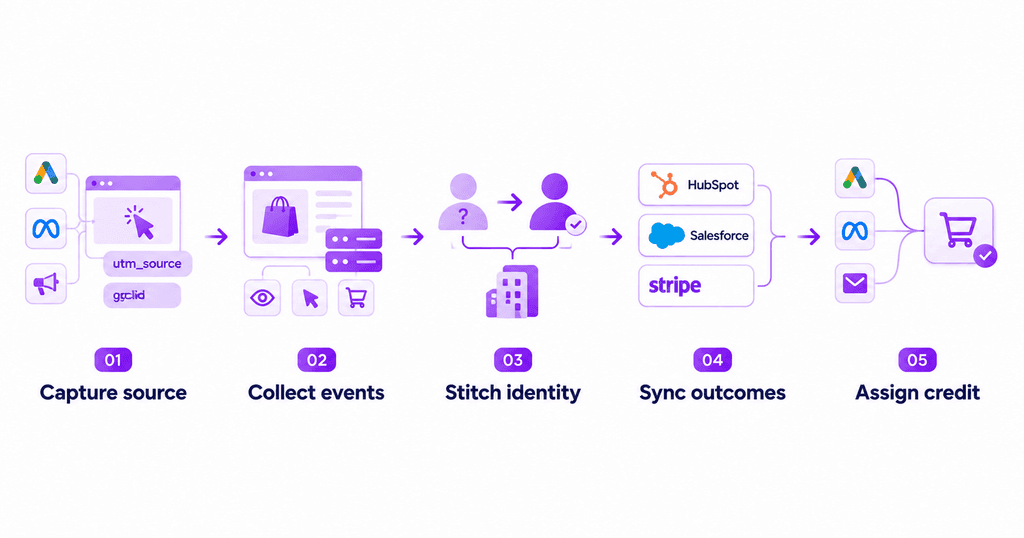
1. Capture source data on every click
When someone clicks an ad or link, the URL carries information about where they came from. UTM parameters record the source, medium and campaign you define, while click IDs such as GCLID and FBCLID are added automatically by Google and Meta.
2. Collect events on your website and product
A tracking script records page views, clicks, form submissions and product actions, and stores the source data with an anonymous visitor ID. Server-side tracking sends the same events from your server, so they are not lost to ad blockers or browser restrictions.
3. Stitch identity across visits and devices
When a visitor signs up or logs in, their anonymous history is merged with a known user ID or email. Identity resolution then links users to companies, so B2B teams can see every touchpoint across a buying group.
4. Sync outcomes from your CRM and billing
Conversions that matter most, such as opportunities, closed deals and subscriptions, usually live in tools like HubSpot, Salesforce or Stripe. Syncing these outcomes back to the tracked journey connects marketing activity to real revenue.
5. Assign credit with an attribution model
Finally, a model distributes credit across the touchpoints in each journey. Single-touch models give all credit to one interaction, while multi-touch attribution spreads it across several.
What data attribution tracking collects
The table below summarizes the main data points, where they come from and why they matter.
| Data point | Source | Why it matters |
|---|---|---|
| UTM parameters | Tagged campaign links | Identify source, medium and campaign |
| Click IDs | Google, Meta and Microsoft ads | Match visits to specific ad clicks |
| Referrer | Browser | Capture untagged organic and referral traffic |
| Events | Website and product | Record the actions that lead to conversion |
| User and company IDs | Sign-ups, logins and CRM | Connect visits across devices and buying groups |
| Deals and revenue | CRM and billing | Tie touchpoints to money, not just leads |
Attribution tracking methods
Teams combine several methods to capture as much of the journey as possible. Each has strengths and blind spots.
Pixel and script-based tracking
Browser pixels, such as the Meta Pixel or LinkedIn Insight Tag, and analytics scripts are fast to install. They lose data when ad blockers, cookie limits or consent choices block them.
Server-side tracking
Server-side events are sent from your own infrastructure using first-party data. They are more reliable and easier to keep consent-compliant, which is why most serious setups now pair them with browser tracking.
Click-through and view-through attribution
Click-through attribution credits ads that were clicked before a conversion. View-through attribution also credits ads that were seen but not clicked, usually within a short window, so treat view-through numbers with caution.
Offline and CRM-based tracking
Calls, events, sales meetings and in-store purchases happen outside the browser. Logging them in the CRM, or uploading them as offline conversions, keeps them in the attribution picture.
Cookieless and first-party tracking
With third-party cookies disappearing, cookieless tracking relies on first-party data and server-side events to measure journeys while respecting privacy rules.
Client-side vs. server-side attribution tracking
Browser and server tracking work best together. The table shows how they compare.
| Aspect | Client-side (browser) | Server-side |
|---|---|---|
| Setup | Quick, tag or script | Needs a server or platform |
| Ad blockers | Often blocked | Not affected |
| Cookie limits | Short cookie lifetimes | First-party, longer lifetimes |
| Data control | Sent directly to vendors | You control what is shared |
| Best use | Real-time page interactions | Conversions and revenue events |
Deduplication and conversion APIs
When the same conversion is sent from the browser and the server, it can be counted twice. Sending a shared event ID with both lets ad platforms keep one copy.
Conversion APIs from Meta, LinkedIn and Google then receive these clean conversions. Sending accurate conversions back to ad platforms with conversion syncs improves their optimization as well as your reporting.
How to set up attribution tracking
These steps create a reliable foundation for any business, from ecommerce to B2B SaaS.
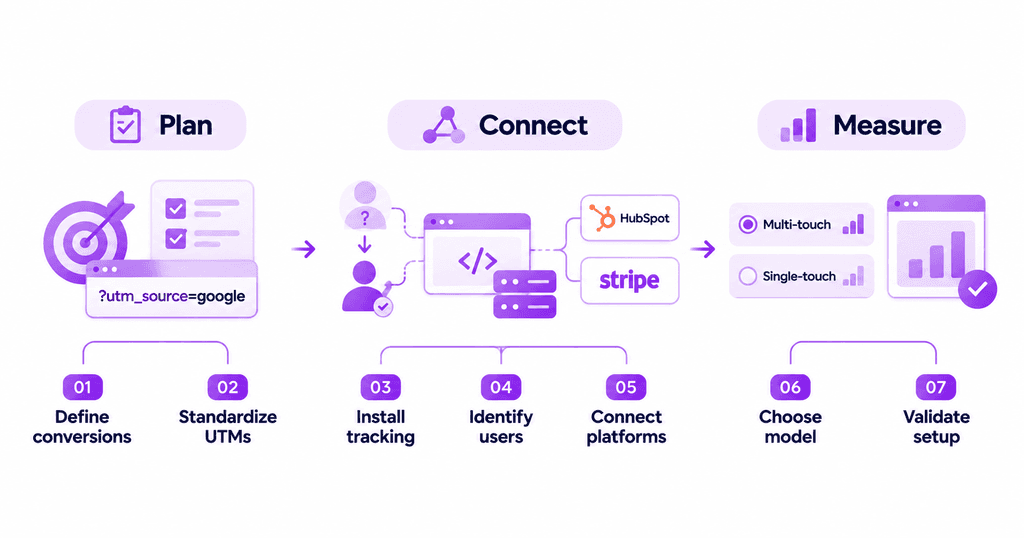
1. Define conversions and revenue events
List the actions that matter, such as sign-ups, demo requests, trials, purchases and closed deals. Decide which are primary goals and where each one is recorded.
2. Standardize UTM naming
Agree on lowercase values and fixed names for source, medium and campaign. A shared UTM builder or template prevents channels from splitting into several spellings in your reports.
3. Install first-party and server-side tracking
Add your tracking script to every site and app domain, then set up server-side events for key conversions. Use cross-domain tracking if journeys move between domains, such as a marketing site and an app.
4. Identify users and companies
Send a user ID and email when people sign up or log in, and attach company or account IDs for B2B. This links anonymous history to known customers.
5. Connect your CRM, billing and ad platforms
Sync deals, subscriptions and revenue from your CRM and billing tools, and connect ad accounts to import spend. This lets you compare cost with outcomes for each channel.
6. Choose a model and attribution window
Pick a model that fits your sales motion and set an attribution window that covers your typical buying cycle. Compare at least two models before drawing conclusions.
7. Validate and monitor
Run test conversions, compare totals with your CRM and check for untagged traffic. Review tracking health monthly, especially after site or campaign changes.
Attribution tracking example
Hypothetical example. A B2B SaaS company runs LinkedIn and Google Ads. A marketer clicks a LinkedIn ad tagged with UTMs, reads two blog posts and leaves. A week later she searches the brand, clicks a Google ad with a GCLID and signs up for a trial.
The tracking script stores both visits under one anonymous ID, then stitches them to her user and company at sign-up. Three weeks later, a $12,000 deal closes in HubSpot and syncs back to her journey.
With a linear model, LinkedIn, organic content and Google Ads share the credit. The server-side conversion is also sent to both ad platforms with one event ID, so neither counts it twice.
Common attribution tracking problems and fixes
Most attribution errors come from a handful of tracking gaps. Use this table to diagnose them quickly.
| Problem | Likely cause | Fix |
|---|---|---|
| Too much direct traffic | Untagged links or lost referrers | Tag every campaign and email link with UTMs |
| Ad platform and analytics disagree | Different models and windows | Compare like-for-like and use one source of truth |
| Duplicate conversions | Browser and server both firing | Send a shared event ID for deduplication |
| Journeys break at sign-up | No identify call | Send user ID and email on sign-up and login |
| Revenue missing from reports | CRM not synced | Connect CRM and billing to the tracking tool |
| Data drops after consent changes | Blocked browser tags | Add server-side tracking for key events |
Persistent gaps between tools are normal. Understanding ad platform discrepancies helps you explain them instead of chasing perfect matches.
Attribution tracking software
Dedicated software handles collection, identity, CRM sync and modeling in one place. When comparing marketing attribution tools, look for these capabilities.
- First-party and server-side collection that survives ad blockers and cookie limits.
- Automatic UTM and click ID capture with clean channel mapping.
- Identity resolution for users, devices and companies.
- CRM and billing integrations for pipeline and revenue.
- Model comparison to see how credit shifts between models.
- Conversion syncs that send results back to ad platforms.
How Usermaven helps with attribution tracking
Usermaven is an AI-powered marketing attribution platform for B2B SaaS companies, ecommerce brands and agencies. It captures touchpoints automatically and connects them to conversions, pipeline and revenue.
Maximize your ROI
with accurate attribution
Usermaven combines automatic event capture, cookieless and server-side tracking, UTM and click ID capture, and identity stitching across users and companies. It syncs with your CRM and ad platforms, compares attribution models side by side and sends conversions back to ad networks.
Maven AI and Maven AI Agents
Maven AI lets you ask questions about your attribution data in plain English and turn the answers into charts, reports or dashboards. Maven AI Agents run scheduled investigations into campaign performance or funnel health and send the findings by email and Slack.

Usermaven MCP
Usermaven MCP connects your analytics to ChatGPT, Claude and Cursor. You can create funnels, segments, dashboards and reports from a chat, with your approval before changes are made, and it is included in all plans.
Final thoughts
Attribution tracking is the foundation of every attribution report. Capture source data on every click, collect events with first-party and server-side tracking, stitch identity and sync revenue before choosing a model.
Validate your setup regularly and fix gaps such as untagged links and missing identify calls early. Clean tracking makes every model, dashboard and budget decision more trustworthy.
If you want to see attribution tracking from first click to revenue in one platform, book a demo to see Usermaven in action.
FAQs
What is attribution tracking?
Attribution tracking is the process of capturing the marketing touchpoints a person interacts with, such as ad clicks, emails and website visits, and linking them to the conversions and revenue that follow.
How does attribution tracking work?
It captures source data from UTMs and click IDs, collects events with a tracking script or server, stitches anonymous visits to known users and companies, syncs outcomes from the CRM and then assigns credit with an attribution model.
What is the difference between attribution tracking and attribution models?
Attribution tracking collects the touchpoint and conversion data. Attribution models, such as first touch, linear or time decay, decide how much credit each tracked touchpoint receives.
What are the best attribution tracking tools?
Good attribution tracking software offers first-party and server-side collection, UTM and click ID capture, identity resolution, CRM sync and model comparison. Usermaven, HockeyStack, Dreamdata, Cometly and Ruler Analytics are common options.
Is server-side tracking better for attribution?
Server-side tracking is more reliable because ad blockers and browser limits do not affect it. Most teams combine it with browser tracking and deduplicate events with a shared event ID.
How do you track attribution in HubSpot?
HubSpot records contact sources and supports attribution reports on higher plans. Connecting HubSpot to a dedicated attribution tool adds cross-channel tracking, server-side events and model comparison.
Why does my attribution data not match my ad platforms?
Ad platforms use their own models, windows and view-through credit, and each claims conversions it influenced. Compare like-for-like settings and use one independent source of truth for decisions.

Written by
Junaid Ahmed
Content Writer & Digital Marketer
Junaid Ahmed is a content and copywriter with 3+ years of experience creating research-driven content across SaaS, B2B, ecommerce, and digital marketing. He specializes in turning complex topics into clear, practical content that helps marketers better understand their challenges, evaluate solutions, and make informed decisions. His work spans educational content, industry insights, and actionable marketing guides.
All articles by Junaid →