A long string called fbclid sometimes appears at the end of a website link after someone opens it from Facebook or Instagram. It can make the URL look messy, produce extra entries in analytics reports, and raise a practical question: should you delete it?
fbclid is a Meta click identifier, not a broken URL or a campaign name. It can help preserve click context for conversion matching, but the right treatment depends on whether you are sharing a link, cleaning a report, or configuring advertising measurement. Reliable marketing attribution software also needs campaign and conversion data beyond this one identifier.
This guide explains what the parameter means, how it differs from Meta’s browser identifiers and UTMs, why it appears in GA4, and how to troubleshoot it without accidentally interrupting the tracking you need.
Key takeaways
- Click identifier: fbclid is a query parameter Meta can append to a destination URL when someone follows a link from its platforms.
- Not proof of an ad click: The parameter alone is not enough to distinguish paid Facebook or Instagram visits from organic social traffic.
- Different tracking jobs: fbclid, _fbc, _fbp, UTMs, and event_id carry different information; none should be treated as interchangeable.
- Clean reports, not necessarily URLs: GA4’s Page path dimension excludes query strings, while Page location includes them. Removing fbclid in the wrong place may lose useful tracking context.
- Preserve before stripping: If your implementation is permitted to use the click ID, capture it before redirects or URL cleanup remove it.
- Verify business outcomes: Test the landing page, click context, conversion event, and any Meta conversion sync rather than assuming that the presence of a parameter guarantees attribution.
What is fbclid?
fbclid stands for Facebook Click Identifier. It is a query-string parameter Meta may add to a website address when someone clicks through from Facebook, Instagram, or another Meta surface. The value is an opaque identifier, not a readable campaign name, person name, or email address.
A simplified example looks like this:
https://example.com/pricing?fbclid=EXAMPLE_CLICK_IDThe page is still /pricing. The question mark begins the query string, fbclid is the parameter name, and the value identifies click context that an eligible measurement implementation may use. Real values are generally much longer than this example.
The parameter does not create a conversion, install a Pixel, or identify a visitor to your own CRM by itself. If a signup or purchase occurs, the site still needs properly configured event tracking and an authorized way to connect that event to available acquisition data.
Why does Meta add it to links?
Meta uses click-related information as one signal in its measurement ecosystem. It can help eligible integrations connect later website events with an earlier interaction, including when Meta Pixel or Conversions API is involved.
A click ID should not be confused with a campaign report. By itself, it does not tell a third-party analytics platform which ad set ran, what was spent, or which targeting audience saw the creative. Those questions require separately captured campaign metadata, ad account integration, and conversion reporting.
How does fbclid work?
Consider a SaaS company promoting a free trial on Instagram. A person taps the link, lands on its website, signs up, and upgrades a week later. The click identifier may be one part of the technical context connecting the original Meta interaction with subsequent events.
The basic sequence is straightforward:
- A visitor follows a Meta link: The destination URL may arrive with fbclid in its query string.
- The landing page loads: An authorized tracking implementation reads the available URL and campaign context before any cleanup or redirect discards it.
- The site records meaningful events: Signup, demo booking, purchase, or another event is tracked with the correct identifiers and timestamps.
- Eligible matching information is used: Meta’s measurement integrations may use click or browser context, together with other permitted signals, to help match a conversion.
- Marketers analyze the result: Conversion and attribution reports are interpreted alongside the marketing source, the journey, and eventual business outcomes.
There are several reasons the chain may be incomplete. The identifier may not be present on a particular visit, a user can decline tracking, a redirect can remove query parameters, or a person may return on another browser. None of these gaps should be silently filled with invented attribution.
fbclid vs. _fbc vs. _fbp vs. UTM parameters
These identifiers and parameters are often mentioned in the same setup guides, but they perform different jobs.
| Parameter or signal | What it represents | Main use |
|---|---|---|
| fbclid | Click-related value in an incoming URL | Preserve available Meta click context |
| _fbc cookie / fbc field | Meta click context stored or sent in Meta’s expected format | Help match eligible website conversions to an earlier Meta click |
| _fbp cookie / fbp field | Browser-related identifier used by Meta | Additional browser matching context |
| utm_source, utm_medium, utm_campaign | Marketer-defined acquisition labels | Classify source, medium, and campaign in analytics |
| event_id | Identifier for one conversion event | Help deduplicate a browser event and server event describing the same action |
When a valid fbclid arrives and the implementation is configured to retain it, the associated _fbc cookie or fbc event field can carry that click context in a different format. This is not just a renaming of the URL parameter. Meta’s official Conversions API SDK includes support for fbc and fbp fields in server events.
The _fbp value is related to browser context rather than an individual ad click. Likewise, event_id serves deduplication and does not identify the advertising source. Our separate Facebook server-side tracking article covers Pixel, Conversions API, and deduplication setup in greater detail.
Unlock insights that drive growth
Why UTMs still matter
A Meta click ID is not a replacement for consistent campaign tags. UTMs help independent analytics tools understand how visits should be grouped. For example, a paid Meta campaign may be tagged with utm_source=facebook and utm_medium=paid_social, while an unpaid post may use utm_medium=organic_social.
The click ID and campaign labels serve complementary purposes. A practical UTM parameters convention lets teams compare campaigns while the permitted click identifier can support conversion matching. Neither guarantees that every conversion will be attributed.
Does fbclid mean the visitor clicked a paid Facebook ad?
No. Seeing fbclid does not, by itself, establish that a session was generated by a paid ad. Meta-related click identifiers can also appear in organic click contexts. AppsFlyer explicitly notes this distinction in its traffic source resolution guidance.
This matters because treating every URL with fbclid as Paid Social can inflate the apparent results of advertising. Source and medium data, the referrer, ad-specific metadata, and your analytics platform’s classification rules are more informative when considered together.
Usermaven’s default channel mapping documentation distinguishes Paid Social, which requires relevant paid indicators, from Organic Social. It can classify a visit carrying fbclid without paid campaign labels as Organic Social where the rest of the mapping conditions apply.
Example: A paid Facebook campaign tagged with a paid medium and an unpaid post shared by a community manager may both bring visitors from Meta’s ecosystem. A click identifier alone cannot tell you which of those two activities earned the conversion.
Why does fbclid appear in Google Analytics 4?
GA4 can collect the page address associated with a web event. If that address includes fbclid, the parameter may appear wherever the report shows the complete URL or a dimension that includes its query string. This does not necessarily mean you have dozens of different pages.
For example, these URLs could describe the same content:
https://example.com/pricing?fbclid=CLICK_Ahttps://example.com/pricing?fbclid=CLICK_Bhttps://example.com/pricingGoogle’s GA4 dimension reference makes the distinction clear:
| GA4 dimension | What it includes | Effect on this example |
|---|---|---|
| Page path | Path without query string | All three show /pricing |
| Page path + query string | Path with parameters | Different fbclid values may appear separately |
| Page location | Full URL including query string | Different click IDs can produce different values |
How to clean up a GA4 report
Start with the reporting dimension. If the question is “How many users visited our pricing page?”, Page path is often more useful than Page location. It removes the visual fragmentation without changing the incoming visitor URL.
If your organization needs the parameter excluded from collected GA4 URL values, GA4’s data redaction settings allow configured query parameters to be redacted. Be aware that this affects the data sent to GA4, does not remove the browser’s address-bar parameter, and does not automatically change what a separate Pixel, tag manager, or server endpoint captures.
Avoid implementing redaction blindly. Confirm whether another authorized measurement integration needs the original click context and test the order of operations first.
Should you remove fbclid from URLs?
There is no universal yes-or-no answer. A clean, shareable link and a production attribution pipeline have different requirements.
| Situation | Recommended action |
|---|---|
| Copying a link to share with a colleague | Use the clean destination URL if the identifier is unnecessary for that sharing task |
| GA4 page report looks fragmented | Start with Page path or appropriate reporting configuration |
| Landing page receives Meta campaign traffic | Capture permitted click context before altering the URL |
| Redirect drops query parameters | Investigate and fix the redirect if the parameters are needed for measurement |
| Search engine crawls many parameterized URLs | Set consistent canonical URL signals for equivalent content |
| Consent or privacy policy restricts tracking | Respect the applicable preferences and data-handling rules before collection or use |
Does fbclid create an SEO duplicate-content problem?
A query parameter can create multiple crawlable URLs that show the same page. That does not automatically mean a penalty or a new piece of content for every click.
Google’s canonicalization guidance recommends indicating a preferred canonical URL for duplicate or very similar pages. For an ordinary pricing page, that is usually its clean, stable URL. Canonicalization is an indexing signal, not a substitute for capturing permitted measurement data.
Avoid using noindex, blanket query-string removal, or broken redirects as a shortcut. Those changes can affect site behavior and measurement in ways unrelated to search consolidation.
How to preserve fbclid for conversion tracking
If your tracking setup is permitted to use the identifier, the objective is to preserve the relevant click context through the visitor’s journey without exposing or mishandling it.
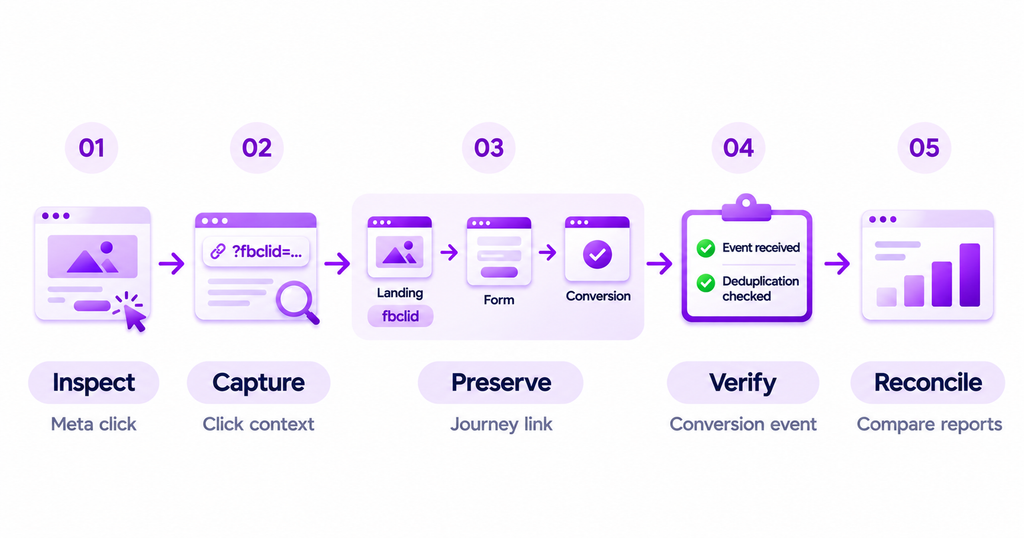
1. Inspect the real destination from a test Meta click
Use a controlled test ad or approved test environment. Open the published link and check whether the resulting landing page contains fbclid. Do not infer that a manually typed URL will behave exactly like a Meta click.
Record whether the page redirects and whether parameters survive. If Meta adds the click ID after your configured destination, make sure URL-cleanup logic does not run before the tracking implementation has had an appropriate opportunity to read it.
2. Verify what your tracking system actually captures
A visible query parameter is not proof that your analytics or Meta integration stored it. Check the permitted tag or event payload, test logs, and relevant first-party identifiers. Avoid pasting live click identifiers or personal information into public support tickets or screenshots.
For Meta measurement, check whether the Pixel or server-side setup collects the necessary click or browser matching information. A conversion tracking plan should specify the events that matter, not merely the URL fields to collect.
3. Preserve context through multi-page and multi-domain journeys
A visitor may start on a marketing landing page and complete a form, checkout, or signup on another route or domain. Ensure that the authorized tracking setup can connect these events where identifiers and consent allow. Carrying the raw URL query string through every step is not necessarily the safest or most reliable approach.
Use stable, properly governed event or customer identifiers where appropriate. Test redirects, account creation, and cross-domain journeys rather than assuming a visit-level signal will survive automatically.
4. Send and validate the correct conversion event
Define the business outcome: a demo booked, subscription purchased, or trial activated. Make sure the event fires only when the outcome really occurs, includes accurate time and value information, and is not duplicated between browser and server sends.
In Meta Events Manager, review Test Events and Diagnostics. If a server event is sent with the appropriate matching fields, verify that it arrives and does not create an extra conversion because browser/server deduplication was omitted.
5. Reconcile the result with marketing reporting
A Meta ad-platform conversion count may differ from independent analytics because platforms apply different attribution windows, eligible interactions, modeling, and identity rules. Compare like-for-like dates and definitions. Investigate discrepancies before changing campaign budgets.
Common fbclid tracking problems and fixes
| Problem | What to check first | Why it matters |
|---|---|---|
| fbclid missing on a test page | Test a real Meta click, then inspect redirects and query-string handling | A manually opened URL does not simulate an advertising click |
| GA4 shows many URL rows for one page | Page path vs. Page location or Page path + query string | The report may be splitting the same page by click ID |
| Meta clicks show as organic social | UTM medium, source, referrer, channel rules, and actual paid ad metadata | fbclid is not a reliable paid-only classification flag |
| Conversions fail to sync | Click context, match data, lookback window, event eligibility, and integration status | The ad platform may not have enough valid information |
| Duplicate purchases in Meta | event_name and deduplication event_id across Pixel and server events | Click IDs do not deduplicate conversions |
| Values disappear during checkout | Cross-domain handoff, consent, identifiers, and event instrumentation | Landing and conversion records may not be connected |
| SEO tools list parameterized duplicates | Canonical configuration and consistent clean internal links | Search consolidation and measurement are different concerns |
A reliable troubleshooting workflow starts with one controlled test and proceeds through the actual chain: arrival URL → permitted capture → conversion event → sync result → attribution report. Don’t simultaneously change redirects, tags, channel rules, and conversion settings; otherwise, it becomes difficult to identify which change helped.
How Usermaven uses fbclid in Meta attribution
Usermaven supports Meta advertising attribution and conversion syncing as part of its broader marketing measurement platform. Its Meta Ads integration documentation describes connecting the ad account and including campaign parameters plus ad_id for granular campaign and ad-level attribution.
The practical distinction is important: ad_id and UTM campaign labels help Usermaven relate website activity to the relevant ad and reporting context, while a preserved fbclid can help with eligible Meta conversion matching. These are complementary inputs, not substitutes.
Connect Meta clicks with actual customer outcomes
With relevant tracking in place, a SaaS business can analyze whether visitors from Meta campaigns requested demos, signed up, activated a product feature, or generated revenue. Usermaven’s Facebook ads attribution workflows connect acquisition with tracked customer journeys and selected business outcomes rather than evaluating every campaign solely by click volume.
Usermaven’s conversion sync documentation describes sending eligible conversions to supported ad networks. It also explains which advertising identifiers may be required and how static or dynamic values are configured.
Diagnose conversions that were not sent
If a configured conversion is missing, open Configure → Conversion Syncs, inspect the sync’s run history, and examine unsent or failed conversion reasons. The official unsent-conversion troubleshooting guide documents missing click IDs, insufficient match data, attribution-window limits, unmet goals, and expired connections.
Fix the reason the system reports rather than automatically adding query parameters to every URL. Where identifiers or consent are unavailable, some conversions may legitimately remain unmatched.
Usermaven’s value extends beyond preserving click context. As marketing attribution software, it can help teams assess Meta activity alongside other supported acquisition channels, customer behavior, and connected business outcomes. For teams that need to compare those journeys, the next step is to book a demo and review the tracking requirements for their stack.
fbclid tracking checklist
- Destination: Confirm the destination URL works and the click ID is visible when Meta actually appends it.
- Redirects: Check whether a redirect or script changes the URL before authorized tracking can capture needed context.
- Channel classification: Use consistent paid and organic campaign classification rules; do not label all fbclid visits as paid.
- Identifier types: Distinguish fbclid, fbc, fbp, campaign tags, and event deduplication IDs.
- GA4 reporting: Review GA4 Page path dimensions before attempting URL removal or stream-level redaction.
- Consent and matching: Validate consent handling, matching data, tracking windows, and cross-domain journeys.
- Conversion events: Test the actual conversion event and inspect Meta Events Manager diagnostics.
- Reporting reconciliation: Check conversion-sync run history and reconcile ad-platform reporting with the same defined outcomes.
Final thoughts
fbclid is neither a universal problem to remove nor a complete attribution solution. It is one click-related signal that may be useful when configured responsibly alongside campaign tags, event tracking, and Meta’s matching mechanisms.
For most marketers, the right starting point is simple: clean up how you report URLs, preserve eligible click context where it is needed, and test the entire conversion path. That turns a confusing parameter into a manageable part of a trustworthy measurement process.
FAQs
1. What does fbclid mean in a URL?
fbclid means Facebook Click Identifier. Meta can append it to a destination URL when someone follows a link from its platforms. It is an opaque click-related value, not a human-readable user name or campaign label.
2. Is fbclid a tracking cookie?
No. fbclid is a URL query parameter. The related _fbc cookie or fbc event field can retain click context in Meta’s required format when the tracking implementation is configured to do so and collection is permitted.
3. Does fbclid mean a visit came from Facebook Ads?
Not necessarily. The parameter can appear in Meta-related click contexts beyond paid ads. Use relevant UTMs, referrer information, ad metadata, and channel rules to distinguish paid from organic social traffic.
4. Is it safe to remove fbclid from a URL?
For simply sharing a clean destination with someone, removing it is often harmless. For a landing page receiving campaign traffic, removing it before an authorized tracking integration captures it may reduce the information available for matching later conversions.
5. Does fbclid hurt SEO?
Not automatically. Parameterized URLs can create multiple addresses serving the same page. Consistent canonical URLs help search engines consolidate equivalent content; removing all click parameters is not generally required for canonicalization.
6. How do I stop fbclid from cluttering GA4 reports?
First use a dimension such as Page path that excludes the query string. If necessary, evaluate GA4 web-stream data redaction, but test the effect on measurement and any other tools that depend on the original landing URL.
7. What is the difference between fbclid and fbc?

Written by
Junaid Ahmed
Content Writer & Digital Marketer
Junaid Ahmed is a content and copywriter with 3+ years of experience creating research-driven content across SaaS, B2B, ecommerce, and digital marketing. He specializes in turning complex topics into clear, practical content that helps marketers better understand their challenges, evaluate solutions, and make informed decisions. His work spans educational content, industry insights, and actionable marketing guides.
All articles by Junaid →