Your signup form works. Your automated test passes. Everything looks fine.
But what if the signup event never reaches your analytics platform?
Your product might be working perfectly while your reports show fewer conversions than you actually generated. And if your marketing team uses those reports to evaluate campaigns, the problem goes beyond a missing event.
That’s where event tracking and test automation work together.
Event tracking records what people do on your website or product. Test automation checks whether those actions and the systems behind them work as expected.
Combining them helps you catch tracking errors before they distort your reports, identify real customer behavior that deserves testing, and make decisions using more reliable data.
Key takeaways
- Event tracking and test automation serve different purposes. Tracking records user behavior, while automated tests verify expected functionality and outcomes.
- A working feature doesn’t guarantee accurate tracking. Signups, purchases, and other events can be missing, duplicated, or recorded with incorrect properties.
- Automated tests can validate analytics events. They can check whether important actions trigger the expected tracking requests.
- Real user behavior improves testing priorities. Analytics can reveal common workflows, unusual paths, and drop-offs worth investigating.
- Reliable tracking supports better business decisions. More trustworthy conversion data helps teams evaluate product performance, marketing channels, and revenue outcomes.
What is event tracking?
Event tracking is the process of recording specific actions or occurrences on a website or application.
An event could be a visitor clicking a button, submitting a form, starting a trial, or completing a purchase.
Each event can also contain properties that explain what happened. For example, a signup_completed event might include the signup method, plan type, or campaign source, provided those properties are collected and configured correctly.
Common events include:
| Event | What it records | Why it matters |
|---|---|---|
page_view | A page was viewed | Helps analyze traffic and navigation |
signup_started | A visitor began registration | Measures signup intent |
signup_completed | Registration was completed | Measures successful acquisition |
feature_used | A user interacted with a feature | Helps evaluate feature adoption |
checkout_started | A customer entered checkout | Identifies purchase intent |
purchase_completed | A purchase was confirmed | Measures completed transactions |
These events form the foundation of event tracking, allowing teams to analyze what users actually do instead of relying on assumptions.
How automated event tracking works
Traditionally, developers often needed to add tracking code for every important interaction.
Modern analytics platforms can automatically capture certain frontend actions, reducing the amount of manual instrumentation required.
However, automatic event tracking doesn’t mean every meaningful action is captured correctly without configuration.
For example:
- A button click may be captured automatically.
- A successful payment may require an explicitly defined event.
- A subscription renewal may happen on the server rather than in a browser.
- A completed signup should be recorded only after registration succeeds, not simply when someone clicks Submit.
The distinction matters because a click doesn’t always represent a successful business outcome.
Teams should decide which events are important, define when they should fire, and validate that the resulting data matches what happened.
For a broader comparison of collection approaches, explore these event tracking tools.
What is test automation?
Test automation uses software to execute tests and check whether an application behaves as expected.
Instead of manually repeating the same steps after every update, teams create automated tests for important workflows.
For example, an automated signup test might:
- Open the registration page.
- Enter valid account information.
- Submit the form.
- Verify that the account was created.
- Confirm that the user reaches the expected page.
Automated tests can run during development, before releases, and after deployments.
They are particularly useful for regression testing, which checks whether previously working functionality still behaves correctly after a change.
Common types of automated testing
| Test type | What it checks | Example |
|---|---|---|
| Unit testing | Individual functions or components | A pricing calculation returns the correct result |
| Integration testing | How components or services work together | A signup form successfully creates a user record |
| End-to-end testing | Complete user workflows | A visitor registers and reaches the dashboard |
| Regression testing | Whether updates break existing functionality | Checkout still works after a new release |
| Analytics tracking testing | Whether expected events are generated correctly | A completed purchase sends the right tracking event |
Analytics tracking tests are often implemented within end-to-end or integration tests rather than treated as an entirely separate testing category.
Can AI generate automated test cases?
AI-assisted testing tools make it easier to create and maintain test cases without writing every script manually.
Traditionally, developers used programming languages to write automated test scripts. Today, AI-powered testing tools can help generate tests from requirements or natural-language instructions, reducing manual effort.
For example, testRigor allows teams to create and run automated tests using natural-language commands.
The screenshots below show how testRigor is used to generate a test case for Usermaven’s login process.
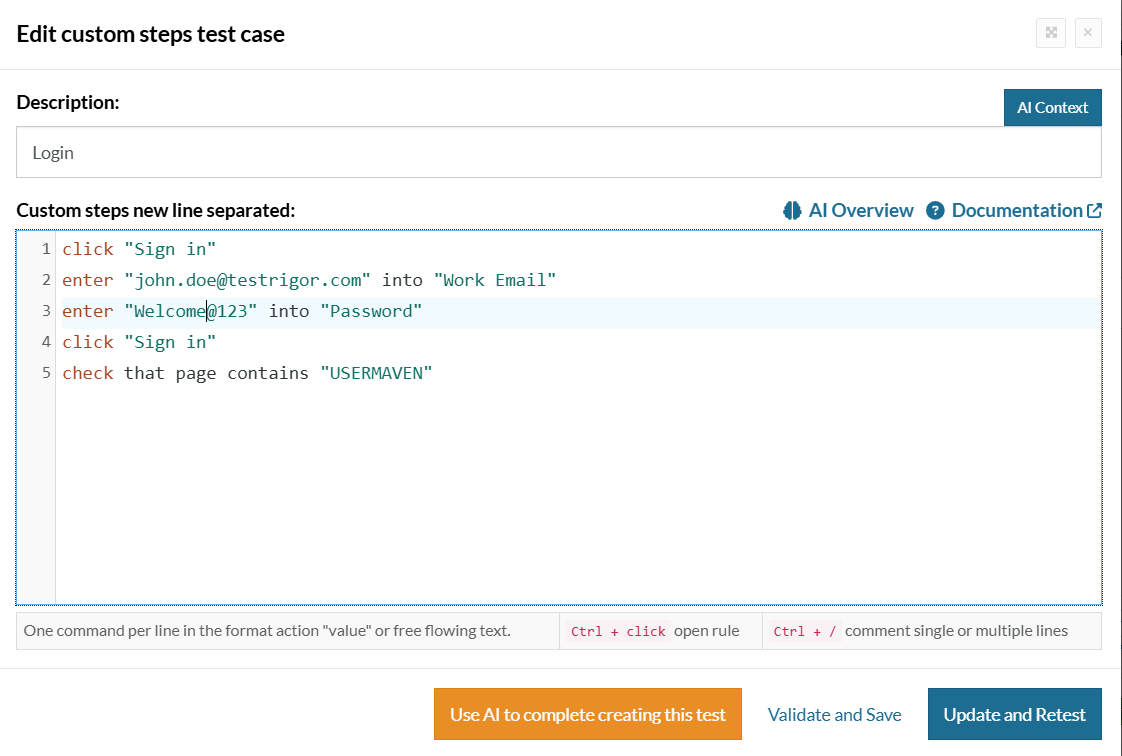
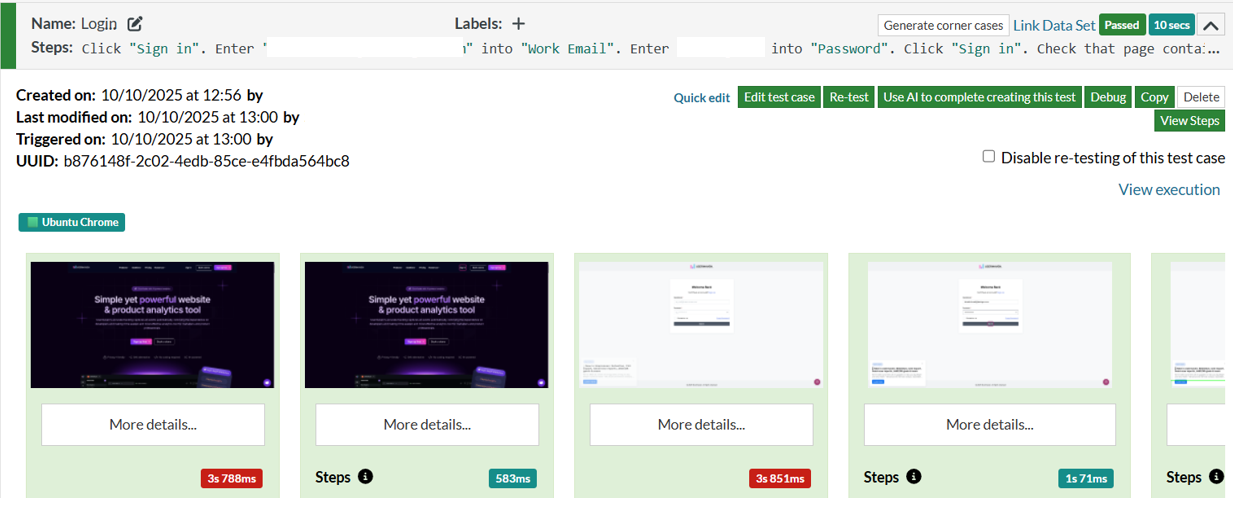
This approach makes it easier to automate repetitive workflows. However, a successful login test doesn’t necessarily confirm that the login event was recorded correctly in your analytics platform.
That requires an additional tracking validation check.
Event tracking vs. test automation
Although these processes are closely related, they answer different questions.
Event tracking asks what users did. Test automation asks whether the application behaved as expected.
| Aspect | Event tracking | Test automation |
|---|---|---|
| Primary purpose | Record and analyze user actions | Verify software behavior |
| Main focus | User behavior and outcomes | Functionality and reliability |
| Typical users | Marketing, product, growth, analytics | QA and engineering |
| Data collected | Events, properties, timestamps | Test results, assertions, failures |
| Example | Record a completed signup | Verify the signup process works |
| Main limitation | Doesn’t prove the feature works correctly | Doesn’t automatically prove analytics are accurate |
| Business value | Supports performance analysis | Reduces software defects |
The two become particularly valuable when the same workflow is measured and tested.
Imagine a SaaS company releases a new onboarding flow.
Its automated tests confirm that customers can complete onboarding. Meanwhile, event tracking shows how many customers actually finish each step.
If completion rates suddenly fall, the team can investigate whether the cause is a broken feature, an incorrect event, or genuine customer friction.
How event tracking and test automation work together
There are three practical ways these processes complement each other.
1. Automated tests help protect tracking accuracy
Tracking code can break even when a feature continues working.
For example, a developer might rename a button, change a form component, or update a checkout workflow. The customer experience still works, but the event listener no longer fires.
If no one tests the tracking implementation, the error may remain unnoticed until someone investigates a drop in conversions.
Automated tests can check whether important events are generated after specific actions.
2. Event tracking reveals which workflows need more testing
This is especially valuable for conversion tracking, where missing events can affect campaign reporting and performance decisions.
Test cases are usually designed around expected behavior.
Real customers don’t always follow those expected paths.
They might:
- Return to an earlier onboarding step several times.
- Switch between pricing plans before completing checkout.
- Abandon a form and return through a different page.
- Use a feature in an unexpected order.
- Repeatedly click a button that appears unresponsive.
Analyzing user behavior can reveal patterns that weren’t considered when the original tests were written.
These patterns don’t automatically prove something is broken. They help QA teams identify scenarios worth reproducing and testing.
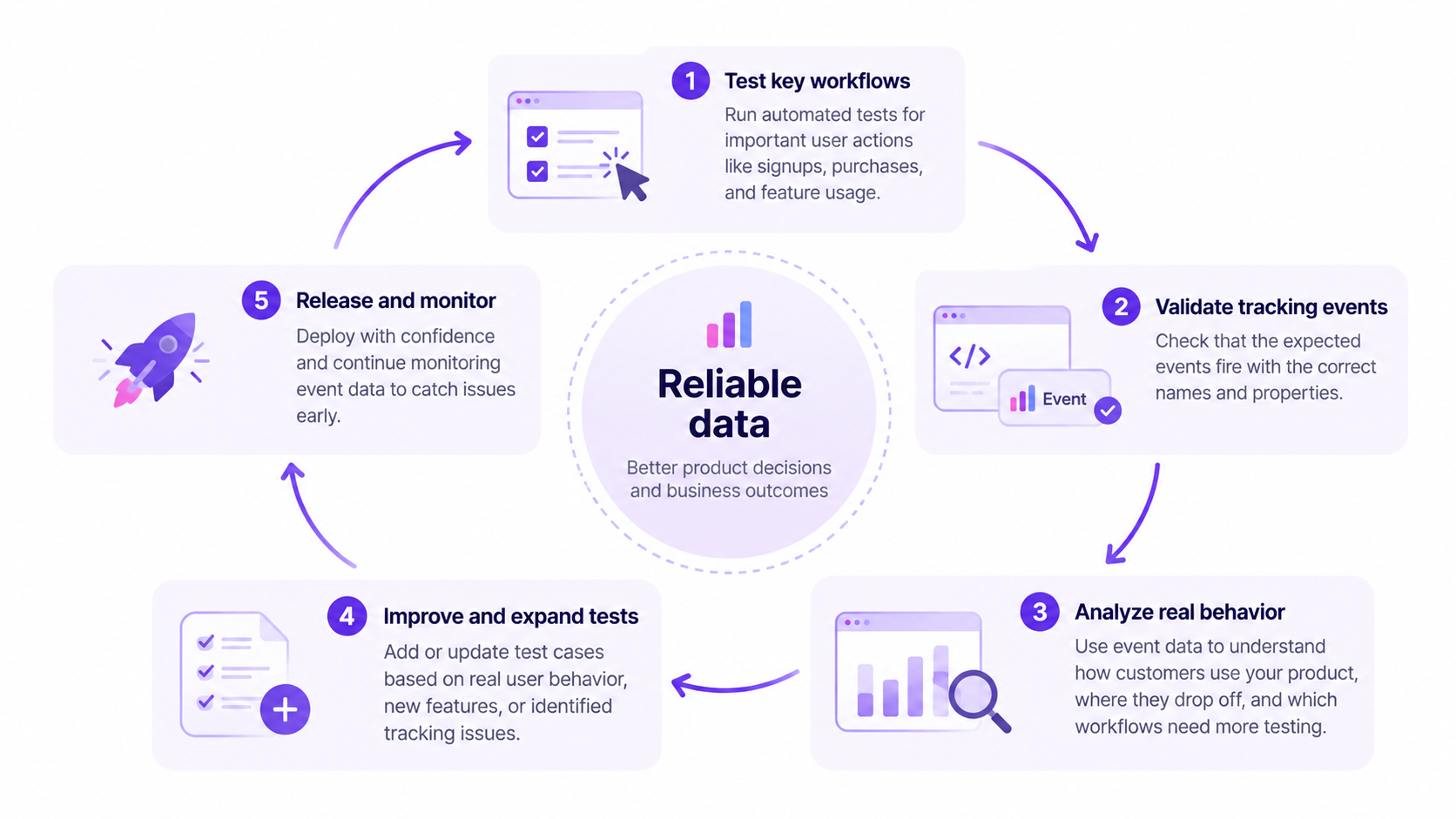
3. Tracking and testing create a continuous feedback loop
Automated testing verifies expected functionality.
Event tracking shows how customers interact with the released product.
Together, they support a repeating improvement cycle:
- Release a feature with automated test coverage.
- Monitor how customers interact with it.
- Identify unusual behavior or conversion changes.
- Investigate whether the cause is a product issue, tracking problem, or usability friction.
- Add or update tests based on what the investigation reveals.
- Validate the fix and continue monitoring.
This helps teams move beyond checking whether a feature works to understanding whether customers can use it successfully.
How to validate event tracking with automated tests
This is where the connection becomes actionable.
You don’t need to automate checks for every interaction on your website. Start with events that directly affect business reporting or important product workflows.
Step 1. Identify your most important events
Choose events that represent meaningful customer actions.
For a SaaS company, these might include:
- Signup completed
- Trial started
- Onboarding completed
- Demo booked
- Subscription purchased
- Subscription canceled
For an ecommerce business, the priorities may be add-to-cart, checkout, purchase, and refund events.
Start with events that influence acquisition, activation, revenue, or retention reporting.
Step 2. Define exactly when each event should fire
Create an event specification before writing tests.
Here’s an illustrative example for a SaaS signup flow:
| Event | Trigger | Expected properties | Important validation |
|---|---|---|---|
signup_started | Registration begins | Signup method | Shouldn’t require successful registration |
signup_completed | Account creation succeeds | Account ID, signup method | Must not fire on failed signup |
trial_started | Trial activation succeeds | Plan, trial duration | Must not fire when activation fails |
onboarding_completed | Required onboarding steps finish | Account ID, onboarding version | Must reflect actual completion |
Event names and properties are examples. Your implementation should follow your own tracking plan.
Be careful with personal information. Avoid placing passwords, authentication tokens, or unnecessary sensitive data into analytics events.
Step 3. Create tests for successful and failed actions
Testing only the happy path leaves important gaps.
For signup tracking, cover scenarios such as:
- Valid signup succeeds.
- Invalid email is rejected.
- Required fields are missing.
- An account already exists.
- The server returns an error.
- A user clicks Submit twice.
A useful test should verify both the visible product behavior and the expected analytics behavior.
For example, when registration fails, signup_completed should not be recorded.
Step 4. Verify the tracking request
Browser automation tools can inspect the network activity generated during a test.
With Playwright, for example, a test can perform an action and wait for a matching analytics request.
An illustrative JavaScript example:
const trackingRequest = page.waitForRequest(request => {
  return request.url().includes('/collect') &&
    request.postData()?.includes('signup_completed');
});

await page.getByRole('button', {
  name: 'Create account'
}).click();

const request = await trackingRequest;
expect(request).toBeTruthy();
This is a simplified example, not a complete production test. The endpoint, payload structure, and action must match your actual analytics implementation.
It also assumes the click completes a successful signup. In a real test, you should verify the signup outcome separately.
A request being sent doesn’t necessarily prove that the analytics platform accepted, processed, and stored the event.
For important conversions, add a receiving-side or reporting validation step where your tools support it.
Step 5. Check event properties and duplicate events
An event can fire successfully and still contain incorrect data.
For example:
plan_typesaysfreewhen the customer purchased a paid plan.- The same purchase is recorded twice.
- The event has the wrong currency.
- The event is associated with the wrong account.
- A failed transaction is recorded as completed.
Tests should check the event name, expected properties, and number of occurrences.
Duplicate events are especially important for revenue-related tracking because they can inflate conversion totals.
Step 6. Run tracking tests after relevant changes
Include critical analytics checks in your regular testing workflow.
Prioritize running them after changes to:
- Signup and checkout forms
- Payment integrations
- Authentication
- Tracking scripts or tag configurations
- Event names and properties
- Consent handling
- Single-page application navigation
You can also use Google Tag Manager’s debugging tools to inspect tag firing, event data, and requests during manual validation.
Google’s Tag Assistant documentation explains how to inspect the tags and data being sent.
The goal is to detect tracking problems close to the change that caused them, rather than discovering them weeks later in a marketing report.
Practical example of tracking and test automation in SaaS
Imagine a B2B SaaS company launches a redesigned trial signup flow.
Before the release, the QA team confirms that users can create accounts successfully.
A week later, the marketing team notices a 30% decline in reported trial signups.
Does that mean fewer people are converting?
Not necessarily.
Here’s how the team could investigate.
| Check | What the team finds | What it suggests |
|---|---|---|
| Automated signup test | Account creation passes | The core signup workflow still works |
| Backend account records | New trial accounts remain stable | Actual signups may not have declined |
| Analytics event counts | trial_started events are down 30% | Tracking may be incomplete |
| Network inspection | Event request is missing after successful signup | Possible instrumentation issue |
| Updated automated test | Fails when the expected event is absent | The problem can now be detected earlier |
In this example, the problem isn’t necessarily the conversion experience. It’s the measurement of that experience.
Without comparing product behavior, backend records, and tracking data, the marketing team might incorrectly conclude that its campaigns are underperforming.
This is one reason tracking discrepancies deserve investigation before major budget decisions.
The same principle applies to other business-critical workflows, including payments, lead submissions, and subscription upgrades.
Common event tracking problems automated tests can catch
Tracking problems often fall into a few predictable categories.
| Problem | Example | Recommended test |
|---|---|---|
| Missing event | Signup succeeds but no event fires | Assert the expected event request |
| Duplicate event | Purchase fires twice | Check event occurrence count |
| Incorrect trigger | Failed signup records a conversion | Test unsuccessful workflows |
| Wrong properties | Paid subscription is labeled free | Validate event payload values |
| Event naming mismatch | trial_started becomes start_trial | Check against the tracking specification |
| Broken navigation tracking | Pageviews disappear after SPA navigation | Test route changes |
| Missing attribution parameters | Campaign data isn’t retained through signup | Validate permitted campaign context |
| Consent-related errors | Tracking runs contrary to consent settings | Test the applicable consent states |
Not every problem can be solved through browser tests alone.
For example, server-side tracking may require integration tests or checks against server-generated events.
Similarly, data loss caused by browser restrictions, network failures, or identity-matching limitations may require additional investigation.
A strong measurement process combines automated tests with periodic data-quality reviews.
Benefits of combining event tracking and test automation
The value isn’t simply having more automation. It’s reducing uncertainty about what your data represents.
More reliable conversion reporting
When important events are tested, teams have a better chance of catching missing or incorrect conversions.
That improves confidence in the metrics used to evaluate signup flows, campaigns, and revenue performance.
For teams investigating inaccurate ad tracking, checking the underlying conversion events is an important starting point.
Faster investigation of conversion drops
A sudden decline in conversions could indicate a real performance problem or a tracking issue.
Automated test results help narrow down the possibilities.
Teams can compare test outcomes, backend records, and analytics trends before deciding what to fix.
This is especially useful when investigating why conversion rates are dropping.
Better product testing priorities
Event data shows which workflows customers use frequently and where they struggle.
QA teams can use that information to prioritize tests around important or high-risk experiences.
For example, if a newly released feature attracts substantial usage, it may deserve additional regression coverage.
Analyzing feature usage can help identify those priorities.
Better decisions about product improvements
A feature can pass every functional test and still be difficult to use.
Tracking reveals whether customers adopt it, return to it, or abandon it.
By combining reliable event data with product adoption metrics, teams can distinguish technical functionality from actual customer value.
Less time spent fixing reporting mistakes
When tracking errors are discovered early, teams can avoid lengthy investigations into misleading reports.
They can also reduce the risk of making decisions based on missing or duplicated events.
That doesn’t eliminate measurement limitations, but it makes important data issues easier to identify and address.
How Usermaven helps connect tracking accuracy to business outcomes
Testing your tracking implementation is only the beginning.
Once you’re confident that important events are being collected correctly, the next question is what those events tell you about customers, conversions, and revenue.
Usermaven is an AI-powered marketing attribution platform that connects marketing interactions and customer behavior with conversions, pipeline, and revenue.
It helps marketing, growth, and product teams move from isolated events to a clearer understanding of what drives business results.
Capture and analyze important customer actions
Usermaven supports event tracking for website and product interactions, including automatically captured actions and explicitly defined events.
Teams can use its event capabilities to collect the actions that matter to their reporting, while validating critical tracking implementations through their own QA workflows.
With product analytics software, they can then analyze how customers engage with the product and where adoption changes.
Identify conversion gaps in important workflows
Suppose your tests confirm that the signup process works, but fewer visitors are completing it.
Usermaven’s funnel analytics software helps teams examine conversion performance across defined steps.
You can investigate where customers drop off and compare the behavior of different audiences.
For example, you might discover that mobile visitors abandon onboarding more frequently than desktop visitors.
That observation can guide further testing, usability investigation, or product improvements. It doesn’t automatically establish the cause.
Understand what happens before and after conversion
Customers rarely move from their first visit to a purchase in one step.
They may discover your product through organic search, return through paid advertising, explore several pages, and eventually book a demo.
Usermaven’s user journey analytics helps teams examine these recorded interactions.
Combined with attribution reporting, this provides context beyond whether a single event fired successfully.
Connect marketing activity to revenue
For B2B SaaS companies, a signup isn’t always the final outcome.
Marketing teams also need to understand which channels contribute to qualified leads, opportunities, and customers.
Usermaven brings marketing touchpoints and conversion data together to support attribution analysis.
For B2B SaaS marketing teams, this means looking beyond traffic and event counts to evaluate pipeline and revenue outcomes.
Reliable event tracking supports that analysis because attribution depends on the quality and completeness of the underlying data.
The practical difference: Automated testing helps you check whether important actions are recorded correctly. Usermaven helps you understand how those recorded actions connect to customer behavior and business performance.
Book a demo to explore how Usermaven can support your analytics and marketing attribution needs.
Final thoughts
Event tracking and test automation work best when they inform each other.
Automated tests help verify that important workflows and tracking events behave as expected. Event tracking reveals how customers use those workflows in the real world.
Start with your most important conversion events, define clear expectations, and test both successful and unsuccessful outcomes.
Then use the resulting data to investigate customer behavior, improve product experiences, and make more informed marketing decisions.
The goal isn’t to track everything or automate every possible test. It’s to make sure the data behind your most important decisions is dependable.
Unlock insights that drive growth
FAQs
What is the difference between event tracking and test automation?
Event tracking records actions and occurrences on a website or application, such as signups, clicks, and purchases. Test automation verifies that software behaves as expected by executing predefined checks. They work together when automated tests also validate the analytics events generated by important user actions.
Can automated testing verify analytics events?
Yes. Automated tests can inspect tracking requests, validate event names and properties, and check whether events fire under the correct conditions. However, verifying that a request was sent doesn’t necessarily confirm that the analytics platform processed or stored it successfully.
What are the most important events to test?
Prioritize events that affect important business outcomes, such as completed signups, demo bookings, trial activations, purchases, and subscription changes. Also test failed actions to ensure unsuccessful attempts aren’t incorrectly recorded as conversions.
Can event tracking replace software testing?
No. Event tracking shows recorded user behavior but doesn’t prove that an application functions correctly. A feature might generate tracking events while still producing errors. Automated testing is needed to verify expected functionality, while analytics provides additional context about real-world usage.
How often should analytics tracking be tested?
Critical tracking events should be tested whenever relevant workflows, event definitions, integrations, or tracking configurations change. High-value conversion events can also be included in regular regression testing. Periodic data-quality checks remain useful because some tracking problems won’t be detected by automated browser tests alone.

Written by
Ryan Mitchell
Marketing Analytics Strategist
Ryan Mitchell is a marketing analytics strategist specializing in campaign measurement, customer journeys, and marketing performance. He writes about analytics, reporting, and data-driven marketing strategies, helping SaaS and B2B teams measure what matters across every stage of the customer journey.
All articles by Ryan →