Every SaaS product has a small group of users who log in almost every day, use advanced features and recommend the product to colleagues. They are your power users, and they often drive a large share of revenue, feedback and word of mouth.
This guide explains what power users are, why they matter, how to find them in your data and how to turn more ordinary users into power users through better user engagement.

Key takeaways
- Definition: Power users are the most engaged users of a product, measured by how often they use it and how deeply they use its features.
- Outsized impact: They tend to retain longer, expand their accounts and refer new customers.
- Find them with data: Define the actions that signal value, then rank users and accounts by frequency and depth of those actions.
- Use the power user curve: A chart of days active per week or month shows whether your product has a healthy group of daily users.
- Grow them on purpose: Faster time to value, contextual education, habit loops and recognition move more users into the top group.
- Watch for drop-offs: A power user whose activity falls is an early churn warning.
What is a power user?
A power user is someone who uses a product more often and more deeply than most other users. In SaaS, that usually means a user who is active on most days, uses advanced features and relies on the product for core parts of their work.
The term is also used in general computing for people with advanced technical skills, and in Windows for a built-in user group with extra permissions. This guide focuses on the product meaning: the most engaged users of a SaaS product.
There is no universal threshold. A team chat app might define power users as people active every workday, while a monthly reporting tool might define them as users who run reports every week.
Power users vs. casual users vs. champions
Power users are not the same as every engaged customer. The table shows how they compare with two related groups.
| Group | How they use the product | Main value to you |
|---|---|---|
| Casual users | Log in occasionally and use a few core features | Show the minimum experience that must work well |
| Power users | Use the product most days and adopt advanced features | Drive retention, expansion, feedback and referrals |
| Champions | Promote the product inside their company, often as buyers or admins | Drive adoption across teams and renewals |
Many champions are also power users, but not always. In B2B products, a champion may be an admin who rarely uses the product but secures budget for it.
Why power users matter
A small group of highly engaged users can shape the success of the whole product. Five benefits stand out.
Higher customer value
Power users get more value from the product, so they are more likely to upgrade, add seats or buy add-ons. Accounts with several power users usually expand faster than accounts with none.
Lower acquisition costs
Engaged users recommend products to colleagues and peers. That word of mouth brings in new users at a far lower cost than paid campaigns.
Better product ideas
Power users push the product to its limits, so they find gaps and new use cases first. Regular conversations with them are a reliable source of ideas, and an ideas software platform can help teams collect, organize and act on that input.
Stronger retention
Users who build the product into daily routines rarely leave. Their behavior also shows which habits you should encourage in everyone else.
A clear activation target
The actions that power users take early often reveal the moments that predict long-term success. Those moments become activation goals for onboarding.
Common traits of power users
Power users differ by product, but most share a few traits that you can spot in your data and conversations.
Frequent usage
They return on most days or weeks, depending on the product’s natural rhythm.
Depth of feature use
They use advanced features, integrations and settings that casual users never touch.
Strong fit with your target market
They usually match your ideal customer profile closely, which is why the product fits their workflow so well.
Willingness to give feedback
They answer surveys, join betas and report bugs, often in detail.
Early adoption of new features
They try new releases first, which makes them ideal testers before a wider launch.
How to find your product’s power users
Finding power users is a data question, not a guess. Follow these steps to identify them reliably.
Define the actions that signal value
List the actions that show a user is getting real value, such as creating a project, sharing a report or completing a workflow. Logins alone do not count.
Measure frequency with the power user curve
Count how many days in a week or month each user performs those actions, then chart the distribution. This chart is known as the power user curve.
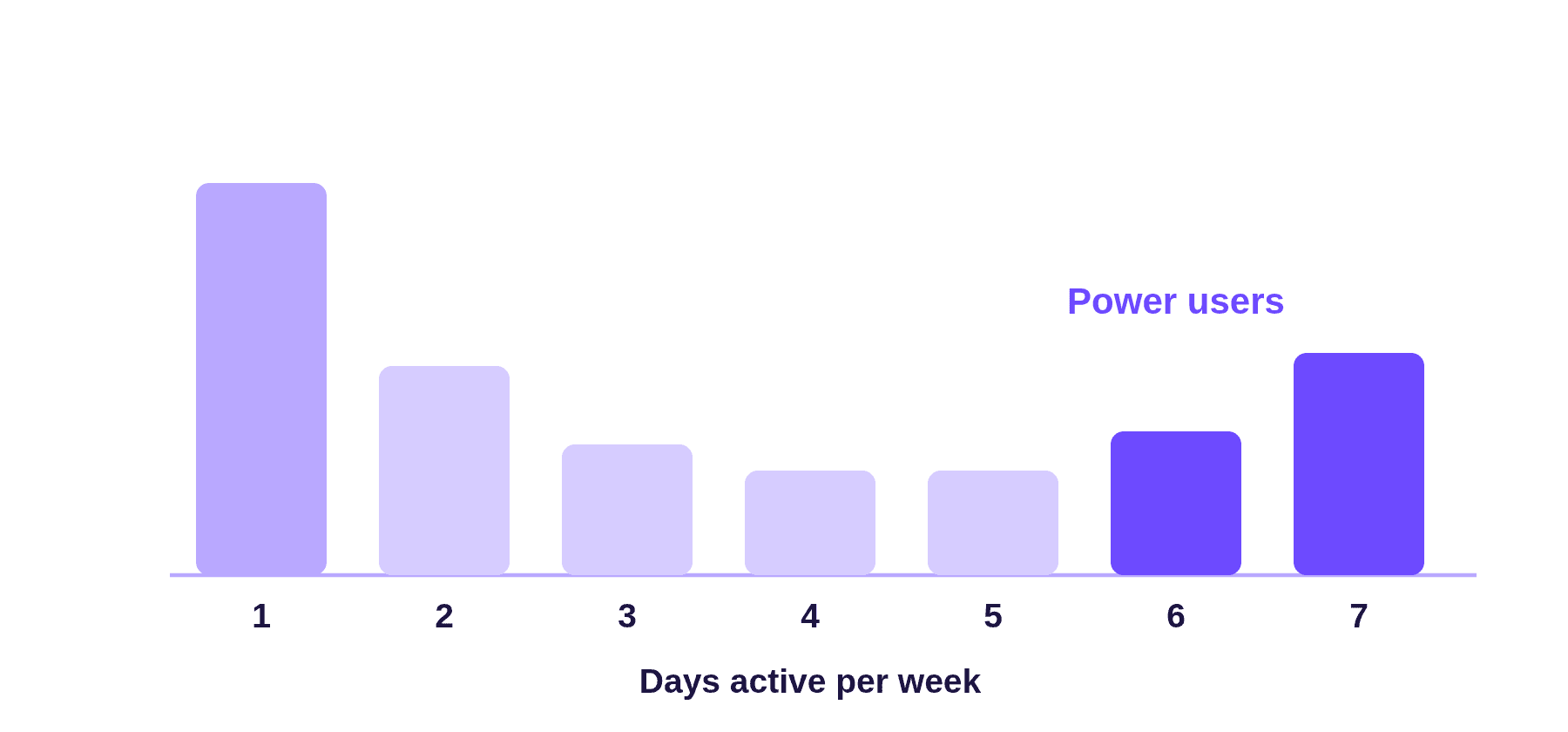
A healthy product shows a group of users on the right side of the curve, active most days. If the curve slopes steadily downward with no rise at the end, few users have built a habit yet. Compare curves month by month to see whether product changes move users to the right.
Add depth of use
Frequency alone can mislead. Combine it with how many key features each user adopts, using the right feature adoption metrics, so you find users who are both active and deeply engaged.
Look at accounts as well as users
In B2B products, count how many power users each company has. An account with several power users is healthier than one that depends on a single person.
Set a threshold and validate it
Choose a cut-off, such as the top 10% of users by active days and key actions, and adjust it for your product. Then talk to a sample of those users to confirm they match what the data suggests.
| Signal | Example threshold |
|---|---|
| Active days | Active on at least 5 of 7 days for a daily product |
| Key actions | Completes the core workflow several times a week |
| Feature breadth | Uses three or more advanced features |
| Collaboration | Invites or works with several teammates |
| Tenure | Active for at least two consecutive months |
The thresholds above are examples. Set your own based on how often your product is naturally used.
Power user metrics to track
Once you know who your power users are, track a few metrics to see whether that group is growing and staying engaged.
| Metric | What it shows |
|---|---|
| Power user ratio | Share of active users who meet your power user definition |
| Power user curve | How active days are distributed across users each week or month |
| Stickiness | How often users return, such as daily active users divided by monthly active users |
| Power user retention | Whether power users stay active month after month |
| Accounts with power users | Share of customer accounts that include at least one power user |
| Expansion from power user accounts | Revenue growth from accounts with several power users |
Cohort analysis helps here, because it shows whether users who joined after a change reach power user status faster than earlier groups.
How to turn more users into power users
Power users are not only found, they can also be developed. The flow below shows the six steps most teams follow.
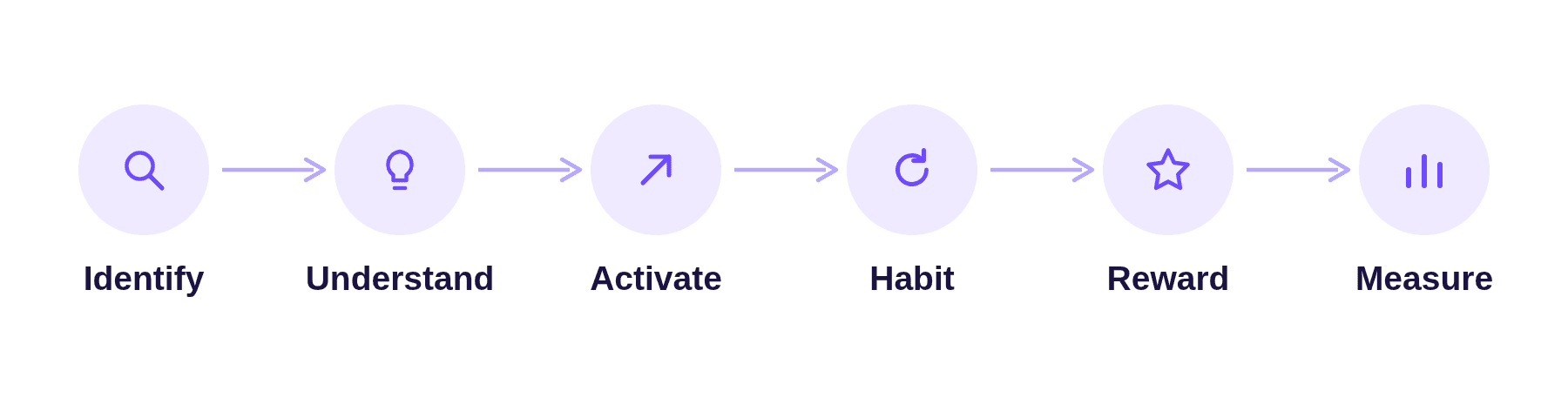
Identify and understand what power users do differently
Compare power users with casual users and note the actions, features and integrations that separate them. Feature usage analysis shows which capabilities matter most.
Activate new users faster
Guide new users toward the actions power users take early. Templates, checklists and sample data shorten the path to value.
Teach advanced features in context
Show advanced features at the moment they are useful, through tooltips, short videos or prompts. Casual users rarely visit help centers on their own.
Build habits
Integrations, scheduled reports and useful notifications bring users back regularly. A product that fits into daily tools becomes part of the routine.
Reward and recognize
Offer power users early access to new features, a community space, referral rewards or a place on a customer advisory board. Recognition encourages them to stay involved.
Measure and repeat
Track the power user ratio and curve after each change. Keep the changes that move users toward daily, deep usage.
How to work with power users
Power users can do much more for your product than generate usage. These four programs make the most of them.
- Beta programs: Invite power users to test new features before launch and share detailed feedback.
- Customer advisory boards: Meet with a small group every quarter to discuss the roadmap.
- Case studies and reviews: Their results make strong proof for prospects, as shown in real customer case studies.
- Referral and community programs: Reward them for bringing in new users and helping others succeed.
Power user examples
The two examples below are hypothetical. They show how teams use power user data in practice.
A project management tool finds its habit moment
The team sees that power users create a recurring task template in their first week, while casual users rarely do. Adding a template prompt to onboarding raises the share of new users who become power users in the next cohort.
A B2B analytics product spots churn risk
Two power users at a large account drop from daily to weekly activity. The success team contacts them, finds a broken integration and fixes it before the renewal discussion.
Common mistakes with power users
Teams often misread or neglect their most engaged users. Avoid these three mistakes.
Defining power users by logins
Frequent logins without meaningful actions do not show value. Use actions tied to outcomes.
Building only for power users
Advanced users ask for complex features. Balance their requests with the needs of new and casual users, or onboarding becomes harder.
Ignoring early warning signs
When a power user’s activity drops, the account is at risk. Monitor this group closely and reach out quickly.
How Usermaven helps you find and grow power users
Usermaven combines product analytics with marketing attribution, so you can see who your power users are, what they do and which channels bring them in. Its AI features help teams keep track of this group without building every report by hand.
Track power users in the product engagement dashboards
Usermaven’s product engagement dashboards include views for active users, stickiness, feature adoption, power users and users who are slipping away. Each can be viewed at the user or company level, which matters for B2B products.
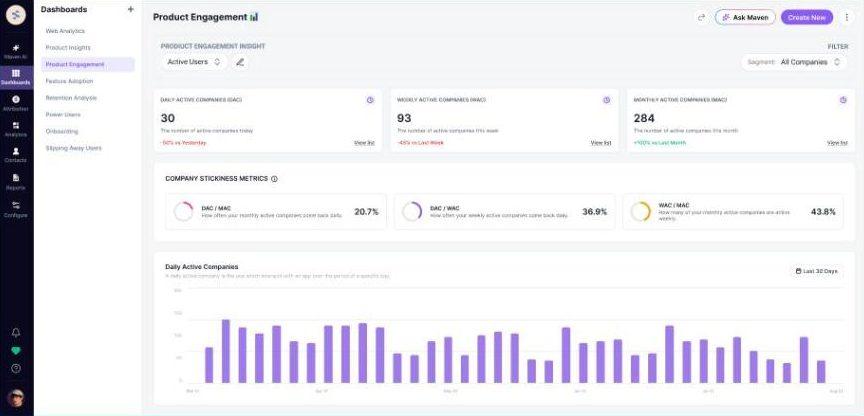
In the power users insight, you choose the events that define a power user and the share of users to include, from the top 5% to the top 30%. The report then shows a 7-day curve, a 30-day curve and a monthly activity view, plus a list of the most active users with their total events.
Ask Maven AI about your power users
Maven AI answers questions about your data in plain language, so you can explore power users without setting up a report first. For example, you can ask:
- Who are our most engaged power users this month, and which features do they use most?
- Which acquisition channels bring users who become power users within 60 days?
- Which power users were less active this month than last month?
Use Maven AI Agents for recurring checks
Maven AI Agents run scheduled analyses in the background. You can set up an agent to send a weekly summary of new power users, or to flag power users whose activity drops so the success team can act early.
Segment and alert on power users
Segments let you save your power user definition and compare that group with everyone else. Scheduled reports and alerts then keep the team informed by email or Slack.
See which channels bring power users
Multi-touch attribution connects power users to the campaigns and channels that first brought them in, so marketing can invest in sources that attract engaged users, not just signups.
B2B SaaS teams that want to grow engaged accounts can use analytics built for B2B SaaS companies to see user and company-level engagement in one place.
Conclusion
Power users are the clearest sign that a product delivers lasting value. Define the actions that matter, find power users with the power user curve and depth of use, learn what they do differently and design onboarding and education so more users follow the same path.
If you want to see who your power users are in your own data, book a demo and we will walk through it with you.
FAQs
What is a power user?
A power user is someone who uses a product more often and more deeply than most other users, including advanced features that casual users rarely touch.
What are power users in SaaS?
In SaaS, power users are the most engaged users, typically active on most days and relying on the product for core work. They tend to retain longer and expand their accounts.
How do I find my product’s power users?
Define the actions that signal value, measure how often each user performs them, add depth of feature use and rank users and accounts against a threshold such as the top 10%.
What is the power user curve?
It is a chart that shows how many users were active on one, two, three or more days in a week or month. A rise on the right side shows a healthy group of habitual users.
What percentage of users are power users?
There is no fixed number. It depends on the product and how you define value. Many teams start by looking at the top 5% to 30% of users by key actions.
How do you create more power users?
Shorten time to value, teach advanced features in context, build habits through integrations and notifications, and reward engaged users with recognition and early access.
What is the difference between a power user and a champion?
A power user is defined by heavy product usage. A champion promotes the product inside their company and may or may not use it heavily.

Written by
Adeel Khan
Growth Marketing Expert
Adeel Khan is a full-stack SaaS marketer with 10+ years of experience in content marketing, paid advertising, analytics, and conversion rate optimization. He shares practical insights and strategies drawn from hands-on experience, helping B2B SaaS marketers improve performance and make better marketing decisions.
All articles by Adeel →