HubSpot can produce an attribution report that is technically correct and still leave a team with the wrong answer to its business question. Sometimes the constraint is native to the report. Sometimes the real problem is missing tracking, incomplete CRM associations, or a customer interaction that was never captured.
The distinction matters because changing the attribution model will not repair missing data, and buying another tool will not fix a broken implementation.
With marketing attribution software, teams can compare the CRM outcome with the behavior, acquisition source, and customer journey around it. This guide separates genuine HubSpot attribution limitations from setup gaps and interpretation problems, then shows when a supplemental measurement layer is actually useful.
Key takeaways
Not every missing or unexpected HubSpot attribution result is a HubSpot product limitation.
Deal Revenue Attribution depends on clean contact associations, deal fields, tracked interactions, and the correct subscription level.
Changing attribution models redistributes credit across captured interactions. It cannot recover interactions that were never recorded.
Contact-linked attribution can add company context, but it does not automatically reconstruct the complete influence of a multi-person buying committee.
Attribution can describe observed contribution. It cannot prove incremental lift by itself.
HubSpot attribution limitations at a glance
HubSpot attribution limitations generally fall into three categories: native reporting constraints, incomplete measurement or CRM data, and questions that attribution itself cannot answer.
| Symptom | Likely issue | Type | First thing to check |
|---|---|---|---|
| Deal missing from revenue attribution | Missing association or required deal data | Setup / data | Contact association, status, amount and dates |
| Too much Direct or Offline | Missing acquisition evidence | Setup / data | UTMs, referrer and tracking code |
| Ad has clicks but no attributed contacts | Tracking or ad-type issue | Setup / native | Tracking code and supported ad tracking |
| HubSpot reports show different totals | Different outcome, model or date logic | Interpretation | Conversion definition and report settings |
| Buying committee looks fragmented | Contact-linked journey | Native / interpretation | Contact and company relationships |
| Large report differs from raw activity | Attribution sampling | Native | Interaction volume and sampling |
| Revenue attribution is unavailable | Subscription access | Native | HubSpot tier |
| Strong attributed revenue but uncertain lift | Attribution vs. incrementality | Interpretation | Causal testing |
| Recent acquisition looks weak | Conversion lag | Interpretation | Time to opportunity and close |
What HubSpot attribution does well
HubSpot has a real attribution system, not just a campaign dashboard. Its current reporting supports Contact Create Attribution, Deal Create Attribution, and Deal Revenue Attribution, with the latter two tied to Marketing Hub Enterprise. Teams can assign credit across tracked interactions, segment results by campaign and source, and connect marketing activity with CRM outcomes.
HubSpot also supports multiple attribution models, ad reporting, campaign reporting, externally hosted pages when the tracking code is installed, and AI-generated report creation through Breeze. That is enough for many teams whose marketing and sales activity is well captured inside HubSpot.
Unlock insights that drive growth
| The useful question is not whether HubSpot has attribution. It is whether its measurable data model contains enough of the journey to answer the decision the team needs to make. |
Three types of HubSpot attribution limitation
Native product and reporting limits
Some constraints are built into the reporting architecture itself. Subscription access, sampling, event-input limits, supported interaction types, and the contact-and-deal structure all define what a report can include before any setup choices are considered.
Data and setup dependencies
Other gaps come from the measurement foundation. A missing tracking code, incomplete UTMs, a visitor who was never identified, an unassociated deal, or an offline interaction that never reached HubSpot can all create incomplete attribution even when the report is working as designed.
| Incomplete input creates incomplete attribution even when the report itself is working correctly. |
Interpretation limits
A third category appears when the report is asked a question that attribution cannot fully answer. Account-level buying-group influence, causal lift, cross-platform deduplication, historical spend-cohort performance, and unobserved dark-funnel activity require a different analytical lens or additional data.
1. Revenue attribution depends on HubSpot tier
HubSpot currently provides three attribution data sources. Within Marketing Hub, Contact Create Attribution is available on Professional and Enterprise, while Deal Create and Deal Revenue Attribution require Enterprise. HubSpot documents these report types in its current attribution report documentation.
| Report | Primary question | Marketing Hub access |
|---|---|---|
| Contact Create Attribution | Which interactions contributed to creating contacts? | Professional and Enterprise |
| Deal Create Attribution | Which interactions contributed to deal creation? | Enterprise |
| Deal Revenue Attribution | Which interactions receive credit for Closed Won revenue? | Enterprise |
That distinction changes the question a team can answer. A Professional account may be able to evaluate lead creation but still need another approach for native deal and revenue attribution.
| Before diagnosing a reporting failure, confirm that the required attribution question is available in the current HubSpot subscription. |
2. HubSpot only attributes interactions it can observe
HubSpot can attribute far more than native HubSpot forms or emails. Depending on the report, captured interactions can include ad clicks, page views, form submissions, CTA clicks, marketing emails, calls, meetings, social interactions, marketing events, integrations, and custom events.
The limitation is simpler: the interaction must be captured, received, and associated correctly. If a prospect researches the company on an untracked page, blocks tracking, has an offline conversation that is never logged, or never becomes connected to a known contact, that influence cannot receive precise credit.
How to diagnose the gap
Was the interaction captured?
Was the visitor identified or associated with a known contact?
Was the later deal or conversion connected to that contact?
Was the interaction eligible for the report being used?
3. Contact-linked attribution can miss buying-group context
B2B purchases are rarely a one-person journey. One stakeholder may discover the product, another may compare vendors, a third may attend a webinar, and procurement may enter only after an opportunity already exists.
| VP clicks LinkedIn ad -> Marketing Manager returns through Google -> Director attends webinar -> Procurement joins the deal -> Closed Won |
HubSpot can store company and contact relationships, but Deal Revenue Attribution is still built from tracked interactions associated with contacts and the deal. Company context does not automatically turn multiple person-level journeys into one complete buying-group attribution model.
That is why broader B2B marketing attribution often needs to distinguish observed person-level evidence from inferred account-level influence.
4. Traffic attribution depends on source evidence
HubSpot categorizes traffic through a rule hierarchy that uses referrers, UTMs, click identifiers, known domains, and other URL evidence. Its current traffic-source rules include Paid Search, Paid Social, Organic Search, Referral, AI Referrals, Direct Traffic, and other categories.
The limitation is not that source classification is inherently inaccurate. It is that the classification can only be as specific as the acquisition evidence available. A missing UTM, stripped referrer, untracked external page, private share, or direct return can reduce the detail available later.
| Source evidence | Likely result |
|---|---|
| Valid UTMs, referrer or click identifier | Specific campaign or channel context can be preserved |
| Referrer available but no campaign parameters | Broader channel context may be available |
| No referrer or tracking URL | Traffic can fall into Direct |
| CRM record created without a tracked digital session | The record may have offline or record-source context instead of a tracked web journey |
See what's working. Fix what's not. Grow faster.
A consistent UTM parameters structure reduces avoidable ambiguity, but it cannot create source evidence for interactions that were never observed.
5. Revenue attribution depends on clean CRM associations
HubSpot Deal Revenue Attribution does not work independently of CRM hygiene. A Closed Won deal must have the data and relationships required for HubSpot to connect revenue with the contact interactions that preceded it.
| Problem | First check |
|---|---|
| Deal is absent from the revenue report | Is at least one contact associated with the deal? |
| Revenue is missing or zero | Does the deal have a valid Amount value? |
| Deal appears in the wrong period | Is the Close date correct? |
| Won deal is not included | Is the deal actually in a Closed Won stage? |
| Marketing touchpoints are missing | Is the associated contact the person whose interactions were tracked? |
HubSpot also requires known Create date and Close date values for revenue attribution. Sales activities such as calls and meetings need the right contact-and-deal associations if they are expected to participate in the revenue journey.
| A missing deal in an attribution report can be a CRM-data problem rather than an attribution-model problem. |
6. Attribution reports can sample high-volume activity
HubSpot documents sampling for high-volume attribution data. Current attribution reports can include up to 20 million interactions per report after sampling, and a report can include up to 100 event input types. High-frequency interactions such as page views and email activity may be sampled when the interaction volume would otherwise exceed the report limit.
That is not the same as saying HubSpot discards the entire journey. The purpose of the attribution report is to distribute credit, not to act as an exact raw activity ledger.
| Question | Better reporting choice |
|---|---|
| Which captured interactions receive attribution credit? | Attribution report |
| Exactly how many page views or activities occurred? | Traffic, activity or other non-attribution reporting |
| Is a very large report being sampled? | Check report scale before comparing raw interaction counts |
| Do not use an attribution report as an exact activity counter when the business question is really about raw volume. |
7. Ad attribution needs the tracking chain to stay intact
HubSpot can import network delivery data even when contact attribution is incomplete. Its ads attribution documentation says a new contact must click the ad, create a web session, and then convert, and the HubSpot tracking code must be installed on an external landing page for the journey to be tracked.
Some ad types also have platform or API restrictions. That creates an important diagnostic distinction: clicks and impressions can still appear from the ad network while HubSpot-specific contact or downstream attribution remains incomplete.
When ad clicks appear but attribution does not
Confirm auto-tracking or the required campaign parameters are active.
Confirm the landing page contains the HubSpot tracking code.
Check whether the ad type is supported for contact attribution.
Verify the form or conversion creates the expected contact.
Confirm the resulting contact is connected to the deal or revenue outcome being analyzed.
This is also why ad platform reporting limitations should be kept separate from HubSpot attribution limitations. The ad network and the CRM are measuring different layers of the same journey.
8. Different HubSpot reports can give different answers
A team can compare HubSpot Ads, Campaigns, Contact Create Attribution, Deal Create Attribution, and Deal Revenue Attribution and see different numbers without any one report being broken.
| Report or layer | Why the number can differ |
|---|---|
| Ads reporting | Ad tracking rules, network data and contact attribution logic |
| Contact Create Attribution | Measures contact creation, not deal or revenue creation |
| Deal Create Attribution | Measures the interactions around deal creation |
| Deal Revenue Attribution | Measures credit around Closed Won revenue |
| Campaign reporting | Uses campaign associations, influenced contacts and campaign-specific logic |
Before troubleshooting the discrepancy, align the conversion definition, attribution model, date field, eligible interactions, and filters. Two reports that answer different questions should not be expected to match.
The same principle explains ad platform discrepancies: two systems can observe the same conversion and still report different totals because their eligibility, identity, timing, and credit rules differ.
| Before troubleshooting a discrepancy, confirm that the two reports are actually answering the same question. |
9. Revenue timing can hide acquisition performance
B2B revenue often closes months after acquisition. A paid click in January can produce a demo in February, an opportunity in March, and Closed Won revenue in May.
| January click -> February demo -> March opportunity -> May Closed Won |
A May revenue report can answer which interactions receive credit for revenue that closed in May. An acquisition team may be asking a different question: what did January marketing spend eventually produce after the buying cycle matured?
The first question starts with the conversion period. The second starts with the historical acquisition or spend period. Both are useful, but they are not interchangeable.
10. Changing the attribution model cannot fix missing data
HubSpot changed its attribution model set in 2026. The current models are First Touch, Last Touch, Linear, Time Decay, and Empirical. Empirical replaced the older U-shaped, W-shaped, J-shaped, and Inverse J-shaped options.
| Business question | Useful model lens |
|---|---|
| What introduced the customer? | First Touch |
| What happened closest to conversion? | Last Touch |
| Which captured interactions participated? | Linear |
| Which recent interactions receive more weight? | Time Decay |
| How does HubSpot weight interaction types from historical conversion paths? | Empirical |
For a deeper explanation of HubSpot setup, report logic, and credit assignment, HubSpot revenue attribution should own that search job.
| Changing attribution models redistributes credit across captured interactions. It cannot restore an interaction that was never tracked or associated. |
11. HubSpot attribution does not prove incrementality
Attribution and incrementality answer different questions.
| Method | Question |
|---|---|
| Attribution | Which observed marketing interactions receive credit for a conversion? |
| Incrementality | What additional outcome occurred because the marketing activity ran? |
If branded search receives $100,000 of attributed revenue, that does not prove that removing branded search would reduce revenue by $100,000. Attribution shows observed contribution under a credit model. Incrementality asks whether the activity caused additional results.
The distinction is covered in more depth in incremental revenue attribution, which should remain the dedicated page for causal lift.
| Attributed revenue is evidence of observed contribution, not automatic proof of causal lift. |
12. The dark funnel remains partly unobservable
HubSpot can measure tracked website activity, marketing email engagement, CRM milestones, recorded meetings, calls, campaign interactions, and other captured events. That still does not mean every influence in a B2B purchase is visible.
A private recommendation, Slack conversation, word of mouth, unclicked ad impression, or offline discussion that is never recorded cannot receive deterministic attribution credit. Another analytics platform has the same boundary if the interaction never enters its measurable data.
| No attribution platform can assign precise credit to an interaction it never observed. |
How to audit HubSpot attribution before replacing it
Phase 1. Verify the report itself
Confirm whether the report measures contact creation, deal creation, or Closed Won revenue.
Confirm the subscription includes the required report type.
Check the attribution model, reporting date, filters, and dimensions.
Phase 2. Verify acquisition tracking
Check the HubSpot tracking code on external pages.
Review UTMs and click identifiers.
Confirm connected ad accounts and auto-tracking where relevant.
Check whether the interaction type is eligible for the report.
Phase 3. Verify identity and CRM associations
Confirm the visitor becomes associated with the correct contact.
Check contact-to-company and contact-to-deal relationships.
Verify deal amount, status, Create date, and Close date.
Confirm sales activities are associated with the intended records.
Phase 4. Verify scale and timing
Check whether report volume triggers sampling.
Compare the reporting period with the real sales cycle.
Wait long enough for recent acquisition cohorts to mature before judging them.
Phase 5. Ask whether attribution can answer the question
If the real question is account-level buying-group influence, cross-channel budget comparison, historical spend-cohort performance, product activation, or causal lift, another analytical layer may be more useful than another HubSpot filter.
For a broader measurement review, an Attribution checklist can extend the audit across tracking standards, integrations, conversion definitions, model choice, and recurring data-quality checks.
HubSpot limitation or measurement problem?
| Situation | Likely category | First action |
|---|---|---|
| Deal absent from report | Setup / data | Check associations and required deal fields |
| Too much Direct traffic | Tracking | Check source evidence and tracking |
| Large report differs from raw counts | Native / report | Check sampling and report purpose |
| Buying committee looks fragmented | Architecture | Review contact and account context |
| Reports disagree | Interpretation | Align outcome, model, date and filters |
| Attributed revenue looks strong but sales disagrees | Outcome mismatch | Validate pipeline and revenue data |
| Historical spend is hard to judge | Timing | Use acquisition or spend-cohort analysis |
| Revenue credit is being treated as causal proof | Methodology | Use incrementality testing |
When HubSpot attribution is enough
HubSpot can be enough when the marketing and sales journey is well captured in HubSpot, CRM associations are clean, the business mainly needs contact, deal, and revenue attribution, and native report timing matches the decisions being made.
It can also be enough when product behavior is not central to customer quality, important conversion events do not live outside the CRM, and the team does not need an independent paid-media comparison across networks.
| A limitation only matters when it prevents the team from answering a decision it actually needs to make. |
When teams need a supplemental attribution layer
A supplemental layer becomes more useful when the missing answer exists outside HubSpot rather than inside a different HubSpot report. Common triggers include independent paid-channel comparison, product behavior after signup, long conversion delays, off-site revenue events, or customer journeys that need to connect behavior before and after the CRM conversion.
The goal is not to replace HubSpot as the CRM system of record. It is to add the behavioral, acquisition, and revenue context needed around those CRM outcomes.
How Usermaven complements HubSpot attribution
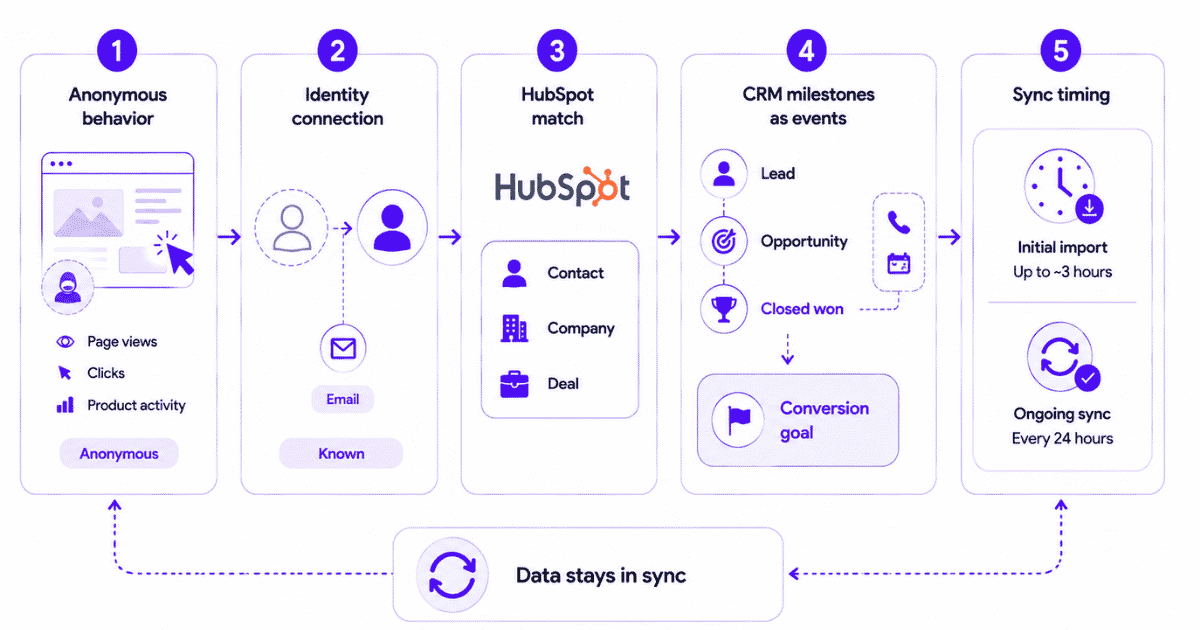
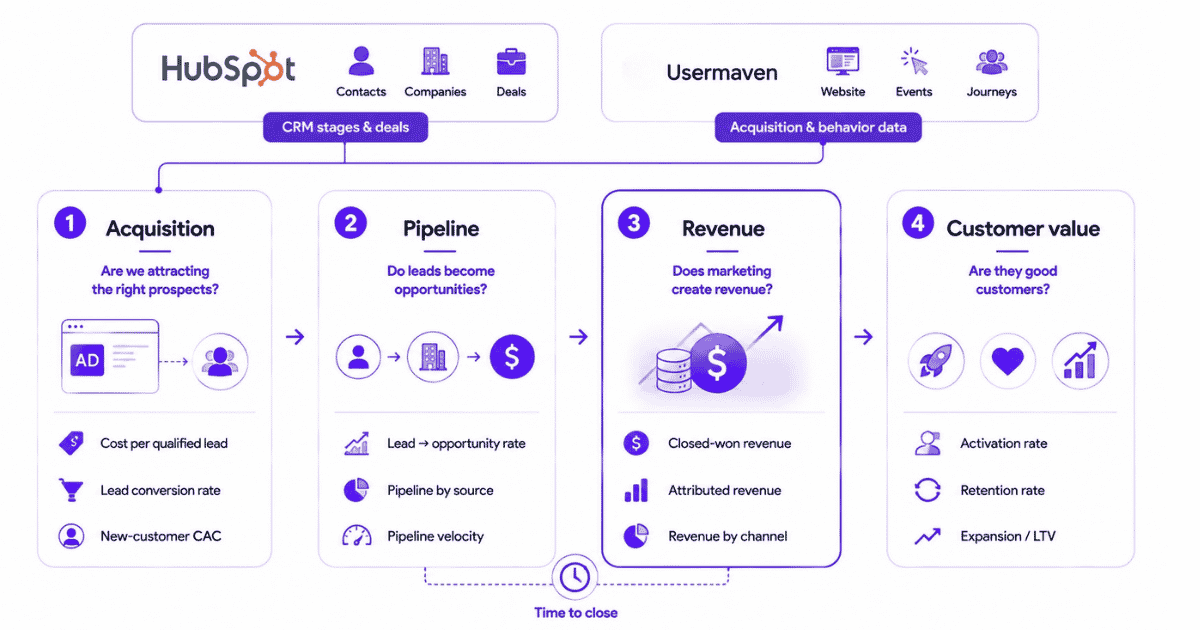
Usermaven can sit alongside HubSpot as a supplemental measurement layer. HubSpot remains the CRM system of record, while Usermaven connects independently collected website and product behavior with HubSpot contacts, companies, deals, marketing acquisition, and revenue outcomes.
Keep HubSpot as the CRM system of record
The current HubSpot integration does not automatically import HubSpot traffic and attribution history. Usermaven first collects its own behavioral data, then matches HubSpot CRM data to identified users, primarily through email-based identity.
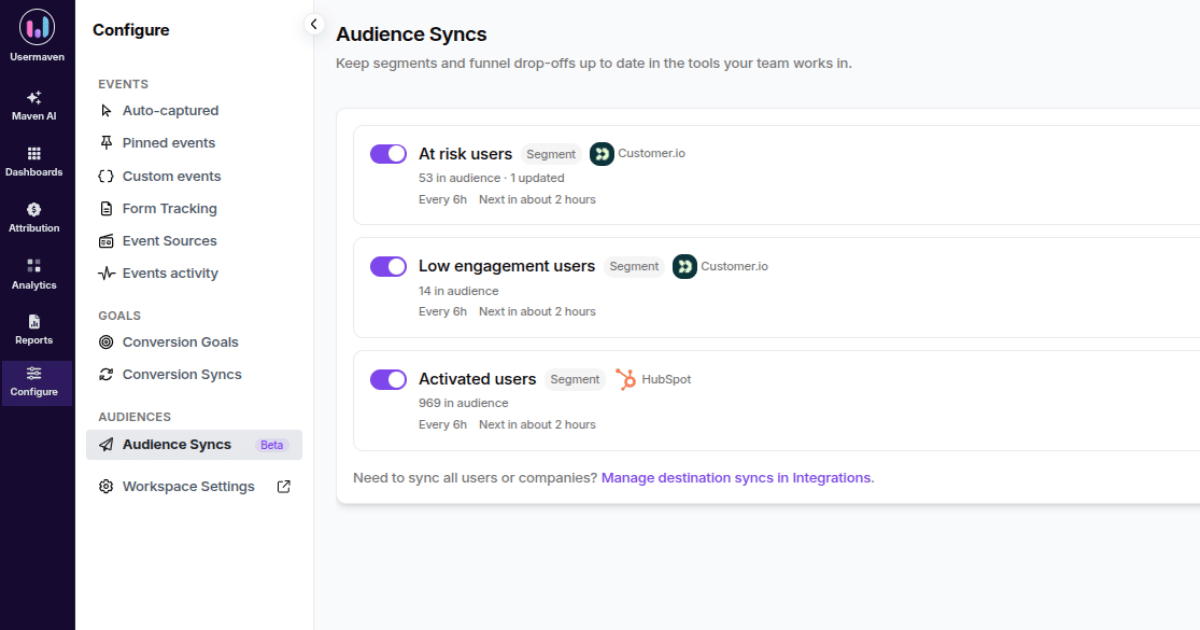
That distinction matters because the two systems retain different jobs: HubSpot manages customer and pipeline records, while Usermaven adds behavior, journey, and attribution context around those records.
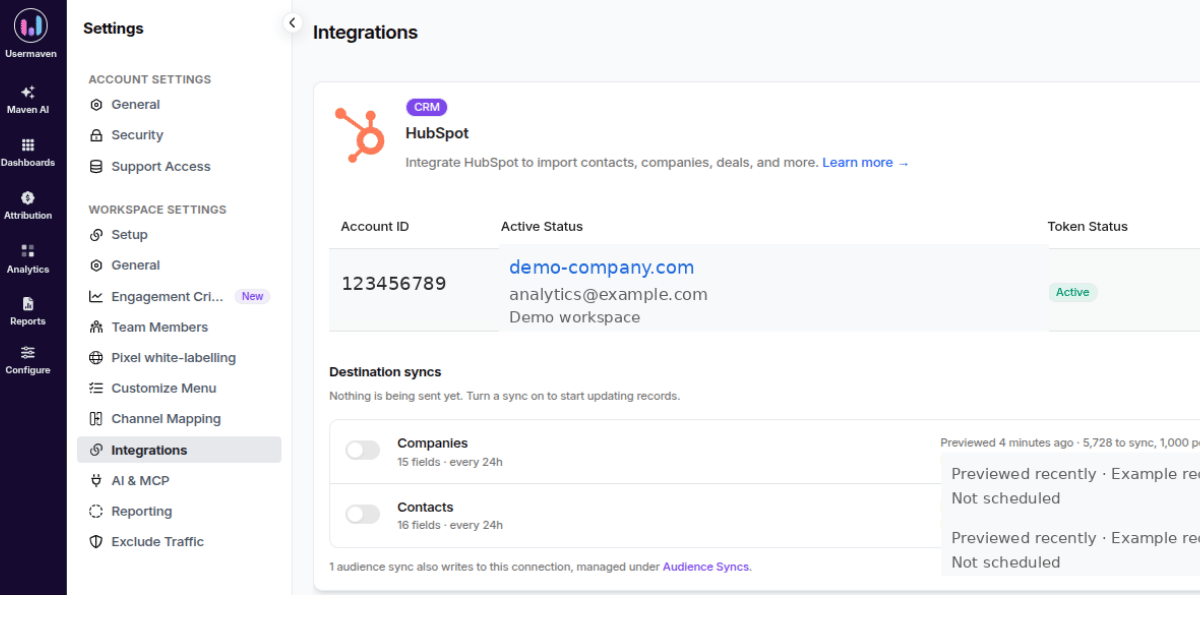
The read-only HubSpot import and outbound Reverse ETL are separate workflows. Reverse ETL can update existing HubSpot records with selected Usermaven user, company, or audience data, while the inbound CRM integration remains read-only.
Check data trust before changing attribution
The Measurement Trust Center checks campaign tracking, customer matching, connected platforms, conversion feedback, and overall data confidence before a team acts on an attribution result.
Usermaven also added warnings for untracked HubSpot contacts in April 2026, which helps expose a common problem earlier: a CRM contact exists, but the anonymous acquisition journey was never stitched to that person.
Connect behavior before and after the CRM conversion
For teams that need behavioral context, User Journeys can show the observed sequence around the contact, while Funnels can reveal where people drop out before or after a CRM milestone.
This is particularly useful for SaaS and hybrid funnels where a form fill is only the start of customer quality, not the final conversion.
Compare paid channels independently
Usermaven paid ads attribution combines spend from Google, Meta, LinkedIn, and Microsoft with first-party conversions, conversion value, attributed revenue, and ROAS.
This provides one cross-channel attribution layer for budget comparison. It does not make native ad-platform or HubSpot reports wrong; it answers a different question under one measurement framework.
Compare Conversion Date vs. Spend Date
Usermaven Paid Ads Attribution can analyze by Conversion Date or Spend Date. Conversion Date starts with conversions in the reporting period and looks backward. Spend Date starts with the budget and clicks from a selected period, then follows them forward through a look-ahead window.
| Conversion Date asks what converted now. Spend Date asks what an earlier period of spend eventually produced. |
Bring off-site outcomes into the journey
Event Sources can bring supported CRM, billing, webinar, webhook, spreadsheet, and other off-site events into the same analytics environment. Imported events can participate in attribution, journeys, funnels, conversion goals, and other analyses.
Connect attribution with pipeline and revenue
For B2B teams, pipeline attribution connects acquisition with qualified opportunities, while full-funnel revenue attribution keeps marketing context attached through customers and revenue.
Investigate attribution with Maven AI
Maven AI can investigate captured attribution and behavioral data with questions such as which acquisition sources create the most Closed Won revenue, where HubSpot-associated journeys break, or which channels have the longest conversion lag.
AI can accelerate investigation, but it cannot repair missing tracking, reconstruct an interaction that was never observed, or turn attributed revenue into proof of causality.
Evidence: Hyperengage unified fragmented attribution
Hyperengage is not evidence that a specific HubSpot feature is defective. It is useful because the B2B SaaS team had the underlying problem this article is about: CRM data, Google Analytics, channel dashboards, and manual tracking each held part of the journey, but no single view made channel contribution easy to trust.
In the Hyperengage case study, the company used Usermaven attribution and journeys to re-evaluate which channels were introducing and influencing qualified conversions.
| Reported attribution outcome | Result |
|---|---|
| Channels now attributed | 4 -> 6 |
| Organic search first-touch conversions | 0 -> 8 |
| Previously hidden sources uncovered | 2 |
| Visitor-to-goal conversion rate | 22.19% |
The broader lesson is not that another platform should replace every CRM report. Hyperengage already had useful data in several systems. The problem was that those systems did not produce one decision-ready journey across channels and pipeline.
| The problem was not that each system contained no useful data. The problem was that the systems did not provide one decision-ready journey. |
HubSpot attribution limitations checklist
| Check | Question |
|---|---|
| Subscription | Is the required attribution report available? |
| Report type | Are we measuring contact, deal, or revenue creation? |
| Tracking code | Are all relevant external pages tracked? |
| UTMs | Is acquisition context preserved consistently? |
| Ad tracking | Are the relevant ad interactions trackable? |
| Identity | Is the visitor connected to the eventual contact? |
| Company context | Are contacts associated with the right company? |
| Deal association | Is the relevant contact tied to the deal? |
| Deal fields | Are status, amount, Create date, and Close date complete? |
| Offline activity | Are important non-web outcomes captured? |
| Sampling | Is report scale affecting interaction counts? |
| Model | Does the model answer the actual business question? |
| Date basis | Is the report using the right reporting period? |
| Conversion lag | Has enough time passed for the cohort to mature? |
| Report comparison | Are two reports measuring the same outcome? |
| Buying committee | Is person-level data being overinterpreted? |
| Incrementality | Is attribution being mistaken for causality? |
| Supplemental layer | Is the missing answer outside HubSpot’s native measurement scope? |
What not to call a HubSpot attribution limitation
Do not automatically blame HubSpot because a deal is missing, Direct traffic is high, ad clicks exceed attributed contacts, two reports disagree, attribution changes after switching models, recent campaigns look weak, or branded search receives substantial credit.
Each of those is a diagnostic signal, not a diagnosis. First determine whether the issue comes from report access, tracking, identity, CRM associations, timing, attribution logic, or a question attribution cannot answer.
| Prove whether the problem is a product limit, a measurement gap, or an interpretation error before changing the stack. |
Final verdict
HubSpot attribution has real native constraints, but many apparent failures begin earlier with incomplete tracking, missing associations, or report definitions that do not match the business question.
The most useful framework is to separate product limits from data limits and interpretation limits. That tells the team whether the next action is better tracking, cleaner CRM data, a different report, a different analytical method, or a supplemental measurement layer.
When HubSpot remains the CRM system of record but teams need independent paid-media comparison, richer behavioral context, off-site events, spend-period analysis, or full-funnel customer journeys, the measurement architecture can be extended without pretending the CRM itself has no attribution capability.
Book a Usermaven demo to see how HubSpot CRM outcomes can be connected with customer journeys, paid acquisition, pipeline, and revenue in one attribution workflow.
FAQs
1. What are the main limitations of HubSpot attribution?
The main limitations fall into three groups: native product and reporting constraints, incomplete tracking or CRM data, and questions that attribution cannot answer by itself. Examples include subscription-gated deal/revenue reports, sampling at high interaction volumes, missing associations, incomplete source data, fragmented buying committees, conversion timing, and incrementality.
2. Does HubSpot support multi-touch attribution?
Yes. HubSpot supports multiple attribution models for captured interactions. Its current 2026 model set includes First Touch, Last Touch, Linear, Time Decay, and Empirical. Model choice changes how credit is distributed, but it cannot restore interactions that were never tracked.
3. Why do HubSpot attribution reports show different numbers?
Different reports can measure different conversion events, use different date fields, apply different filters, or include different eligible interactions. Ads, Contact Create Attribution, Deal Create Attribution, Deal Revenue Attribution, and Campaign reporting therefore do not have to match.
4. Why is a deal missing from HubSpot revenue attribution?
First check the CRM data. A deal needs to be Closed Won, associated with at least one contact, and have the required Amount, Create date, and Close date values. Missing associations or fields can exclude the deal from revenue attribution.
5. Does HubSpot attribution track all external marketing activity?
No attribution system can credit activity it never observes. HubSpot can capture external website and campaign interactions when the tracking and identity setup is in place, but untracked pages, private recommendations, offline conversations, blocked tracking, and other unobserved interactions can remain outside the attribution path.
Updated

Written by
Ryan Mitchell
Marketing Analytics Strategist
Ryan Mitchell is a marketing analytics strategist specializing in campaign measurement, customer journeys, and marketing performance. He writes about analytics, reporting, and data-driven marketing strategies, helping SaaS and B2B teams measure what matters across every stage of the customer journey.
All articles by Ryan →