Facebook ads can generate clicks today and produce valuable outcomes days later. A browser pixel may record the landing-page visit, while a qualified lead, subscription, or purchase is confirmed somewhere else. That gap makes facebook server-side tracking useful: it gives Meta a server-to-server path for receiving conversion events after the business action happens.
But adding another event source is not automatically better measurement. You still need correct event definitions, deduplication, match data, and testing. This guide narrows the broader facebook ad tracking workflow to one task: setting up and verifying the Meta Conversions API (CAPI) without accidentally counting the same conversion twice.
Key takeaways
- Pixel and CAPI work together: The Pixel collects browser events, while CAPI can send eligible website and backend conversion events from a server or connected platform.
- Deduplication is essential: If both sources report the same action, align its event name and event ID so Meta can recognize the pair.
- Better delivery is not perfect attribution: A successfully received event may still lack enough matching context or fall outside the relevant attribution window.
- Test the full path: Verify the original action, the server sync, Meta Test Events, diagnostics, and the final reporting behavior.
- Usermaven offers a managed route: Its Meta conversion sync can send defined first-party conversion goals through CAPI without a custom API integration.
What is Facebook server-side tracking?
Facebook server-side tracking is a way to send conversion events to Meta from a server or connected system rather than relying exclusively on the browser-based Meta Pixel. Meta receives these events through the Conversions API, which can represent outcomes such as a lead, completed registration, purchase, or other qualifying action.
For example, someone clicks an Instagram ad, requests a demo, and becomes a qualified opportunity in a CRM later. The browser can record the initial visit or form submission. A server-side integration can submit an eligible downstream event when that later business outcome is recorded, provided the relevant identifier, permissions, and platform requirements are met.
This is one implementation of the broader server side tracking approach. The Facebook-specific challenge is getting the right conversion event into Meta, matching it to an eligible interaction, and avoiding duplicates when the Pixel also sends it.
Unlock insights that drive growth
Facebook Pixel vs. Conversions API: What actually changes?
Both methods can send conversion events, but their collection paths differ.
| Area | Meta Pixel | Meta Conversions API |
|---|---|---|
| Browser or backend | Runs in the visitor’s browser | Sends from a server or connected platform |
| Typical event | Button action, form completion, page visit | Confirmed order, signup, CRM or backend outcome |
| Dependency | Browser execution, settings, and connectivity | Server integration, mapping, identifiers, and delivery |
| Reliability limits | Blockers, restrictions, consent, script failures | Missing identifiers, integration failures, policy/consent limits |
| Can share an event? | Yes | Yes, with appropriate deduplication |
For website conversions, the strongest architecture often uses browser and server signals together. CAPI does not automatically replace Pixel, erase consent obligations, or recover events a business never collected. Likewise, sending an event to Meta does not guarantee it will be attributed to a specific ad.
The distinction matters because a reliable event pipeline and an accurate attribution report are different goals. Event delivery tells you whether an action reached a destination; attribution decides whether and how an advertising touchpoint receives credit.
How does Facebook server-side tracking work?
The sequence begins with a real user action. A website, application, payment system, or CRM records a conversion, and a connected server or integration formats it into a CAPI event. That event can include an event name, time, action source, matching identifiers, and relevant custom data.
A simplified flow looks like this: Ad click → website or app → verified business event → server/connected platform → Meta Conversions API → Events Manager diagnostics. If the browser also sends the same action, Meta needs a reliable way to identify it as one event, not two.
The event fields that matter
| Field | What it does | Example or requirement |
|---|---|---|
event_name | Identifies the conversion type | Lead, CompleteRegistration, Purchase |
event_time | Records when the action occurred | Timestamp of the real conversion |
action_source | Identifies where it happened | website for a website event |
user_data | Supplies eligible matching signals | Appropriate identifiers, normalized/hashed where required |
event_id | Supports Pixel/CAPI deduplication | Stable unique ID for that specific action |
custom_data | Adds business context | Value and currency for a valid purchase |
The exact required fields depend on the event and integration. Follow Meta’s current Conversions API documentation rather than copying an outdated payload from a forum. Do not send personal data you are not authorized to share; fields have different formatting and hashing requirements.
Click identifiers and matching are different jobs
The fbclid parameter is a click identifier associated with Meta ad traffic. The _fbc value can retain relevant click context, while _fbp is a browser identifier. These are not interchangeable with a conversion event’s event_id: click and browser identifiers can help Meta recognize a user or interaction, while the event ID lets Meta deduplicate multiple copies of one action.
For reliable attribution, preserve the acquisition context through redirects, signups, cross-domain steps, and CRM handoffs where applicable. Missing identifiers may legitimately occur, even in a properly designed implementation.
How to set up Facebook server-side tracking step by step
The setup method depends on your current stack. The goal is the same in each case: send accurate, permitted, uniquely identifiable conversions to the intended Meta data source, then verify what Meta receives.
Step 1: Decide which conversion deserves a server event
Do not begin by forwarding every page view or click. Choose outcomes tied to business value, such as a qualified lead, completed trial signup, subscription purchase, or plan upgrade. Define one unambiguous trigger for each action.
A Lead event might represent a successfully submitted form. A separate later milestone, such as sales acceptance, should have its own clear rule rather than silently being added to the original lead count. For a purchase, use the confirmed payment or order status rather than the checkout button click.
The foundation is consistent event tracking and explicit conversion tracking definitions. If different systems disagree about what counts as a conversion, server delivery will preserve that disagreement rather than fix it.
Step 2: Choose your CAPI implementation method
| Method | Best for | What your team manages |
|---|---|---|
| Direct CAPI integration | Custom systems with engineering support | Event payloads, credentials, retries, mapping, monitoring |
| Server-side Google Tag Manager | Teams with an established tagging stack | Server container, tags, infrastructure, routing and testing |
| Partner or managed connection | Teams prioritizing a guided workflow | Event definitions, permissions, validation and vendor-specific setup |
| Usermaven Meta conversion sync | Teams using Usermaven conversion goals | Account connection, eligible goals, sync configuration and diagnostics |
A direct API implementation offers flexibility but introduces ongoing engineering work. Server-side GTM can centralize event routing, but it still requires a maintained server container. A managed connection reduces integration work, though the integration’s supported event types and matching rules still matter.
Step 3: Confirm Meta account access and the destination
Verify the business, ad account, data source, and permissions before configuring event delivery. Confirm that your Pixel and any server implementation report to the intended Meta data source. In multi-brand or agency environments, an event delivered to the wrong account is a reporting failure even if the API returns success.
Keep credentials and access tokens out of public code and shared documents. For a custom integration, arrange secure storage, ownership, monitoring, and token rotation. For a partner integration, use its documented account-authorization flow.
Step 4: Define event mapping and value rules
Map each internal business action to the appropriate Meta standard event when one exists. Keep the event name stable across systems and avoid treating every micro-action as an optimization goal.
For revenue events, send the actual transaction value and currency when known. For a lead, a fixed assigned value may be an internal approximation, not booked revenue. Label it accordingly so bidding and reporting do not misinterpret it.
Decide who owns each event, where its timestamp comes from, and what happens if the same order or lead is updated later. That agreement prevents a status update from becoming another completed purchase.
Step 5: Preserve eligible matching context
Confirm that the necessary click identifiers and user context survive the path from ad click to conversion. Check landing-page redirects, consent handling, signup flows, checkout domains, and CRM fields. Avoid adding data solely to raise a matching score if the collection or transfer is not permitted.
Matching quality can improve when valid identifiers are consistently available, but every missing identifier is not an implementation error. Privacy controls and the actual user journey affect what can be collected.
Step 6: Send an event and verify delivery
Run a controlled conversion that matches the real trigger. Then check the source system, your server or integration log, and Meta Events Manager → Test Events. Confirm that the event has the expected name, time, source, value, and delivery method.
A successful API response or a visible Test Events entry shows that an event reached Meta. It does not, by itself, prove correct deduplication, identity matching, or attribution. Those are separate checks in the next sections.
How to set up Meta Conversions API using Usermaven
Usermaven provides a native, no-code Meta Conversions API workflow for sending eligible first-party conversion goals back to Meta. This is different from running your own server-side GTM container: Usermaven manages the connection and conversion-sync mechanics while you define the meaningful business events.
The setup below follows Usermaven’s current send conversions to ad networks documentation and its April 2026 Meta CAPI release.
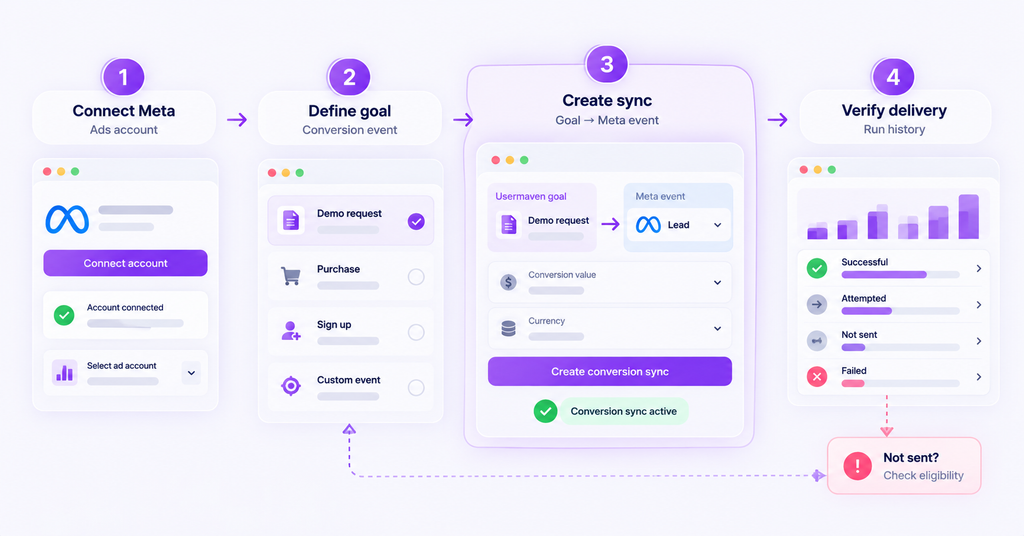
1. Connect the correct Meta Ads account
In Usermaven, open Workspace Settings → Integrations, choose Meta Ads, authorize the required permissions, and select the ad account associated with the website and workspace. Check the integration’s connection and sync status before proceeding.
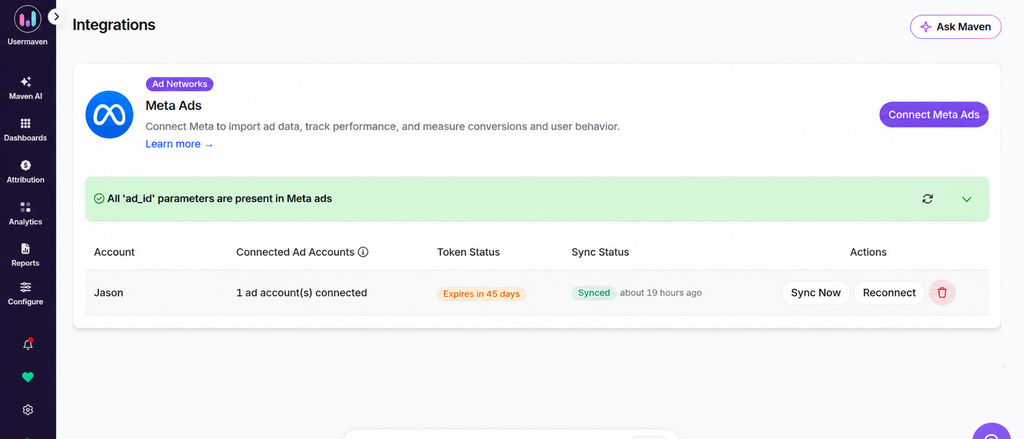
Make sure your Meta campaigns include the intended URL parameters. Usermaven’s Meta integration guidance emphasizes the ad ID for campaign and creative-level attribution. It also captures Meta click context when available. See the official Meta Ads integration guide for its current UTM template.
2. Create a conversion goal
Open Configure → Conversion Goals or the Conversion Goals area in Web Analytics. Select a recorded action, such as a successful demo request, trial start, or confirmed purchase. Name the goal according to the actual business milestone and test that Usermaven records it.
Goals may be based on page visits, pinned events, custom events, and eligible connected CRM or event-source outcomes. A goal must exist and be recording before a conversion sync can deliver it reliably.
3. Create the Meta conversion sync
Go to Configure → Conversion Syncs and select + Create New Conversion Sync. Enter a descriptive sync name, choose the connected Meta account, select the Usermaven conversion goal, and map it to the appropriate conversion category such as Lead, Sign-up, or Purchase.
For monetary events, choose the correct static or dynamic value and specify a valid three-letter currency code for Meta, such as USD or EUR. Check that the values reflect the business event rather than an unrelated page view.
4. Save, activate, and monitor
Save the configuration. Usermaven creates the associated conversion action and begins syncing eligible conversions. Check the sync status and Run History, including attempted, successful, not sent, and failed counts.
Usermaven’s documentation notes that Meta reporting can lag behind event delivery, sometimes by up to 24 hours. For immediate delivery verification, use Meta Events Manager’s Test Events view. The Diagnostics view can surface match-quality issues; the Usermaven run history gives additional reasons for events not being sent.
5. Investigate unsent conversions rather than assuming the sync failed
A healthy sync may intentionally omit conversions that are not eligible for delivery. Usermaven lists causes including missing click identifiers, insufficient matching data, an event outside the accepted lookback window, and conversions that do not meet the configured goal definition.
If you see repeated missing-click-ID warnings, check whether fbclid is preserved through the landing page and conversion flow. If a connection expires, reconnect it under Workspace Settings → Integrations; do not assume previously failed events will automatically be replayed.
This workflow is particularly useful when teams want to feed later-stage goals into Meta and use conversion syncs without building a direct API integration from scratch.
How to prevent duplicate Pixel and server events
Deduplication is often the point where an otherwise working setup goes wrong. Imagine a customer completes one purchase. The browser fires Purchase, and your backend also sends Purchase through CAPI. Both are valid observations of the same action, but they should not create two separate conversions.
For the standard Pixel/CAPI deduplication pattern, both copies should have the same event name and the same event ID. In the Pixel, that identifier is supplied as eventID; in the server event, it appears as event_id. Meta can use the pair to recognize duplicates within its deduplication window.
| Same business action | Browser event | Server event |
|---|---|---|
| Event name | Purchase | Purchase |
| Event ID | order_48271 | order_48271 |
| Expected behavior | First copy received | Matching copy can be deduplicated |
This is an illustrative identifier, not real customer data. The event ID must be stable for that specific action and must not be reused across unrelated purchases or leads.
A different event name, a separately generated random ID, or two independent plugins that both issue distinct identifiers can undermine deduplication. Meta uses event names and identifiers to match duplicate Pixel and Conversions API events.
Deduplication does not mean removing every server event
If your server reports a genuine backend milestone that the Pixel never sent, it may be a separate valid event. Conversely, if both systems send the same signup, coordinate the event ID and name. Review mappings before changing them so you do not collapse separate stages into one conversion.
For Usermaven-managed conversion syncs, do not assume that configuring a goal automatically deduplicates it against every existing Pixel event. Audit any overlapping Pixel and CAPI implementations and check Meta diagnostics to confirm the actual behavior.
How to test and troubleshoot Facebook server-side tracking
Use four checkpoints when diagnosing a discrepancy: event occurred → source captured it → server sent it → Meta accepted it. Then assess matching and attribution separately.
| Symptom | Likely checks | Practical action |
|---|---|---|
| Event absent in Test Events | Wrong source, no trigger, integration failure | Repeat the conversion, verify destination and server log |
| Duplicate purchases or leads | Mismatched IDs, multiple tags/plugins | Compare event_name and event_id across both paths |
| Low event match quality | Weak or missing permitted identifiers | Review matching context, formatting, consent and diagnostics |
| Usermaven conversion not sent | No click identifier, goal not met, lookback limits | Inspect unsent-reason breakdown in Conversion Syncs |
| Sync shows an error | Revoked authorization, mapping or API issue | Inspect Run History; reconnect only if required |
| Meta and CRM totals differ | Attribution windows, other channels, date rules | Reconcile definitions and count actual business outcomes |
Test Events and Diagnostics serve different purposes
Test Events is best for checking whether a specific trigger produces an event in the intended data source. Diagnostics helps identify recurring implementation concerns such as missing or invalid parameters. Review both after launch, not just during initial setup.
If a server event is received but not matched to an ad interaction, check identity and click context. If an event is matched but not credited in reporting, compare attribution windows, campaign eligibility, timing, and platform rules. The problem may not be transport at all.
Verify the revenue or CRM outcome at its source
For B2B SaaS, a form submission is often not the final commercial outcome. Confirm the CRM’s accepted lead, opportunity, subscription, or revenue status independently before using it as an optimization signal. A reliable event pipeline cannot validate a flawed lead definition.
This is where facebook ads attribution and server-side event delivery should be treated as related but separate processes. One captures and forwards an outcome; the other determines how campaign interactions contribute to that outcome.
Facebook server-side tracking best practices
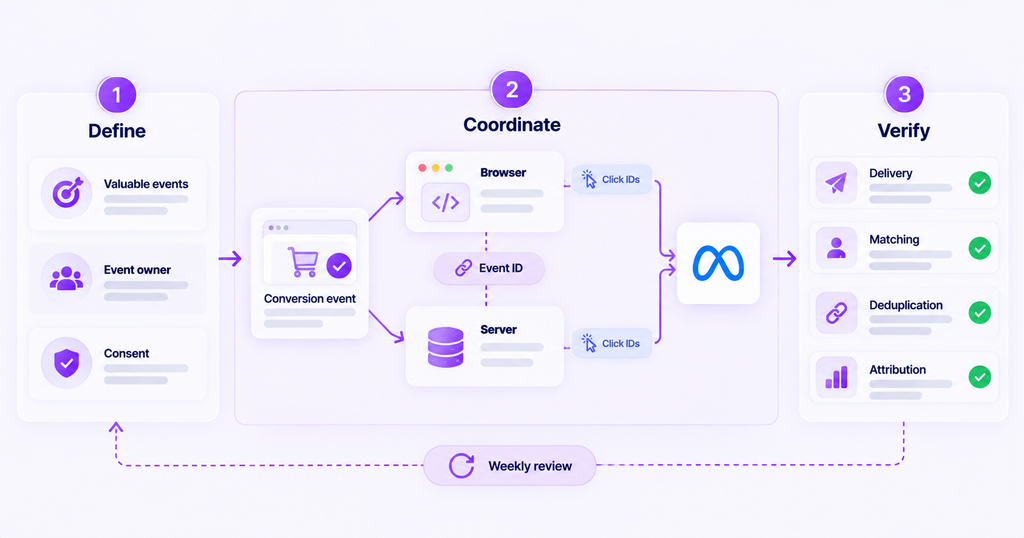
- Start with valuable conversions: Choose business milestones that are stable and unambiguous instead of forwarding every interaction.
- Assign event ownership: Keep one source of truth for when each purchase, demo booking, or qualified lead becomes final.
- Plan browser/server overlap: Decide which actions appear in both paths and document their event-ID strategy.
- Preserve campaign context: Keep valid click IDs and ad identifiers through redirects and cross-domain flows.
- Respect privacy choices: Apply relevant consent, data minimization, platform rules, and retention policies before collection and transfer.
- Monitor ongoing quality: Recheck events after form, checkout, CRM, website, and tag-manager changes.
- Separate delivery from credit: Evaluate server delivery, matching, deduplication, and attribution as separate quality checks.
An operational review can be simple: each week, inspect one high-value conversion from its source through the server logs and Meta diagnostics. Reconcile that sample against business outcomes, then investigate any changes in missing IDs, errors, or double-counting.
When does Usermaven make sense for Meta CAPI?
A developer-managed integration is reasonable when your team needs bespoke payloads and has the engineering resources to maintain them. Server-side GTM fits teams that already manage multiple advertising tags through a server container. Usermaven suits teams that want to define conversions in their analytics platform and send eligible outcomes to Meta without maintaining the CAPI integration themselves.
Its value goes beyond event transport. A business can examine channels, campaigns, journeys, and downstream outcomes through [[marketing attribution software|https://usermaven.com/]], then send selected conversion goals back to Meta through a managed sync. That can help teams align ad-platform optimization signals with the actions they actually care about.
The important boundary is that more server events do not guarantee better ROAS or identical conversion counts across platforms. Signal quality, campaign execution, customer behavior, and attribution rules all influence the result.
If your team wants to connect Meta campaign activity with meaningful first-party conversions and revenue, book a demo to see how Usermaven’s attribution and conversion-sync workflows fit your setup.
Facebook server-side tracking checklist
Before treating the integration as complete, confirm the following:
- Outcome defined: Each conversion has one business meaning and one valid trigger.
- Account connected: The server integration points to the correct Meta account and data source.
- Event mapped: Name, timestamp, action source, and valid values are correct.
- Matching reviewed: Permitted identifiers and click context survive the relevant journey.
- Deduplication tested: Pixel and server copies of the same action share the right IDs.
- Delivery verified: Test Events and server logs show the expected transaction.
- Errors monitored: Diagnostics and run histories are checked regularly.
- Reporting reconciled: Business totals and platform-attributed totals are not treated as the same metric.
FAQs
Does Facebook server-side tracking replace the Meta Pixel?
Not necessarily. Pixel and CAPI can complement each other: one reports from the browser, while the other reports from a server or connected platform. If they report the same conversion, implement and verify deduplication.
Is Conversions API the same as server-side Google Tag Manager?
No. Meta Conversions API is the interface that receives conversion events. Server-side GTM is one way to route and manage events that may ultimately be sent to CAPI. Direct integrations and supported partner connections are other options.
How do I know Meta received a server-side event?
Trigger an eligible test conversion and review the correct source in Events Manager → Test Events. Confirm the server connection’s own delivery or run logs, then inspect Diagnostics and deduplication indicators separately.
Why does Meta show more conversions than my CRM?
Meta may attribute a conversion within its configured window while your CRM records only the completed business outcome. Differences in event definitions, duplicate tags, view-through credit, timing, and identity can also matter. Compare like-for-like events before drawing conclusions.
What is the difference between fbclid and event_id?
fbclid is a click identifier associated with Meta ad traffic. event_id identifies a specific conversion action and supports deduplication of browser and server copies. They solve different tracking problems.
Can I set up Facebook server-side tracking without coding?
Yes, if your chosen partner integration supports the conversions you need. For example, Usermaven lets you configure a Meta conversion sync from an existing conversion goal. You still need to establish the right tracking, permissions, and event mapping.

Written by
Junaid Ahmed
Content Writer & Digital Marketer
Junaid Ahmed is a content and copywriter with 3+ years of experience creating research-driven content across SaaS, B2B, ecommerce, and digital marketing. He specializes in turning complex topics into clear, practical content that helps marketers better understand their challenges, evaluate solutions, and make informed decisions. His work spans educational content, industry insights, and actionable marketing guides.
All articles by Junaid →