Black Friday can produce a burst of website visits, coupon redemptions, trial signups, and sales. The difficult part is knowing which activities brought in valuable customers, what revenue the promotion actually generated, and whether those customers stay after the discount ends. A campaign report that stops at clicks or platform-reported conversions cannot answer all of those questions.
For SaaS teams, the 15 Black Friday marketing ideas for SaaS cover what to offer and how to promote it. This guide tackles the next job: building a measurement system that follows campaign traffic through conversions, billing, CRM outcomes, and attributed revenue. Black Friday falls on November 27, 2026, and Cyber Monday on November 30, but the reporting window should extend well beyond those dates.
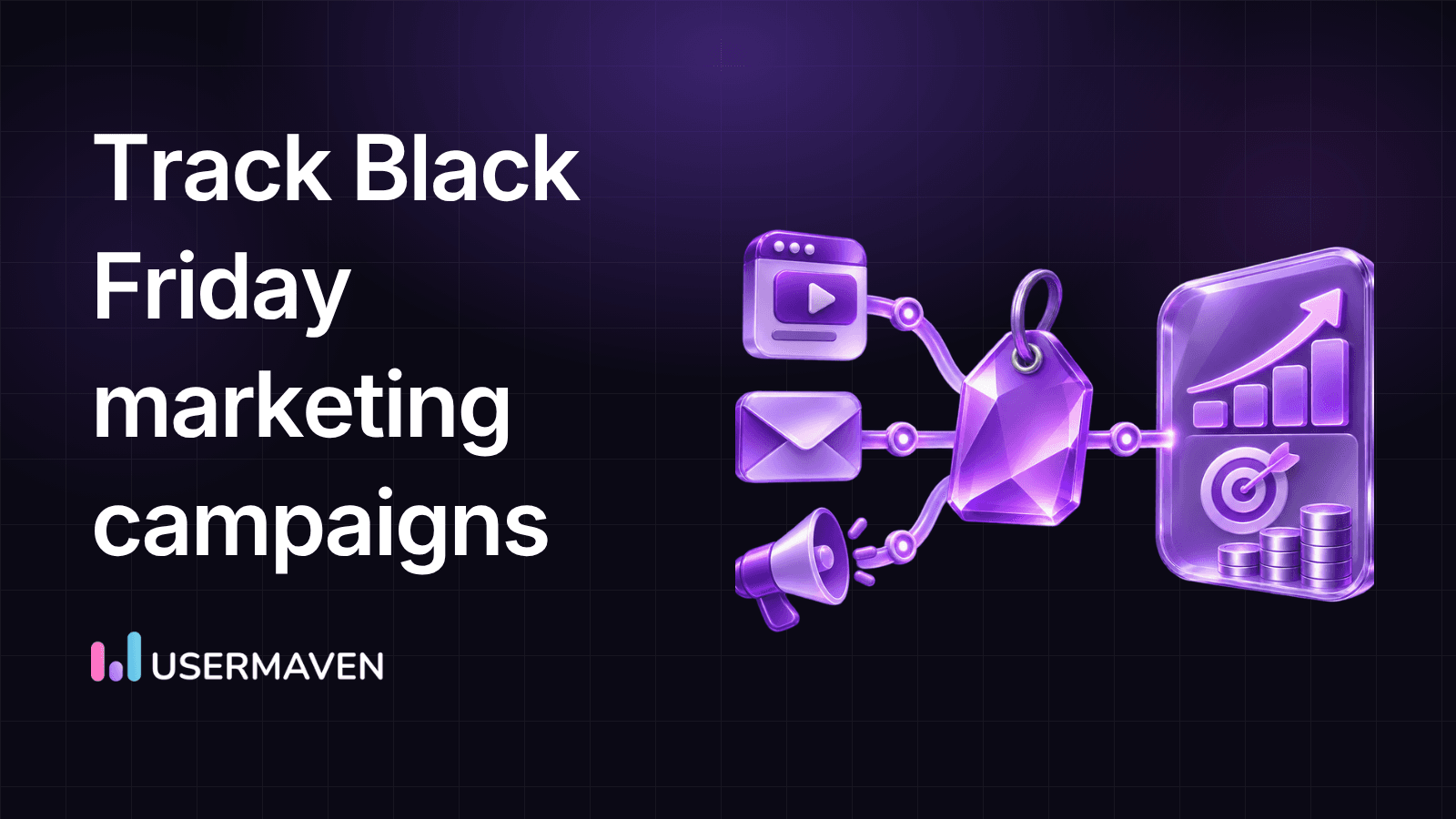
You will learn how to establish a tracking plan, name campaign links, configure Google Analytics 4 (GA4), test key events, reconcile revenue, and interpret attribution in Usermaven without confusing a credited conversion with an incremental sale.
Key takeaways
- Define success first: Separate trial signups, qualified leads, paid purchases, upgrades, and retained customers before launching campaigns.
- Use consistent UTMs: Label external placements with shared campaign conventions, then confirm the actual values recorded in analytics.
- Test business events: A recorded page view is not proof that a purchase, approved demo, or subscription upgrade was measured correctly.
- Reconcile revenue: Distinguish cash collected, contract value, recurring revenue, refunds, and attributed conversion value.
- Allow for delayed conversions: Compare Black Friday spend with subsequent outcomes using a clearly documented attribution window.
- Measure customer quality: Campaign success also depends on activation, product usage, renewals, and the cost of acquiring and supporting customers.
Black Friday campaign measurement plan at a glance
Use this scorecard as the campaign’s measurement specification. Each layer answers a different decision, and no single analytics tool automatically captures every row without correct implementation.
| Measurement layer | What to collect | Decision it supports |
|---|---|---|
| Campaign identity | UTM campaign, source, medium, content, ad identifiers | Which placement brought the visit? |
| Acquisition | Ad spend, clicks, sessions, landing-page engagement | Which channels generated useful traffic? |
| Funnel actions | Signup, form completion, checkout start, demo booking | Where did prospects progress or drop off? |
| Verified outcomes | Payment, qualified opportunity, upgrade, closed-won deal | Which visits led to real business events? |
| Revenue | Net payment, discount, refund, subscription and deal values | What economic value can be confirmed? |
| Attribution | Eligible touchpoints, model, lookback and reporting date | How is conversion credit distributed? |
| Customer quality | Activation, retained accounts, renewal and expansion | Were promotional customers worth acquiring? |
The tracking plan should be signed off by marketing, analytics, engineering, finance, and sales operations when those functions own different pieces of the journey. An incomplete handoff between the website and billing system can be more damaging to the report than an imperfect chart design.
Unlock insights that drive growth
What to prepare before your Black Friday campaign goes live
Choose one primary business outcome
Define the most important result for this promotion. For a self-serve product, that might be the first successful paid subscription. For a sales-led B2B product, it might be a qualified opportunity or a contract signed within an approved offer period. Track earlier steps as supporting indicators rather than substituting them for the outcome.
Avoid giving an ordinary signup the same monetary value as a completed annual contract unless you have an explicitly documented value model. A completed form and an accepted, paid subscription represent different stages of commitment.
Document the customer and account identifiers
Map where each event originates: website or app, checkout or billing provider, CRM, advertising platform, and analytics tool. Identify the stable customer, subscription, transaction, lead, or account IDs that can legitimately connect records. Keep personal data collection aligned with your privacy policies and consent requirements.
For B2B SaaS, decide whether reporting should count unique users, accounts, opportunities, or contracts. A company with five employees completing trial steps is not necessarily five acquired customers. Agree on the deduplication rules before the campaign begins.
Set a baseline and reporting period
Choose a relevant pre-promotion comparison window, while accounting for weekday patterns, seasonality, channel mix, and product changes. Use the same definitions for both periods. Document when the offer begins and ends, including its time zone, and agree on the period for evaluating delayed sales, refunds, activation, and renewals.
A baseline helps reveal changes but does not, on its own, prove that a campaign caused them. When practical, a randomized holdout or another valid comparison is needed to estimate incremental impact.
How to track Black Friday marketing campaigns step by step
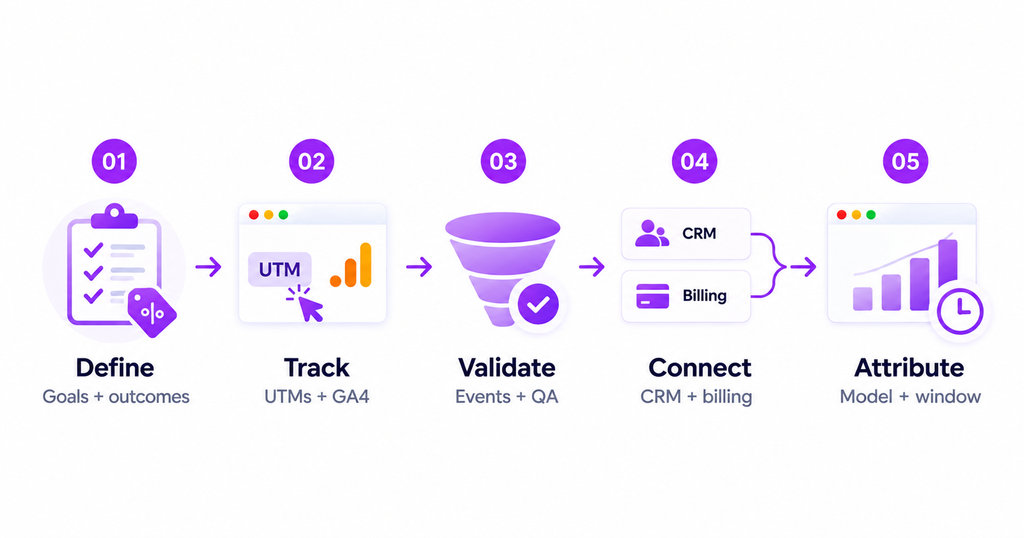
The following eight steps form the complete workflow. You can use GA4 for web measurement, your billing and CRM systems for confirmed outcomes, and a marketing attribution platform to study connected journeys. The exact configuration depends on your stack.
Step 1. Create a campaign measurement brief
Write a one-page specification containing the offer, eligible audiences, campaign owner, channel list, landing-page destinations, event definitions, conversions, revenue fields, and dashboard responsibilities. Include the date each source is expected to update and who is responsible when something breaks.
For a B2B software promotion, separately name new-customer purchases, existing-customer annual upgrades, reactivated subscriptions, and sales-assisted opportunities. These outcomes should not collapse into one generic “sale” metric because their costs and long-term value differ.
A useful measurement brief also records the business question behind each metric. For example, “Which channels produced paid accounts that activated within the first week?” is more actionable than “How many leads came from Black Friday?”
Step 2. Standardize UTM parameters across every external channel
Use one naming convention for all links promoting the same offer. Reserve campaign tags for inbound links from outside your website, not navigation between your own pages. The UTM parameters guide explains the individual fields; here the important task is making the values consistent enough to compare.
For a hypothetical 2026 SaaS campaign, document the fields as values rather than copying a tracked URL into every report:
| Placement | utm_source | utm_medium | utm_campaign | utm_content |
|---|---|---|---|---|
| LinkedIn paid campaign | paid_social | bf2026_annual_offer | product_video_a | |
| Customer newsletter | customer_email | bf2026_annual_offer | upgrade_cta | |
| Agency partner promotion | partner_name | referral | bf2026_annual_offer | partner_article |
| Organic social post | organic_social | bf2026_annual_offer | founder_post |
The values above are illustrative naming examples, not real campaign data. Agree on approved mediums, lowercase formatting, separators, and who can create new values. Do not label a paid placement as organic_social or mix multiple spellings for one source.
Google’s campaign URL builder documentation explains the GA4 manual tagging parameters, including campaign IDs. Check the platform’s auto-tagging requirements and preserve necessary click identifiers. An apparently clean UTM scheme cannot compensate for a broken ad-platform integration.
Tracking QA: Click each final published ad, newsletter, and partner link in a suitable test session. Confirm redirects retain the intended query parameters and that the analytics traffic report receives the matching source, medium, and campaign. Never attach UTMs to ordinary editorial hyperlinks or internal website links.
Step 3. Configure acquisition reporting in GA4
Ensure the GA4 property, Google tag or GTM implementation, and consent configuration are working before launch. In Reports → Acquisition → Traffic acquisition, inspect session source/medium and session campaign dimensions, including manual campaign dimensions when relevant to the setup.
Traffic acquisition describes the session’s acquisition context. User acquisition reports answer different first-user questions, while advertising attribution reports apply crediting rules to eligible conversions. Do not mix these scopes in a single unlabeled chart.
For paid media, compare the advertising platform’s click records with the website’s recorded sessions, but do not expect them to match exactly. Repeat clicks, blocked or abandoned page loads, consent decisions, reporting windows, and different counting rules can create legitimate differences.
Tracking QA: Review a test visit from each channel, check the destination URL, confirm that session campaign values appear under the expected spelling, and inspect “Unassigned” or unexpected “Direct” traffic if campaign labels seem to disappear.
Step 4. Instrument conversions that match the SaaS buying journey
Define the funnel before counting conversions. Google recommends events such as sign_up, generate_lead, begin_checkout, and purchase for relevant journeys. For purchase, send a unique transaction_id and appropriate value and currency data. Use a well-defined custom event for a business action that is not represented by a suitable recommended event.
| Event or outcome | What should trigger it | Verification requirement |
|---|---|---|
| sign_up | Account registration completed successfully | Unique completed account, not button click |
| generate_lead | Lead request genuinely submitted | Accepted form or server confirmation |
| begin_checkout | Checkout process genuinely started | Not simply viewing a pricing page |
| purchase | Confirmed paid transaction | Unique transaction ID, actual amount and currency |
| Subscription upgrade | Confirmed plan change in billing | Current plan, new plan, effective date and payment |
| Qualified opportunity | CRM stage changed to qualified | Stable opportunity/account ID and qualification rule |
Google’s recommended GA4 events reference explains the standard names and required parameters. Mark appropriate events as key events in GA4 after verifying they are collected. Google’s key event setup guidance notes that the setting does not rewrite historical reports.
If a booking widget, embedded form, cross-domain checkout, or billing system finishes outside your primary domain, plan its event flow explicitly. Do not assume a button click establishes a completed purchase or that GA4 automatically imports a later CRM deal.
Tracking QA: Complete approved test purchases and lead submissions, including a coupon, payment failure, existing-account upgrade, and refund scenario where supported. Validate that each successful business outcome creates the intended single conversion record.
Step 5. Use GTM Preview and GA4 DebugView to test the full path
Open your GTM workspace in Preview, then trigger a test visit and conversion. Confirm the web event, trigger, and payload are what you expected. Use GA4 Admin → Data display → DebugView with debug mode enabled for the test device to inspect event names and key parameters.
DebugView is a collection diagnostic, not proof that an event will be attributed correctly to a particular campaign. Google’s DebugView instructions cover prerequisites and privacy-related limitations. Confirm report outputs later with suitable processing time.
Test the same journey on mobile, desktop, supported browsers, and the actual purchase path. Check that consent choices are respected. Never treat server-side tracking as a consent bypass or guarantee that blocked events will be recovered.
Tracking QA: Compare one intentional action to the events fired in the browser, any server relay, GA4, and your billing database. Look for duplicate purchase events, dropped query parameters, missing currency, and inconsistent account identifiers.
Step 6. Connect billing, CRM, and offline outcomes
A Black Friday campaign can create revenue after the visitor leaves the website. A buyer may book a demo on November 27, pass qualification in December, and close a contract later. That is why reliable attribution depends on bringing confirmed offline outcomes into the reporting system.
Document the fields your CRM and billing providers can supply: stable lead or customer ID, account, opportunity stage, paid status, plan, transaction ID, currency, net collected amount, refund, effective date, and relevant campaign IDs. Only join records where identifiers and permissions allow reliable matching.
Usermaven’s Event Sources can ingest supported CRM, payment, webhook, and CSV-based events into the workspace. Its conversion goals documentation explains how confirmed outcomes can become goals for analytics and attribution. This is not equivalent to saying GA4 or Usermaven automatically knows the revenue of a lead that has not been connected to the underlying contract or payment.
Tracking QA: Reconcile at least one validated payment and one validated CRM opportunity between the source system and your analysis. Check whether a refund changes the relevant financial total and whether annual upgrades are reported separately from new subscriptions.
Step 7. Choose an attribution model and a delayed-conversion window
Attribution assigns credit to the eligible touchpoints recorded before a conversion. First-touch can highlight discovery; last-touch emphasizes the interaction closest to the conversion; multi-touch models distribute credit according to their rules. None independently establishes the number of sales that would not have happened otherwise.
For a short Black Friday weekend with a long B2B buying cycle, reporting only conversions dated November 27–30 may undercount the outcomes associated with campaign spend. Define an attribution lookback window appropriate to the journey and avoid changing it mid-report without recording that change.
In Usermaven Paid Ads Attribution, By Conversion Date asks which ads influenced conversions completed during a selected period, with a backward-looking attribution window. By Spend Date associates clicks in a selected spend period with conversions found within the configured look-ahead window. Both views can be useful, but they are different questions and should never be merged without explanation.
In GA4, the Advertising area’s key event attribution paths report helps review paths, touchpoints, and time to conversion. Available GA4 attribution-model choices differ from those available in Usermaven; do not assume the same model labels or results across tools.
Tracking QA: Note the model, eligible channels, lookback or look-ahead window, conversion goal, and date basis beside every attributed revenue figure. Avoid presenting a partial future conversion window as a final result.
Step 8. Reconcile the dashboard before making budget decisions
Build a joined view by campaign and channel, but keep separate columns for advertising costs, site visits, leads, purchases, CRM-qualified outcomes, attributed revenue, refunds, and post-sale activation. Avoid one “total conversions” figure that mixes signups with confirmed purchases.
Check major discrepancies against source-of-truth systems. Your ad platform may count conversions using a different attribution model and window than GA4. Your billing provider may report the net amount charged, while your CRM may report annual contract value. A marketing dashboard can display these together only when each measure is labeled precisely.
Tracking QA: Assign owners for daily collection health, budget pacing, and revenue reconciliation. Record both the action taken and the evidence behind it. A lower cost per lead does not automatically justify more spending if the leads have lower qualified-pipeline or paid conversion rates.
How to read Black Friday results in GA4
GA4 is useful for analyzing tagged acquisition and on-site events, provided the implementation is correct. Start with Traffic acquisition to compare session sources and campaigns. Use Events and Key events reporting to inspect the actions you defined and validate their event names and counting behavior.
Then open Advertising → Key event attribution paths to examine eligible journeys and conversion timing. Choose a specific key event rather than interpreting a blend of trial signup, contact form, and purchase as a single business outcome. Review the available campaign and channel dimensions and the attribution configuration used.
For more detailed breakdowns, configure an Exploration using compatible session, traffic-source, event, and conversion dimensions. GA4’s standard traffic reports are not a substitute for reconciled subscription economics, sales opportunities, or refunds in billing systems.
Three GA4 reporting mistakes to avoid
Mixing user and session scope: First-user acquisition, session acquisition, and key event attribution may assign different labels to the same journey. Identify the report scope before comparing numbers.
Treating every key event as paid revenue: A demo booking or free trial may matter, but it is not the same as a verified payment. If you use assigned lead values, label them as estimates, not cash received.
Using DebugView as your final performance report: DebugView confirms test events are collected. Real campaign reporting requires completed data processing, valid campaign dimensions, and reconciliation of final outcomes.
How Usermaven connects Black Friday campaigns to revenue
A campaign-specific UTM report is the starting point. Usermaven is marketing attribution software that can connect supported acquisition data with website and product activity, conversion goals, and business outcomes, helping SaaS and marketing teams examine why a channel contributes value beyond the first click.
Compare campaign spend with attributed conversion value
With supported Google, Meta, LinkedIn, and Microsoft ad accounts connected, Usermaven’s paid ads attribution reporting brings ad spend, clicks, conversions, attributed conversion value, and ROAS into one analytical view. Marketers can drill into sources, campaigns, ad sets, and ads where the integration supplies those dimensions.
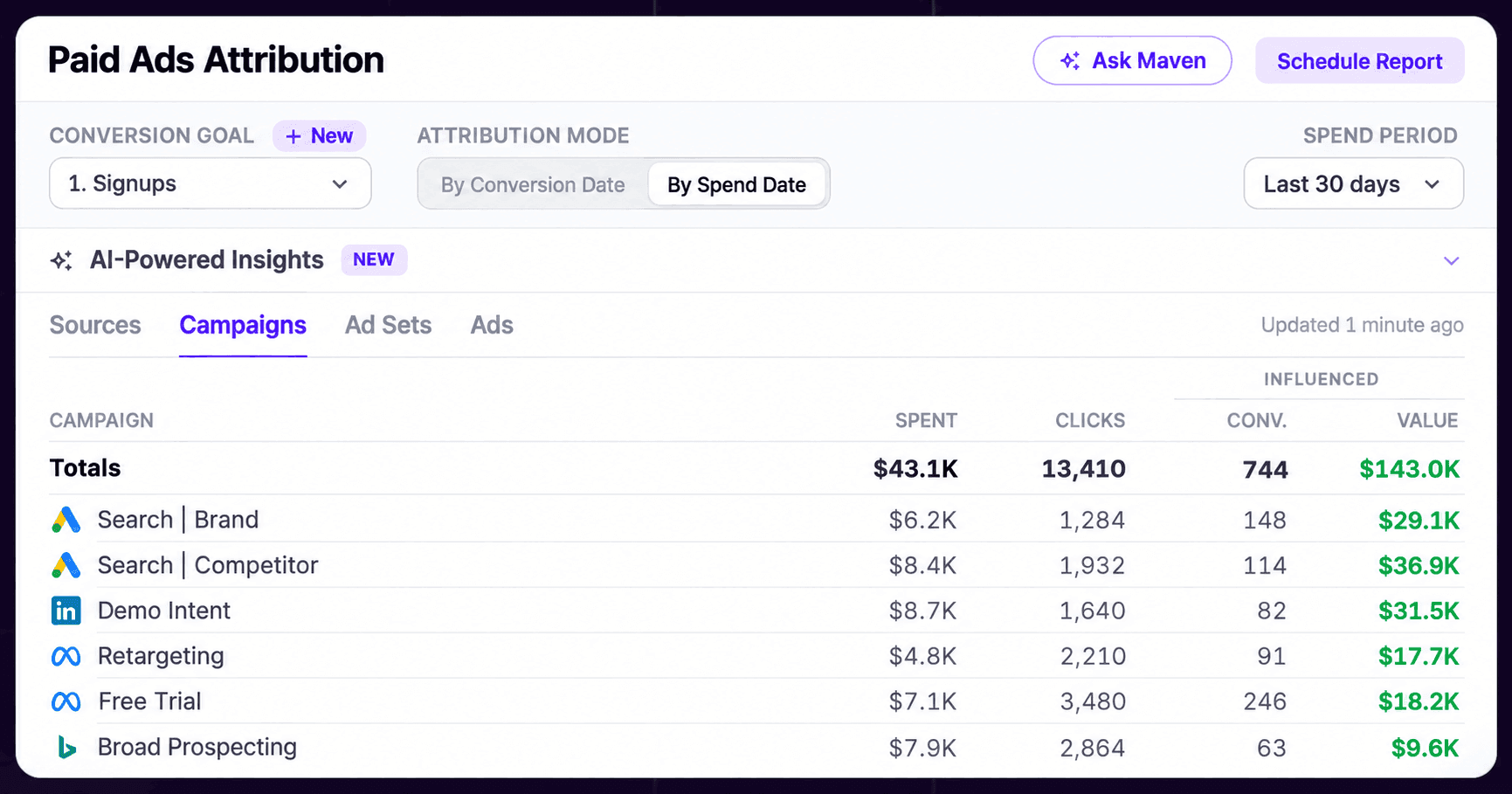
For Black Friday, that means evaluating whether a campaign generated verified paid customers rather than merely creating a large trial-signup count. Always choose the correct conversion goal and clarify whether the displayed amount is attributed revenue or an assigned value for a nonrevenue event.
Analyze the journey beyond the promotion
A visitor may click a Black Friday email, return from organic search, activate a trial, and buy after the promotional weekend. Usermaven’s attribution reports can compare eligible touchpoints under different crediting models, while funnel and product analytics can examine the actions users completed after acquisition.
Segmentation can also separate new paying accounts, existing customers who upgraded, and reactivated users, provided the correct identities and events exist. A useful companion is marketing campaign attribution, which explains how multiple channels participate in conversions.
Monitor changes with Maven AI Agents
Usermaven’s Maven AI Agents can run recurring analyses of campaign performance, acquisition changes, funnel drop-offs, and account behavior, then surface findings for review. October 2026 updates also support saving AI-generated reports to dashboards and sharing Agent findings. These capabilities can help an analyst spot unusual movement during a short promotional period.
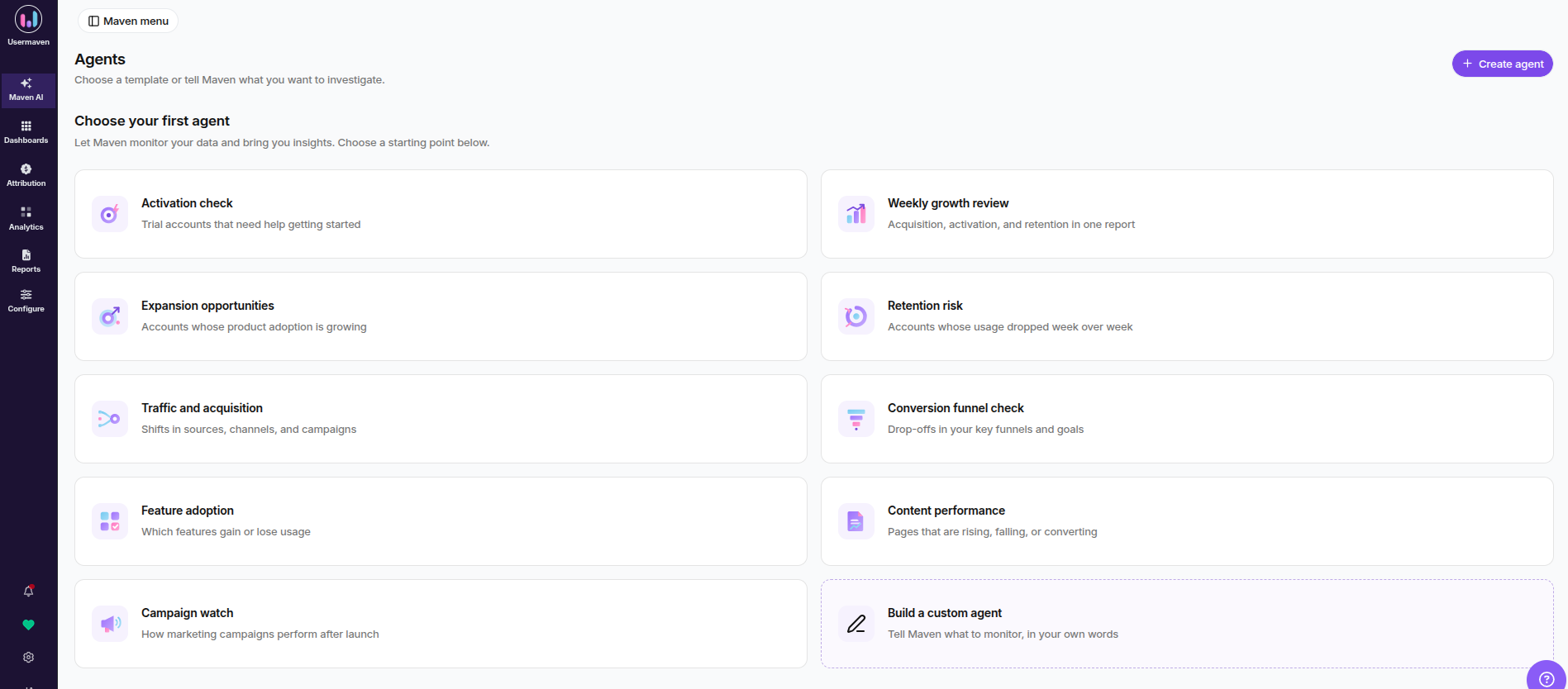
Agents should support human judgment, not replace reconciliation. An automated alert about falling conversion rate is a prompt to inspect attribution windows, payment errors, consent changes, and audience mix. It does not establish that an ad creative or price caused the movement.
Build a report stakeholders can act on
Create views for campaign acquisition, paid performance, funnel conversion, and verified financial outcomes. Use clear definitions for the reporting period and conversion date, and record which systems supplied the data. A marketing attribution dashboard is most useful when finance, sales, and marketing agree on the underlying goal and value definitions.
Black Friday revenue and ROI reporting for SaaS
A SaaS promotion can improve cash collection while lowering long-term revenue per customer. That is why reporting should separate booked contract value, net payments, recognized revenue, recurring-revenue effects, and customer value. Do not add these measures together: they are different representations of economic activity.
| Metric | Practical calculation or source | Important distinction |
|---|---|---|
| Conversion rate | Completed qualifying outcomes ÷ eligible visitors or leads | State the denominator and observation window |
| Cost per acquired customer | Relevant acquisition spend ÷ new paying customers | Exclude existing-customer upgrades if measuring new CAC |
| Attributed ROAS | Attributed conversion value ÷ ad spend | Model-based credit, not proven incremental return |
| Net promotional cash collected | Paid amounts less refunds and applicable adjustments | Not the same as recognized revenue |
| Contract value or bookings | Signed contractual value under your sales policy | Not the same as cash or earned revenue |
| MRR/ARR movement | Subscription revenue normalized under a consistent policy | An annual prepayment is not twelve months of earned revenue immediately |
| Contribution from the promotion | Relevant net receipts less variable delivery, support, incentive and acquisition costs | Requires agreed cost allocation |
| Activation or retention | Eligible promotional cohort reaching defined post-sale milestone | Needs enough time for follow-up |
How to calculate ROAS: Divide attributed conversion value by relevant ad spend. Document the attribution model and avoid comparing one platform’s reported ROAS with another platform’s figure as though both use identical crediting rules. The how to calculate ROAS article covers the underlying calculation in more detail.
How to estimate campaign ROI: Define a consistent incremental-return framework: relevant incremental contribution minus campaign costs, divided by campaign costs. Estimating the incremental portion requires a defensible counterfactual, such as an experiment or suitably designed comparison. A descriptive dashboard alone cannot supply it.
How to compare annual plans: Report the discounted amount charged, renewal pricing, refund policy, and any resulting recurring-revenue change separately. A discounted annual plan may collect more cash upfront yet produce lower net retention later; both facts matter.
Why Black Friday numbers disagree across tools
Discrepancies are normal, but unexplained discrepancies are not a strategy. Use the table below to triage the cause before reallocating spend.
| Symptom | Likely area to check | Recommended response |
|---|---|---|
| Ad clicks exceed analytics sessions | Repeat clicks, unloaded pages, consent, redirect issues | Compare definitions and test landing requests |
| GA4 traffic is Direct or Unassigned | Missing UTMs, changed redirects, unexpected source/medium | Audit final published links and session dimensions |
| Purchase counts exceed billing transactions | Duplicate tags, repeated success pages, duplicate IDs | Check event implementation and transaction IDs |
| Trial signups look strong but revenue is weak | Misaligned goal, low activation, delayed purchases | Report trial-to-paid and customer quality separately |
| Ad platform and analytics ROAS differ | Different models, windows, identifiers or source coverage | Label each model and use a consistent analytical comparison |
| December sales do not appear in the weekend report | Conversion-date cutoff or unfinished look-ahead | Track a delayed-conversion cohort and update after maturity |
| Revenue differs from finance records | Refund timing, tax, discount, currency, bookings vs. cash | Reconcile with payment and accounting source systems |
If discrepancies remain large, inspect the event and identity pipeline before adding new tracking technologies. The conversion tracking workflow remains the foundation; server-side routing is an architectural choice, not a guaranteed accuracy fix.
2026 Black Friday reporting calendar
Black Friday is Friday, November 27, 2026, followed by Cyber Monday on Monday, November 30, 2026. The dates below are a suggested operating plan for teams publishing this guidance in early November, not universal industry deadlines.
| Period | Reporting priority | Owner or output |
|---|---|---|
| Nov 4–10 | Finalize campaign naming, event specs and baseline | Marketing + analytics tracking plan |
| Nov 11–19 | QA links, checkout, CRM events and campaign dashboards | Engineering + analytics sign-off |
| Nov 20–26 | Review test traffic, attribution settings and spend pacing | Pre-launch validation log |
| Nov 27–30 | Check daily spend, funnel failures, paid sales and support issues | Daily operational readout |
| Dec 1–7 | Reconcile payments, refunds and initial attribution | First post-sale scorecard |
| Later in Dec and beyond | Review delayed B2B deals, activation and retention | Matured cohort and revenue update |
A sales-led company may need a longer attribution and opportunity-close window than a self-serve checkout. Identify the reporting maturity date in advance. Do not label the first December report as final if significant opportunities are still open or refunds may arrive later.
Example: Follow one SaaS buyer from campaign to payment
Consider an illustrative workflow, not measured campaign results. A prospect clicks a LinkedIn promotion with the approved Black Friday campaign label, reads the landing page, and signs up for a trial. The prospect later returns through an email reminder, activates a product feature, and purchases an eligible annual plan after a successful checkout.
The analytics implementation should record the tagged entry, signup, relevant activation event, and purchase with a unique transaction identifier. The billing system should confirm the discounted amount and the subscription plan, while attribution reports apply their documented rules to the eligible recorded touchpoints.
A first-touch view may give the original LinkedIn visit credit; a last-touch view may emphasize the email or another later interaction. Neither, by itself, proves what the prospect would have done without the campaign. The retention report can later examine whether the customer continued using the product and renewed.
The point is not to produce one perfectly precise number immediately. It is to keep the event, campaign, identity, attribution, and financial definitions consistent so that each later decision can be defended.
Black Friday marketing tracking checklist
Use this operational checklist before launch and again after the promotion closes.
- Campaign naming: One approved 2026 campaign identifier, consistent source/medium values, and no internal-link UTMs.
- Acquisition QA: Test final ads, newsletter links, partner placements, redirects, and GA4 or Usermaven traffic records.
- Conversion events: Verify signup, qualified lead, purchase, upgrade and other relevant goals at the correct completion point.
- Financial events: Include stable transaction identifiers, actual value, currency, discount, refunds and plan details where relevant.
- CRM connection: Confirm opportunity IDs, account matching, sales stage definitions and the timing of imported outcomes.
- Attribution settings: Document model, goal, date basis, window, eligible sources and late-conversion policy.
- Dashboard ownership: Assign a person to spend, event health, billing reconciliation and reporting decisions.
- Privacy safeguards: Respect consent, data minimization, permitted integrations and retention policies throughout the journey.
- Post-sale analysis: Schedule follow-up checks for activation, retention, refunds, renewal and pipeline maturity.
Final thoughts
The best Black Friday tracking setup links campaign labels to real conversion events, verified financial outcomes, and an explicit attribution model. Marketers should know which data is observed, which value is estimated, and which revenue remains pending after the promotional weekend.
Start with a sound measurement plan, test links and events before November 27, reconcile the records after the sale, and evaluate customers over a long enough period to understand their value. For organizations that need to connect campaign acquisition with product behavior, CRM outcomes, and revenue, book a Usermaven demo to explore its marketing attribution workflows.
FAQs
How do you track Black Friday campaigns in GA4?
Tag external campaign links consistently, validate source and campaign dimensions in Traffic acquisition, configure the relevant events and key events, and test the event payloads in DebugView. Then review key event attribution paths. For subscriptions and offline deals, reconcile confirmed business outcomes with the billing or CRM source system.
Which UTM parameters should I use for Black Friday?
At a minimum, use consistently defined utm_source, utm_medium, and utm_campaign values for external links. Add utm_content when comparing creatives or placements and other parameters only when your reporting actually uses them. Preserve required ad-platform auto-tagging identifiers.
What counts as a Black Friday conversion for B2B SaaS?
That depends on the primary business objective. A self-serve product may count a confirmed first paid subscription. Sales-led SaaS may measure qualified opportunities and signed contracts, with separate reporting for earlier demo requests. Do not assign the same revenue value to all stages.
Why doesn’t my ad platform’s Black Friday revenue match GA4?
Ad platforms, GA4 and billing systems use different attribution rules, windows, identifiers, consent-based collection, and financial definitions. Verify event implementation first, then compare clearly labeled metrics instead of forcing all tools to match numerically.
How do I track Black Friday sales that close in December?
Keep the original campaign and spend dates, connect later CRM or payment outcomes with stable IDs, and use a documented conversion window. Report conversions by their completion date as well as relevant spend-date attribution where supported. Update the final report only after the agreed window has matured.
Is ROAS enough to judge a Black Friday SaaS campaign?

Written by
Junaid Ahmed
Content Writer & Digital Marketer
Junaid Ahmed is a content and copywriter with 3+ years of experience creating research-driven content across SaaS, B2B, ecommerce, and digital marketing. He specializes in turning complex topics into clear, practical content that helps marketers better understand their challenges, evaluate solutions, and make informed decisions. His work spans educational content, industry insights, and actionable marketing guides.
All articles by Junaid →