A customer signs up through an ad, uses a product, and closes a deal weeks later. Marketing, product, and finance may report different outcomes because each team measures a different part of the journey.
Enterprise analytics connects data, common definitions, and governance across departments so leaders can evaluate performance and make decisions using consistent evidence.
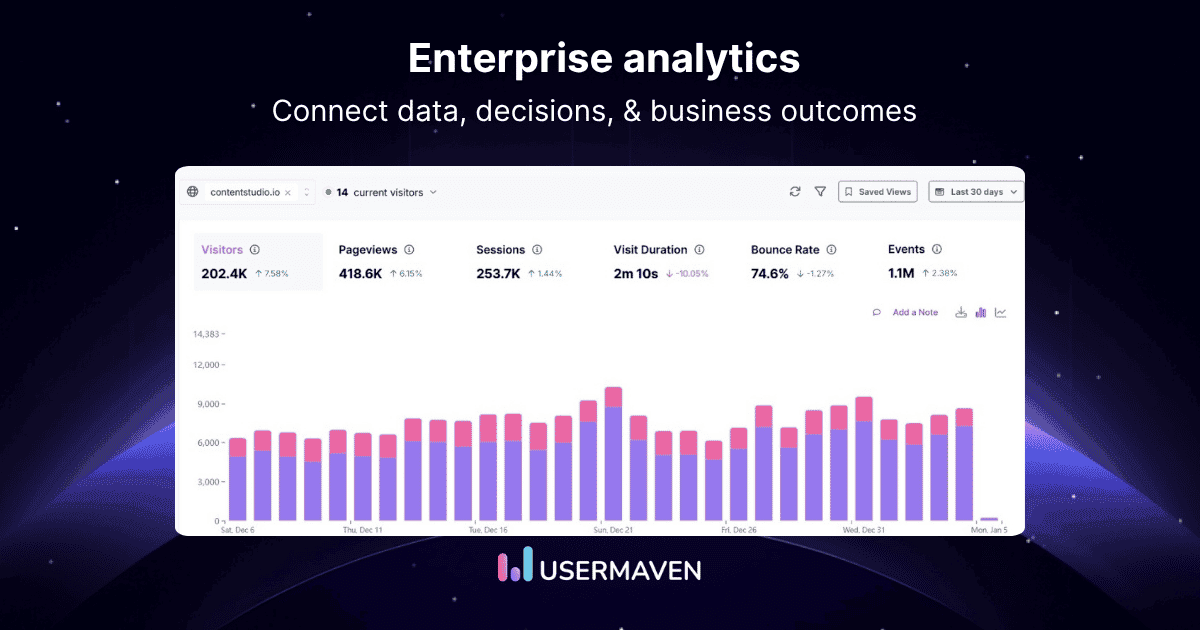
This guide explains its architecture, examples, implementation steps, and platform requirements.
Key takeaways
- Enterprise analytics connects decisions across departments. Shared definitions and governed data matter more than collecting every metric in one dashboard.
- Different questions require different analytical methods. Descriptive and diagnostic approaches explain performance; predictive and prescriptive approaches estimate future outcomes and possible actions.
- Reliable inputs come before advanced AI. Validate data quality, identity matching, metric ownership, access controls, and source-system reconciliation before trusting automated findings.
- Start with a measurable cross-team use case. Connect source data to a business outcome, assign owners, test the findings, and monitor whether decisions improve results.
- No single tool must do everything. Warehouses and BI tools support broad enterprise reporting; specialized applications such as Usermaven focus on customer, product, marketing, and revenue measurement.
Enterprise analytics at a glance
| Element | What it covers | Key decision |
|---|---|---|
| Purpose | Consistent analysis across business functions | Which decisions need shared evidence? |
| Data sources | CRM, finance, operations, websites, and product events | Which records must connect? |
| Methods | Descriptive, diagnostic, predictive, and prescriptive | What question are we answering? |
| Technology | Data pipelines, governed storage, BI, and specialist analytics | Which layer is missing? |
| Trust controls | Metric definitions, data quality, access, and reconciliation | Can teams rely on the result? |
| Success measure | Decision speed, verified outcomes, and process improvement | What changed after the insight? |
What is enterprise analytics?
Enterprise analytics is the organization-wide practice of collecting, integrating, governing, and analyzing data from business systems to support decisions across teams. It combines shared metrics with appropriate reporting, statistical analysis, and sometimes predictive models.
Unlike a single dashboard, enterprise analytics coordinates data ownership, definitions, access, quality, and decision processes. It can support finance, operations, product, sales, and marketing analytics without requiring every department to use the same front-end tool.
Enterprise analytics vs. business intelligence
Business intelligence (BI) is often the reporting and exploration layer of an enterprise analytics program. Enterprise analytics also includes data pipelines, governance, experimentation, advanced models, and operational follow-through.
| Approach | Primary question | Typical scope |
|---|---|---|
| Departmental reporting | How is this team performing? | Metrics from one function or application |
| Business intelligence | What happened, and where? | Shared reporting, dashboards, and drill-downs |
| Enterprise analytics | What should the organization understand and change? | Cross-system data, trusted definitions, analysis, and decisions |
| Enterprise data platform | How is information stored and governed? | Warehouses, lakes, pipelines, access, and data modeling |
A data warehouse may supply the underlying information, while BI and specialized analytics applications help people interpret it. Neither a warehouse nor a dashboard alone guarantees consistent decisions.
The four types of enterprise analytics
The four commonly used analytical approaches answer different business questions. They complement one another rather than representing four mandatory software modules.
| Type | Question | Enterprise example | Output |
|---|---|---|---|
| Descriptive | What happened? | Monthly revenue by region | KPI report |
| Diagnostic | Why did it happen? | Higher churn after onboarding changes | Segment and funnel investigation |
| Predictive | What might happen? | Estimate next-quarter renewal risk | Forecast with confidence ranges |
| Prescriptive | What action may help? | Compare retention interventions | Recommended actions under constraints |
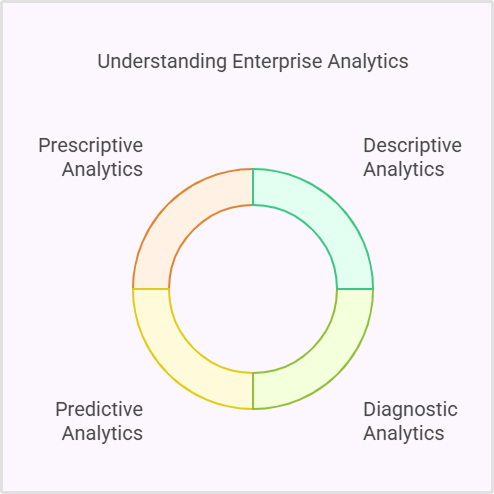
For instance, predictive customer analytics may estimate which accounts are likely to churn. A separate intervention study is still needed to determine whether a proposed action actually improves retention.
How enterprise analytics works
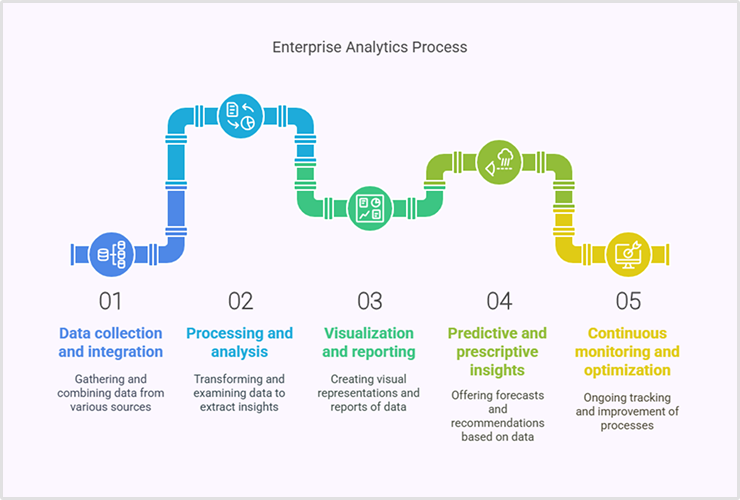
An effective enterprise analytics workflow moves from raw data to governed measures, analysis, and action. The sequence can be simplified into six connected stages.
1. Collect data from business systems
Inputs may include website events, advertising costs, CRM opportunities, billing records, purchase orders, support tickets, product usage, and finance ledgers. Capture timestamps, identifiers, and data ownership wherever possible.
For customer measurement, first party data helps connect known interactions to the organization’s own outcomes, subject to valid consent, access controls, and applicable laws.
2. Integrate and prepare the data
APIs, batch imports, streams, and ETL or ELT pipelines move records into appropriate storage. Transformations standardize currencies, dates, identifiers, categories, and event schemas while preserving source-level auditability.
Integration also requires identity resolution. An anonymous website visit and a CRM opportunity cannot be treated as the same customer unless a defensible identifier or matching rule connects them.
3. Define trusted metrics and governance
Teams need consistent definitions for revenue, active customers, qualified leads, churn, and conversion dates. Ownership, lineage, refresh frequency, and permissions must be documented before dashboards are widely shared.
Practical data governance best practices include defining metric owners, testing transformations, limiting sensitive access, and reviewing changes to the definitions that leadership relies on.
4. Analyze and visualize the results
Teams then create reports, segments, cohorts, funnels, and forecasts. The right output depends on the question, from an executive trend dashboard to a finance reconciliation or customer-journey analysis.
Well-designed custom analytics dashboards make performance visible, but each chart should state its date range, metric definition, filters, and source rather than relying on visual polish alone.
5. Validate findings and decide
Analysts compare outputs with source systems and investigate anomalies. Business owners review alternative explanations before deciding to adjust budgets, processes, staffing, inventory, or customer communications.
6. Monitor the change and its impact
Track whether the decision produced the expected effect and whether measurement conditions changed. Use experiments or appropriate causal methods when the question is whether an intervention caused an improvement.
Enterprise analytics use cases by department
Enterprise analytics becomes useful when a business question crosses systems or functions. The following examples show common applications and the underlying measurement challenges.
Marketing, sales, and revenue
Marketing may report leads while sales measures opportunities and finance measures collected revenue. Connecting those records lets teams investigate whether campaigns produce valuable customers, not merely cheap inquiries.
A revenue analytics framework can compare pipeline created, win rate, sales cycle, and realized revenue while documenting the attribution model and its limits.
Product and customer experience
Product teams combine onboarding events, feature adoption, support activity, and renewals to identify friction. customer journey analytics can reveal common sequences, though observed paths do not establish causation.
Finance and procurement
Finance teams can analyze spending by business unit, supplier, and approval stage. Records from purchase requisition software can complement ERP transactions to reveal unusual purchasing patterns and delays.
Operations and supply chain
Operations teams can examine throughput, fulfillment delays, returns, and inventory levels. Forecasts can support staffing or purchasing decisions, but unexpected supply changes and missing observations require human review.
Risk and compliance
Unusual transaction patterns, permission changes, or deteriorating forecasts may indicate potential risks. Analytics makes those signals visible, but investigators must assess false positives and their business context.
Where organizations need controls, incidents, ownership, and remediation workflows, dedicated risk management software can complement analytical monitoring rather than replace it.
Worked example: Connecting sales to revenue
Consider a fictional B2B software company assessing paid acquisition. Its ad platforms report clicks and signups, but the CRM and billing systems show which leads became paying customers.
| Metric | Campaign A | Campaign B |
|---|---|---|
| Ad spend | $20,000 | $20,000 |
| Leads | 400 | 200 |
| Closed customers | 8 | 16 |
| New first-year contract revenue | $40,000 | $96,000 |
| Cost per lead | $50 | $100 |
| Cost per new customer | $2,500 | $1,250 |
| Attributed revenue / ad spend | 2.0× | 4.8× |
Campaign A appears stronger by lead volume and cost per lead. Campaign B produces twice as many customers and 2.4 times the first-year contract value with the same advertising spend.
The calculation is simple: cost per new customer equals ad spend divided by new customers. Attributed revenue divided by ad spend gives an illustrative ROAS-like ratio, not a profitability or incremental-lift estimate.
Before changing budgets, the business should confirm attribution windows, revenue recognition, sales-cycle length, matching quality, and non-ad acquisition costs. A controlled test may be needed to establish incremental impact.
How to implement an enterprise analytics strategy
Start with decisions, not a procurement exercise. A focused program can expand after it proves value on a measurable cross-functional question.
- Choose one decision. Define who will act and what metric would change the decision, such as qualified pipeline per dollar spent.
- Inventory sources and owners. Identify CRM, billing, operational, and event data; record definitions, freshness, and access requirements.
- Choose a suitable architecture. Decide which information belongs in the warehouse, BI layer, and specialized customer or marketing tools.
- Standardize identities and definitions. Document customer IDs, account matching, funnel stages, fiscal dates, currencies, and revenue treatment.
- Instrument and test. Validate event tracking, data ingestion, attribution keys, permissions, and source-system reconciliation before rollout.
- Publish decision-ready views. Provide owners with a concise dashboard and explain what the numbers do and do not establish.
- Review and improve. Set a review cadence, log measurement changes, and test whether decisions improved the selected outcome.
Practical rollout checklist
| Validation test | Evidence to look for | Action if it fails |
|---|---|---|
| Coverage | Key systems, segments, and conversions represented | Add or repair collection paths |
| Identity | Visits matched to the correct users or accounts | Fix stable IDs and mapping rules |
| Freshness | Pipelines updated within agreed latency | Repair imports, retries, and sync schedules |
| Consistency | KPI definitions match across teams | Reconcile filters, dates, and source rules |
| Security | Role access and audit expectations tested | Restrict access and document controls |
| Decision impact | Owners can explain the resulting action | Simplify reports and run a pilot |
Enterprise analytics platform requirements
Selecting software starts with architecture and governance requirements. Large enterprises often combine a warehouse, business intelligence, and specialized applications rather than relying on one product to do every job.
| Requirement | What to verify | Why it matters |
|---|---|---|
| Data connectivity | Supported systems, APIs, batch and stream paths | Avoids isolated reporting |
| Data modeling | Reusable metrics and lineage | Limits conflicting definitions |
| Performance | Scale, refresh latency, concurrency | Supports real operational use |
| Governance | Permissions, audit logs, access reviews | Protects sensitive information |
| Analysis | Funnels, cohorts, SQL/BI, forecasting as needed | Fits real business questions |
| Portability | Export formats, warehouse access, migration | Reduces lock-in and fragmentation |
| Economics | Events, seats, usage, services, deployment | Reveals full lifecycle cost |
Depending on the organization, enterprise web analytics may need different controls and performance characteristics from finance data warehousing or operational business intelligence.
Common enterprise analytics challenges
| Problem | How it distorts decisions | Practical response |
|---|---|---|
| Data silos | Teams disagree on performance | Map systems, owners, and shared identifiers |
| Poor data quality | False changes and misleading trends | Monitor validity, freshness, and duplicates |
| Conflicting KPI definitions | Leadership compares incompatible numbers | Approve shared metrics and version changes |
| Privacy and security | Exposure of sensitive records | Least privilege, audits, retention rules |
| Low adoption | Good reports do not change behavior | Build around decisions and train owners |
| Overconfident AI | Predictions treated as facts | Require evaluation, review, and uncertainty labels |
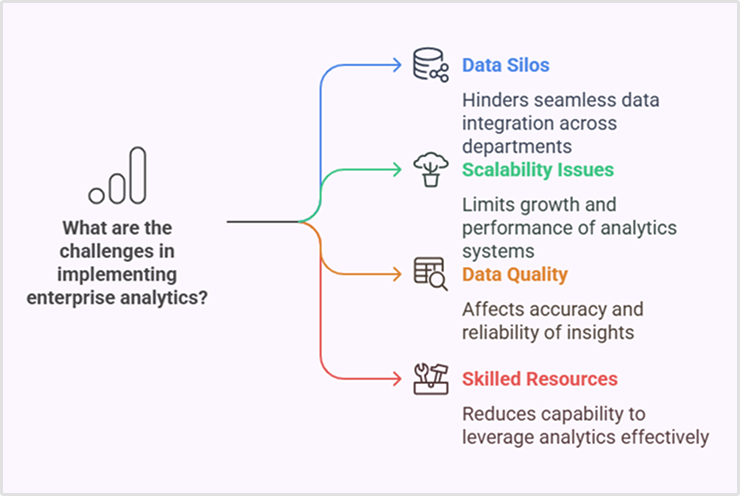
A recurring data discrepancy should be investigated at the source and transformation level before assuming an analytics dashboard is wrong.
Security, access, and risk controls
Enterprise programs require robust security measures alongside access policies, encryption, retention rules, audit trails, and vendor reviews. Password management is one supporting control, not a substitute for data governance.
Where AI fits into enterprise analytics
AI can summarize reports, query governed data, classify anomalies, forecast scenarios, and reduce repetitive investigation. It works best when metrics are defined consistently and relevant source data is accessible.
A model may highlight a pattern without showing why it occurred. Teams should inspect the underlying records, evaluate forecast quality, review permissions, and maintain human accountability for consequential actions.
Where Usermaven fits in enterprise analytics
Usermaven is an AI marketing attribution platform focused on connecting customer acquisition, website and product behavior, conversions, pipeline, and revenue. It supports the customer-measurement layer of an enterprise stack, not a replacement for all finance or operational BI.
Customer and revenue measurement
Teams can use website analytics software alongside product analytics software to understand traffic, user engagement, and adoption. The customer journey analytics tool connects supported touchpoints across conversion paths.
For deeper diagnosis, funnel analytics software tracks progression and drop-offs, while behavioral segmentation software helps compare audiences without relying on one overall average.
For B2B SaaS teams, the aim is to connect acquisition with opportunity and customer outcomes. For ecommerce brands, it is to understand campaigns, orders, and customer value.
Organizations serving several accounts, including marketing agencies, may need separate workspaces, client reporting, and clear ownership of attribution definitions.
CRM connections and off-site conversions
Usermaven supports CRM-connected journeys, including Salesforce opportunities and deal-stage events. The Salesforce integration documentation explains the read-only CRM connection and how stage changes become usable analytics events.
Its Event Sources documentation explains how billing, webhooks, embedded forms, and imports can bring off-site conversions into the measurement process. Matching remains dependent on identifiers and correct mapping.
Maven AI and scheduled AI Agents
Maven AI can answer questions about workspace data and create reports, dashboards, trends, funnels, attribution, and retention analyses. It is designed to make supported analytics accessible without manually assembling every report.
Maven AI Agents can schedule investigations of traffic shifts, campaign performance, feature adoption, funnels, and retention risks. The Maven AI documentation describes agent objectives, run reports, findings, and permissions.
Agents use read-only analytics tools while running. They report findings for people to evaluate; they do not autonomously change budgets, modify CRM records, or establish causal impact.
Data confidence and enterprise controls
The Measurement Trust Center shows a Trust Score and checks five areas: campaign tracking, customer matching, connected platforms, conversion feedback, and data confidence. Teams can review prioritized fixes and rerun checks after changes.
Enterprise teams can also evaluate SAML SSO, role-based access, audit logs, private-cloud or on-premise deployment, and custom integrations. Availability and configuration should be confirmed against the organization’s commercial agreement.
For enterprise attribution workflows, enterprise attribution model documentation describes custom first, middle, and last credit splits and channel adjustments. Custom-model availability is documented for Enterprise workspaces.
Usermaven also supports Usermaven MCP connectivity with authorized AI clients. The MCP connection instructions explain consent, tool permissions, and the capabilities available to each connected client.
For warehouse-led reporting, the BigQuery export instructions explain exporting raw event records for downstream analysis. This complements rather than replaces the enterprise data model.
Visualize & optimize
user journeys with Usermaven
Real customer example: Hyperengage
The Hyperengage case study documents a B2B SaaS team connecting fragmented marketing reports to customer journeys and attributed pipeline. Reported channel coverage expanded from four channels to six.
The case also reported eight organic-search first-touch conversions where the previous approach showed zero. These are reported visibility improvements, not proof that the software caused incremental revenue.
How to choose an enterprise analytics approach
Match tools to the business question and the information each can credibly measure. A full enterprise program may require several complementary layers.
- Enterprise-wide BI: Prioritize semantic definitions, reusable reporting, access management, warehouse compatibility, and broad organizational adoption.
- Customer and marketing analytics: Prioritize attribution, journey identity, conversion events, CRM integration, and revenue reconciliation.
- Product analytics: Prioritize event definitions, cohorts, experiments, and feature adoption metrics.
- Risk and operations analytics: Prioritize transactional coverage, data lineage, controls, and process ownership.
- AI-assisted analytics: Prioritize data quality, scoped permissions, evidence trails, evaluation, and review mechanisms.
Run a limited proof of concept with real source data. Test one cross-functional metric, a known data discrepancy, access controls, and the action the report is supposed to support.
Make enterprise analytics decision-ready
Enterprise analytics succeeds when multiple teams trust the same definitions and can connect findings to measurable decisions. Start with one valuable question, validate the data, and expand the program only as the evidence supports it.
For customer acquisition, product engagement, and revenue attribution, book a demo to explore how Usermaven can support the marketing and customer analytics layer of your enterprise measurement stack.
FAQs about enterprise analytics
1. What is enterprise analytics in simple terms?
Enterprise analytics brings data from multiple business systems into governed analyses that help teams make consistent decisions across departments.
2. What are the four types of enterprise analytics?
Descriptive analytics explains what happened, diagnostic analytics explores why, predictive analytics estimates possible outcomes, and prescriptive analytics evaluates potential actions.
3. How is enterprise analytics different from BI?
Business intelligence usually focuses on reporting and exploration. Enterprise analytics also includes collection, integration, governance, advanced analysis, and using findings to change decisions.
4. What are common enterprise analytics examples?
Examples include comparing marketing spend with closed revenue, forecasting inventory demand, analyzing onboarding drop-offs, identifying procurement exceptions, and monitoring operational risk.
5. What data sources does enterprise analytics use?
It can use CRM records, advertising data, website and product events, ERP transactions, finance ledgers, support activity, and operational systems, depending on the use case.
6. How do companies improve enterprise analytics accuracy?
Define shared metrics, assign owners, use stable identifiers, monitor data freshness, reconcile source systems, validate access controls, and document changes to transformations.
7. Does enterprise analytics require AI?
No. Many valuable enterprise decisions rely on trusted descriptive and diagnostic reporting. AI can help with forecasts and investigation, but needs reliable data and review.

Written by
Adeel Khan
Growth Marketing Expert
Adeel Khan is a full-stack SaaS marketer with 10+ years of experience in content marketing, paid advertising, analytics, and conversion rate optimization. He shares practical insights and strategies drawn from hands-on experience, helping B2B SaaS marketers improve performance and make better marketing decisions.
All articles by Adeel →