A client receives a marketing report with hundreds of clicks, several charts, and a reassuring upward trend. Yet one question remains unanswered: did the work produce the leads, customers, or revenue the business needed?
That disconnect is the central client reporting problem. An agency may measure campaigns accurately and still struggle to communicate which results matter, what the numbers can support, and what should happen next.
Effective client reporting turns marketing evidence into a clear account of progress and practical decisions. This guide explains the essential report sections, suitable KPIs, reporting formats, an end-to-end workflow, automation, and ways to keep the conclusions trustworthy.
Key takeaways
- Client reporting should answer five questions: what happened, how it compares with the goal, what explains the movement, how trustworthy the evidence is, and what happens next.
- Start with business outcomes rather than filling the opening page with impressions, clicks, and unrelated metrics.
- Use different KPIs for ecommerce, B2B SaaS, lead generation, SEO, and paid media clients.
- Show assumptions and measurement gaps when conversion totals, attribution windows, or CRM records do not align.
- Dashboards support reporting, but a useful client report also includes interpretation, decisions, and accountable next steps.
- Automation can handle collection and delivery. People still need to review anomalies, explain tradeoffs, and approve recommendations.
What is client reporting?
Client reporting is the structured process of communicating work completed, results achieved, progress against agreed objectives, and recommended next actions to a client. It may use a dashboard, written summary, slide presentation, or scheduled update, but the core purpose is the same: make performance understandable and actionable.
For a project-management engagement, the report might emphasize timelines, deliverables, and budget consumption. For a marketing agency, it normally connects campaigns and channel performance to qualified conversions and business outcomes.
A client report therefore needs two layers: the underlying measurement and the explanation that makes it useful. A collection of exported metrics is data, not necessarily a completed client report.
Unlock insights that drive growth
Client reporting vs. agency analytics
Agency analytics examines performance patterns, customer behavior, attribution, and measurement quality. Client reporting selects the findings that matter to a particular client and communicates them in an agreed format.
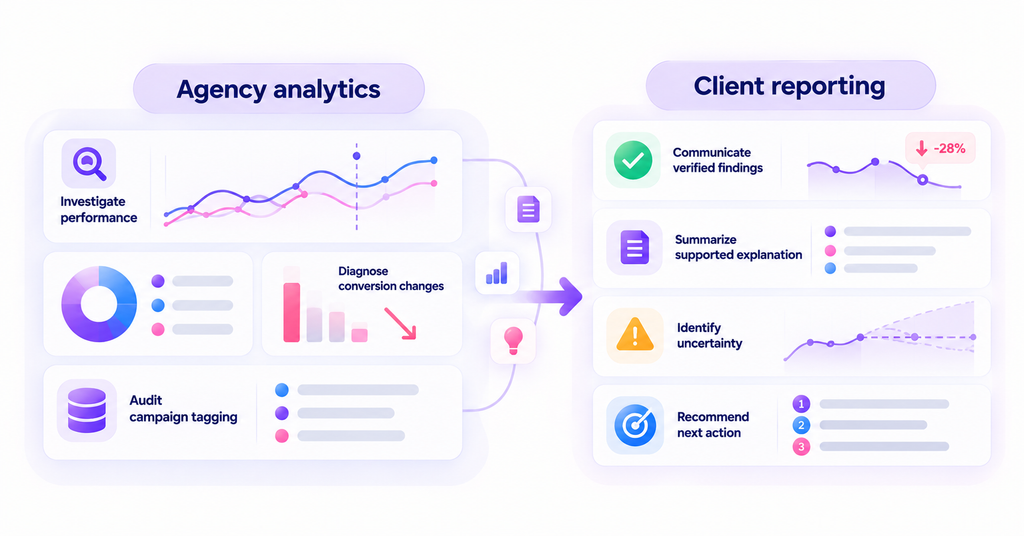
For example, an analyst might investigate why organic conversions declined, compare segments, and audit campaign tagging. The client-facing report should state the verified decline, summarize the supported explanation, identify uncertainty, and recommend the next action.
| Dimension | Client reporting | Agency analytics |
|---|---|---|
| Primary question | What should the client understand and decide? | What does the data reveal and why? |
| Output | Scorecard, narrative, recommendations | Exploratory analysis and measurement findings |
| Level of detail | Selected and audience-specific | Detailed, diagnostic, and investigative |
| Value | Alignment and accountable decisions | Evidence and deeper understanding |
Teams that confuse reporting vs. analytics can produce technically detailed charts without giving clients the context needed to make a decision.
What should a client report include?
A good structure lets a busy client understand the conclusion quickly and examine supporting detail when necessary. Seven components usually provide a useful starting point, although the scope should reflect the engagement.
| Report section | Essential content | Question it answers |
|---|---|---|
| Executive summary | Major result, risk, and recommendation | What matters this period? |
| Goals vs. results | Agreed targets, actuals, comparison period | Are we on track? |
| KPI scorecard | Relevant performance indicators and definitions | Which outcomes changed? |
| Channel performance | Spend, qualified conversions, efficiency, attributed impact | Where was activity effective? |
| Business impact | Leads, customers, opportunities, pipeline, revenue | What did marketing contribute? |
| Findings and limitations | Supporting evidence, caveats, open questions | How should we interpret results? |
| Action plan | Recommendations, owner, due date, review criteria | What happens next? |
Executive summary and agreed goals
Lead with two or three outcomes and one recommendation, not a list of every metric that changed. State the reporting period and the business objective so the reader knows what success was supposed to look like.
A summary should distinguish an achieved goal from a promising intermediate signal. More demo requests, for instance, do not necessarily mean more qualified pipeline unless the qualification and CRM data support that conclusion.
Key performance indicators and channel results
The scorecard should connect each KPI with the client’s objective, its definition, and the appropriate comparison period. Include channel metrics only when they help explain a result or a decision.
A client focused on profitable acquisition might need CAC, verified customers, and attributed revenue. Click-through rate and impressions can remain supporting diagnostics rather than the headline.
Findings, limitations, and recommendations
A report should separate a confirmed observation from an interpretation. “Paid search conversions declined” may be directly observed; “competitors caused the decline” requires additional evidence before it becomes a confident explanation.
Explain material data limitations next to the relevant finding. If a CRM integration stopped updating or one platform includes view-through conversions, disclose that before drawing cross-channel conclusions.
Next steps and accountability
Turn each recommendation into an action with an owner, a deadline or next review, and a measure of success. A suggestion to “improve landing pages” is difficult to evaluate without naming the page, problem, intended change, and outcome to monitor.
Keep unresolved questions in a small follow-up list. This makes the next client meeting a continuation of the decision process rather than a repeat of last month’s presentation.
Which KPIs should agencies include in client reports?
Different clients define commercial success differently. The correct KPI set reflects the business model, stage of growth, measurement reliability, and decisions the report supports.
Avoid treating leading indicators as interchangeable with commercial outcomes. A landing-page visit, a lead, a qualified opportunity, and a closed-won sale are not four names for the same conversion.
| Client type | Lead KPIs | Useful supporting measures |
|---|---|---|
| Ecommerce | Orders, net revenue, CAC, attributed ROAS | Checkout completion, repeat purchases, returns |
| B2B SaaS | Qualified opportunities, pipeline, won revenue | Demos, opportunity progression, source and campaign |
| Lead generation | Sales-qualified leads, booked appointments, cost per qualified lead | Lead-to-appointment rate, no-shows, lead quality |
| SEO and content | Qualified organic conversions, organic-assisted pipeline | Search visibility, landing-page engagement, content paths |
| PPC | Verified conversions, acquisition efficiency, attributed value | Spend pacing, CPC, CTR, impression share |
Ecommerce reporting
Show commercial results first, then connect them to acquisition channels and shopping behavior. Gross platform-reported conversion value may differ from net realized revenue once refunds, canceled orders, taxes, or duplicate events are considered.
Define the revenue field being used, and avoid presenting a platform’s claimed ROAS as a cross-channel causal return on investment. If different attribution reports assign different credit, explain which view drives the decision.
B2B SaaS and lead generation reporting
For B2B clients, a spike in demo requests may matter less than the proportion progressing into qualified opportunities. Align funnel definitions with sales so the report does not silently substitute form completions for pipeline.
Where the CRM is available, show opportunity stage, pipeline created, and won revenue separately. Longer sales cycles also mean the marketing activity and the commercial outcome may fall in different reporting periods.
SEO and content reporting
Organic visibility and traffic quality help explain how audiences discover the client. But the headline should reflect the objective, whether that is qualified leads, trial signups, ecommerce purchases, or pipeline influenced by content.
A content report can connect landing pages to observed customer journey analytics, while acknowledging that some visits or later sales may not be linked to the same known person.
Types of client reports and how often to send them
Reporting frequency should match the decisions the client needs to make. A high-spend campaign may need weekly monitoring, while a stable account may benefit more from a monthly narrative and a quarterly strategic review.
| Format or cadence | Best suited for | Main emphasis |
|---|---|---|
| Weekly update | Active optimization, pacing, launch periods | Exceptions, changes, immediate actions |
| Monthly report | Ongoing agency engagement | Outcomes, trends, interpretation, decisions |
| Quarterly business review | Strategy and budgets | Cumulative impact, priorities, future investment |
| Live dashboard | Stakeholders needing between-meeting access | Current performance with consistent definitions |
| Issue-specific alert | Tracking failures or material anomalies | What happened, impact, responsible response |
Monthly reporting is common across agencies, but the right cadence depends on each client’s goals, budget, and how quickly decisions need to be made. Treat any industry norm as a starting point rather than a rule for every client.
Clients tend to value clear visuals and accurate numbers above everything else, because both build trust and support retention. That favors clarity and reliability over unnecessary chart volume.
How to create an effective client report
A repeatable process improves consistency across accounts while leaving room for each client’s business questions. The sequence below works for a written report, dashboard commentary, or executive presentation.
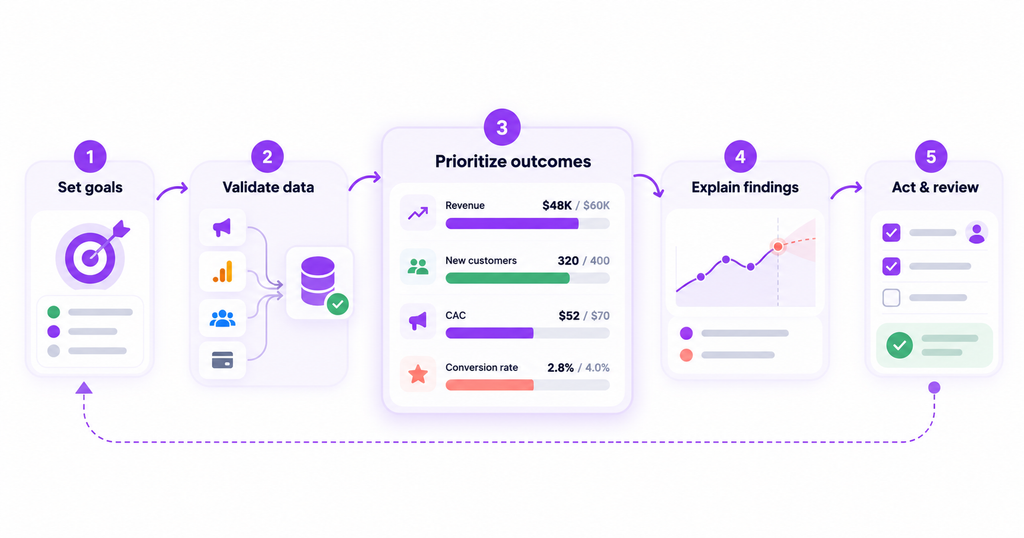
Step 1. Agree on goals and reporting rules
Confirm which business outcome the client wants to improve, who will read the report, and what the reporting period covers. Document conversion definitions, reporting currency, timezone, comparison period, attribution model, and any material exclusions.
Agree which system is authoritative for each measure. For example, a CRM might own closed-won revenue while an advertising platform owns delivery and spend data. Without that agreement, the report may show competing versions of success.
Step 2. Collect and validate the evidence
Gather data from the relevant campaign platforms, website or product analytics, CRM, and billing systems. Check that accounts, currencies, date ranges, and conversion actions are comparable before summarizing performance.
Investigate unexpected gaps rather than smoothing them away. Duplicate purchase events, broken UTM tagging, disconnected data sources, and changes in lead definitions can all create impressive-looking numbers with weak business meaning.
Step 3. Prioritize business outcomes
Rank the results by importance to the agreed goal. Begin with customers, qualified opportunities, revenue, or other meaningful outcomes, then use supporting metrics to explain what appears to be changing upstream.
An effective scorecard makes the comparison visible without forcing the client to calculate it. Display actual performance, target or prior period, and a short interpretation next to the same metric.
Step 4. Explain findings and uncertainty
For each important result, write what happened, what evidence supports a possible explanation, and what remains unclear. Do not infer customer motivation from clicks alone or claim an attribution model proves that a campaign caused every credited conversion.
The report should answer why a particular change matters to the client. A lower click-through rate may be acceptable if qualified opportunities and acquisition efficiency improve.
Step 5. Recommend actions and review them
Convert findings into a prioritized action plan. State the next test or change, why it is justified, who owns it, and which measure will indicate whether the decision helped.
At the next reporting cycle, revisit previous recommendations before introducing new ones. This builds accountability and lets the client see how analysis is translated into action.
Client reporting example: A reusable report layout
A report example does not need invented campaign results. The following fill-in structure helps an agency prepare a real report using the client’s verified data.
| Field | What to enter |
|---|---|
| Client and period | Account name, date range, timezone |
| Business objective | Agreed goal and measurement definition |
| Headline result | Verified outcome and comparison |
| KPI scorecard | Selected targets, actuals, trends |
| Channel analysis | Supported channel findings and limitations |
| Data confidence | Known gaps, model assumptions, checks completed |
| Decision | Proposed change and expected learning |
| Action owner and review | Named responsibility and next check-in |
The executive summary can follow a simple narrative: “The primary goal was [goal]. The verified outcome was [result] compared with [target or prior period]. The main contributing evidence was [observation]. The next recommendation is [action], subject to [limitation].”
Use placeholders until real results are available. This keeps the example practical without presenting hypothetical conversion rates or fictional client performance as observed facts.
How to automate client reporting
Automation is most useful for consistent data delivery, recurring summaries, and routine alerts. It should reduce repetitive exports without obscuring which systems supplied the metrics or which rules calculated them.
Begin with standardized data collection and a stable KPI glossary. Create report templates by client objective, set a review cadence, and then automate delivery only after the source data and access permissions are tested.
A live dashboard helps stakeholders inspect trends between meetings; a scheduled report preserves a periodic snapshot. The most helpful analytics dashboards are designed around decisions, with enough context for readers to understand what each measure represents.
When choosing between marketing agency reporting tools, evaluate source coverage, reporting flexibility, client access, auditability, and the ability to connect marketing metrics with commercial outcomes.
AI-generated summaries can identify movement and suggest questions, but a person should verify important causal claims, financial figures, and recommendations before sending them to clients.
How to make client reports more trustworthy
A polished dashboard can still mislead when the underlying numbers answer different questions. The most common problem is comparing metrics that use different conversion definitions, attribution windows, or reporting dates.
Google explains in its conversion reporting guidance that Google Ads can attribute a conversion to the date of the ad interaction while Google Analytics records the date the action happened. Counting settings can also change totals even when tracking is functioning correctly.
Never add the platform-claimed conversions from several ad networks and call that sum unique customers. Use a clearly defined deduplicated outcome source where one is available, and distinguish the attribution view from the underlying transaction count.
| Evidence source | What it can establish | What it cannot establish by itself |
|---|---|---|
| Ad-platform report | Delivery, spend, platform-attributed actions | Deduplicated results across all channels |
| Website or product analytics | Recorded visits, events, user behavior | Every offline interaction or true motivation |
| CRM | Qualified leads, opportunities, deal status | Every prior anonymous marketing touch |
| Billing data | Recorded payments, refunds and realized charges | Which channel caused the purchase |
| Attribution report | Model-assigned credit for eligible touches | Incremental causal impact |
| Client interviews | Reported needs, priorities and explanations | Complete observed behavioral histories |
Agencies should disclose important measurement limitations in plain language. If data coverage is incomplete, define the affected period and explain whether the conclusion is provisional, directional, or fully supported by the available records.
A Measurement Trust Center can help check customer matching, campaign tracking, platform connections, and conversion feedback before reporting decisions depend on those signals.
Common client reporting mistakes
| Mistake | Better approach |
|---|---|
| Leading with impressions instead of outcomes | Begin with the agreed commercial objective |
| Presenting every available metric | Choose KPIs relevant to a specific decision |
| Adding overlapping platform conversions | Explain attribution and use a consistent outcome definition |
| Comparing mismatched time periods | Align dates, timezones, and comparison logic |
| Making unsupported causal claims | Distinguish observation, hypothesis, and test result |
| Ending without recommendations | Add action, owner, and review date |
| Sharing broadly by default | Check client-specific permissions and access settings |
One mistake worth emphasizing is reporting without follow-through. A report that identifies declining lead quality but never assigns a next step leaves the client informed without changing the agency’s work.
How Usermaven helps agencies with client reporting
Usermaven is primarily marketing attribution software that connects recorded marketing activity with conversions and revenue. Its reporting, dashboards, and agency workflow features help teams present those findings to clients without positioning the platform as general project-management software.
Connect marketing results with revenue
Agencies can use attribution reports to analyze how eligible channels, campaigns, and touchpoints receive credit for conversion outcomes. This makes the reporting conversation more useful than a simple traffic summary, provided the underlying tracking and revenue associations are reliable.
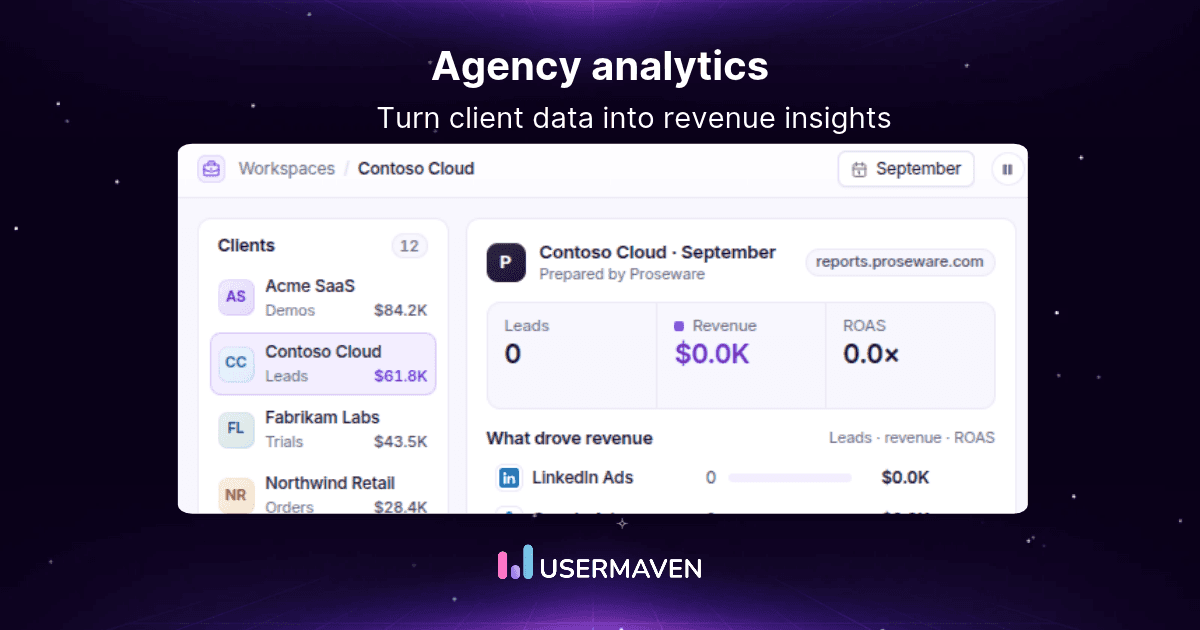
Usermaven’s agency solution also describes separate client workspaces and reporting around measures such as qualified leads, ROAS, CAC, and attributed revenue. Different client objectives should still be configured and interpreted individually.
Build dashboards around each client’s objectives
Usermaven supports custom dashboards that combine insights from analytics modules, including trends, funnels, journeys, and attribution. Agencies can select the views that relate to the client’s decision rather than forcing every account into the same report format.
Its client workspaces help separate data and measurement setups. The availability or number of workspaces should be confirmed against the account’s plan before promising a particular deployment at scale.
Schedule recurring performance reports
The Reports & Alerts feature supports report types such as key stats, trends, funnels, attribution, retention, and AI summaries. Its published documentation describes daily, weekly, and monthly schedules, with email delivery and supported Slack reporting workflows.
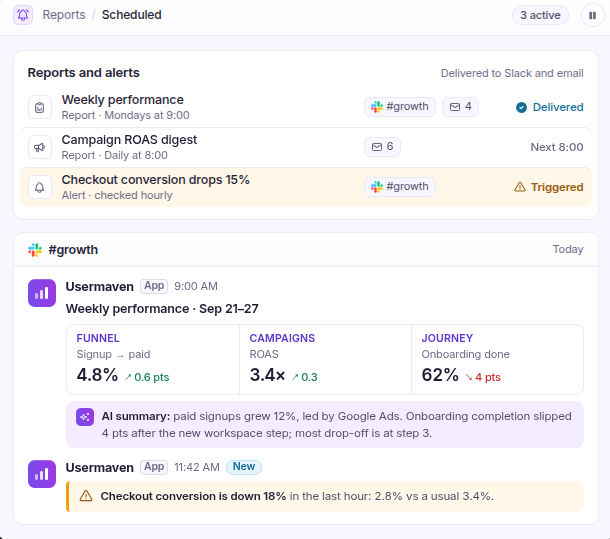
The scheduled reports documentation explains how to select a reporting cadence and recipients. Agencies should review the data and interpretation before using an automatic summary as a final strategic recommendation.
Share dashboards with appropriate controls
Client-facing access should match the data’s sensitivity. Usermaven supports dashboard sharing and optional password-protected access, helping teams provide visibility without circulating reports to unnecessarily broad audiences.
The official shareable dashboards guidance describes creating a shareable link and configuring how viewers can access the dashboard.
Provide a branded reporting experience
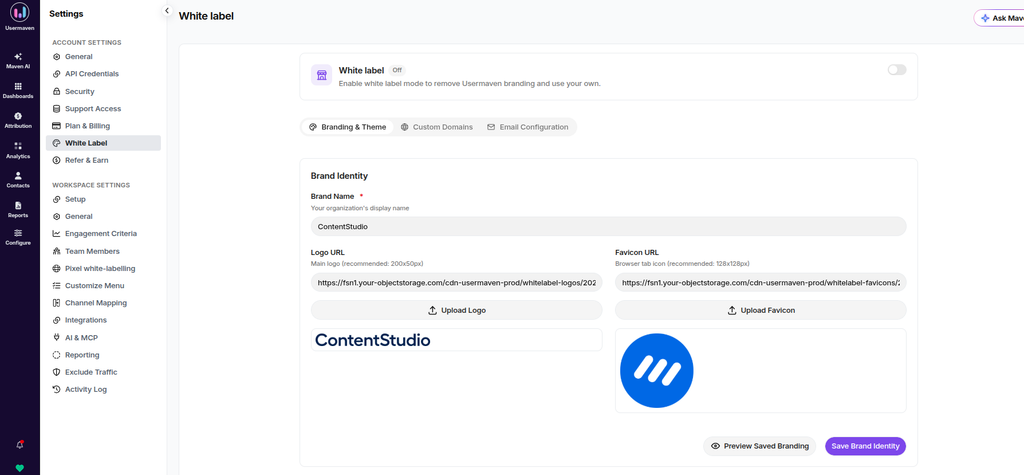
For agencies that want their brand across dashboards and communications, Usermaven offers white-label analytics as an optional add-on. It includes capabilities for branded dashboards and domains, rather than being assumed to be included in every subscription.
The broader principles of white label analytics matter when evaluating whether the reporting experience should sit under the agency’s identity or remain visibly connected to the software provider.
Client reporting checklist
Before sending a report, check the following:
- The objective, conversion definitions, reporting period, and client audience are agreed.
- The KPI scorecard prioritizes real business outcomes and uses clear units and currencies.
- Data sources, account scope, missing periods, and attribution assumptions have been reviewed.
- Charts and summaries use consistent dates and comparable metrics.
- The findings separate confirmed evidence from possible explanations.
- Recommendations identify an action, owner, and review point.
- Client-specific access and sharing permissions are checked.
- Previous actions are revisited so progress remains accountable.
Final verdict
The strongest client reports do more than document activity. They connect marketing work to agreed business objectives, explain what the results mean, and make it clear where the evidence is reliable or incomplete.
A consistent structure, careful KPI selection, and a practical action plan make reports easier to understand and more useful over time. Automation can help deliver them, but it does not replace judgment.
For agencies connecting marketing performance with conversions, pipeline, and revenue, Usermaven provides attribution-led reporting and customizable dashboards. A well-designed marketing attribution dashboard can organize eligible channel credit alongside commercial results for more useful client decisions.
Usermaven connects marketing activity with conversions, pipeline, and revenue through attribution-led dashboards. Agencies can book a demo to see how a marketing attribution dashboard supports clearer client reporting and better-informed decisions.
FAQs
What is client reporting?
Client reporting is the process of presenting agreed work, results, progress, limitations, and recommended next actions to a client. Reports may be delivered through written summaries, dashboards, presentations, or scheduled updates.
What should a client report include?
A practical client report includes an executive summary, agreed objectives, KPI scorecard, relevant channel results, business outcomes, interpretation, and an action plan. It should identify the reporting period and important data limitations.
How do you write a client report?
Start with the client’s business goal, validate the relevant data, select the most important results, explain meaningful changes, and recommend specific next actions. Make the reporting definitions and comparisons clear.
What KPIs should agencies report to clients?
KPIs depend on the client’s business model and objective. Ecommerce clients may emphasize orders and net revenue, while B2B SaaS clients often prioritize qualified opportunities and pipeline. Engagement metrics are useful when they explain these outcomes.
How often should client reports be sent?
Monthly reporting is common, but frequency should reflect decisions and campaign intensity. Weekly updates can support active optimization, quarterly reviews can inform strategy, and live dashboards can provide between-meeting access.
What is the difference between reporting and analytics?
Analytics investigates performance, behavior, causes, and uncertainty. Reporting organizes the most relevant findings for a defined audience so they can assess progress and decide what to do next.
Can client reporting be automated?

Written by
Junaid Ahmed
Content Writer & Digital Marketer
Junaid Ahmed is a content and copywriter with 3+ years of experience creating research-driven content across SaaS, B2B, ecommerce, and digital marketing. He specializes in turning complex topics into clear, practical content that helps marketers better understand their challenges, evaluate solutions, and make informed decisions. His work spans educational content, industry insights, and actionable marketing guides.
All articles by Junaid →