A client opens a marketing dashboard and sees 25 charts, each updating at a different time. The information is available, but the business question remains unanswered: are the campaigns helping the client reach their goals?
A useful client reporting dashboard fixes that experience. It puts agreed outcomes first, makes trends and channel performance easy to explore, and gives clients enough context to decide what happens next. The challenge is not fitting every metric onto one screen. It is deciding what deserves to be there.
This guide shows how to structure a client dashboard, choose the right charts and filters, and adapt layouts for B2B SaaS, ecommerce, and SEO engagements.
An effective dashboard also supports the broader client reporting process by making performance evidence accessible between scheduled updates and client meetings.
Key takeaways
- Focus on business outcomes: Design dashboards around client objectives rather than default widgets. Put the most important KPIs and targets first.
- Create a clear hierarchy: Organize dashboards into outcome scorecards, performance trends, channel analysis, and recommended actions.
- Customize by client type: B2B SaaS, ecommerce, and SEO clients need different metrics, visualizations, and reporting priorities.
- Provide measurement context: Clearly label reporting periods, data sources, attribution models, and refresh times to prevent misinterpretation.
- Choose the right reporting format: Interactive dashboards provide ongoing visibility, while scheduled reports and client meetings deliver interpretation and recommendations.
- Validate before sharing: Check data accuracy, metric definitions, and access permissions. A visually polished dashboard is only useful when its underlying information is reliable.
What is a client reporting dashboard?
A client reporting dashboard is an interactive, client-facing view of selected metrics, trends, and performance evidence. It brings relevant information from connected marketing or business systems into one place so clients can monitor progress against agreed objectives and investigate changes without receiving a fresh spreadsheet for every question.
For a marketing agency, the dashboard might combine qualified leads, attributed conversions, pipeline, channel efficiency, or organic search performance. A delivery-focused agency might use a separate dashboard for milestones, budgets, and project status. The chosen metrics should follow the service and the client’s decisions.
The word dashboard does not mean every number updates instantly. Refresh speed depends on the underlying source, connection, and processing schedule. A client should be able to see the reporting period and understand whether a figure is provisional, delayed, or final.
Unlock insights that drive growth
Client reporting dashboard vs. client report vs. client portal
These terms overlap, but they are not interchangeable. A dashboard is a reusable view for exploration. A report packages findings for a period. A portal provides a broader space where clients may access reports, files, communication, and other services.
| Format | Main job | Typical delivery | Best when |
|---|---|---|---|
| Client reporting dashboard | Explore selected KPIs and trends | Shared interactive view | Clients need visibility between meetings |
| Scheduled client report | Summarize a period and recommend actions | Email, link, or export | Stakeholders need a recurring performance update |
| Client portal | Organize access to client resources and services | Authenticated workspace | Clients need files, tasks, messages, and reports together |
A dashboard may support the client reporting process, but a monthly report still needs an interpretation of what changed, which factors remain uncertain, and who owns the next action. Likewise, an agency does not need a full client portal simply to share marketing metrics.
What should a client reporting dashboard include?
Start with a single question: what should the client be able to decide after looking at this screen? The answer determines which metrics receive prominence and which supporting details can be placed lower down or behind filters.
1. A clear client and reporting context
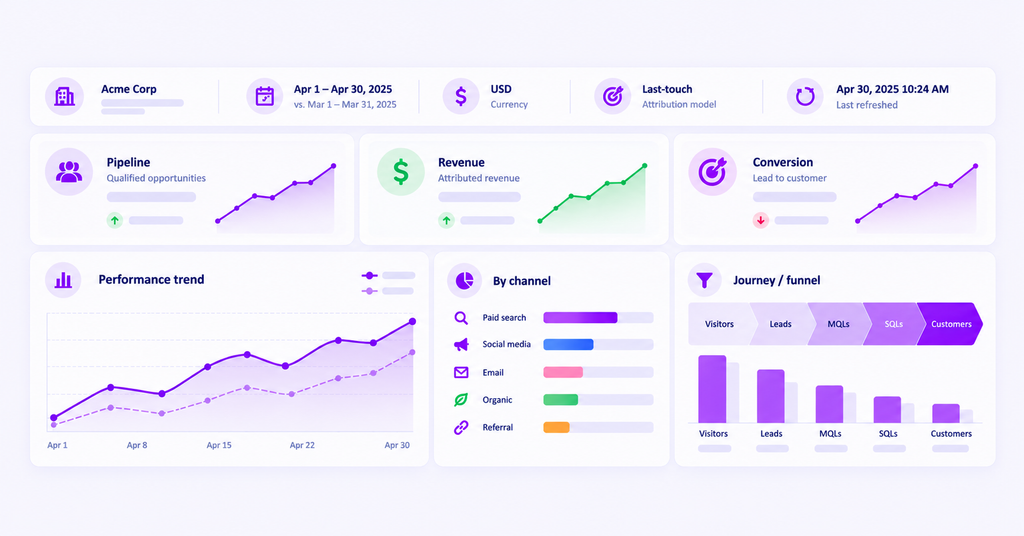
Show the client or workspace name, date range, comparison period, currency, relevant conversion goal, and last successful refresh where available. These labels prevent a common mistake: comparing two charts that appear aligned but represent different time periods or conversion definitions.
If the report uses an attribution model, name it. A last-touch revenue figure and a linear-attribution revenue figure should not be presented as though they were the same measure.
2. An outcome-first KPI scorecard
Use three to five primary KPIs related to the engagement’s goals. Place the metric label, definition or unit, current value, and comparison or target status together. A B2B client may need qualified opportunities and pipeline; an ecommerce client may want net revenue and orders.
Avoid placing impressions and clicks in the first row when the client is buying qualified pipeline or sales. Those numbers can support an explanation lower in the dashboard without defining success on their own.
3. Trends and drivers
A time-series chart shows whether a result is moving, while a channel or campaign breakdown helps identify where change is concentrated. Use consistent comparison periods, and annotate meaningful changes such as a campaign launch or tracking adjustment only when the event is documented.
Trends identify patterns; they do not independently prove causation. A dashboard should distinguish a confirmed observation from a possible explanation that needs testing.
4. Journey, funnel, or channel detail
The middle section should answer where results are coming from and where progress slows. A B2B dashboard may show a lead-to-opportunity funnel. An ecommerce dashboard may show checkout drop-offs. An SEO dashboard may connect landing-page traffic with qualified conversions.
Avoid forcing every client into the same visualization. Some clients need an attribution breakdown; others need a search-intent view or a geographic performance table.
5. Notes, limitations, and next actions
Reserve space for a short interpretation of the most important change, known data limitations, and the recommended action. A client-ready dashboard should tell users whether a number deserves attention, not merely show that the number exists.
Dashboard anatomy: editable layout blueprint
| Region | Display | Client question answered |
|---|---|---|
| Header | Client, period, currency, goal, data freshness | Am I looking at the correct scope? |
| First row | Primary outcome, target comparison, efficiency KPI | Are we progressing toward the objective? |
| Middle left | Trend with comparison and annotated events | What changed over time? |
| Middle right | Channel, campaign, or segment contribution | Where is the change concentrated? |
| Detail | Funnel, journey, landing pages, or opportunity stages | What needs investigation? |
| Footer | Evidence caveats, owner, and next action | What should we do next? |
See what's working. Fix what's not. Grow faster.
Three client reporting dashboard examples
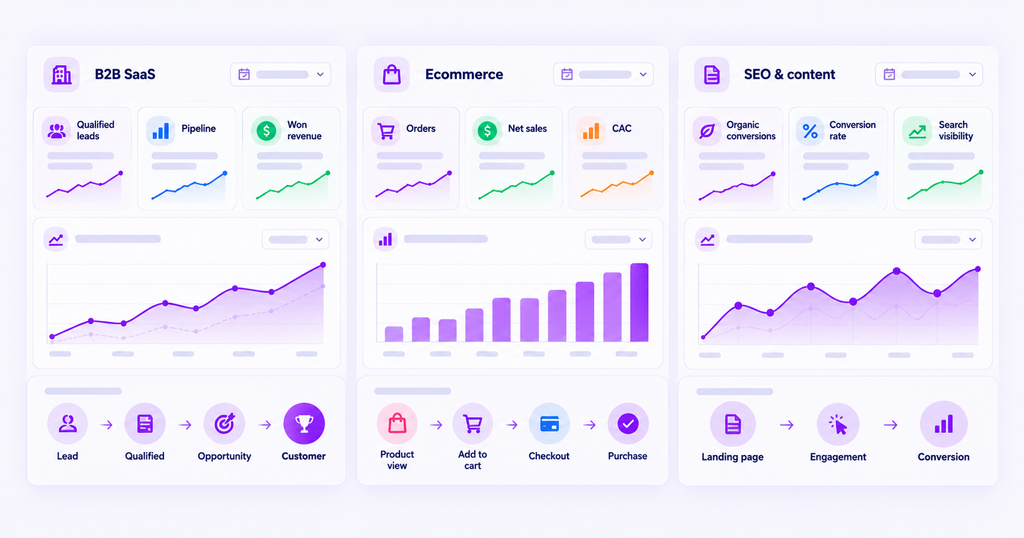
The following layouts are original editorial blueprints, not screenshots from a live customer account. They intentionally contain no invented performance figures. Each example specifies what an agency should include, why it matters, and the decision the dashboard should support.
Example 1. B2B SaaS dashboard: From marketing engagement to pipeline
Audience: Demand generation manager, sales leader, and the client’s executive sponsor.
Primary decision: Which acquisition sources and campaigns are contributing to qualified opportunities and revenue, and where is the buying journey slowing down?
| Dashboard region | Recommended cards or visualizations | Data inputs |
|---|---|---|
| Top scorecard | Qualified leads; opportunities created; pipeline value; attributed won revenue | Conversion events and CRM opportunity records |
| Acquisition section | Channel and campaign contribution by chosen attribution model | UTM/first-party activity and attribution data |
| Progression section | Lead → qualified lead → opportunity → customer funnel | Agreed funnel stage definitions |
| Diagnostic section | Time to conversion; drop-off by segment; conversion paths | Website and CRM events |
| Decision panel | Growth opportunity, data caveat, owner, next review | Account manager analysis |
How to read it: Lead volume can increase while opportunity creation stalls. That discrepancy should be visible before the team decides to scale the acquisition source. An attribution view can help connect eligible recorded touchpoints to opportunities, but it does not prove that one campaign caused the resulting revenue.
Configuration note: Name the opportunity stage, conversion goal, attribution model, and lookback period. Pipeline created and closed-won revenue must remain separate measures, and the dashboard should not silently replace one with the other.
Example 2. Ecommerce dashboard: Revenue, acquisition efficiency, and checkout
Audience: Ecommerce manager, performance marketer, and finance stakeholder.
Primary decision: Is acquisition producing profitable customer activity, and what part of the purchase experience needs attention?
| Dashboard region | Recommended cards or visualizations | Data inputs |
|---|---|---|
| Top scorecard | Orders; net sales; customer acquisition cost; attributed ROAS | Store, ad-spend, and analytics records |
| Performance section | Revenue and orders trend against a comparable period | Ecommerce transactions |
| Channel section | Channel spend, conversions, and attributed revenue | Ad connectors and configured attribution |
| Journey section | Product view → add to cart → checkout → purchase | Ecommerce event tracking |
| Decision panel | Checkout concern, refund caveat, next optimization | Agency investigation |
How to read it: A strong platform-reported ROAS is not enough if refunds, missing purchases, or overlapping conversion claims affect the business result. Show the definition of revenue, whether returns are deducted, and how advertising costs are counted.
Configuration note: Choose one primary sales definition for the scorecard, and use channel-level attribution as a separate explanatory lens. Do not add Google Ads and Meta Ads claimed conversions together as if they were unique orders.
Example 3. SEO and content dashboard: Qualified demand beyond rankings
Audience: SEO lead, content owner, and the client’s marketing manager.
Primary decision: Which organic pages and topics are attracting relevant visitors and contributing to meaningful business actions?
| Dashboard region | Recommended cards or visualizations | Data inputs |
|---|---|---|
| Top scorecard | Organic qualified conversions; organic conversion rate; priority search visibility | First-party analytics and search data |
| Demand section | Organic entrance trend by landing page or topic group | Web analytics |
| Search context | Query groups, impressions, clicks, ranking changes | Search Console or SEO platform |
| Outcome section | Organic landing page → key event; assisted journey detail | Website events and attribution where available |
| Decision panel | Page to improve, intent mismatch, tracking caveat | Content and SEO analysis |
How to read it: Ranking growth can be valuable, but its business importance depends on whether relevant visitors engage and progress toward a meaningful outcome. Separate estimated ranking-tool traffic from actual first-party sessions, and label conversions consistently.
Configuration note: A dedicated SEO platform may be needed for rank tracking and technical audits. Marketing attribution software can add conversion context, but should not be described as a complete replacement for an SEO reporting suite.
How to build a client reporting dashboard in six steps
The following workflow creates a reusable view without treating reporting as a one-time design exercise.
Step 1. Define the audience and the decision
Ask who will open the dashboard, what business question they need answered, and which decisions they control. An agency account manager might need detailed campaign diagnostics, whereas a client executive may need only a scorecard and a short explanation of material changes.
Write a one-sentence dashboard purpose. For example: Help the B2B client evaluate qualified pipeline and investigate the channels associated with new opportunities. This becomes the rule for deciding whether each widget belongs.
Step 2. Choose primary KPIs and metric definitions
Select three to five top-level metrics, then define each one’s numerator, denominator, units, source, and comparison period. Agree whether “lead” means a form fill, marketing-qualified lead, or CRM-accepted contact.
If the dashboard includes attributed revenue, define the conversion event, attribution model, and lookback window. The deeper mechanics of that process belong in the separate marketing attribution dashboard guide; this dashboard needs clear labels that communicate the chosen setup.
Step 3. Connect and scope the data
Map each KPI to its source. A client may use advertising platforms for spend, analytics for observed website behavior, and a CRM or ecommerce system for commercial outcomes. Check that account IDs, currencies, timezones, and goal definitions match the intended client.
Do not assume that adding a connector resolves every mismatch. Some systems refresh on different schedules, attribute conversions differently, or omit activity because of consent and tracking limits. Document these differences before building headline charts.
Step 4. Build the visual hierarchy
Start with client context at the top, followed by primary outcome cards. Add a trend that explains direction and one breakdown that explains distribution. Use the next section for funnel or journey analysis, and end with evidence limitations and actions.
Pick charts by question. Lines work for time trends; bars for comparisons; tables for precise ranked values; funnel views for step progression. Prefer a small number of useful charts over a wall of decorative widgets.
Step 5. Validate with real client questions
Before sharing, ask someone unfamiliar with the build to answer: What is the principal outcome? Has it improved? Which segment deserves attention? When was the data last updated? What action follows?
Then test the calculations against their source systems, check that the correct client workspace is selected, review missing or delayed dates, and confirm that privacy-sensitive details are not exposed through a broad link.
Step 6. Share, review, and maintain
Configure the intended audience and available access controls. Explain which figures are interactive and which are informational, and agree how often the client will review the dashboard alongside a human-written assessment.
Set ownership for the dashboard. A responsible person should revisit KPIs after strategy or conversion-definition changes, and review access permissions as client stakeholders join or leave. For recurring delivery setup and failure handling, use a separate automated client reporting workflow.
Dashboard design practices that help clients act
Use a visible hierarchy, not equal-weight tiles
The primary outcome should be identifiable within seconds. Large summary cards deserve space only when their numbers support the business decision. Supporting SEO visibility, campaign reach, and source diagnostics can sit below the outcomes they help explain.
Keep related charts together, and use the same channel labels and currencies across cards. A dashboard is harder to interpret when “Paid Search” becomes “Google CPC” in a neighboring table without explanation.
Make comparisons explicit
Show whether a change is against a target, the previous period, or the same period a year earlier. Each comparison answers a different question, so don’t mix them silently. Annotate unusual changes when the agency has supporting evidence, such as a launch date or a known measurement interruption.
Be wary of causal wording. A visual correlation between higher ad spend and more leads is an observation, not proof that the spending increase generated the lead change.
Design for readability and accessibility
Use readable chart labels, a predictable layout, and contrasting visual elements. Do not make red and green the only way to distinguish performance states; add direct labels or symbols so the meaning survives color-vision differences.
The W3C’s non-text contrast guidance recommends at least 3:1 contrast for meaningful graphical elements. Treat this as a useful accessibility check when creating custom dashboard designs.
Build with the client’s actual data vocabulary
Call a KPI “qualified demo requests” if that is the tracked outcome, rather than the generic “conversions.” Name funnel steps as they are defined in the client’s systems. If a value is estimated or modeled, label it accordingly.
Client dashboard needs vary across channels and business functions. The agency’s job is to tailor the layout and metric definitions rather than reproduce a template without context.
Live dashboards vs. scheduled reports vs. client portals
Choosing the delivery format is part of dashboard design. The three approaches are complementary, not interchangeable.
| Approach | Most useful for | Limitation to remember |
|---|---|---|
| Shared dashboard | Self-service exploration and performance check-ins | Needs clear definitions, refresh status, and access control |
| Scheduled report | Time-bound updates with interpretation | Can become stale between deliveries |
| Client portal | Multiple client services in one workspace | May add complexity when only analytics access is needed |
A live dashboard may display changing values, but its underlying source may still refresh overnight or after a CRM synchronization. State the data’s effective freshness instead of claiming every widget is real time.
For executives who prefer a concise monthly narrative, a dashboard plus a scheduled summary often works better than expecting them to interpret every chart independently. The dashboard supports exploration; the narrative covers findings, decisions, and responsibilities.
How Usermaven helps agencies build client reporting dashboards
Usermaven is primarily marketing attribution software with analytics and dashboard capabilities. It is relevant when an agency must explain which recorded marketing interactions are associated with qualified leads, customer journeys, conversions, pipeline, and revenue, then present those findings in a client-facing view.
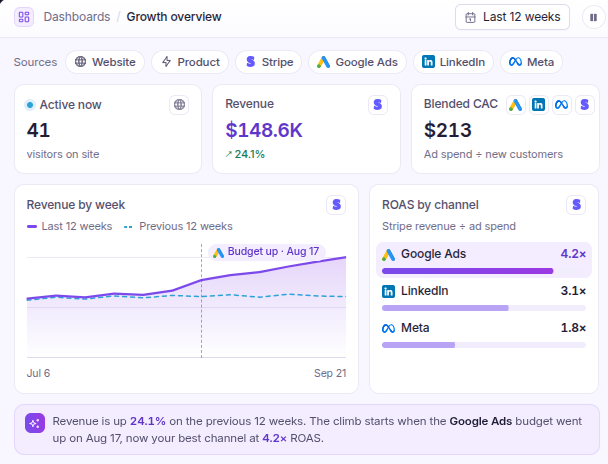
Its analytics dashboards allow teams to organize metrics from trends, funnels, journeys, and attribution into custom dashboards. The agency solution describes separate workspaces for client accounts, enabling different conversion goals and reporting views without mixing unrelated data. Workspace capacity and available options should be checked against the account’s plan.
Build client-specific layouts around attributed outcomes
Start with the client’s primary conversion or revenue outcome, then add the necessary evidence. A B2B dashboard may put qualified opportunities and attributed pipeline first. An ecommerce dashboard may lead with purchases, revenue, and acquisition efficiency. Supporting trends and funnels can provide context without crowding the first row.
Usermaven’s attribution views can help explain credit assigned to eligible touchpoints under a selected model. Keep the interpretation precise: modeled attribution distributes credit over recorded journeys, but does not by itself establish incremental causal impact.
Generate dashboard drafts with Maven AI
The official Maven AI documentation describes natural-language dashboard creation. An agency can describe the desired outcome, date range, and tiles, such as a conversion trend and channel attribution view, and Maven AI can assemble a dashboard draft.
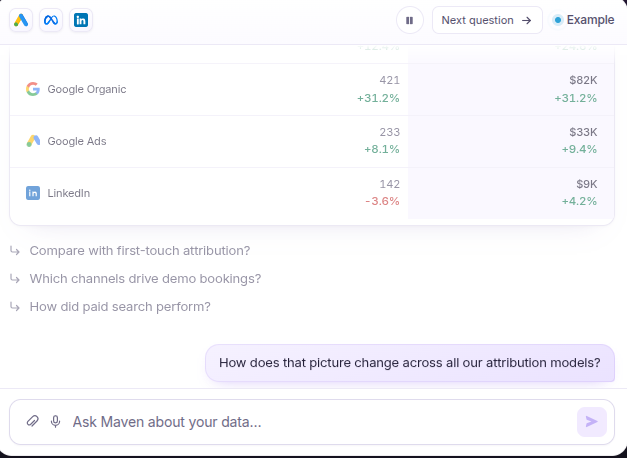
This is valuable for initial exploration, not an excuse to skip review. Teams should confirm the conversion goal, metric definitions, chart appropriateness, and client-specific access before presenting AI-generated work as a finished reporting product.
Share views while protecting client information
Usermaven supports dashboard sharing, including public links and optional password protection on supported shared views. Its shareable dashboard instructions explain how access can be configured and why the visibility decision matters.
Before sending a link, verify the client workspace, available permissions, fields exposed in drilldowns, and recipient audience. Password protection should not substitute for a broader client-data access policy.
Pair dashboards with recurring reports and branded delivery
An interactive dashboard supports client exploration, while Usermaven’s Reports & Alerts supports daily, weekly, and monthly scheduled summaries over supported analytics types. The delivery method should reflect how often stakeholders need to act on the information.
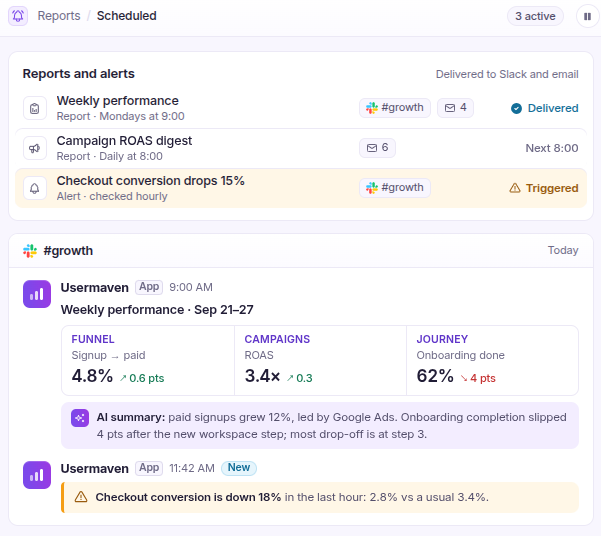
For agencies wanting a branded analytics experience, white-label functionality is offered as an add-on rather than a universal plan entitlement. The current pricing information also lists additional workspaces as an add-on, so deployment needs should be confirmed before committing to a client rollout.
Common client reporting dashboard mistakes
| Mistake | Why it hurts | Better approach |
|---|---|---|
| Every available metric gets a tile | The decision becomes hard to find | Lead with three to five agreed outcomes |
| Conversion definitions are missing | Similar-looking numbers get compared incorrectly | Add source, goal, model, and time-period labels |
| Platform conversions are summed | The same outcome may be credited more than once | Use a defined outcome measure and explain attribution |
| Client data is mixed | Reporting can become inaccurate or sensitive | Verify workspace, account scope, and permissions |
| Charts use color alone | Some viewers cannot interpret the differences | Include direct labels and adequate contrast |
| Trends are treated as explanations | Reporting turns correlation into a causal claim | Separate observation, hypothesis, and evidence |
| Dashboard is never reviewed | Stale KPIs and broken source connections go unnoticed | Assign ownership and maintenance cadence |
A dashboard can look professional while communicating an unreliable story. The accuracy of its source definitions, conversion setup, and access permissions matters as much as the visual layout.
Client reporting dashboard checklist
Before sharing a dashboard with a client, check that:
- The client, audience, reporting dates, goal, and currency are clearly identified.
- The main scorecard follows the client’s business objective rather than vanity metrics.
- Each primary KPI has an agreed definition, source, and useful comparison.
- Attribution models and conversion time windows are labeled where relevant.
- Every chart answers a specific decision or diagnostic question.
- Charts are readable, consistently labeled, and accessible without color alone.
- The data’s refresh timing and known limitations are clear.
- Workspace scope, dashboard permissions, and link visibility have been reviewed.
- The dashboard identifies where to investigate and who owns the next action.
- A named owner will review it when campaigns, goals, or data connections change.
Final verdict
A client reporting dashboard is useful when it makes performance easier to understand and decisions easier to make. The strongest layouts lead with business outcomes, use trends and breakdowns to explain the story, and state where the evidence is incomplete.
Agencies should design dashboards around individual client needs rather than reproducing the same set of widgets for every account. A B2B SaaS client, ecommerce brand, and SEO engagement each require a different view of success.
Usermaven helps agencies connect recorded marketing interactions with conversions and revenue, then organize those findings through customizable dashboards and attribution reporting.
Agencies can book a demo to see how a client-specific attribution dashboard could support their reporting workflow.
FAQs
What is a client reporting dashboard?
A client reporting dashboard is an interactive view that organizes selected metrics, trends, and supporting evidence for a specific client. It helps stakeholders monitor outcomes, investigate changes, and review progress against agreed goals.
What metrics should a client dashboard include?
Begin with the business objective. Ecommerce clients often need orders and revenue, B2B SaaS clients may need qualified opportunities and pipeline, and SEO clients may prioritize organic qualified conversions. Supporting metrics should explain these outcomes rather than replace them.
How do I create a client reporting dashboard?
Define the audience and decision, select KPIs, map data sources, design the visual hierarchy, validate figures, and configure sharing. Assign an owner to review data definitions and dashboard access as requirements change.
Can client reporting dashboards update automatically?
Many dashboards refresh from connected data sources, but timing depends on each source and connector. Display the effective reporting period and refresh status so clients do not assume every value is current to the second.
What is the difference between a client dashboard and a monthly report?
A dashboard provides reusable, interactive access to selected performance data. A monthly report summarizes a completed period and adds interpretation, conclusions, and recommended next actions. Agencies often use both.
Should every client use the same dashboard template?
No. Reusable layout patterns can save time, but the top KPIs, source details, and diagnostic charts should reflect each client’s objectives, business model, and reporting needs.

Written by
Junaid Ahmed
Content Writer & Digital Marketer
Junaid Ahmed is a content and copywriter with 3+ years of experience creating research-driven content across SaaS, B2B, ecommerce, and digital marketing. He specializes in turning complex topics into clear, practical content that helps marketers better understand their challenges, evaluate solutions, and make informed decisions. His work spans educational content, industry insights, and actionable marketing guides.
All articles by Junaid →