Marketing agencies often repeat the same reporting routine every week or month: collect campaign results, reconcile conversions, update charts, write a summary, and send a client update. As client portfolios grow, these manual steps become harder to maintain consistently.
Automated client reporting reduces that repetitive work by connecting data sources, producing standardized reports, and delivering updates on a schedule. The difficult part is not scheduling an email. It is making sure the numbers, interpretations, and recipients are correct.
This guide explains how to build a dependable reporting workflow, what to automate, where human review remains essential, and how agencies can combine marketing attribution with recurring reports and Maven AI Agents.
Key takeaways
- Automated client reporting connects data, applies consistent report definitions, produces recurring updates, and delivers them to the intended audience.
- Standardize business goals, metrics, client-specific data access, and report formats before configuring automation.
- Validate source freshness, conversion definitions, attribution settings, and recipient permissions separately from the report-generation process.
- Use scheduled reports for predictable updates and AI agents for recurring investigations into performance changes and opportunities.
- Human review remains important for interpretation, unusual results, material claims, and high-stakes client recommendations.
- Monitor reporting quality after launch instead of assuming that a successful scheduled send means the underlying data was correct.
What is automated client reporting?
Automated client reporting is the process of collecting or updating data from connected systems, generating client-specific performance reports, and delivering them on a recurring schedule with less manual preparation. Agencies commonly use it for campaign summaries, website analytics, conversion reports, and executive updates.
A complete workflow includes more than an automatically refreshed dashboard. It also defines which client’s information appears, which metrics the report uses, when data becomes available, who receives the output, and how reporting failures are investigated.
For agencies, the purpose is to make client reporting more repeatable while preserving the context clients need to make decisions. Automation can distribute the evidence, but the agency remains responsible for what that evidence means.
What parts of client reporting can be automated?
Different automation steps solve different problems. A tool that automatically sends a dashboard may not reconcile CRM conversions or explain why performance changed.
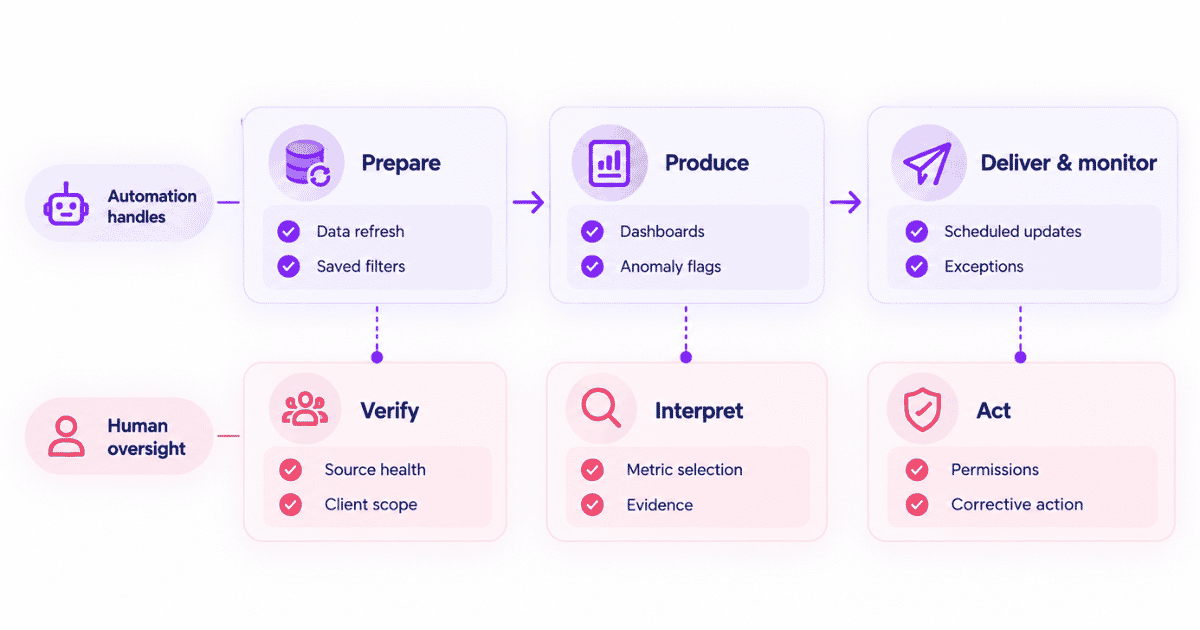
| Reporting task | What automation can handle | What still needs attention |
|---|---|---|
| Data collection | Refresh connected advertising, analytics, or CRM data | Expired connections and missing sources |
| Data organization | Apply saved filters, segments, date ranges, and metric definitions | Correct client scope and business definitions |
| Report generation | Populate dashboards or recurring summaries | Appropriate metrics and readable presentation |
| Analysis support | Flag anomalies or produce draft narrative explanations | Evidence, uncertainty, and meaningful interpretation |
| Distribution | Send email or Slack updates on schedule | Permissions, recipients, and delivery status |
| Monitoring | Surface exceptions and changes | Ownership and corrective action |
In practice, an agency may automate weekly campaign summaries while keeping monthly strategy recommendations under human review. A different client might need an executive-ready presentation or document in addition to a dashboard.
The format should follow the client’s reporting needs. A dashboard link offers interactive access to data, while a presentation-ready report provides a structured summary for discussion and decision-making.
How to automate client reporting step by step
A reliable system starts with reporting requirements, not a software subscription. The following six steps provide an implementation framework for agencies managing one client or multiple accounts.
Step 1. Define the reporting objective and audience
Begin with the decision the report is supposed to support. A B2B client might want to know whether paid campaigns contribute to qualified pipeline, while an ecommerce client may care about new customers, orders, and attributed revenue.
Agree on the recipient, primary business outcome, KPIs, reporting period, comparison period, delivery format, and frequency. The same report may need a short executive summary for leadership and supporting detail for an in-house marketing manager.
Document metric definitions before automating them. For example, a lead, MQL, SQL, completed purchase, and closed-won deal should not be treated as equivalent conversion events. If a client’s definition changes, the report needs a documented change rather than a silent replacement.
Step 2. Connect the relevant marketing and revenue sources
Identify where each metric comes from: advertising platforms for spend, analytics for recorded on-site behavior, CRM systems for sales stages, and billing systems for realized payments where applicable.
Decide which source will be authoritative for each outcome. A campaign platform’s credited conversions and a CRM’s qualified opportunities can both be useful, but they answer different questions and should not be casually combined into a single total.
For multi-client agencies, use a stable account or workspace boundary so one client’s data cannot appear in another client’s report. Agency analytics becomes more trustworthy when identity, attribution, and conversion definitions stay consistent across connected systems.
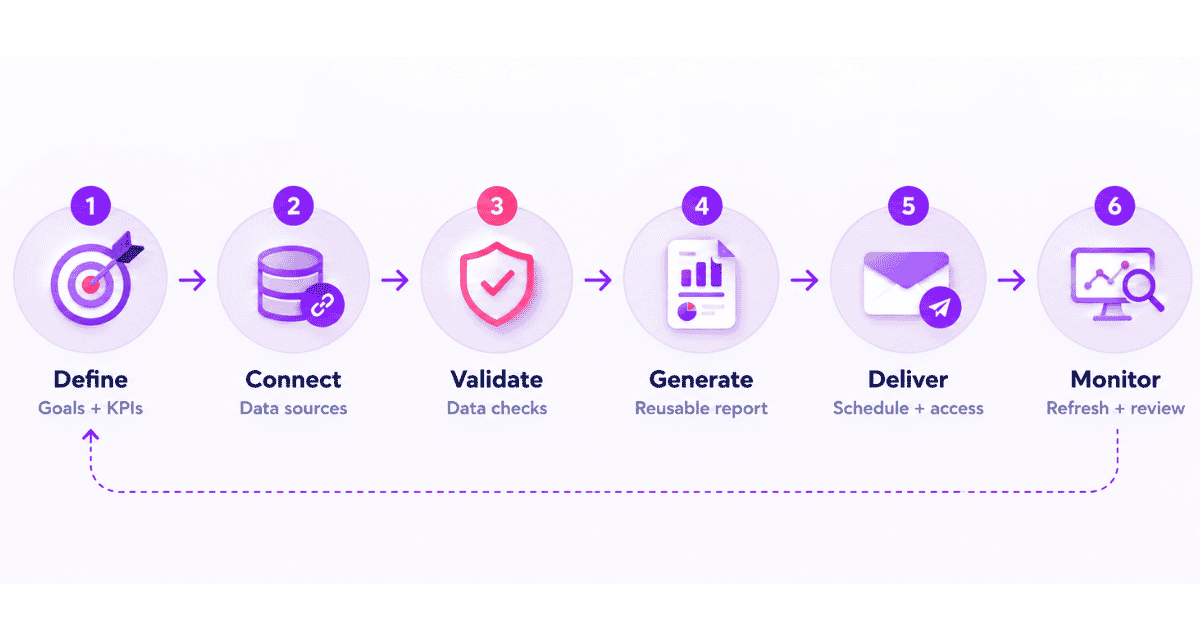
Step 3. Validate data before scheduling the first send
Run the report manually for a recent completed period. Check whether all expected campaigns appear, whether the sources refreshed, and whether the same date and timezone rules are applied across comparisons.
Inspect important conversions against the agreed outcome source. Google’s conversion reporting guidance explains why Google Ads and Google Analytics may differ even when implemented correctly, including different reporting dates and counting methods.
Record the attribution model, lookback window, conversion definitions, and any missing sources. A report can be internally consistent yet incomplete if an account connection failed or a revenue event cannot be associated with the intended customer.
Step 4. Build a reusable, client-specific report
Create a core structure that works across reporting cycles: executive summary, target outcomes, key results, material changes, data caveats, and next actions. Use optional modules for client-specific needs rather than creating a new layout from scratch every month.
Set appropriate filters and segments for each client. Keep a small set of meaningful KPIs above the fold and leave diagnostic charts in supporting views. A report with thirty metrics but no clear recommendation is not automatically more valuable than a concise one.
Analytics dashboards can provide a consistent place to organize performance views, but the final output might instead be an emailed summary, a PDF, or a presentation, depending on the client’s workflow.
Step 5. Schedule delivery and control access
Choose daily, weekly, or monthly delivery according to decision frequency. Daily updates may be appropriate during a high-spend launch, while monthly reports often provide enough context for ongoing agency relationships.
Configure the sending timezone, recipients, channels, and format. Test the delivered result rather than relying only on the preview. Confirm that the report opens, the correct reporting period appears, and the client can access the linked material.
Treat permissions as a release check. Separate workspaces, recipient verification, and appropriate sharing controls reduce the risk of exposing one client’s performance to another client or an unintended recipient.
Step 6. Monitor each reporting cycle and improve the workflow
After launch, make one person accountable for reviewing exceptions. Check whether the source refreshed, the report generated, the message arrived, and material performance changes received an appropriate explanation.
Review metric definitions whenever a client changes campaigns, sales stages, purchase flows, or tracking systems. Retire reports that are no longer useful and update templates when recurring client questions reveal missing information.
The objective is not zero human involvement. It is reducing repetitive assembly while protecting the accuracy and usefulness of each client update.
How to structure automated reports for different clients
Agencies should use a consistent reporting process without forcing every account into identical metrics. Business models, campaign objectives, and stakeholder expectations change the content of the recurring update.
| Client type | Primary recurring outcomes | Useful supporting views |
|---|---|---|
| Ecommerce | Orders, customer acquisition cost, revenue, attributed ROAS | Campaign efficiency, checkout funnel, repeat purchases |
| B2B SaaS | Qualified pipeline, demo conversions, won revenue | Channel attribution, contact journeys, funnel stages |
| Lead generation | Qualified leads and booked appointments | Lead quality, cost per qualified lead, source breakdown |
| Content or SEO | Qualified organic conversions and pipeline contribution | Landing-page journeys, content engagement, source trends |
| Product-led SaaS | Signups, activation, paid conversion, retention | Acquisition channels, adoption and trial drop-offs |
For a B2B client, weekly operational reports might focus on qualified lead flow while monthly reviews connect recorded marketing interactions with opportunities and revenue. The underlying reports should label these outcomes separately.
A reusable report can therefore have a stable executive-summary layout and client-specific modules. This approach keeps production efficient without flattening meaningful differences between agency accounts.
How to verify the reliability of automated client reports
Report generation, measurement quality, and delivery are three independent checks. A successful automated email proves that something was sent; it does not prove that every campaign, conversion, or customer was captured correctly.
The most important quality controls apply before the report runs and again when the output is reviewed. These checks are particularly valuable when agencies compare multiple paid platforms or report on long B2B sales cycles.
| Quality check | What to verify | Why it matters |
|---|---|---|
| Source freshness | Most recent successful refresh and expected latency | Prevents incomplete period-end totals |
| Conversion definition | Tracked action matches the agreed business outcome | Stops unlike conversions being presented as equivalent |
| Attribution settings | Model, eligible touches, and lookback window | Preserves consistent interpretation of channel credit |
| Identity and CRM matching | Events belong to the intended person or account | Reduces misassigned revenue and fragmented journeys |
| Date and timezone | Reporting period is aligned across sources | Avoids misleading comparisons |
| Client access | Recipients, workspace, links, and permissions | Protects confidential client data |
| Delivery confirmation | Scheduled report was actually received or accessible | Avoids missing client updates |
It is also important to distinguish attributed contribution from incremental impact. An attribution model allocates credit among eligible, recorded touchpoints; it does not by itself prove what would have happened without a marketing activity.
Usermaven’s Measurement Trust Center provides checks for campaign tracking, customer matching, platform connections, and conversion feedback. Those checks can help identify weaknesses before agencies rely on analytics for client recommendations.
What should stay under human review?
Automation is well suited to repeated calculations, source refreshes, templated layouts, and scheduled distribution. It is less suited to unsupported explanations of why performance changed or strategic decisions where context is missing.
| Automate routinely | Review before client-facing use |
|---|---|
| Refreshing connected sources | Missing, inconsistent, or delayed data |
| Populating agreed metrics | Changes in KPI definitions and attribution rules |
| Sending scheduled updates | Unusual recipients or sensitive permissions |
| Detecting abnormal movement | Whether the change is meaningful and well explained |
| Drafting AI summaries | Causal claims, forecasts, and budget recommendations |
For example, an AI-generated report might identify that conversions declined alongside paid-search traffic. That is a useful observation, but it does not establish that lower paid-search traffic caused the decline.
Agencies should document significant uncertainty and investigate alternative explanations before presenting a conclusion as fact. A good workflow gives reviewers enough evidence to distinguish observed changes from hypotheses.
How Usermaven automates client reporting and attribution analysis
Usermaven is primarily marketing attribution software that connects recorded customer journeys, conversion outcomes, and revenue with the marketing interactions eligible for credit. Its reporting features help agencies turn those measurements into repeatable updates rather than disconnected dashboard exports.
This distinction matters for clients asking which campaigns influence pipeline or revenue. Automated delivery is useful, but the underlying measurement must correspond to the business questions the report is meant to answer.
Connect automated reports to conversion and revenue outcomes
Usermaven lets agencies analyze channels, campaigns, conversion paths, funnels, and attribution based on the tracking and integrations configured for each workspace. These views can support reporting on qualified leads, signups, purchases, pipeline, and other defined outcomes.
For long B2B journeys, a marketing source’s contribution can look different under different attribution models or when new CRM outcomes arrive. Reports should disclose the relevant conversion goal and model rather than presenting all credited metrics as unique customer totals.
Usermaven’s agency solution emphasizes separate client workspaces, tailored conversion goals, and revenue-focused measurement. Agencies can select meaningful outcomes for each account instead of applying a single generic KPI template.
Create and schedule recurring analytics reports
Within Usermaven, navigate to Reports, select Create Report, name the report, and choose a supported report type. Options include key statistics, trends, funnels, attribution, retention, and AI summaries. Configure a daily, weekly, or monthly schedule, then set the delivery time and recipients.
Scheduled delivery uses the workspace timezone. The documented email setup lets you add multiple recipients; the Slack integration also supports delivery to configured channels. Users can review existing scheduled reports and edit, pause, or delete them as reporting needs change.
For client-facing use, create a clear naming convention that identifies the account, topic, and reporting cadence. Review one complete delivered report before allowing it to run as a standard recurring communication.
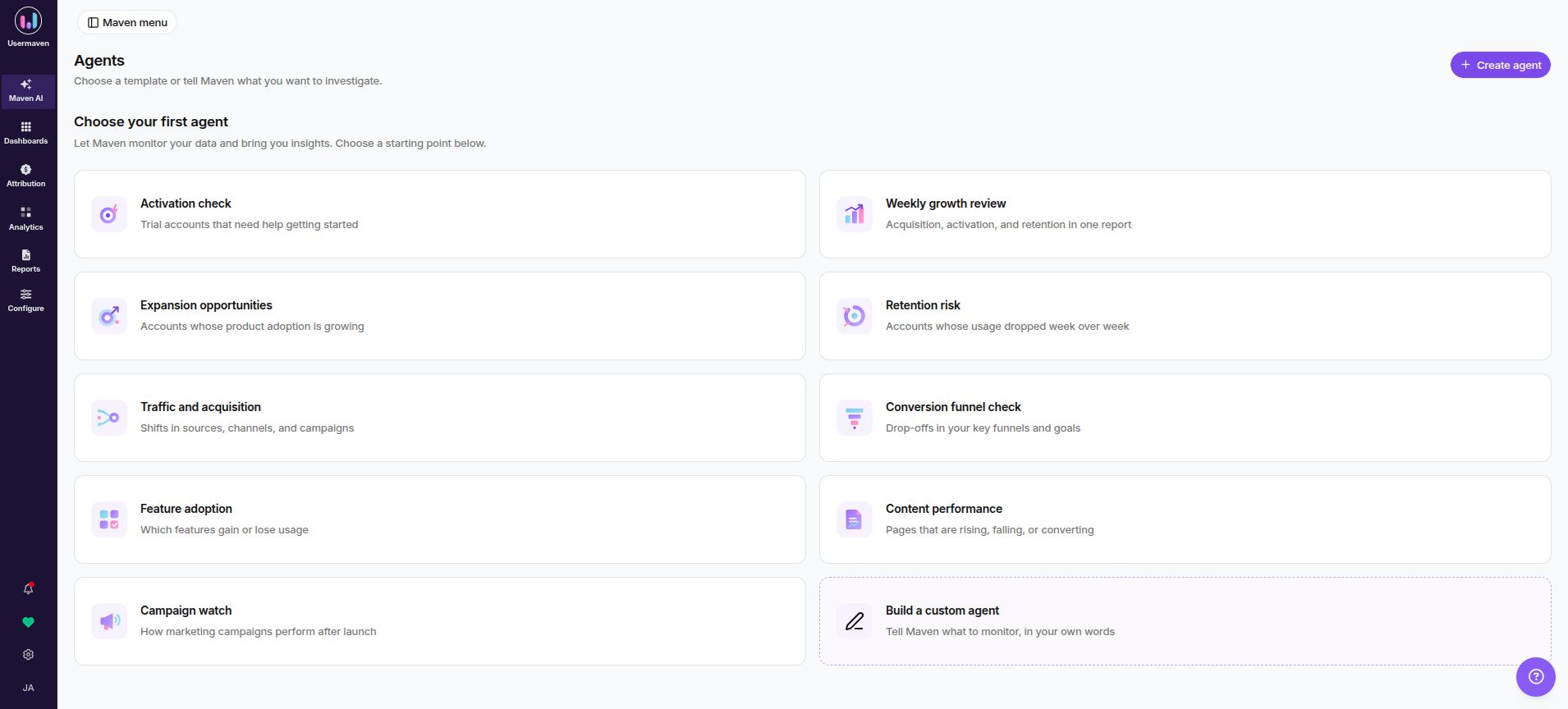
Automate performance monitoring with Maven AI Agents
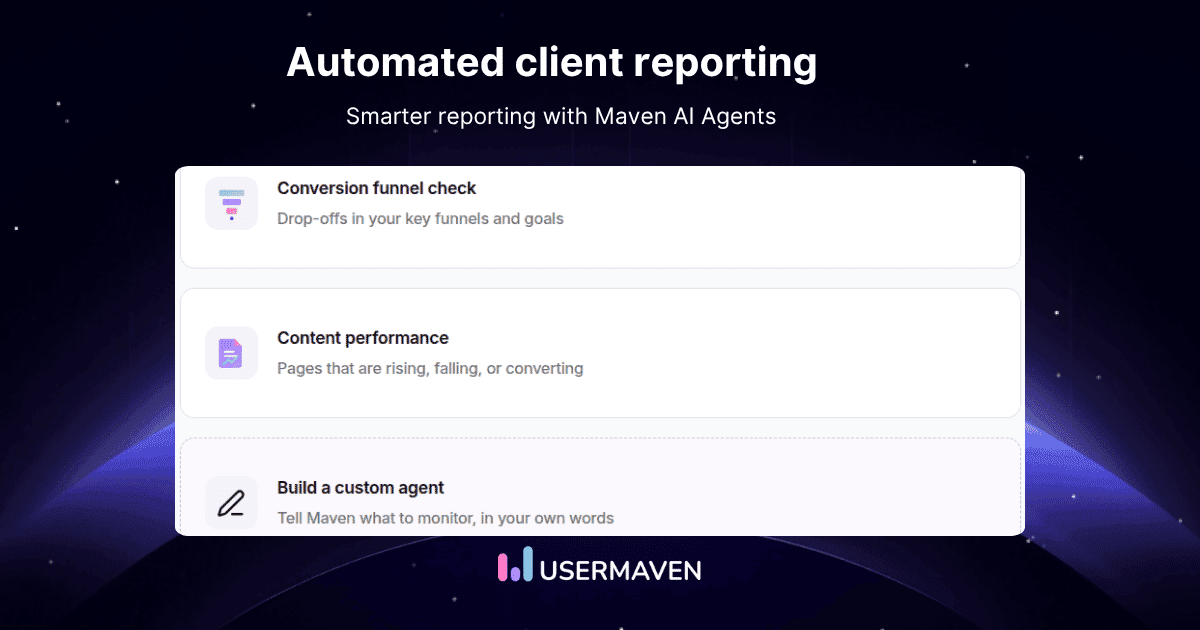
Maven AI Agents extend automation beyond fixed recurring reports. An agent receives an analytical objective, investigates the relevant workspace data on a schedule, and produces findings with evidence and suggested areas for follow-up.
An agency could configure a campaign-watch agent to examine marketing-channel changes after a launch. A traffic and acquisition agent can investigate shifts in sources and campaigns, while a conversion-funnel agent can look for changes in progression toward important client goals.
For SaaS clients, an agent can also investigate activation, adoption, retention risk, or changes in account activity. These analyses complement recurring KPI summaries by identifying questions an account manager may need to investigate before the next client review.
Agents support daily, weekday, or weekly schedules at an hour and timezone you choose. Results can be delivered inside Maven, by email, or to a configured Slack channel. The agent’s objective, scope, business definitions, and notification preferences determine what it investigates and how findings are surfaced. An agent runs with its creator’s workspace permissions; email or Slack delivery requires permission to share Maven results.
Agent reports include what was examined and the supporting evidence, giving teams a starting point for discussion rather than a black-box verdict.
Scheduled reports vs. Maven AI Agents: Scheduled reports deliver predefined analytics outputs at chosen intervals. Agents pursue specified investigation goals on a recurring basis and report what they discover. Both are useful, but they answer different reporting needs.
Agents operate with read-only analytics tools during scheduled investigations. They do not independently alter advertising campaigns, fix tracking issues, or guarantee that every suggested explanation is correct. Agency teams should review material findings before presenting them as client-facing conclusions.
Customize AI-generated report summaries
In Workspace Settings → Reporting → Automated report AI settings, agencies can set a default language and prompt instructions for AI-generated summaries. The prompt can guide tone, structure, audience, or analytical focus, and individual scheduled reports can override the workspace defaults. These settings can help standardize recurring updates across an agency’s workspaces.
A useful summary instruction might ask for the most important measured change, the supporting metric, relevant data limitations, and one recommended next investigation. Such structure can reduce generic commentary while making exceptions easier for reviewers to spot.
Summary customization should not be treated as automatic verification. Human reviewers still need to check whether the narrative accurately reflects the reported figures and respects the client’s specific business definitions.
Check measurement health before relying on results
The Measurement Trust Center checks campaign tracking, customer matching, connected platforms, conversion feedback, and data confidence. It surfaces prioritized fixes, helping agencies investigate measurement issues before relying on attribution and analytics in a client report.
Use its findings alongside normal checks for delivery status and source timing. It is not evidence that every scheduled report automatically stops when data becomes stale, so agencies should retain a practical review routine for high-value reporting periods.
Keep client reporting environments separate
Agencies managing several brands need account-specific goals, integrations, dashboards, and recipients. Separate Usermaven workspaces help maintain those boundaries, while Reports & Alerts supports recurring analytics communication through configured channels.
Before scaling to additional clients, standardize naming, access permissions, and report ownership. A repeatable process is useful only when it consistently delivers the correct data to the correct people.
Common automated reporting problems and how to fix them
Even well-designed workflows need ongoing checks. Most failures arise from source connections, definitions, scheduling, or access rather than the visual design of a report.
| Problem | Likely issue | First corrective step |
|---|---|---|
| Missing campaigns | Ad connector expired or changed | Verify access and source refresh |
| CRM revenue looks too low | Deal data arrives later than ad data | Check CRM sync and reporting cut-off |
| Different conversion totals | Different dates, windows, or counting rules | Compare definitions before reconciling |
| The wrong client appears | Workspace or report filter mismatch | Validate client scope and permissions |
| AI summary overstates results | Inference exceeds the available evidence | Revise the narrative and prompt guidance |
| Report did not arrive | Disabled schedule or delivery configuration | Check active status, email, or Slack access |
| Last month changes after sending | Late conversions or source adjustments | Define a reporting finalization policy |
How to measure whether reporting automation is working
Agencies can evaluate the reporting workflow without inventing an ROI estimate. Track the manual preparation time per cycle, the number of reports delivered on schedule, the frequency of source or access failures, and the amount of corrective rework required.
Also monitor whether clients can act on the report. Recurring requests to explain inconsistent numbers or rebuild exports may indicate that the automation is distributing information without answering the real business question.
A useful operational dashboard could include on-time delivery rate, report exceptions, correction requests, review time, and the percentage of recurring reports with a clear next action. These are suggested management measures, not industry benchmarks or predefined Usermaven metrics.
Automated client reporting checklist
Use this checklist before launching a reporting workflow and whenever its underlying sources change.
- Confirm each client’s reporting objective, audience, format, and cadence.
- Define conversion outcomes and document KPI ownership.
- Connect only the sources required for the agreed report.
- Check client boundaries, identifiers, and access permissions.
- Align reporting periods, timezone, and attribution settings.
- Validate a complete historical reporting period before scheduling.
- Test the generated report and its delivered format.
- Assign ownership for missing data and delivery failures.
- Review AI narratives and material business recommendations.
- Reassess the workflow when client goals or tracking change.
Final verdict
Automated client reporting is most valuable when it makes reliable information easier to deliver and easier to use. The right workflow standardizes data definitions, protects client-specific access, and produces consistent updates without eliminating accountability.
For marketing agencies, automation is especially useful when it connects campaign activity with observed conversions, pipeline, and revenue. Scheduled updates and proactive AI investigations can complement one another, provided the findings are verified before clients act on them.
Usermaven brings together marketing attribution, recurring analytics reports, and Maven AI Agents for these workflows. Agencies can book a demo to explore how its reporting and AI capabilities fit their client measurement requirements.
Frequently asked questions
What is automated client reporting?
Automated client reporting uses connected data and reusable reporting configurations to generate and distribute client updates on a recurring schedule. The goal is to reduce repetitive preparation while retaining consistent definitions, correct access, and useful interpretation.
How do agencies automate client reporting?
Agencies define client KPIs and recipients, connect the relevant reporting sources, validate the data, build reusable outputs, and schedule delivery. They then monitor source refreshes, report delivery, and any important changes requiring review.
What can automated reporting tools do?
Depending on the platform, they may refresh data, apply filters, generate charts, deliver scheduled summaries, and support AI-assisted analysis. Some automate only delivery, while others also offer attribution, conversion analysis, or client-specific workspaces.
What is the difference between scheduled reports and Maven AI Agents?
Scheduled reports deliver configured analytics results at selected intervals. Maven AI Agents investigate defined analytical objectives on a schedule, such as campaign shifts or funnel drop-offs, and return evidence-backed findings for review.
How often should agencies send automated client reports?
The cadence should follow the client’s decision needs. Weekly reporting can support active optimization, monthly reporting often suits ongoing engagements, and more frequent monitoring may be useful during a launch or significant performance issue.
Can AI write client report summaries automatically?
AI can generate draft summaries and highlight notable changes, but agencies should review important claims, data limitations, and recommended actions. Automated narrative generation does not prove that a claimed cause of a performance change is correct.

Written by
Junaid Ahmed
Content Writer & Digital Marketer
Junaid Ahmed is a content and copywriter with 3+ years of experience creating research-driven content across SaaS, B2B, ecommerce, and digital marketing. He specializes in turning complex topics into clear, practical content that helps marketers better understand their challenges, evaluate solutions, and make informed decisions. His work spans educational content, industry insights, and actionable marketing guides.
All articles by Junaid →