UTM tracking is the practice of adding campaign-identifying parameters to a URL so an analytics platform can recognize where a visit came from. A tagged link can identify the source, marketing channel, and campaign behind a visit, giving marketers a more useful starting point for measuring performance.
But UTM tracking is not the same as conversion tracking or marketing attribution. A tag tells your analytics tool about a click’s campaign context. To understand what happens after the click, marketing attribution software can connect campaign data with conversion events and customer journeys.
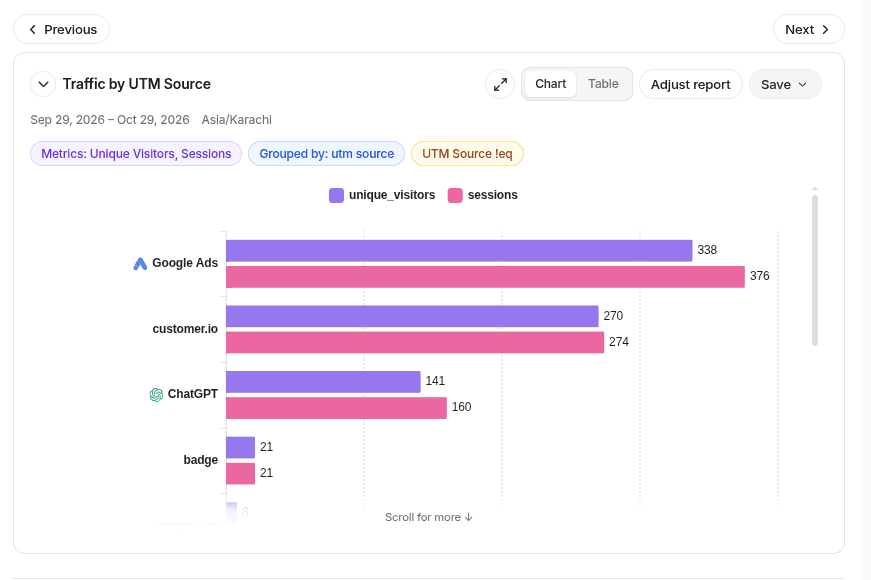
This guide follows one campaign from its URL to a report, explains where to find the data, and shows how to use it without confusing traffic with business results.
Key takeaways
- UTM tracking basics: UTM parameters are tags added to URLs to identify where campaign traffic comes from.
- How it works: When someone clicks a tagged link, analytics tools can capture campaign details such as source, medium, and campaign name.
- Campaign measurement: UTM tracking helps marketers compare traffic, engagement, and conversions across marketing channels.
- Accurate tracking: Consistent naming conventions, properly formatted URLs, and regular testing help prevent reporting errors.
- Tracking vs. attribution: UTMs identify campaign context, while marketing attribution connects touchpoints with conversions and revenue.
- Beyond traffic data: Tools like Usermaven combine campaign information with customer journeys and conversion data to provide deeper marketing insights.
What is UTM tracking?
UTM stands for Urchin Tracking Module. In practical terms, UTM tracking means putting labels such as utm_source=linkedin and utm_campaign=fall_webinar after a destination URL. When someone opens that link, a configured analytics tool can read those labels and associate the visit with the intended campaign.
Imagine a SaaS company promoting a webinar through LinkedIn, an email newsletter, and a partner. Without campaign tags, some visits may be grouped only by general referrer or channel. With consistent UTMs, the team can compare the tagged sources under one campaign name and then investigate which visits produced meaningful actions.
UTMs are primarily acquisition labels. They do not change the landing page’s message, identify the visitor by themselves, or guarantee that a conversion will be recorded. Their usefulness depends on the analytics implementation behind the site.
Unlock insights that drive growth
How does UTM tracking work?
The process has five connected stages. First, a marketer builds a URL with campaign parameters. Second, the link is placed in an external email, advertisement, social post, or partner placement. Third, someone clicks through to the website. Fourth, the site’s analytics setup reads the landing-page URL and records available campaign context. Finally, marketers analyze those visits alongside engagement or conversion events.
Campaign link → Website visit → UTM capture → Campaign report → Conversion analysis
That sequence is worth keeping separate. An ad platform might record a click even if the visitor never finishes loading the landing page. A website analytics tool normally needs the page and its measurement logic to run before it can record a visit. Consequently, advertising-platform clicks and analytics sessions will not always match.
UTM tracking also does not create a conversion. For a trial signup, demo request, or purchase to appear in analysis, the corresponding event or goal needs to be collected correctly. For multi-visit journeys, the platform must also have an appropriate way to link eligible interactions, subject to consent and data availability.
Where the UTM information comes from
The parameters travel as part of the URL’s query string. The browser requests the page with the tagged URL, and the analytics implementation may collect that URL and translate the fields into source, medium, campaign, and other report dimensions. The precise processing and attribution rules vary by platform and configuration.
What does a UTM tracking link look like?
Here is a hypothetical webinar promotion link:
https://example.com/webinar?utm_source=linkedin&utm_medium=paid_social&utm_campaign=fall_webinar_2026&utm_content=video_a
The base address, https://example.com/webinar, is the destination. The question mark starts the query string; ampersands separate individual parameters. The UTM values describe the placement and the marketing initiative, not the visitor’s identity.
| Parameter | What it communicates | Example |
|---|---|---|
| utm_source | Which platform or publisher sent the visit | |
| utm_medium | The marketing medium or traffic type | paid_social |
| utm_campaign | The shared campaign or promotion name | fall_webinar_2026 |
| utm_content | The creative, placement, or link variant | video_a |
| utm_term | A keyword or other term, often for paid search | attribution_software |
The first three are the most useful foundation for a consistent tagging convention. utm_content and utm_term are optional for many campaigns. GA4 also supports additional campaign parameters, including utm_id and utm_source_platform, so the familiar five are not the entire possible set.
For parameter-by-parameter definitions and naming examples, see Usermaven’s UTM parameters guide. This article concentrates on the tracking and measurement workflow rather than repeating a full glossary.
How to set up UTM tracking step by step
Follow these steps to build consistent campaign links and verify that visits and conversions are recorded correctly.
1. Choose the destination and the decision you want to make
Start with the final page you want people to visit: a webinar registration, product page, downloadable guide, or demo landing page. Decide which question the campaign report should answer. For example: Which distribution channel brings the most qualified webinar registrations?
That question determines what you must track beyond visits. If registration completion matters, confirm that your analytics tool records a registration event or conversion goal. A tagged URL without a measurable outcome can tell you where visitors arrived from, but not whether the campaign worked.
2. Agree on a naming convention before building links
Use one campaign name across all channels promoting the same initiative. Then change the source and medium to reflect each placement. For a webinar, fall_webinar_2026 might remain constant while utm_source changes from linkedin to newsletter or partner_site.
Prefer lowercase labels, predictable separators, and approved medium values. Do not mix LinkedIn, linkedin_ads, and li without a reason. Changing capitalization, spacing, or encoding can fragment reporting into multiple values that appear to describe separate campaigns.
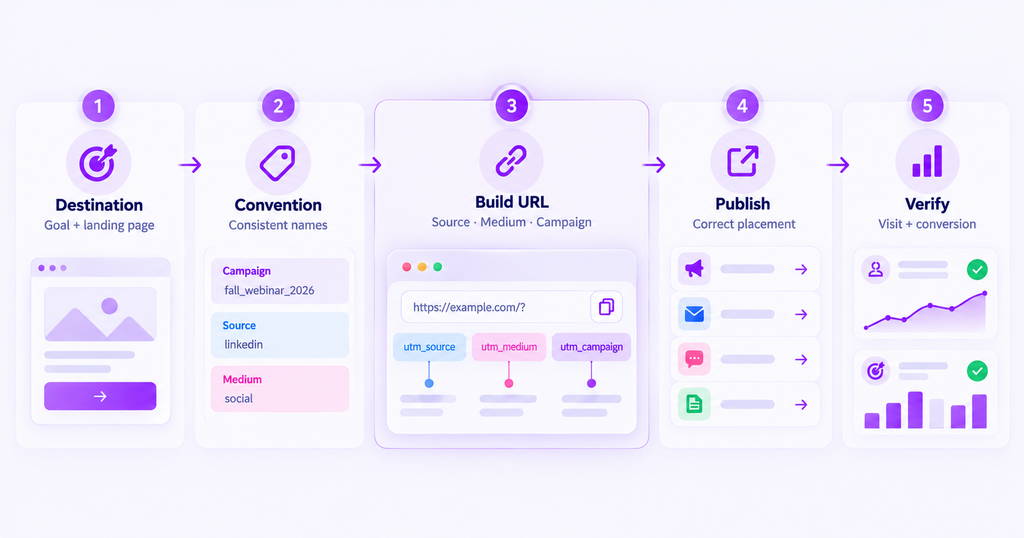
3. Build the URL and check its syntax
Use Usermaven’s free UTM builder to assemble and review links, or construct them carefully by hand. If the destination URL already contains a query string, append more parameters using &, not another ?. Encode reserved characters instead of introducing raw spaces or ampersands into values.
For example, use ?utm_source=newsletter&utm_medium=email&utm_campaign=fall_webinar_2026 for a clean destination. Never attach campaign tags to ordinary links between pages on your own website. Internal UTM links can disrupt your original acquisition reporting; measure internal interactions with event tracking instead.
Google’s campaign URL builder guidance describes the parameters accepted for manual campaign tagging. If Google Ads auto-tagging is configured, review its integration rules rather than replacing or conflicting with its identifiers blindly.
4. Launch a tagged link for every external placement
Place the final URL into the relevant ad, newsletter button, social post, partner page, or downloadable PDF. Use separate utm_content values when you genuinely need to compare variants, such as video_a and static_b, while keeping the same campaign name.
For paid channels, the correct tracking template may also need platform click IDs or vendor-specific fields. Usermaven documents ad-network UTM tracking templates for more granular attribution. Standard UTMs alone should not be described as a universal replacement for ad-platform identifiers.
5. Test the landing page and verify the analytics record
Open the exact published link, follow all redirects, and confirm that the destination loads and the campaign information reaches your analytics setup. Check the resulting visit in the appropriate traffic report, allowing for any reporting delay. If your platform offers live or debugging views, use them to validate the event flow.
Then perform the action your campaign is designed to generate, such as submitting a test form in an approved test environment. Confirm that the conversion event appears and that source information is available where your reports expect it. A working URL is only the first half of a working tracking setup.
Where can you see UTM tracking data?
Once a tagged link is live, review its campaign values in your analytics reports. The available dimensions and reporting views depend on the platform.
See UTM data in Google Analytics 4
In GA4, begin with Reports → Acquisition → Traffic acquisition, then inspect session-level source, medium, and campaign dimensions available in your property. GA4 also documents manual campaign dimensions such as Session manual source, Session manual medium, and Session manual campaign name; these may be used in configured reports or explorations.
The important distinction is between who brought a session, who first acquired a user, and which interactions receive conversion credit. These are different scopes and questions. A source shown in a session report is not automatically the sole cause of a later conversion.
Tagged URLs populate campaign dimensions in analytics reports. Manual tagging and auto-tagging can supply different traffic-source information, depending on the setup.
See tagged campaigns in Usermaven
Usermaven’s web analytics includes a UTM Traffic area for visits arriving through tagged links. Its documentation describes drilldowns by source, medium, campaign, term, and content. This lets a marketer separate campaign-driven traffic from broader acquisition totals and inspect which tags are being captured.
To connect campaign activity with performance, use the relevant tracked events, conversion goals, and attribution reports available in your Usermaven setup. For more detail about how values are captured, refer to how UTM tracking works in Usermaven.
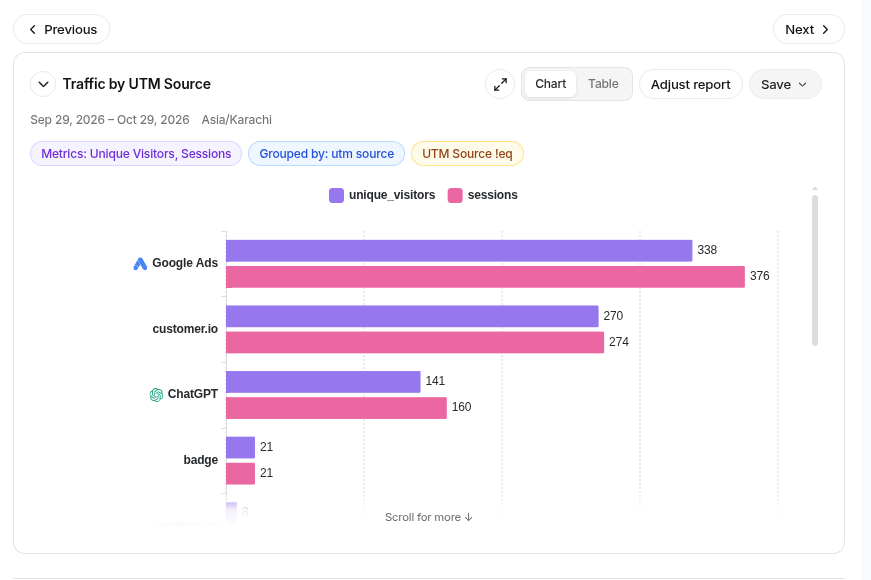
A practical audit is to compare three things: the tagged link you published, the campaign values that actually arrived in analytics, and the conversion event you want to evaluate. If those do not agree, avoid drawing budget conclusions until the data is corrected.
UTM tracking examples across marketing channels
Consider one illustrative, not measured webinar campaign with the shared value utm_campaign=fall_webinar_2026. You can use one naming system and still distinguish where each visit came from.
| Placement | Source | Medium | Optional content |
|---|---|---|---|
| LinkedIn sponsored post | paid_social | video_a | |
| Email newsletter | newsletter | hero_cta | |
| Partner resource page | partner_site | referral | article_link |
A marketing team could compare visits and registrations from these placements, provided its event and traffic reporting are set up correctly. For a campaign spanning several dates or audience segments, additional consistent naming fields can help separate the tests without inventing new campaign definitions every week.
The goal is not to create the longest URL possible. It is to encode distinctions you will actually use in a report. If nobody intends to compare utm_content values, adding a different content tag to every link may create work without improving decisions.
What UTM tracking can and cannot measure
UTMs are excellent for making external campaign traffic easier to identify. They can support source and medium comparisons, campaign-specific reporting, and analysis of conversions recorded after tagged visits. When linked with reliable event data, they help answer which placements are associated with valuable on-site actions.
They do not, by themselves, measure impressions or every click on an ad. They cannot reliably identify people across all browsers or devices, recover all unrecorded visits, or prove that a campaign caused a sale that would not otherwise have happened. A tracking URL is a label, not a complete attribution model or incrementality study.
Also watch for collection gaps. Consent choices, ad blockers, lost parameters, tag-loading problems, and redirect behavior may prevent some interactions from being recorded. The presence of clean UTMs improves interpretability, but does not make measurement perfect.
UTM tracking vs. conversion tracking vs. attribution
| Measurement layer | Main question | What is required |
|---|---|---|
| UTM tracking | Where did this tagged visit come from? | Campaign URL + visit capture |
| Conversion tracking | Did a meaningful action occur? | Correctly recorded event or goal |
| Marketing attribution | How should eligible touches receive conversion credit? | Connected touchpoints, outcomes, rules/model |
This distinction is essential for performance reporting. A channel with many tagged visits can still produce few qualified conversions. And a campaign that helped introduce a buyer may receive no credit in a simple last-touch view, even when it appears elsewhere in the journey.
Why is UTM tracking not working?
The campaign never appears: Check the published URL first. Make sure every parameter has the proper key, =, and separator, and verify that redirects or URL-cleanup scripts are not removing the query string before analytics captures it. Then review tag installation, consent settings, and reporting delay.
One campaign appears under several names: Compare case, spelling, and encoding. Usermaven stores captured UTM values as received, so variations can create separate rows. Fix the naming workflow at the source rather than relying on manual report cleanup.
Ad clicks exceed measured sessions. These metrics are not interchangeable. Repeat clicks, page abandonment, privacy controls, network failures, and measurement differences can create gaps. Investigate the scale of the discrepancy before treating it as broken tracking.
Traffic appears as direct or unassigned. Test links, redirects, and source/medium conventions. Missing campaign information and tracking disruptions are among the possible causes.
For a broader prevention checklist, read common UTM mistakes and how to fix them. Once a campaign is running, build a repeatable quality-control check into launch and reporting workflows.
Make campaign tracking useful beyond the click
UTM tracking works best when every external campaign link follows consistent naming rules and the data is checked after launch. That creates a dependable record of where tagged visits originated. The bigger payoff comes when that record is connected to meaningful outcomes and interpreted with the right attribution assumptions.
Start with clean links, validate the captured values, confirm your conversion events, and use the results to answer a business question rather than simply collecting more traffic labels.
From UTM tracking to marketing attribution
For simple campaigns, knowing that a webinar registration came from an email or LinkedIn link is a useful result. For longer buying journeys, it is only the beginning. Someone may discover a brand through paid social, return through organic search, read product documentation, and request a demo weeks later.
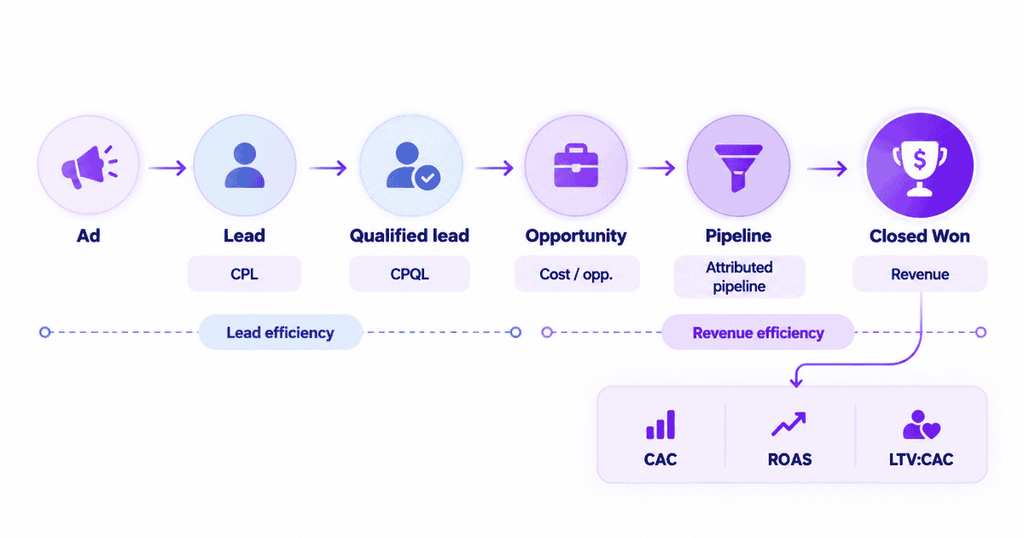
This is where marketing attribution software has a different job from UTM tagging. Campaign labels help describe some incoming touchpoints. Attribution brings together the eligible interactions and a defined conversion outcome, then applies an explicit crediting model. The quality of that analysis still depends on identity continuity, event collection, lookback settings, and the available data.
Usermaven combines web analytics, tracked customer behavior, and marketing attribution capabilities to help teams examine campaign activity in the context of conversions and journeys. Its performance marketing attribution guide goes further into the measurement checks needed before making spending decisions.
The next step after setting up UTMs is therefore not simply generating more tags. It is agreeing on the conversion you care about, confirming the journey data is usable, and deciding which attribution question your report should answer. To explore how Usermaven can support your measurement workflow, book a demo.
FAQs
What does UTM stand for in marketing?
UTM stands for Urchin Tracking Module. The term refers to URL parameters that help analytics tools identify the source, medium, campaign, and related context of visits arriving through tagged links.
What is UTM tracking used for?
Marketers use it to distinguish traffic from campaigns across email, paid ads, social posts, and partner placements. Combined with correctly recorded conversions, the tagged visits can help teams evaluate the performance of those placements.
How do I track a UTM link?
Create a tagged destination URL, publish it externally, click it to test the landing page, and look for the source, medium, and campaign values in your analytics traffic reports. Also check that relevant conversion events are being recorded.
Is UTM the same as Google Tag Manager?
No. A UTM is a set of URL parameters that conveys campaign context. Google Tag Manager is a tag-management system used to deploy and manage measurement code. A site can use both, but they solve different problems.
Do UTM parameters automatically track conversions?
No. They label the campaign context of a visit. Conversion tracking still requires the analytics system to record the relevant signup, purchase, form submission, or other goal. Attribution across several visits requires additional data and rules.
Should I add UTM parameters to internal website links?
Generally no. Reserve campaign UTMs for links that bring visitors to your site from external placements. Use event tracking or other internal interaction measurements to evaluate clicks inside the website without distorting acquisition data.

Written by
Junaid Ahmed
Content Writer & Digital Marketer
Junaid Ahmed is a content and copywriter with 3+ years of experience creating research-driven content across SaaS, B2B, ecommerce, and digital marketing. He specializes in turning complex topics into clear, practical content that helps marketers better understand their challenges, evaluate solutions, and make informed decisions. His work spans educational content, industry insights, and actionable marketing guides.
All articles by Junaid →