A SaaS company can rank for dozens of keywords and still struggle to generate qualified trials or demos. The problem is often not content volume. It is the distance between what people search for, what the product solves, and what the website helps visitors do next.
SaaS keyword research is the process of finding and prioritizing search queries that match your ideal customers’ problems, buying intent, and software use cases. Done well, it produces a plan for the right pages, not just a spreadsheet of phrases sorted by search volume.
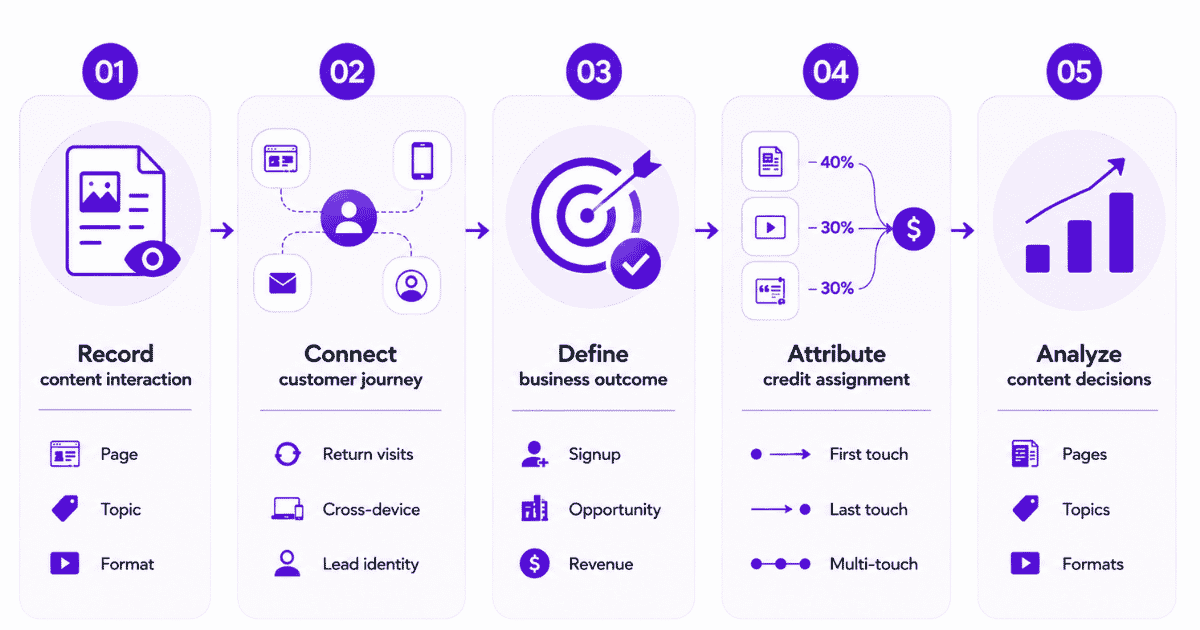
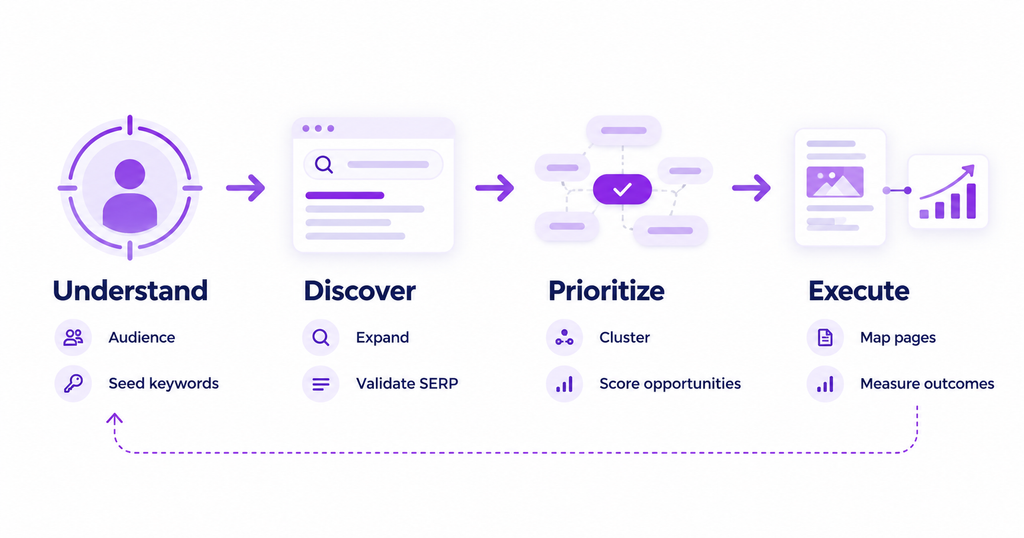
This guide shows how to collect keyword ideas, validate them against real search results, map them to pages, and measure whether those pages contribute to signups, pipeline, and revenue.
Key takeaways
- Start with product fit: A keyword is useful when the underlying problem is one your software solves for a relevant audience.
- Read the SERP: Search volume and difficulty cannot tell you whether Google expects a guide, comparison, integration page, or product page.
- Group by intent: One useful page can target several related phrases; separate URLs need genuinely different searcher needs.
- Plan the next step: Match each content asset with a logical internal link and conversion action for its audience.
- Measure business impact: Track search visibility alongside organic landing-page conversions and content attribution, without treating query data as individual-level revenue data.
What is SaaS keyword research?
SaaS keyword research identifies the searches a software company’s potential buyers make while discovering a problem, evaluating solutions, and choosing a product. It combines customer language, keyword demand, search intent, competition, and product relevance to guide SEO investments.
Unlike a general keyword list, the output should explain what each topic is meant to accomplish. A troubleshooting article might introduce new visitors, a feature page might clarify product fit, and an alternatives page might serve buyers comparing vendors.
For example, a customer-feedback SaaS product could target “how to analyze customer feedback,” “customer feedback analysis software,” and “feedback tool alternatives.” Those are related searches, but they require different answers, pages, and calls to action.
The purpose is not to force all three into one article. It is to choose a searcher problem and build the page most likely to satisfy that particular problem.
Unlock insights that drive growth
Why is keyword research different for SaaS?
Software buying rarely follows a straight line from one search to one purchase. Teams research pain points, implementation requirements, integrations, security, price, and competing tools. An early educational search can happen long before a trial, demo, or sales conversation.
SaaS also has multiple stakeholders. An individual user may search for a task-based tutorial, while a manager searches for reporting, governance, or team workflows. Enterprise buyers may involve procurement and technical reviewers who use completely different language.
That changes how you evaluate a keyword. A low-volume comparison query can be commercially important, while a broad term with thousands of searches may attract people who will never need your software.
It also changes how success should be measured. Search rankings reveal discoverability; organic visits reveal acquisition; signups and qualified opportunities reveal whether the content attracts the right audience. No single metric explains all three.
Which types of SaaS keywords should you target?
Build coverage around the questions prospective customers ask as they move from recognizing a problem to comparing products. These categories are useful planning labels, not rigid funnel stages that every buyer must follow in order.
| Keyword type | Illustrative query | Best-fit page | Typical reader need |
|---|---|---|---|
| Problem-aware | how to organize customer feedback | How-to guide | Understand and solve a task |
| Solution-aware | customer feedback management software | Category or use-case page | Find a type of solution |
| Feature-led | feedback tagging automation | Feature or workflow page | Check a specific capability |
| Comparison | tool A vs. tool B | Comparison page | Evaluate tradeoffs |
| Alternatives | tool A alternatives | Alternatives page | Find replacement options |
| Integration | customer feedback Slack integration | Integration page | Confirm workflow compatibility |
| Implementation | how to set up feedback collection | Tutorial or documentation | Get started or troubleshoot |
Problem-aware keywords: These can create awareness before a prospect knows which product category to seek. Prioritize them when your software can solve the problem and the article can offer a helpful next step.
Commercial keywords: Category, feature, comparison, and alternatives searches often make product evaluation more explicit. They may attract fewer searches, but they deserve attention because the reader is closer to making a decision.
Implementation keywords: Integration and how-to queries help buyers assess technical fit. They can also support existing customers, so clarify whether your objective is acquisition, activation, or support before assigning a page.
Do not assume that every keyword beginning with “best” has immediate purchase intent. Inspect the results and ask what the searcher expects to compare, learn, or accomplish.
How to do SaaS keyword research step by step
A reliable process moves from actual customer language to a validated, prioritized list of pages. Each step should leave behind a concrete decision rather than adding another unsorted export to your research folder.
Step 1: Define the ideal customer and the job to be done
Start with the audience and product rather than a keyword tool. Describe who buys your software, who uses it, the problem it solves, and what situations make that problem urgent.
Ask sales, customer success, and product teams which questions recur in discovery calls, onboarding conversations, support tickets, and lost deals. Record the customer’s original wording, including industry terms and common workarounds.
A useful seed phrase should connect to an identifiable task or purchase concern. “Reporting” is broad. “Automated client reporting for agencies” points to a more specific audience, workflow, and product expectation.
Keep separate notes for the economic buyer, technical evaluator, and day-to-day user. Their queries may belong to different pages even when they influence the same deal.
Step 2: Collect seed keywords from your own evidence
Begin with existing Google Search Console data, website search terms, product documentation, support questions, CRM notes, and sales call themes. These sources can reveal how prospective customers describe problems before marketers standardize the terminology.
In Search Console, look for pages getting impressions for unplanned queries and pages ranking near the first page for relevant terms. Review queries and pages together rather than assuming a high-impression query deserves a brand-new article.
Use the Google Search Console performance report to compare clicks, impressions, CTR, and average position by page and query. Remember that its query table does not expose every search because of privacy filtering and data limits.
Then add seed ideas from competitor navigation, comparison pages, integrations, review sites, communities, and support forums. Treat them as hypotheses until you validate actual search demand and intent.
Step 3: Expand the list and investigate competitor gaps
Enter your seed terms into a research platform to discover related phrases, questions, variations, and competing pages. Record monthly search estimates, difficulty, SERP features, and the strongest ranking URLs rather than exporting every suggestion indiscriminately.
Compare direct product competitors with editorial competitors. A software vendor can compete with a publisher, community discussion, or specialist agency for the same query. The SERP determines who you actually need to outperform for that topic.
Teams researching inside AI-assisted workflows can use ContextBolt SEO to inspect keywords, live search results, competitor data, and connected Search Console information without switching to a separate research dashboard.
Whatever platform you choose, manually verify important terms. Automated clustering and AI suggestions are useful starting points, but a plausible keyword is not proof that it has demand, fits your product, or merits its own URL.
Step 4: Inspect the SERP before assigning intent
Search the shortlisted query in your target market and look beyond the first organic result. Note whether the page is dominated by guides, vendor category pages, comparison articles, videos, community posts, or AI-generated summaries.
For example, “customer feedback analysis” might produce educational guides, while “customer feedback analysis software” may return product lists and vendor pages. The shared vocabulary does not make their intent identical.
Open several relevant results. Examine what they explain, what they leave unanswered, whether they show product workflows, and how much expertise a reader needs to use the information. Identify an angle you can genuinely support with experience or product knowledge.
Useful, original, people-first content should address the searcher’s needs. A larger word count or extra keyword variants cannot replace a page that meets the searcher’s needs.
Step 5: Cluster keywords and check for cannibalization
Group phrases that express the same intent and could reasonably be answered on one page. Variations such as “keyword research for SaaS” and “SaaS keyword research” usually belong to the same core guide.
Split clusters when the reader expects a materially different outcome. A “SaaS keyword research services” query could deserve a service page, whereas “how to do SaaS keyword research” calls for a practical tutorial.
Before proposing a new URL, search your own site for overlapping content and review which pages already earn impressions. If an existing page is relevant but incomplete, updating or expanding it may be smarter than publishing a second page for the same intent.
Document one primary topic, supporting variations, intent, target page, and owner per cluster. Avoid treating every keyword variation as a separate production assignment.
Step 6: Prioritize by business relevance and ranking feasibility
Keyword difficulty can help estimate competitive pressure, but it should not set the editorial calendar by itself. Evaluate whether the topic fits your product, whether the searcher could become a qualified buyer, and whether your site can credibly create a better page.
Use a simple editorial scorecard with five dimensions: product fit, buyer intent, search demand, ranking feasibility, and existing conversion evidence. Rate each as high, medium, or low, and explain your reasoning in a notes column.
Prioritize a clear product-fit topic with reasonable visibility potential over a large but loosely related query. Also reserve some capacity for early-stage topics that consistently introduce the right audience, even when they rarely generate immediate signups.
Forecasts should remain directional. Do not convert estimated search volume into promised trial or revenue figures without a defensible model based on your own conversion data.
Step 7: Map each cluster to a page and next action
Assign every priority cluster to an existing or planned page. Specify its reader question, proposed H1, page type, supporting topics, internal-link destination, and intended conversion action.
The next step should fit the reader’s readiness. A beginner guide might link to a practical template or detailed use-case page. An alternatives page can lead to a side-by-side comparison, product walkthrough, or demo request.
For a useful planning model, pair the target query with the page type and next action before writing. This stops teams from producing isolated articles that win traffic but leave visitors without a relevant path forward.
Step 8: Set up measurement before publishing
Choose the outcome for each content group before the first page goes live. Examples include a demo request, trial signup, activated account, qualified opportunity, or a commercially meaningful product action.
Ensure those outcomes are tracked as reliable events or goals. Maintain clean landing-page URLs, consistent content groupings, and a workable distinction between organic search and paid or email distribution.
Review the keyword map at regular intervals. Keep pages that attract the right visitors, improve those with weak engagement or poor conversion paths, and reconsider topics whose assumptions no longer match the market.
Drive business growth
with AI-powered analytics
How to build a SaaS keyword map that supports conversions
A keyword map turns research into an actionable content plan. It prevents multiple teams from creating competing URLs and clarifies how readers can move from a query to the next useful page.
The example below uses an illustrative customer-feedback SaaS product. It is a planning demonstration, not actual keyword volume, ranking, or conversion data.
| Target cluster | Search intent | Page format | Suggested next step |
|---|---|---|---|
| analyze customer feedback | Learn the method | Practical guide | Read analysis workflow |
| customer feedback software | Evaluate category | Solution page | Explore features |
| customer feedback automation | Confirm capability | Feature page | View automation example |
| customer feedback tool alternatives | Compare choices | Alternatives guide | Open comparison page |
| Slack customer feedback integration | Check compatibility | Integration page | See setup guide |
Add columns for primary keyword, related terms, existing URL, SEO owner, priority, current impressions, and measurement goal. Include a status field so an update, a merge, and a new page are not mistakenly treated as the same task.
Review internal links from both directions. A problem-solving guide should help readers understand the related product capability, while product pages can link back to explanatory resources when they reduce evaluation friction.
A map is not final once published. Search behavior changes, product features evolve, and several clusters can converge as Google interprets them differently. Use ongoing performance data to decide whether to expand, consolidate, or redirect pages.
Best tools for SaaS keyword research
No single tool tells you which keyword will produce qualified customers. Combine demand estimates, first-party search performance, qualitative customer evidence, and post-click analytics.
| Tool | Best use in the workflow | Important limitation |
|---|---|---|
| Google Search Console | Actual queries, pages, impressions, clicks, positions | No full visitor-to-revenue query trail |
| Ahrefs or Semrush | Demand estimates, keyword expansion, competition, SERPs | Estimates require validation |
| Google Keyword Planner | Paid-search phrasing and demand direction | Designed for advertising workflows |
| AI-assisted SEO research | Explore patterns, organize findings, review SERPs | Validate outputs and sources |
| Customer and CRM research | Buyer language, objections, product fit | Needs structured qualitative review |
| Usermaven | Post-click journeys, conversion goals, content attribution | Not a replacement for keyword discovery |
For a small SaaS team, start with Search Console, one serious keyword discovery tool, and customer interviews or sales notes. Add deeper competitive tooling when the size and complexity of the content roadmap justify it.
The software matters less than a repeatable process that produces decisions. Every tool should answer a clear question: What are people searching for? What page do they expect? Can we help? Did the traffic eventually matter?
How to measure whether SaaS keyword research is working
Rankings and clicks tell you whether your research generated discoverable pages. They do not tell you whether the visitors were a good match for your product or whether the content helped generate a qualified business outcome.
Track performance at three levels. First, use search data to assess impressions, clicks, CTR, and visibility for the relevant queries and URLs. Second, use on-site analytics to measure engagement and conversion behavior by landing page.
Third, evaluate how those pages participate in the journey to your selected conversion goal. A guide might start a buyer’s journey, while a comparison page may appear immediately before a demo request.
Separate keyword visibility from page-level outcomes
A query report shows how a search term performed in results. An analytics report shows how visits and recorded actions behaved after arrival. These are related but not interchangeable datasets.
Google also filters some low-frequency queries for privacy. As a result, total performance figures and visible query rows do not always reconcile.
Do not claim that each individual search query can be connected with certainty to a specific customer’s revenue. A safer interpretation connects query trends to landing-page performance, then evaluates eligible visits and content interactions against conversion goals.
Use content attribution for the full journey
Suppose someone discovers a problem through an educational blog post, returns later to a comparison page, and finally books a demo. A last-touch-only report may give most or all credit to the final eligible interaction.
First-touch and multi-touch views answer different questions. The first helps identify content that begins measurable journeys, while other models examine the contribution of pages that appear along the path. Neither is proof of a page’s causal effect.
For a deeper explanation, see SEO attribution models and how to interpret first-touch, last-touch, and multi-touch credit without confusing attribution with incrementality.
Where Usermaven fits into the workflow
Keyword discovery belongs in research tools; evaluating the resulting website journeys belongs in analytics and attribution. Usermaven’s Google Search Console integration makes search performance metrics available alongside web analytics.
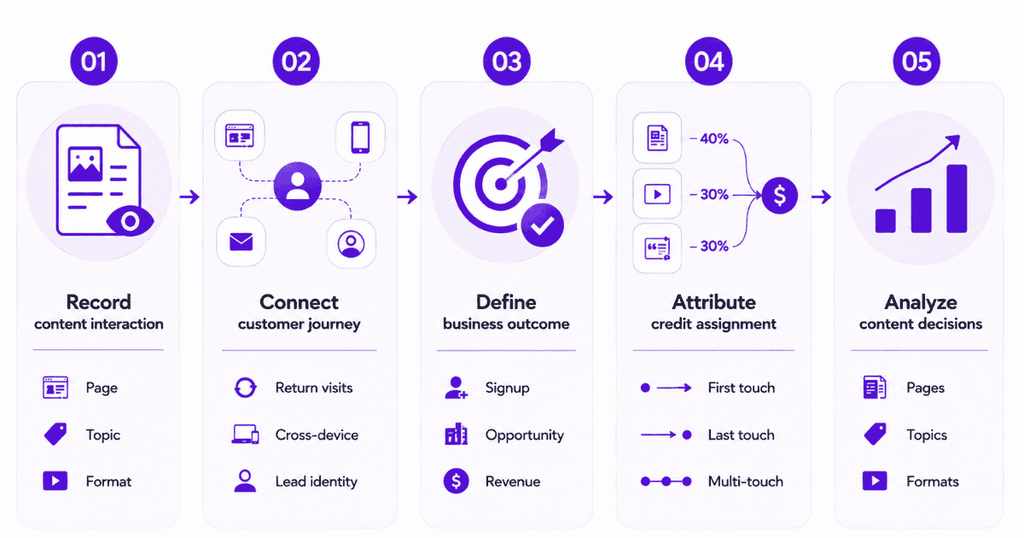
Teams can then use content attribution to examine which articles and landing pages receive credit for selected conversions under different attribution models. The analysis depends on reliable event tracking, appropriate lookback windows, and the selected goal.
This is the business case for marketing attribution software: connecting acquisition and content interactions with outcomes, rather than assuming a high-ranking article is automatically a high-value article.
For B2B teams that track opportunities beyond an initial signup, pipeline attribution can extend the discussion from leads to downstream sales outcomes when relevant data is connected.
Build a monthly SEO feedback loop
Compare four groups of pages: those gaining qualified organic traffic, those influencing meaningful conversions, those getting impressions without clicks, and those generating traffic with weak next-step engagement.
For strong converting topics, investigate neighboring problems and use cases. For high-impression, low-click pages, inspect intent and search snippets before rewriting. For high-traffic, low-conversion pages, review whether the page is attracting the wrong audience or offers an unsuitable CTA.
When a page is relevant but stuck outside strong visibility positions, consider updating its answer, examples, supporting evidence, or internal links. Use your organic traffic growth strategy to support improvements rather than producing new posts by default.
Common SaaS keyword research mistakes to avoid
- Chasing volume without product fit: A broad term can inflate traffic dashboards while attracting readers with no realistic need for the software.
- Treating KD 0 as a guarantee: Difficulty estimates are useful signals, not promises. Review the actual ranking pages, domain strength, intent, and content expectations.
- Publishing one page for every variation: Closely related phrases often belong to one URL. Duplicating intent can fragment internal links and confuse site structure.
- Copying competitor content: A table of the same features and definitions offers little reason to choose your page. Add genuine experience, workflows, useful comparisons, or original reasoning.
- Using AI keywords without verification: A fluent list can still contain irrelevant or imaginary demand. Confirm important suggestions in search data and the live SERP.
- Ignoring the conversion path: An article without a relevant next step may help a reader but fail to support a coherent content journey.
- Judging everything by last touch: Educational material can contribute earlier in a longer cycle. Compare attribution views and remember their limitations.
SaaS keyword research checklist
Before adding a target to your editorial calendar, check the following:
- Audience: Identify the searcher and the problem they want to solve.
- Search intent: Confirm the expected answer and likely page format.
- Product relevance: Explain how the topic connects to your product and the reader’s next useful action.
- Competition: Review the search results and assess the competitive landscape.
- Existing content: Check that another page does not already serve the same intent.
- Review ownership: Assign a qualified reviewer to the topic.
- Measurement: Confirm that the appropriate conversion goal can be measured.
- Follow-up: Record assumptions to revisit after publication.
- Keyword map: Prioritize each keyword cluster, assign an owner, and map it to a page.
Turn keyword research into a measurable growth plan
The best SaaS keyword research does not end with a list of phrases. It identifies the right problems, creates the right pages, gives readers a logical next step, and checks which content helps move the business forward.
Once the pages are live, keep your research connected to search performance, customer journeys, and conversion goals. To see how Usermaven supports content and marketing attribution across those journeys, book a demo.
FAQs
How do you do keyword research for a SaaS company?
Start with your ideal customers’ problems, gather phrases from sales and Search Console, expand them with keyword tools, inspect search intent, group related queries, and map each cluster to a useful page. Prioritize product fit and feasible demand, then measure both organic traffic and conversion outcomes.
What is the best keyword research tool for SaaS?
There is no universal winner. Search Console shows your existing search performance; platforms such as Ahrefs and Semrush help expand and assess keyword opportunities; customer research clarifies product fit. Analytics and attribution tools are valuable for evaluating what happens after the click.
Should SaaS startups target low-volume keywords?
Yes, when the query closely matches a valuable problem, product feature, comparison, or integration. A small but relevant audience may be more useful than broad traffic. Validate the SERP and opportunity, rather than assuming every low-volume term deserves a page.
How many keywords should a SaaS page target?
Choose one primary intent and cover the closely related terms needed to satisfy it. The objective is not an arbitrary keyword count. Build a separate page when searchers expect a genuinely different answer, format, or decision.
How often should SaaS teams update keyword research?
Review priority pages and search trends monthly, and reassess the roadmap when product features, competitive positioning, or customer needs change. Larger strategic refreshes can happen quarterly, provided urgent changes are not delayed.
Can SaaS keyword research be tied directly to revenue?
It can be evaluated alongside landing-page conversions, content attribution, and connected pipeline or revenue data. However, anonymized search queries and cross-session tracking limits mean marketers should not claim a precise one-to-one revenue value for every individual keyword.

Written by
Junaid Ahmed
Content Writer & Digital Marketer
Junaid Ahmed is a content and copywriter with 3+ years of experience creating research-driven content across SaaS, B2B, ecommerce, and digital marketing. He specializes in turning complex topics into clear, practical content that helps marketers better understand their challenges, evaluate solutions, and make informed decisions. His work spans educational content, industry insights, and actionable marketing guides.
All articles by Junaid →